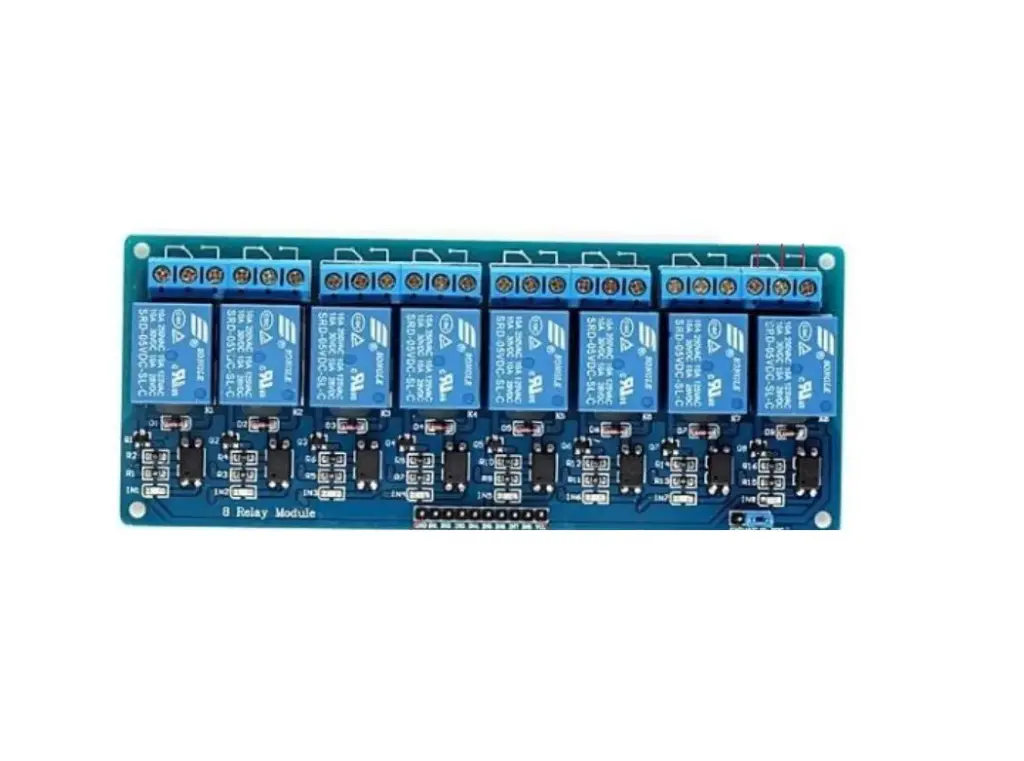
Features:
- Individual Relay Status Visualization: Each relay on the board is equipped with an LED indicator, shining in an alluring blue color. This clever addition allows you to easily monitor the status of each relay, providing visual feedback on their operational state.
- Optocoupler for Signal Integrity: To ensure utmost signal integrity and minimize distortion, we've incorporated an optocoupler into the board's design. This innovative component effectively isolates the input and output circuits, safeguarding your system against potential electrical noise.
- Dual Contact Configurations: With two contact types at your disposal, you gain unparalleled flexibility in your applications. Each relay includes both a normally closed (NC) contact and a normally open (NO) contact, empowering you to tailor the relay behavior to your specific needs.
- High-Impedance Controller Pin: The relay board boasts a high-impedance controller pin, enabling seamless interfacing with your microcontroller. This feature not only enhances signal compatibility but also minimizes the risk of interference between your controller and the relay module.
- Convenient Indicator Lamps: The board is equipped with two indicator lamps for added convenience. The power supply indicator keeps you informed about the status of the power source, while the control indicator lamp visually confirms when the relays are actively responding to your commands.
- Versatile Power Source Configuration: For even greater flexibility, the relay interface board features a configurable power source option. A strategically placed jumper on the board allows you to tailor the power supply setup according to your project requirements, ensuring seamless integration.
Principle of Work:
The 8-channel relay interface board functions as a controllable switch that operates with an electrical signal from a connected microcontroller. It serves as a means to open or close a circuit, granting the microcontroller the power to control the flow of electricity in the system. The relay plays a vital role in isolating the circuit of the device being controlled from the circuit of the controlling device. When the microcontroller sends a signal to the relay, it effectively toggles the relay's state, either opening or closing the circuit, which subsequently affects the connected device. In the case of a low-level triggered relay, when the control signal from the microcontroller is grounded (GND) or in a closed state, the relay allows the current to pass through the power line, permitting electricity to flow and activate the controlled device. Here comes the remarkable role of the optocoupler, which provides true photo isolation between the relay and the microcontroller. This isolation mechanism ensures that electrical signals are securely transferred between the isolated circuits without interference or distortion from either side. It effectively protects the microcontroller from potential electrical noise or voltage fluctuations that may occur in the controlled device's circuit. By utilizing the optocoupler to establish this photo isolation, the relay interface board achieves a high level of signal integrity and safety in its operation. Distortions from external factors are minimized, ensuring that the relay responds accurately to the microcontroller's signals and providing a reliable and consistent switching performance. The combination of relay-based circuit control and optocoupler-based photo isolation allows the 8-channel relay interface board to serve as a robust and efficient tool for seamlessly controlling various electrical devices and applications. With this setup, you can confidently integrate the relay interface board into your projects, knowing that it provides a secure, distortion-free link between the microcontroller and the controlled devices.
Pinout of the Module: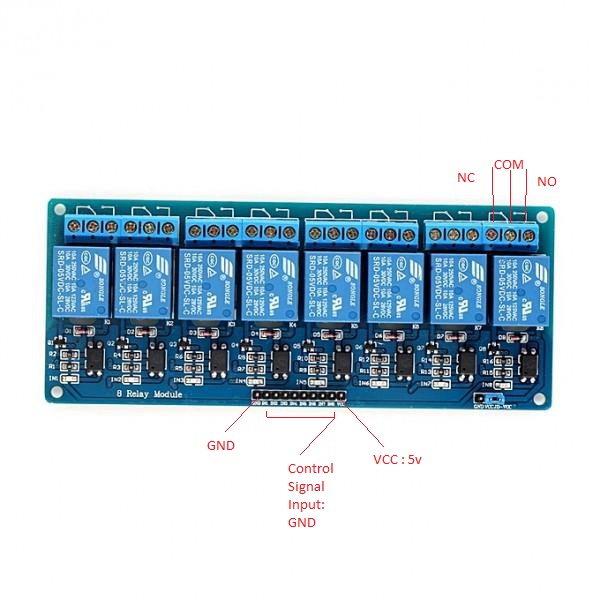
- VCC (Voltage Input - 5V): This pin is to be connected to a 5V power supply, ensuring the relay module receives the necessary voltage to function properly.
- GND (Ground): To complete the power circuit, this pin must be connected to the ground of the power source, creating a closed loop for the electricity to flow.
- INT 1 -> 8 (Input Pins): These pins correspond to individual relays (1 to 8) on the board and serve as triggers to control each relay's state. Depending on the number of the relay you wish to activate or deactivate, you need to connect the appropriate input pin to trigger the corresponding relay.
- Jumper VCC (Power Supply Selection): The presence of this jumper allows you to choose the power supply source for the relay module. You can configure it to use the VCC pin (5V) for the power input.
- JD-VCC (Alternate Power Pin): This pin offers an alternative power input option for the relay module. When configured using the jumper, it provides an alternate power source to operate the relays.
- NC (Normally Closed): By connecting your application or device to this pin, you can keep it continuously functioning, and it will stop only when you attach the input to the ground (GND).
- COM (Common): The COM pin acts as a common connection that is always connected to one side of the load, forming the basis for the relay's switching operation.
- NO (Normally Open): This pin allows you to connect your application or device to it, causing it to remain stopped until you attach the input to the ground (GND), which will then activate the device.
Applications:
- Relay Drive from External Contacts: The relay interface board can be used to drive and control external contacts, such as switches or sensors. It acts as an intermediary between the external contacts and the microcontroller, allowing you to trigger the relay based on the input received from these external devices.
- LED Series and Parallel Connections: You can utilize the relay interface board to create series or parallel connections for LEDs. By switching the relay, you can control the lighting patterns and brightness levels of multiple LEDs simultaneously.
- Electronic Circuit Drive by Means of a Relay: Integrate the relay interface board into electronic circuits to control the flow of current to various components. This is useful in applications where you need to activate or deactivate specific parts of a circuit based on external signals.
- Home Automation: The relay interface board plays a crucial role in home automation systems, enabling the remote control of lights, appliances, and other electrical devices. It allows you to create smart home setups where you can control various devices through a microcontroller or home automation platform.
- Battery Backup Systems: In battery backup systems, the relay interface board can be employed to switch between the main power supply and the battery backup. This ensures a seamless transition between power sources during power outages.
- High Current Load Switching: The relay interface board is designed to handle high-current loads, making it suitable for switching heavy-duty devices such as motors, pumps, or heaters. It is widely used in industrial applications where robust and reliable control of high-power equipment is essential.
- Security Systems: Incorporate the relay interface board into security systems to control access points, such as electronic door locks or gates. It enables remote activation and deactivation of security devices for added convenience and security.
- IoT (Internet of Things) Projects: The relay interface board is a valuable component in IoT projects, allowing you to remotely control devices and appliances through internet connectivity and microcontrollers.
- Smart Lighting Systems: Use the relay interface board in smart lighting systems to control the illumination of different areas or rooms. It enables energy-efficient lighting management and customization.
- Robotics and Automation: In robotics and automation projects, the relay interface board can be employed to control various motors, actuators, and other devices, enabling precise and coordinated movements.
Circuit:
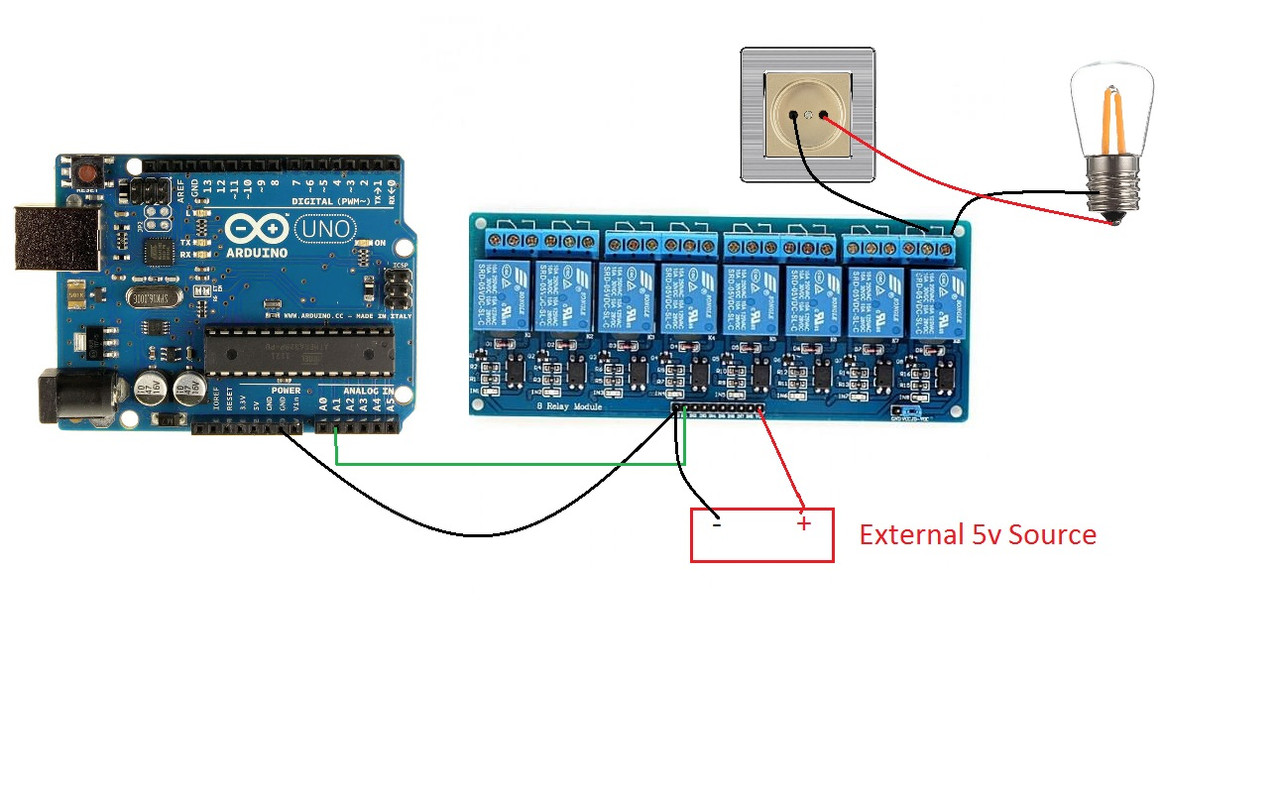
In this exciting example, we will showcase how to use the 8-channel relay interface board to create a mesmerizing blinking effect with a 220V lamp. Get ready to witness the lamp gracefully lighting up for one second and then gracefully dimming for another second. To achieve this captivating effect, we will use one of the relay channels to control the power supply to the lamp. Let's walk through the process step by step:
Step 1: Setup First, ensure you have properly connected the 8-channel relay interface board to your microcontroller (e.g., Arduino) and provided the necessary power supply to the board.
Step 2: Connect the Lamp Next, carefully connect the 220V lamp to one of the relay channels on the interface board. The lamp should be connected between the NO (Normally Open) and the COM (Common) pins of the relay.
Safety Precautions:
- Always exercise caution when working with high-voltage devices. Ensure the proper insulation and safety measures are in place to prevent electrical hazards.
- Double-check all connections and power sources before testing the blinking effect with the lamp.
- If you are not familiar with working with high-voltage circuits, consider seeking assistance from a knowledgeable individual or professional.
Library:
This Module doesn't need a library to work.
Code:
void setup() {
  // initialize digital pin LED_BUILTIN as an output.
  pinMode(A2, OUTPUT);
  digitalWrite(A2, HIGH);

}

// the loop function runs over and over again forever
void loop() {
  digitalWrite(A2 , LOW);   // turn the LED on (HIGH is the voltage level)
  delay(1000);                       // wait for a second
  digitalWrite(A2 ,HIGH);    // turn the LED off by making the voltage LOW
  delay(1000);                       // wait for a second
}
Technical Details:
- Number of Channels: 8
- Maximum Switching Voltage: 250VAC (Alternating Current) / 30VDC (Direct Current)
- Maximum Switching Current: 10A
- Module Operating Voltage: 5V DC
- Trigger Input Voltage: 0V (LOW) to 2.5V (HIGH) for Low-Level Triggered Relays
- Optocoupler Voltage: 5V DC
- Relay Type: Single Pole Double Throw (SPDT) Relay
- Contact Material: Silver Alloy
- Contact Resistance: ≤ 100mΩ (Initial)
- Insulation Resistance: ≥ 100MΩ (500VDC)
- Relay Life: Mechanical: ≥ 10,000,000 Operations, Electrical: ≥ 100,000 Operations
- Operating Temperature: -40°C to +85°C
Resources:
Comparisons:
- When using an Active Low Triggered Relay Module, it's important to consider the trade-offs it brings. On one hand, you need to apply a current to keep the application off on the other side of the relay. Alternatively, you can use this board for applications that need to be on continuously and turned off less frequently, or simply connect the application to the NO (Normally Open) side of the relay instead of the normal connection. However, the inclusion of an optocoupler in this relay board proves to be highly advantageous. The optocoupler significantly reduces distortion from power lines, creating a more isolated and improved circuit compared to boards without this feature. It eliminates the need to directly connect the MCU ground to the circuit ground, which can sometimes lead to undesirable consequences.
- Despite its numerous advantages, this kind of relay board does have some drawbacks when compared to SSR (Solid State Relay) boards. It tends to be slower, with response times ranging from 5 to 15 milliseconds. The larger package size might be less suitable for small projects. Additionally, electromechanical relays, due to mechanical wear, might have a shorter life compared to other types of relays.
- For those interested in SSRs, you can explore and acquire them from reputable sources like [here ] to meet your project's specific requirements. SSRs offer various benefits such as rapid response times, smaller package sizes, and enhanced longevity compared to electromechanical relays.
- Take into account these considerations while selecting the appropriate relay type for your project, ensuring optimal performance and reliability for your specific application.
Features:
- Individual Relay Status Visualization: Each relay on the board is equipped with an LED indicator, shining in an alluring blue color. This clever addition allows you to easily monitor the status of each relay, providing visual feedback on their operational state.
- Optocoupler for Signal Integrity: To ensure utmost signal integrity and minimize distortion, we've incorporated an optocoupler into the board's design. This innovative component effectively isolates the input and output circuits, safeguarding your system against potential electrical noise.
- Dual Contact Configurations: With two contact types at your disposal, you gain unparalleled flexibility in your applications. Each relay includes both a normally closed (NC) contact and a normally open (NO) contact, empowering you to tailor the relay behavior to your specific needs.
- High-Impedance Controller Pin: The relay board boasts a high-impedance controller pin, enabling seamless interfacing with your microcontroller. This feature not only enhances signal compatibility but also minimizes the risk of interference between your controller and the relay module.
- Convenient Indicator Lamps: The board is equipped with two indicator lamps for added convenience. The power supply indicator keeps you informed about the status of the power source, while the control indicator lamp visually confirms when the relays are actively responding to your commands.
- Versatile Power Source Configuration: For even greater flexibility, the relay interface board features a configurable power source option. A strategically placed jumper on the board allows you to tailor the power supply setup according to your project requirements, ensuring seamless integration.
Principle of Work:
The 8-channel relay interface board functions as a controllable switch that operates with an electrical signal from a connected microcontroller. It serves as a means to open or close a circuit, granting the microcontroller the power to control the flow of electricity in the system. The relay plays a vital role in isolating the circuit of the device being controlled from the circuit of the controlling device. When the microcontroller sends a signal to the relay, it effectively toggles the relay's state, either opening or closing the circuit, which subsequently affects the connected device. In the case of a low-level triggered relay, when the control signal from the microcontroller is grounded (GND) or in a closed state, the relay allows the current to pass through the power line, permitting electricity to flow and activate the controlled device. Here comes the remarkable role of the optocoupler, which provides true photo isolation between the relay and the microcontroller. This isolation mechanism ensures that electrical signals are securely transferred between the isolated circuits without interference or distortion from either side. It effectively protects the microcontroller from potential electrical noise or voltage fluctuations that may occur in the controlled device's circuit. By utilizing the optocoupler to establish this photo isolation, the relay interface board achieves a high level of signal integrity and safety in its operation. Distortions from external factors are minimized, ensuring that the relay responds accurately to the microcontroller's signals and providing a reliable and consistent switching performance. The combination of relay-based circuit control and optocoupler-based photo isolation allows the 8-channel relay interface board to serve as a robust and efficient tool for seamlessly controlling various electrical devices and applications. With this setup, you can confidently integrate the relay interface board into your projects, knowing that it provides a secure, distortion-free link between the microcontroller and the controlled devices.
Pinout of the Module:
- VCC (Voltage Input - 5V): This pin is to be connected to a 5V power supply, ensuring the relay module receives the necessary voltage to function properly.
- GND (Ground): To complete the power circuit, this pin must be connected to the ground of the power source, creating a closed loop for the electricity to flow.
- INT 1 -> 8 (Input Pins): These pins correspond to individual relays (1 to 8) on the board and serve as triggers to control each relay's state. Depending on the number of the relay you wish to activate or deactivate, you need to connect the appropriate input pin to trigger the corresponding relay.
- Jumper VCC (Power Supply Selection): The presence of this jumper allows you to choose the power supply source for the relay module. You can configure it to use the VCC pin (5V) for the power input.
- JD-VCC (Alternate Power Pin): This pin offers an alternative power input option for the relay module. When configured using the jumper, it provides an alternate power source to operate the relays.
- NC (Normally Closed): By connecting your application or device to this pin, you can keep it continuously functioning, and it will stop only when you attach the input to the ground (GND).
- COM (Common): The COM pin acts as a common connection that is always connected to one side of the load, forming the basis for the relay's switching operation.
- NO (Normally Open): This pin allows you to connect your application or device to it, causing it to remain stopped until you attach the input to the ground (GND), which will then activate the device.
Applications:
- Relay Drive from External Contacts: The relay interface board can be used to drive and control external contacts, such as switches or sensors. It acts as an intermediary between the external contacts and the microcontroller, allowing you to trigger the relay based on the input received from these external devices.
- LED Series and Parallel Connections: You can utilize the relay interface board to create series or parallel connections for LEDs. By switching the relay, you can control the lighting patterns and brightness levels of multiple LEDs simultaneously.
- Electronic Circuit Drive by Means of a Relay: Integrate the relay interface board into electronic circuits to control the flow of current to various components. This is useful in applications where you need to activate or deactivate specific parts of a circuit based on external signals.
- Home Automation: The relay interface board plays a crucial role in home automation systems, enabling the remote control of lights, appliances, and other electrical devices. It allows you to create smart home setups where you can control various devices through a microcontroller or home automation platform.
- Battery Backup Systems: In battery backup systems, the relay interface board can be employed to switch between the main power supply and the battery backup. This ensures a seamless transition between power sources during power outages.
- High Current Load Switching: The relay interface board is designed to handle high-current loads, making it suitable for switching heavy-duty devices such as motors, pumps, or heaters. It is widely used in industrial applications where robust and reliable control of high-power equipment is essential.
- Security Systems: Incorporate the relay interface board into security systems to control access points, such as electronic door locks or gates. It enables remote activation and deactivation of security devices for added convenience and security.
- IoT (Internet of Things) Projects: The relay interface board is a valuable component in IoT projects, allowing you to remotely control devices and appliances through internet connectivity and microcontrollers.
- Smart Lighting Systems: Use the relay interface board in smart lighting systems to control the illumination of different areas or rooms. It enables energy-efficient lighting management and customization.
- Robotics and Automation: In robotics and automation projects, the relay interface board can be employed to control various motors, actuators, and other devices, enabling precise and coordinated movements.
Circuit:
In this exciting example, we will showcase how to use the 8-channel relay interface board to create a mesmerizing blinking effect with a 220V lamp. Get ready to witness the lamp gracefully lighting up for one second and then gracefully dimming for another second. To achieve this captivating effect, we will use one of the relay channels to control the power supply to the lamp. Let's walk through the process step by step:
Step 1: Setup First, ensure you have properly connected the 8-channel relay interface board to your microcontroller (e.g., Arduino) and provided the necessary power supply to the board.
Step 2: Connect the Lamp Next, carefully connect the 220V lamp to one of the relay channels on the interface board. The lamp should be connected between the NO (Normally Open) and the COM (Common) pins of the relay.
Safety Precautions:
- Always exercise caution when working with high-voltage devices. Ensure the proper insulation and safety measures are in place to prevent electrical hazards.
- Double-check all connections and power sources before testing the blinking effect with the lamp.
- If you are not familiar with working with high-voltage circuits, consider seeking assistance from a knowledgeable individual or professional.
Library:
This Module doesn't need a library to work.
Code:
void setup() {
  // initialize digital pin LED_BUILTIN as an output.
  pinMode(A2, OUTPUT);
  digitalWrite(A2, HIGH);

}

// the loop function runs over and over again forever
void loop() {
  digitalWrite(A2 , LOW);   // turn the LED on (HIGH is the voltage level)
  delay(1000);                       // wait for a second
  digitalWrite(A2 ,HIGH);    // turn the LED off by making the voltage LOW
  delay(1000);                       // wait for a second
}
Technical Details:
- Number of Channels: 8
- Maximum Switching Voltage: 250VAC (Alternating Current) / 30VDC (Direct Current)
- Maximum Switching Current: 10A
- Module Operating Voltage: 5V DC
- Trigger Input Voltage: 0V (LOW) to 2.5V (HIGH) for Low-Level Triggered Relays
- Optocoupler Voltage: 5V DC
- Relay Type: Single Pole Double Throw (SPDT) Relay
- Contact Material: Silver Alloy
- Contact Resistance: ≤ 100mΩ (Initial)
- Insulation Resistance: ≥ 100MΩ (500VDC)
- Relay Life: Mechanical: ≥ 10,000,000 Operations, Electrical: ≥ 100,000 Operations
- Operating Temperature: -40°C to +85°C
Resources:
Comparisons:
- When using an Active Low Triggered Relay Module, it's important to consider the trade-offs it brings. On one hand, you need to apply a current to keep the application off on the other side of the relay. Alternatively, you can use this board for applications that need to be on continuously and turned off less frequently, or simply connect the application to the NO (Normally Open) side of the relay instead of the normal connection. However, the inclusion of an optocoupler in this relay board proves to be highly advantageous. The optocoupler significantly reduces distortion from power lines, creating a more isolated and improved circuit compared to boards without this feature. It eliminates the need to directly connect the MCU ground to the circuit ground, which can sometimes lead to undesirable consequences.
- Despite its numerous advantages, this kind of relay board does have some drawbacks when compared to SSR (Solid State Relay) boards. It tends to be slower, with response times ranging from 5 to 15 milliseconds. The larger package size might be less suitable for small projects. Additionally, electromechanical relays, due to mechanical wear, might have a shorter life compared to other types of relays.
- For those interested in SSRs, you can explore and acquire them from reputable sources like [here ] to meet your project's specific requirements. SSRs offer various benefits such as rapid response times, smaller package sizes, and enhanced longevity compared to electromechanical relays.
- Take into account these considerations while selecting the appropriate relay type for your project, ensuring optimal performance and reliability for your specific application.