- All products
- Sensors & Modules
- Finger Print
- Fingerprint Scanner Module
- Finger Print
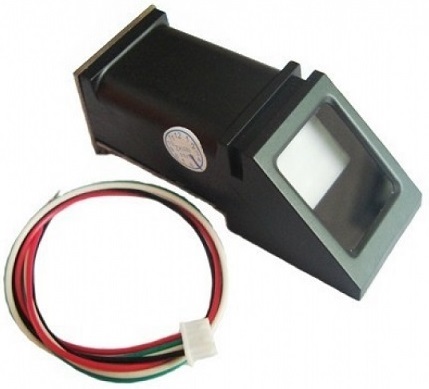
Features
- High-resolution optical fingerprint sensor
- Internal flash memory for fingerprint storage
- Supports up to 127 fingerprint templates
- TTL UART serial communication
- Easy integration with Arduino and other MCUs
- Eliminates the need for keys or passwords
- Adjustable security levels
Principle of Operation
When a finger is placed on the sensor surface, the optical system captures the unique ridge pattern of the fingerprint. The module processes this image and extracts key features to create a digital template.
For verification, the captured fingerprint is compared against stored templates. If a match is found within the selected security level, the module sends a success response to the microcontroller.
Pinout
- Vin Positive power supply input
- GND Ground connection
- Tx Serial data output
- Rx Serial data input
Applications
- Door and locker access control systems
- Attendance and time tracking systems
- Keyless entry systems
- Smart home security
- Robotics and automation access control
- Banking and payment authentication
- Medical device user verification
Example Circuit
Connect the Vin pin to a 3.6V to 6V power source and GND to ground. Connect the Tx and Rx pins to the corresponding serial pins on the Arduino or microcontroller. Ensure the baud rate is set to 9600 in the code.
Library
Fingerprint scanner modules are commonly used with available Arduino libraries that simplify enrollment, deletion, and verification of fingerprints.
Arduino Code Example
#include <SoftwareSerial.h>
#include <Adafruit_Fingerprint.h>

SoftwareSerial fingerSerial(2, 3);
Adafruit_Fingerprint finger = Adafruit_Fingerprint(&fingerSerial);

void setup() {
  Serial.begin(9600);
  fingerSerial.begin(9600);

  if (finger.verifyPassword()) {
    Serial.println("Fingerprint sensor found");
  } else {
    Serial.println("Fingerprint sensor not found");
  }
}

void loop() {
  int result = finger.getImage();
  if (result == FINGERPRINT_OK) {
    Serial.println("Fingerprint detected");
  }
}
Technical Details
- Sensor type Optical fingerprint sensor
- Operating voltage DC 3.6V to 6.0V
- Current consumption less than 120 mA
- Interface UART serial
- Baud rate 9600
- Security levels 1 to 5
- False accept rate less than 0.001 percent at level 3
- False reject rate less than 1 percent at level 3
Comparison
Compared to password or key based systems, fingerprint authentication provides higher security and convenience. Biometric identification cannot be easily copied or forgotten, making this module a reliable choice for modern embedded systems.
Features
- High-resolution optical fingerprint sensor
- Internal flash memory for fingerprint storage
- Supports up to 127 fingerprint templates
- TTL UART serial communication
- Easy integration with Arduino and other MCUs
- Eliminates the need for keys or passwords
- Adjustable security levels
Principle of Operation
When a finger is placed on the sensor surface, the optical system captures the unique ridge pattern of the fingerprint. The module processes this image and extracts key features to create a digital template.
For verification, the captured fingerprint is compared against stored templates. If a match is found within the selected security level, the module sends a success response to the microcontroller.
Pinout
- Vin Positive power supply input
- GND Ground connection
- Tx Serial data output
- Rx Serial data input
Applications
- Door and locker access control systems
- Attendance and time tracking systems
- Keyless entry systems
- Smart home security
- Robotics and automation access control
- Banking and payment authentication
- Medical device user verification
Example Circuit
Connect the Vin pin to a 3.6V to 6V power source and GND to ground. Connect the Tx and Rx pins to the corresponding serial pins on the Arduino or microcontroller. Ensure the baud rate is set to 9600 in the code.
Library
Fingerprint scanner modules are commonly used with available Arduino libraries that simplify enrollment, deletion, and verification of fingerprints.
Arduino Code Example
#include <SoftwareSerial.h>
#include <Adafruit_Fingerprint.h>

SoftwareSerial fingerSerial(2, 3);
Adafruit_Fingerprint finger = Adafruit_Fingerprint(&fingerSerial);

void setup() {
  Serial.begin(9600);
  fingerSerial.begin(9600);

  if (finger.verifyPassword()) {
    Serial.println("Fingerprint sensor found");
  } else {
    Serial.println("Fingerprint sensor not found");
  }
}

void loop() {
  int result = finger.getImage();
  if (result == FINGERPRINT_OK) {
    Serial.println("Fingerprint detected");
  }
}
Technical Details
- Sensor type Optical fingerprint sensor
- Operating voltage DC 3.6V to 6.0V
- Current consumption less than 120 mA
- Interface UART serial
- Baud rate 9600
- Security levels 1 to 5
- False accept rate less than 0.001 percent at level 3
- False reject rate less than 1 percent at level 3
Comparison
Compared to password or key based systems, fingerprint authentication provides higher security and convenience. Biometric identification cannot be easily copied or forgotten, making this module a reliable choice for modern embedded systems.