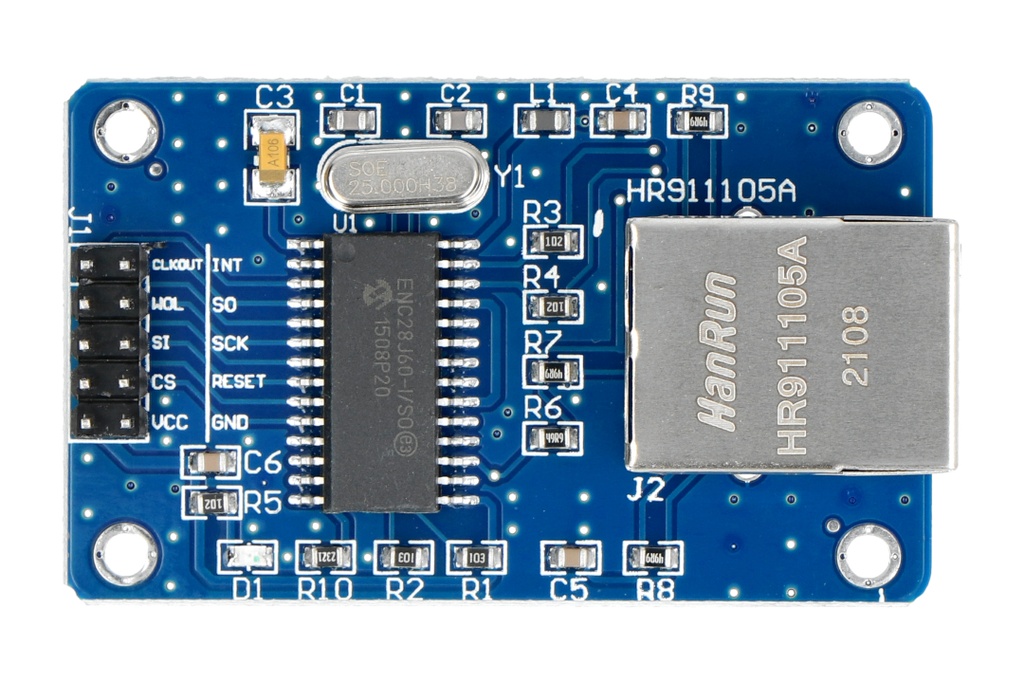
Features
- Provides Ethernet connectivity for microcontrollers
- Compatible with Arduino and other SPI-based controllers
- Uses the SPI communication protocol
- Operates at 3.3V with 5V-tolerant digital lines
- Supports hosting a basic web server
- Can respond to network ping requests
- Suitable for home automation via the internet
- Based on the Microchip ENC28J60 Ethernet controller
- RJ45 connector with integrated magnetics for compact design
Specifications
- Ethernet chip: ENC28J60 from Microchip
- Network interface: HR911105A
- Compatible with Arduino, AVR, LPC, and STM microcontrollers
- Supply voltage: 3.3V with 5V tolerant digital IO lines
- Crystal oscillator: 25 MHz
- Board size: approximately 58 x 34 x 17 mm
ENC28J60 Module Connections With Arduino
| Label |
Arduino Pin |
Description |
| +5V |
5V |
Power supply input, may be 3.3V on some modules |
| GND |
GND |
Ground |
| INT |
NC |
Interrupt output |
| CLK |
NC |
Clock output from Ethernet controller |
| SO |
MISO 12 |
SPI data output |
| WOL |
NC |
Reserved pin |
| SCK |
SCK 13 |
SPI clock |
| SI |
MOSI 11 |
SPI data input |
| RST |
NC |
Reset pin |
| CS |
SS 8 or 10 |
Chip select |
| Q3 |
NC |
RX 3.3V supply according to datasheet |
Arduino Code Example Using ENC28J60
The EtherCard library is commonly used to interface the ENC28J60 module with Arduino. After installing the library in the Arduino IDE, you can upload the following example code to test Ethernet communication and web requests.
#include "EtherCard.h"

static byte mymac[] = { 0x74, 0x69, 0x69, 0x2D, 0x30, 0x31 };
byte Ethernet::buffer[700];
static uint32_t timer;
const char website[] PROGMEM = "www.google.com";

static void my_callback (byte status, word off, word len) {
  Serial.println("Response:");
  Ethernet::buffer[off + 300] = 0;
  Serial.println((const char*) Ethernet::buffer + off);
}

void setup () {
  Serial.begin(57600);

  if (ether.begin(sizeof Ethernet::buffer, mymac, SS) == 0)
    Serial.println("Ethernet controller not found");

  if (!ether.dhcpSetup())
    Serial.println("DHCP failed");

  ether.printIp("IP: ", ether.myip);
  ether.printIp("Gateway: ", ether.gwip);
  ether.printIp("DNS: ", ether.dnsip);

  if (!ether.dnsLookup(website))
    Serial.println("DNS lookup failed");

  ether.printIp("Server: ", ether.hisip);
}

void loop () {
  ether.packetLoop(ether.packetReceive());

  if (millis() > timer) {
    timer = millis() + 5000;
    ether.browseUrl("/foo/", "bar", website, my_callback);
  }
}
Applications
- Arduino-based web servers
- Wired home automation systems
- Network monitoring and diagnostics
- Internet-connected sensors and controllers
- Educational networking projects
Features
- Provides Ethernet connectivity for microcontrollers
- Compatible with Arduino and other SPI-based controllers
- Uses the SPI communication protocol
- Operates at 3.3V with 5V-tolerant digital lines
- Supports hosting a basic web server
- Can respond to network ping requests
- Suitable for home automation via the internet
- Based on the Microchip ENC28J60 Ethernet controller
- RJ45 connector with integrated magnetics for compact design
Specifications
- Ethernet chip: ENC28J60 from Microchip
- Network interface: HR911105A
- Compatible with Arduino, AVR, LPC, and STM microcontrollers
- Supply voltage: 3.3V with 5V tolerant digital IO lines
- Crystal oscillator: 25 MHz
- Board size: approximately 58 x 34 x 17 mm
ENC28J60 Module Connections With Arduino
| Label |
Arduino Pin |
Description |
| +5V |
5V |
Power supply input, may be 3.3V on some modules |
| GND |
GND |
Ground |
| INT |
NC |
Interrupt output |
| CLK |
NC |
Clock output from Ethernet controller |
| SO |
MISO 12 |
SPI data output |
| WOL |
NC |
Reserved pin |
| SCK |
SCK 13 |
SPI clock |
| SI |
MOSI 11 |
SPI data input |
| RST |
NC |
Reset pin |
| CS |
SS 8 or 10 |
Chip select |
| Q3 |
NC |
RX 3.3V supply according to datasheet |
Arduino Code Example Using ENC28J60
The EtherCard library is commonly used to interface the ENC28J60 module with Arduino. After installing the library in the Arduino IDE, you can upload the following example code to test Ethernet communication and web requests.
#include "EtherCard.h"

static byte mymac[] = { 0x74, 0x69, 0x69, 0x2D, 0x30, 0x31 };
byte Ethernet::buffer[700];
static uint32_t timer;
const char website[] PROGMEM = "www.google.com";

static void my_callback (byte status, word off, word len) {
  Serial.println("Response:");
  Ethernet::buffer[off + 300] = 0;
  Serial.println((const char*) Ethernet::buffer + off);
}

void setup () {
  Serial.begin(57600);

  if (ether.begin(sizeof Ethernet::buffer, mymac, SS) == 0)
    Serial.println("Ethernet controller not found");

  if (!ether.dhcpSetup())
    Serial.println("DHCP failed");

  ether.printIp("IP: ", ether.myip);
  ether.printIp("Gateway: ", ether.gwip);
  ether.printIp("DNS: ", ether.dnsip);

  if (!ether.dnsLookup(website))
    Serial.println("DNS lookup failed");

  ether.printIp("Server: ", ether.hisip);
}

void loop () {
  ether.packetLoop(ether.packetReceive());

  if (millis() > timer) {
    timer = millis() + 5000;
    ether.browseUrl("/foo/", "bar", website, my_callback);
  }
}
Applications
- Arduino-based web servers
- Wired home automation systems
- Network monitoring and diagnostics
- Internet-connected sensors and controllers
- Educational networking projects