Features
- Capacitive touch sensing technology
- Detects touch using the human body as a capacitive element
- Non mechanical and wear free operation
- Fast and reliable digital output response
- Simple three pin interface for easy integration
- Built in LED provides visual feedback on touch detection
- Suitable for Arduino and other microcontrollers
Principle of Operation
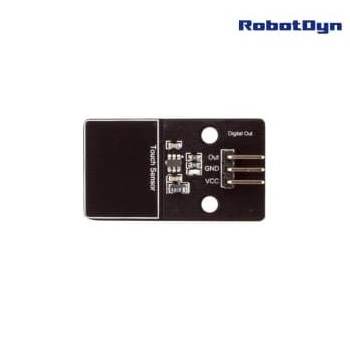
The human body naturally holds an electrical charge. When the user touches the sensor pad, the body becomes part of the sensor circuit. This causes a measurable change in capacitance, which is detected by the onboard controller. The controller then changes the digital output state and activates the indicator LED.
Pinout
- VCC Power supply input 3.3V to 5V
- GND Ground connection
- Out Digital signal output
Application Areas
- Interactive electronic projects
- Touch controlled automation systems
- Smart home interfaces
- Educational electronics experiments
- Rapid prototyping of touch enabled devices
Arduino Test Code
int touchPin = 2;
int ledPin = 13;
int touchState = 0;

void setup() {
  pinMode(touchPin, INPUT);
  pinMode(ledPin, OUTPUT);
  Serial.begin(9600);
}

void loop() {
  touchState = digitalRead(touchPin);

  if (touchState == HIGH) {
    digitalWrite(ledPin, HIGH);
    Serial.println("Touch detected");
  } else {
    digitalWrite(ledPin, LOW);
    Serial.println("No touch");
  }

  delay(200);
}
Technical Details
- Manufacturer Robotdyn
- Sensor type Capacitive touch
- Number of pins 3
- Operating voltage 3.3V to 5V
- Output type Digital
- Built in LED indicator
Features
- Capacitive touch sensing technology
- Detects touch using the human body as a capacitive element
- Non mechanical and wear free operation
- Fast and reliable digital output response
- Simple three pin interface for easy integration
- Built in LED provides visual feedback on touch detection
- Suitable for Arduino and other microcontrollers
Principle of Operation
The human body naturally holds an electrical charge. When the user touches the sensor pad, the body becomes part of the sensor circuit. This causes a measurable change in capacitance, which is detected by the onboard controller. The controller then changes the digital output state and activates the indicator LED.
Pinout
- VCC Power supply input 3.3V to 5V
- GND Ground connection
- Out Digital signal output
Application Areas
- Interactive electronic projects
- Touch controlled automation systems
- Smart home interfaces
- Educational electronics experiments
- Rapid prototyping of touch enabled devices
Arduino Test Code
int touchPin = 2;
int ledPin = 13;
int touchState = 0;

void setup() {
  pinMode(touchPin, INPUT);
  pinMode(ledPin, OUTPUT);
  Serial.begin(9600);
}

void loop() {
  touchState = digitalRead(touchPin);

  if (touchState == HIGH) {
    digitalWrite(ledPin, HIGH);
    Serial.println("Touch detected");
  } else {
    digitalWrite(ledPin, LOW);
    Serial.println("No touch");
  }

  delay(200);
}
Technical Details
- Manufacturer Robotdyn
- Sensor type Capacitive touch
- Number of pins 3
- Operating voltage 3.3V to 5V
- Output type Digital
- Built in LED indicator