- All products
- Development Boards
- Arduino
- Arduino Boards
- Seeeduino: Arduino UNO Compatible
- Arduino Boards
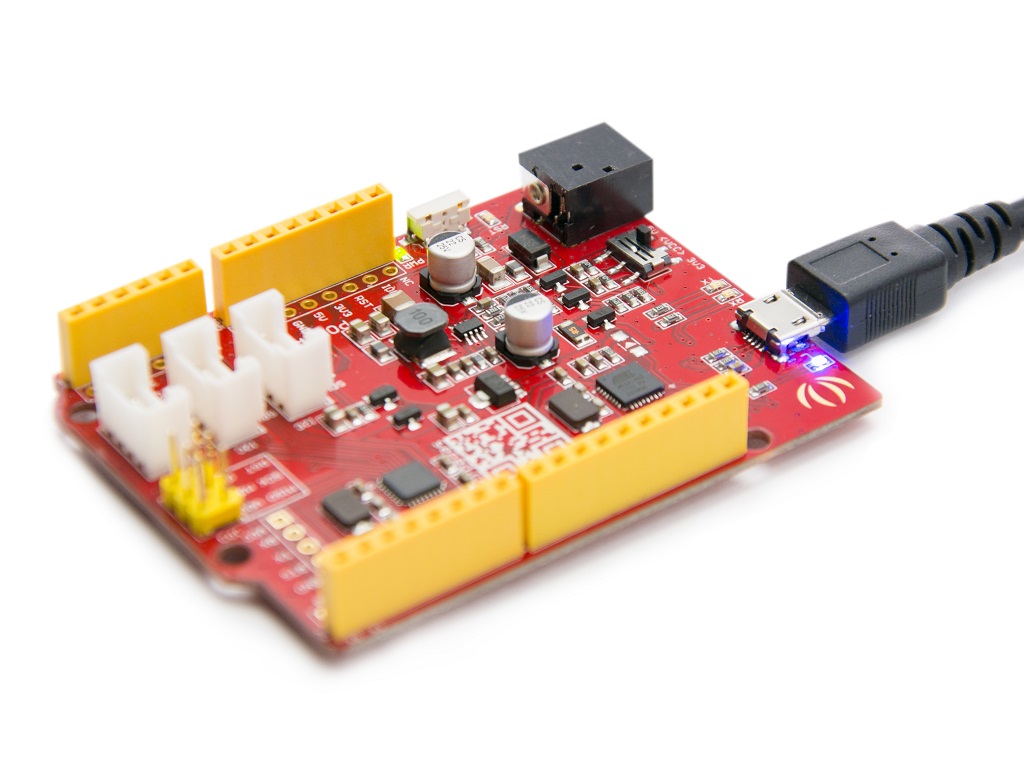
Features
- ATmega328P microcontroller
- Fully compatible with Arduino IDE
- 14 digital input output pins
- 8 analog input pins
- Selectable operating voltage 5V or 3.3V
- Integrated USB to serial converter
- Onboard reset button
- Grove connectors for easy module connection
- ICSP header for advanced programming
Power Options
- USB power input
- DC power jack input from 7V to 15V
- Selectable system voltage using onboard switch
Pinout
- Digital Pins D0 to D13 for input and output
- Analog Pins A0 to A7 for sensor readings
- PWM supported on selected digital pins
- I2C pins on A4 SDA and A5 SCL
- UART pins on D0 RX and D1 TX
- SPI available via ICSP header
- Onboard LED connected to D13
Principle of Operation
The Seeeduino v4.2 works by uploading a program to the ATmega328P microcontroller using the Arduino IDE. Once powered, the microcontroller executes the uploaded code continuously. It can read sensor inputs, control outputs such as LEDs and motors, and communicate with other devices using serial protocols.
Getting Started
- Install Arduino IDE on your computer
- Connect the board using a USB cable
- Select Arduino Uno as the board type
- Select the correct serial port
- Write or open a sketch
- Upload the code to the board
Example Circuit
No external circuit is required. The onboard LED connected to pin D13 is used.
Arduino Test Code
const int ledPin = 13;

void setup()
{
  pinMode(ledPin, OUTPUT);
}

void loop()
{
  digitalWrite(ledPin, HIGH);
  delay(500);
  digitalWrite(ledPin, LOW);
  delay(500);
}
Code Explanation
The code sets pin 13 as an output. The loop function turns the LED on and off every half second. This verifies that the board, USB connection, and programming process are working correctly.
Technical Specifications
| Microcontroller | ATmega328P |
| Operating Voltage | 5V or 3.3V |
| Clock Speed | 16 MHz |
| Digital IO Pins | 14 |
| Analog Input Pins | 8 |
| Flash Memory | 32 KB |
| SRAM | 2 KB |
| EEPROM | 1 KB |
| USB to Serial Chip | CH340 |
Applications
- Learning electronics and programming
- Rapid prototyping
- Home automation systems
- Robotics projects
- Sensor data acquisition
- Educational demonstrations
- Interactive art installations
Compatibility
The Seeeduino v4.2 is software compatible with Arduino Uno sketches and libraries. Shields designed for Arduino Uno can be used with proper voltage and pin considerations.
Features
- ATmega328P microcontroller
- Fully compatible with Arduino IDE
- 14 digital input output pins
- 8 analog input pins
- Selectable operating voltage 5V or 3.3V
- Integrated USB to serial converter
- Onboard reset button
- Grove connectors for easy module connection
- ICSP header for advanced programming
Power Options
- USB power input
- DC power jack input from 7V to 15V
- Selectable system voltage using onboard switch
Pinout
- Digital Pins D0 to D13 for input and output
- Analog Pins A0 to A7 for sensor readings
- PWM supported on selected digital pins
- I2C pins on A4 SDA and A5 SCL
- UART pins on D0 RX and D1 TX
- SPI available via ICSP header
- Onboard LED connected to D13
Principle of Operation
The Seeeduino v4.2 works by uploading a program to the ATmega328P microcontroller using the Arduino IDE. Once powered, the microcontroller executes the uploaded code continuously. It can read sensor inputs, control outputs such as LEDs and motors, and communicate with other devices using serial protocols.
Getting Started
- Install Arduino IDE on your computer
- Connect the board using a USB cable
- Select Arduino Uno as the board type
- Select the correct serial port
- Write or open a sketch
- Upload the code to the board
Example Circuit
No external circuit is required. The onboard LED connected to pin D13 is used.
Arduino Test Code
const int ledPin = 13;

void setup()
{
  pinMode(ledPin, OUTPUT);
}

void loop()
{
  digitalWrite(ledPin, HIGH);
  delay(500);
  digitalWrite(ledPin, LOW);
  delay(500);
}
Code Explanation
The code sets pin 13 as an output. The loop function turns the LED on and off every half second. This verifies that the board, USB connection, and programming process are working correctly.
Technical Specifications
| Microcontroller | ATmega328P |
| Operating Voltage | 5V or 3.3V |
| Clock Speed | 16 MHz |
| Digital IO Pins | 14 |
| Analog Input Pins | 8 |
| Flash Memory | 32 KB |
| SRAM | 2 KB |
| EEPROM | 1 KB |
| USB to Serial Chip | CH340 |
Applications
- Learning electronics and programming
- Rapid prototyping
- Home automation systems
- Robotics projects
- Sensor data acquisition
- Educational demonstrations
- Interactive art installations
Compatibility
The Seeeduino v4.2 is software compatible with Arduino Uno sketches and libraries. Shields designed for Arduino Uno can be used with proper voltage and pin considerations.