- All products
- Development Boards
- Beetle
- Beetle - The Smallest Arduino Compatible
- Beetle
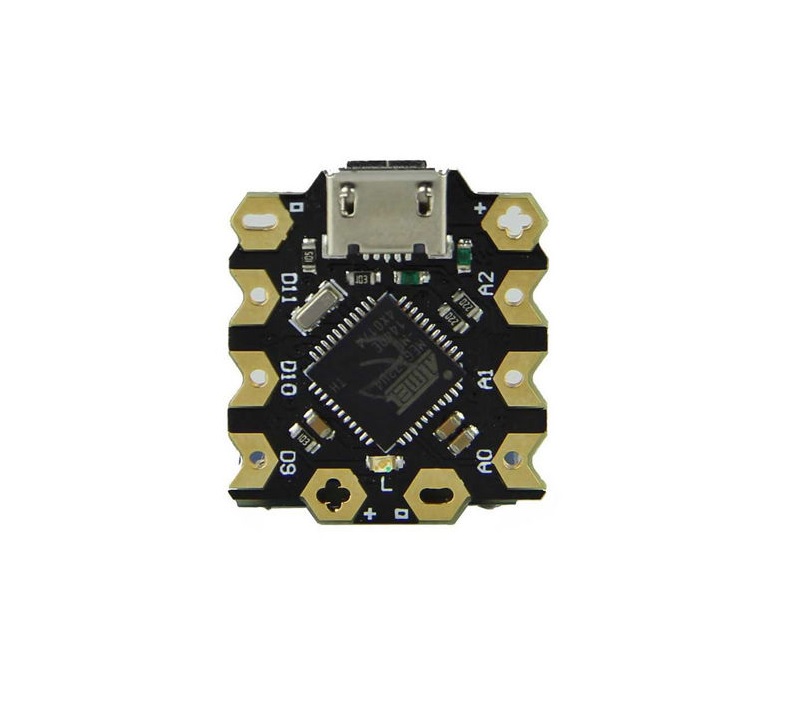
Features:
- Compact size
- Direct downloading and testing via Micro USB
- V-shaped large-size gold-plated IO ports for wire twisting or sewing with conductive thread
- Two honeycomb shape gold-plated power interface
- Magic light blue soft BLINK indicator
- Fully compatible with Arduino
- Digital I/O Pins: 10
- PWM Channels: 4
- Analog Input Channels: 5
- UART: 1
- I2C: 1
- Micro USB: 1
- Power interfaces: 2
- Flash Memory: 32 KB (4 KB used by bootloader)
- SRAM: 2.5 KB
- EEPROM: 1 KB
Principle of Work:
Beetle is an open-source platform based on Arduino and supported by a large open-source community. The hardware and software ecosystem is adaptable and user-friendly, making it popular for artists, designers, and hobbyists. The Arduino IDE connects to the board via USB, enabling users to write code, upload it to the microcontroller, and execute it while interacting with sensors, motors, and lights. Numerous free tools and resources are available for both beginners and advanced users.
Pinout of the Board:
Silkscreen, Digital Pin, PWM Channel, Analog Channel, UART, I2C
- RX: 0, Serial1
- TX: 1
- SDA: 2, SDA
- SCL: 3, 3, SCL
- 9: 9, 9, A9
- 10: 10, 10, A10
- 11: 11, 11
- A0: A0, A0
- A1: A1, A1
- A2: A2, A2
Digital I/O Pins: 10 digital pins for input or output, HIGH = 5V, LOW = 0V.
Analog Pins: 5 channels of 10-bit ADC for variable input values.
PWM Pins: 4 PWM channels for analog output simulation using digital means.
UART Pins: Provides serial communication via Rx and Tx pins.
SPI Pins: MOSI and MISO for communication with peripheral devices.
I2C Pins: SDA for data and SCL for clock line, enabling two-wire communication.
Power Pins:
- VCC: 5V regulated for the ATmega32u4 and can supply other devices
- GND: Common ground voltage (0V reference)
Applications:
- Health and security systems
- Wireless keyboard creation
- Industrial automation
- Embedded systems
- Student projects
- Automatic pill dispenser
- Water level meter
Circuit:
- Connect DFRobot Beetle Leonardo to PC via USB
- Open Device Manager to view the port number
- Open Arduino IDE, select Tools - Board - DFRobot AVR Boards - DFRobot Beetle Leonardo
- Select the correct COM port
- Upload the program
Troubleshooting:
- Q: Port number not displayed? A: Download and install the driver again
- Q: Failure to burn program? A: Check if serial port is installed correctly in Device Manager
Library:
New updates with additional functions or boards are released via Tools - Board - Boards Manager. Select the DFRobot AVR Boards section and click Update.
Code Example (Blink LED):
void setup() {
pinMode(LED_BUILTIN, OUTPUT);
}
void loop() {
digitalWrite(LED_BUILTIN, HIGH);
delay(1000);
digitalWrite(LED_BUILTIN, LOW);
delay(1000);
}
Technical Details:
- Microcontroller: ATmega32u4
- Clock Speed: 16 MHz
- Operating Voltage: 5V DC
- Data Retention: 20 years at 85°C / 100 years at 25°C
- Physical Dimension: 20mm x 22mm x 3.8mm
Comparisons:
Beetle is a minimalized Arduino Leonardo (20mm x 22mm x 3.8mm) with similar functionality. Ideal for small DIY and wearable projects, but its 10 GPIO pins may be insufficient for larger projects, where a standard Leonardo board is recommended.
Features:
- Compact size
- Direct downloading and testing via Micro USB
- V-shaped large-size gold-plated IO ports for wire twisting or sewing with conductive thread
- Two honeycomb shape gold-plated power interface
- Magic light blue soft BLINK indicator
- Fully compatible with Arduino
- Digital I/O Pins: 10
- PWM Channels: 4
- Analog Input Channels: 5
- UART: 1
- I2C: 1
- Micro USB: 1
- Power interfaces: 2
- Flash Memory: 32 KB (4 KB used by bootloader)
- SRAM: 2.5 KB
- EEPROM: 1 KB
Principle of Work:
Beetle is an open-source platform based on Arduino and supported by a large open-source community. The hardware and software ecosystem is adaptable and user-friendly, making it popular for artists, designers, and hobbyists. The Arduino IDE connects to the board via USB, enabling users to write code, upload it to the microcontroller, and execute it while interacting with sensors, motors, and lights. Numerous free tools and resources are available for both beginners and advanced users.
Pinout of the Board:
Silkscreen, Digital Pin, PWM Channel, Analog Channel, UART, I2C
- RX: 0, Serial1
- TX: 1
- SDA: 2, SDA
- SCL: 3, 3, SCL
- 9: 9, 9, A9
- 10: 10, 10, A10
- 11: 11, 11
- A0: A0, A0
- A1: A1, A1
- A2: A2, A2
Digital I/O Pins: 10 digital pins for input or output, HIGH = 5V, LOW = 0V.
Analog Pins: 5 channels of 10-bit ADC for variable input values.
PWM Pins: 4 PWM channels for analog output simulation using digital means.
UART Pins: Provides serial communication via Rx and Tx pins.
SPI Pins: MOSI and MISO for communication with peripheral devices.
I2C Pins: SDA for data and SCL for clock line, enabling two-wire communication.
Power Pins:
- VCC: 5V regulated for the ATmega32u4 and can supply other devices
- GND: Common ground voltage (0V reference)
Applications:
- Health and security systems
- Wireless keyboard creation
- Industrial automation
- Embedded systems
- Student projects
- Automatic pill dispenser
- Water level meter
Circuit:
- Connect DFRobot Beetle Leonardo to PC via USB
- Open Device Manager to view the port number
- Open Arduino IDE, select Tools - Board - DFRobot AVR Boards - DFRobot Beetle Leonardo
- Select the correct COM port
- Upload the program
Troubleshooting:
- Q: Port number not displayed? A: Download and install the driver again
- Q: Failure to burn program? A: Check if serial port is installed correctly in Device Manager
Library:
New updates with additional functions or boards are released via Tools - Board - Boards Manager. Select the DFRobot AVR Boards section and click Update.
Code Example (Blink LED):
void setup() {
pinMode(LED_BUILTIN, OUTPUT);
}
void loop() {
digitalWrite(LED_BUILTIN, HIGH);
delay(1000);
digitalWrite(LED_BUILTIN, LOW);
delay(1000);
}
Technical Details:
- Microcontroller: ATmega32u4
- Clock Speed: 16 MHz
- Operating Voltage: 5V DC
- Data Retention: 20 years at 85°C / 100 years at 25°C
- Physical Dimension: 20mm x 22mm x 3.8mm
Comparisons:
Beetle is a minimalized Arduino Leonardo (20mm x 22mm x 3.8mm) with similar functionality. Ideal for small DIY and wearable projects, but its 10 GPIO pins may be insufficient for larger projects, where a standard Leonardo board is recommended.