- All products
- Displays
- OLED
- OLED 0.96 Inch 128x64 I2C SSD1306 Display Module White
- OLED
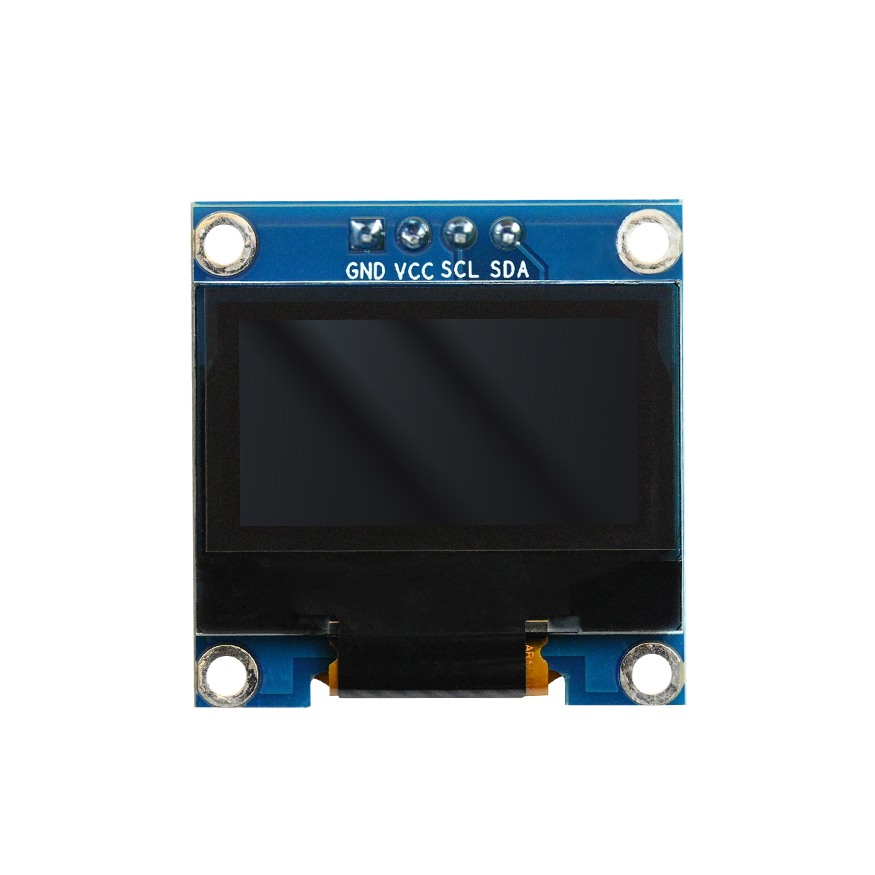
Features
- OLED display technology with high contrast and wide viewing angle
- Display size of 0.96 inch with 128 by 64 resolution
- I2C communication interface for simple wiring
- SSD1306 driver controller
- White color display output
- Low power consumption
- Compact size for space limited projects
- Suitable for IoT wearable and embedded systems
Principle of Work
- The OLED pixels emit light individually when powered
- The SSD1306 controller manages pixel data and display refresh
- The microcontroller communicates with the display using I2C
- The display is initialized using configuration commands
- Pixel data is sent to display text and graphics
- The controller refreshes the screen continuously
Pin Description
- Vin connect to 5V
- GND connect to ground
- SCL connect to I2C clock pin
- SDA connect to I2C data pin
Arduino Connections
Arduino Uno
- Vin to 5V
- GND to GND
- SCL to A5
- SDA to A4
Arduino Mega
- SDA to pin 20
- SCL to pin 21
Arduino Leonardo
- SDA to pin 20
- SCL to pin 21
Applications
- Wearable electronics
- IoT devices
- DIY and prototyping projects
- Embedded control panels
- Educational projects
- Measurement instruments
- Consumer electronics
Library Installation
Install Adafruit GFX and Adafruit SSD1306 libraries using the Arduino Library Manager.
I2C Scanner Code
#include "Wire.h"
void setup() {
 Wire.begin();
 Serial.begin(9600);
 while (!Serial);
 Serial.println("I2C Scanner");
}
void loop() {
 byte error, address;
 int deviceCount = 0;
 for (address = 1; address < 127; address++) {
 Wire.beginTransmission(address);
 error = Wire.endTransmission();
 if (error == 0) {
 Serial.print("Device found at address ");
 Serial.println(address, HEX);
 deviceCount++;
 }
 }
 delay(5000);
}
Sample Arduino Code
#include "Wire.h"
#include "Adafruit_GFX.h"
#include "Adafruit_SSD1306.h"
#define OLED_ADDR 0x3C
Adafruit_SSD1306 display(128, 64, &Wire, -1);
void setup() {
 Wire.begin();
 display.begin(SSD1306_SWITCHCAPVCC, OLED_ADDR);
 display.clearDisplay();
 display.setTextSize(1);
 display.setCursor(0, 0);
 display.println("Hello World");
 display.display();
}
void loop() {
}
Technical Details
- Display type OLED
- Resolution 128 by 64
- Operating voltage 3.3V to 5V
- Maximum current 20mA
- Viewing angle 160 degrees
- Interface I2C
Comparison
I2C version uses two wires and fewer pins but is slower. SPI version uses more pins but provides faster data transfer.
Features
- OLED display technology with high contrast and wide viewing angle
- Display size of 0.96 inch with 128 by 64 resolution
- I2C communication interface for simple wiring
- SSD1306 driver controller
- White color display output
- Low power consumption
- Compact size for space limited projects
- Suitable for IoT wearable and embedded systems
Principle of Work
- The OLED pixels emit light individually when powered
- The SSD1306 controller manages pixel data and display refresh
- The microcontroller communicates with the display using I2C
- The display is initialized using configuration commands
- Pixel data is sent to display text and graphics
- The controller refreshes the screen continuously
Pin Description
- Vin connect to 5V
- GND connect to ground
- SCL connect to I2C clock pin
- SDA connect to I2C data pin
Arduino Connections
Arduino Uno
- Vin to 5V
- GND to GND
- SCL to A5
- SDA to A4
Arduino Mega
- SDA to pin 20
- SCL to pin 21
Arduino Leonardo
- SDA to pin 20
- SCL to pin 21
Applications
- Wearable electronics
- IoT devices
- DIY and prototyping projects
- Embedded control panels
- Educational projects
- Measurement instruments
- Consumer electronics
Library Installation
Install Adafruit GFX and Adafruit SSD1306 libraries using the Arduino Library Manager.
I2C Scanner Code
#include "Wire.h"
void setup() {
 Wire.begin();
 Serial.begin(9600);
 while (!Serial);
 Serial.println("I2C Scanner");
}
void loop() {
 byte error, address;
 int deviceCount = 0;
 for (address = 1; address < 127; address++) {
 Wire.beginTransmission(address);
 error = Wire.endTransmission();
 if (error == 0) {
 Serial.print("Device found at address ");
 Serial.println(address, HEX);
 deviceCount++;
 }
 }
 delay(5000);
}
Sample Arduino Code
#include "Wire.h"
#include "Adafruit_GFX.h"
#include "Adafruit_SSD1306.h"
#define OLED_ADDR 0x3C
Adafruit_SSD1306 display(128, 64, &Wire, -1);
void setup() {
 Wire.begin();
 display.begin(SSD1306_SWITCHCAPVCC, OLED_ADDR);
 display.clearDisplay();
 display.setTextSize(1);
 display.setCursor(0, 0);
 display.println("Hello World");
 display.display();
}
void loop() {
}
Technical Details
- Display type OLED
- Resolution 128 by 64
- Operating voltage 3.3V to 5V
- Maximum current 20mA
- Viewing angle 160 degrees
- Interface I2C
Comparison
I2C version uses two wires and fewer pins but is slower. SPI version uses more pins but provides faster data transfer.