BadUSB Concept
BadUSB demonstrates how a standard USB device can act as a keyboard, mouse, or network device by modifying its firmware. Since USB firmware is not easily scanned by security software, this behavior cannot be detected or blocked, making it a valuable concept for security research and learning.
Beetle Controller Overview
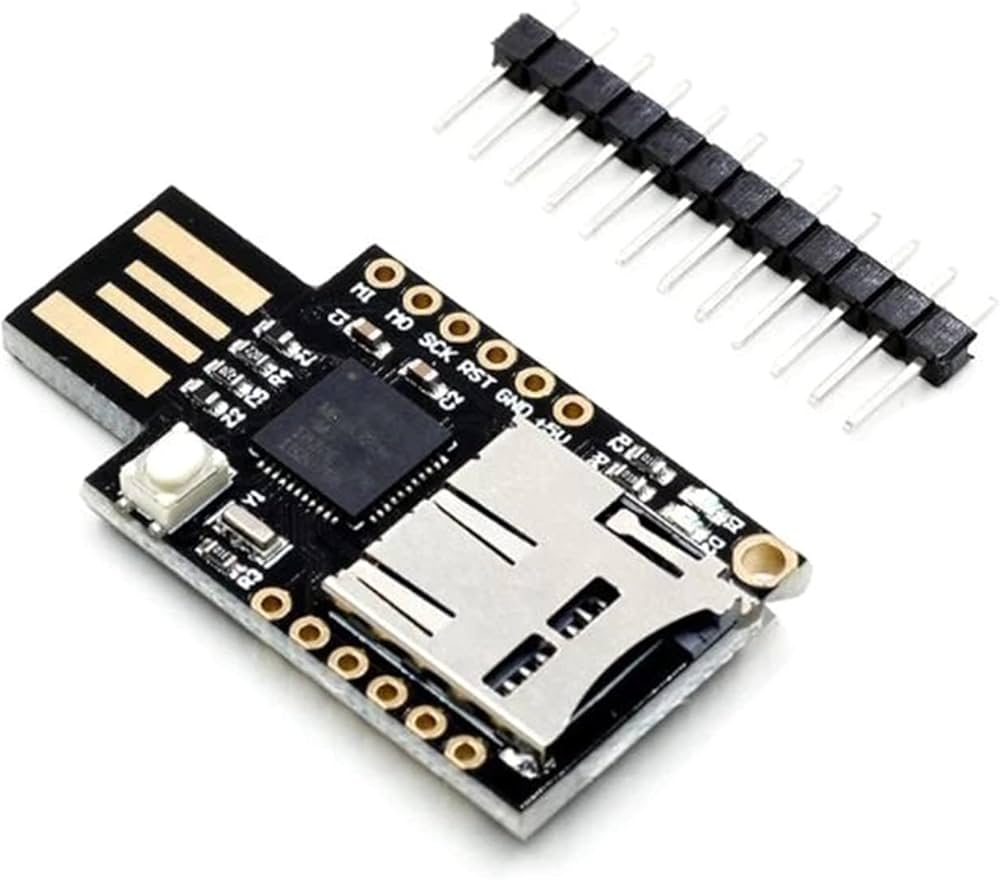
The Beetle board is compact yet fully functional, based on the ATmega32U4 microcontroller running at 16 MHz with native USB support. It can emulate USB HID devices without additional hardware and is fully compatible with the Arduino IDE using the "Arduino Leonardo" board selection.
Educational and DIY Use
Its small size and low cost make the Beetle ideal for workshops, DIY projects, e-textiles, and educational experiments. It can be easily attached to a keychain, stored in a toolbox, or included in small electronics projects.
Features
- ATmega32U4 microcontroller with 16 MHz clock
- Native USB support for keyboard/mouse emulation
- 10 digital I/O pins, 4 PWM channels, 5 analog inputs
- 1 UART, 1 I2C, Micro USB programming port
- 32 KB flash memory (4 KB used by bootloader), 2.5 KB SRAM, 1 KB EEPROM
- Compact and low-cost, ideal for educational and DIY projects
USB Keyboard Example
The following Arduino sketch demonstrates how the Beetle board can act as a USB keyboard and type predefined commands:
#include "Keyboard.h"

void setup() {
  Keyboard.begin();
  delay(1000);
  Keyboard.press(KEY_LEFT_GUI);
  Keyboard.press('r');
  delay(10);
  Keyboard.releaseAll();
  delay(200);
  Keyboard.print("notepad");
  Keyboard.press(KEY_RETURN);
  delay(10);
  Keyboard.releaseAll();
  delay(500);
  Keyboard.print("This message will self destruct in 5 seconds!");
  delay(5000);
  Keyboard.press(KEY_LEFT_CTRL);
  Keyboard.press('a');
  delay(10);
  Keyboard.releaseAll();
  Keyboard.press(KEY_DELETE);
  delay(10);
  Keyboard.releaseAll();
  Keyboard.press(KEY_LEFT_ALT);
  Keyboard.press(KEY_F4);
  delay(10);
  Keyboard.releaseAll();
  Keyboard.end();
}

void loop() {
}
Key codes used in this example are provided by the Arduino Keyboard library.
BadUSB Concept
BadUSB demonstrates how a standard USB device can act as a keyboard, mouse, or network device by modifying its firmware. Since USB firmware is not easily scanned by security software, this behavior cannot be detected or blocked, making it a valuable concept for security research and learning.
Beetle Controller Overview
The Beetle board is compact yet fully functional, based on the ATmega32U4 microcontroller running at 16 MHz with native USB support. It can emulate USB HID devices without additional hardware and is fully compatible with the Arduino IDE using the "Arduino Leonardo" board selection.
Educational and DIY Use
Its small size and low cost make the Beetle ideal for workshops, DIY projects, e-textiles, and educational experiments. It can be easily attached to a keychain, stored in a toolbox, or included in small electronics projects.
Features
- ATmega32U4 microcontroller with 16 MHz clock
- Native USB support for keyboard/mouse emulation
- 10 digital I/O pins, 4 PWM channels, 5 analog inputs
- 1 UART, 1 I2C, Micro USB programming port
- 32 KB flash memory (4 KB used by bootloader), 2.5 KB SRAM, 1 KB EEPROM
- Compact and low-cost, ideal for educational and DIY projects
USB Keyboard Example
The following Arduino sketch demonstrates how the Beetle board can act as a USB keyboard and type predefined commands:
#include "Keyboard.h"

void setup() {
  Keyboard.begin();
  delay(1000);
  Keyboard.press(KEY_LEFT_GUI);
  Keyboard.press('r');
  delay(10);
  Keyboard.releaseAll();
  delay(200);
  Keyboard.print("notepad");
  Keyboard.press(KEY_RETURN);
  delay(10);
  Keyboard.releaseAll();
  delay(500);
  Keyboard.print("This message will self destruct in 5 seconds!");
  delay(5000);
  Keyboard.press(KEY_LEFT_CTRL);
  Keyboard.press('a');
  delay(10);
  Keyboard.releaseAll();
  Keyboard.press(KEY_DELETE);
  delay(10);
  Keyboard.releaseAll();
  Keyboard.press(KEY_LEFT_ALT);
  Keyboard.press(KEY_F4);
  delay(10);
  Keyboard.releaseAll();
  Keyboard.end();
}

void loop() {
}
Key codes used in this example are provided by the Arduino Keyboard library.