- All products
- Development Boards
- ESP32
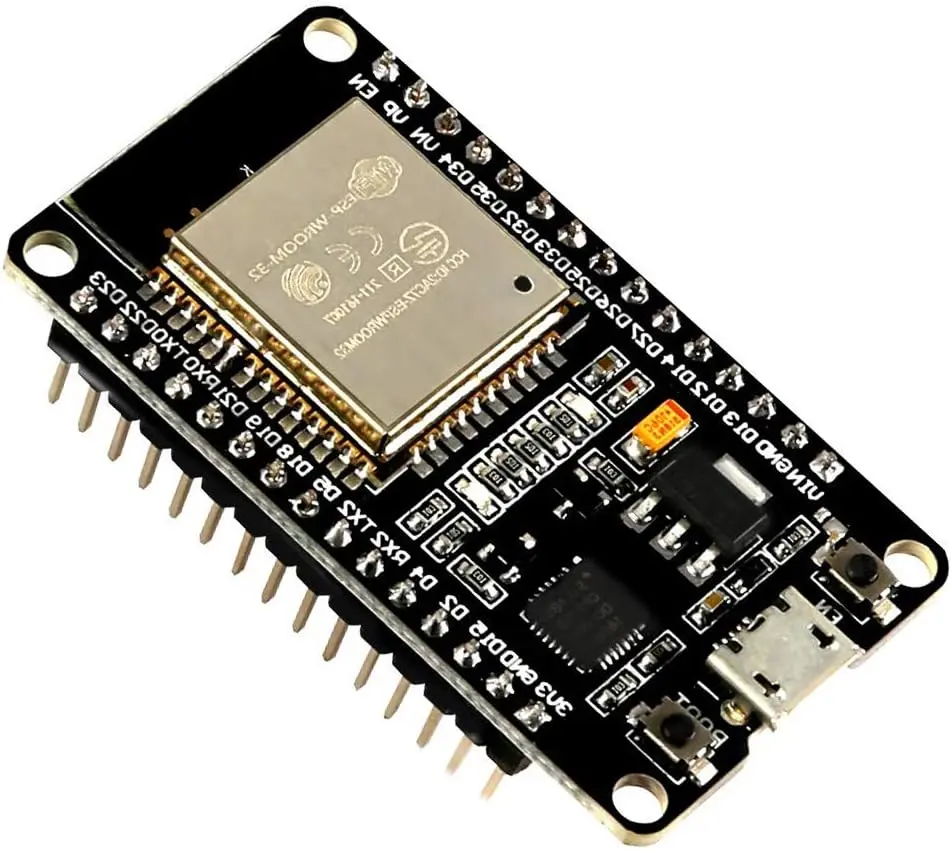
- ESP32 WROOM 32S Development Board
- ESP32
Features
- ESP32-WROOM-32S Module: Powered by the Espressif dual-core Xtensa® LX6 processor.
- Dual-Core Processing: Up to 240MHz CPU frequency delivering approximately 600 DMIPS performance.
- Integrated Wi-Fi: IEEE 802.11 b/g/n 2.4GHz wireless networking.
- Bluetooth Support: Bluetooth v4.2 Classic (BR/EDR) and Bluetooth Low Energy (BLE).
- 4MB SPI Flash: Integrated onboard program and data storage.
- Low Power Operation: Multiple sleep modes for battery-powered applications.
- Rich Peripheral Set: Supports ADC, DAC, UART, SPI, I2C, I2S, PWM, CAN, SDIO, touch sensing, and Hall sensor.
- Hardware Security: AES, SHA, RSA acceleration, secure boot, flash encryption, and hardware random number generator.
- USB Programming: Easy firmware upload and serial debugging.
- Wide Software Support: Compatible with Arduino IDE, ESP-IDF, MicroPython, and PlatformIO.
Principle of Operation
The ESP32-WROOM-32S functions as a high-performance wireless microcontroller that combines processing, communication, and peripheral control on a single chip. Application firmware executes on the dual-core Xtensa LX6 processor while integrated Wi-Fi and Bluetooth radios handle wireless communication with routers, smartphones, cloud platforms, and other embedded devices.

External sensors, displays, motors, and communication modules connect through the board's GPIO interfaces including SPI, I2C, UART, ADC, DAC, PWM, and touch inputs. Hardware encryption engines provide secure communication and data storage, while multiple power-saving modes significantly reduce energy consumption in battery-powered applications.
Pinout

| Interface | Description |
|---|---|
| 3V3 | 3.3V regulated output |
| VIN | External power input (typically 5V) |
| GND | Ground |
| GPIO | General-purpose digital input/output pins |
| ADC | 12-bit analog input channels |
| DAC | 2 analog output channels |
| PWM | LED and motor control outputs |
| UART | Serial communication interfaces |
| I2C | Sensor communication interface |
| SPI | High-speed peripheral communication |
| I2S | Digital audio interface |
| Touch | Capacitive touch sensing inputs |
| EN | Chip enable/reset |
| BOOT (IO0) | Programming mode selection |
Wiring
Programming via USB:

| ESP32 Board | Connection |
|---|---|
| USB Port | Connect to PC using USB cable |
| VIN | 5V input (optional external supply) |
| 3V3 | 3.3V output for external sensors |
| GND | Common Ground |
Getting Started with Arduino IDE
Step 1: Install the Arduino IDE
- Download and install the latest Arduino IDE from the official Arduino website.
- Launch the Arduino IDE after installation is complete.
Step 2: Install the ESP32 Board Package

- Open File → Preferences.
- In the Additional Boards Manager URLs field, add the following URL:
https://espressif.github.io/arduino-esp32/package_esp32_index.json
If other board URLs already exist, separate each URL with a comma.
- Click OK.
- Open Tools → Board → Boards Manager.
- Search for esp32.
- Install ESP32 by Espressif Systems.
Step 3: Connect the Board
- Connect the ESP32-WROOM-32S Development Board to your computer using a USB data cable.
- If necessary, install the USB-to-Serial driver for your board (CP210x or CH340, depending on the USB interface used).
- Select the correct COM port from Tools → Port.
Step 4: Select the Board
- Open Tools → Board → ESP32 Arduino.
- Select ESP32 Dev Module.
Step 5: Upload Your First Sketch
- Open File → Examples → Basics → Blink.
- If required, change the LED pin to the onboard LED pin used by your board.
- Click Upload.
- If the upload does not start automatically, press and hold the BOOT button while the IDE displays "Connecting...", then release the button once uploading begins.
Step 6: Verify Operation
After uploading, the program will run automatically. You can also open the Serial Monitor by selecting the correct baud rate used in your sketch to monitor debugging messages and verify proper operation.
Applications
- Internet of Things (IoT) devices.
- Home automation systems.
- Wireless sensor networks.
- Industrial monitoring and control.
- Smart energy management systems.
- Robotics and autonomous platforms.
- Wearable electronics.
- Wireless audio applications.
- Mesh networking.
- Environmental monitoring.
- Remote data logging.
- Smart agriculture.
Specifications
- Module: ESP32-WROOM-32S
- CPU: Dual-core Xtensa® 32-bit LX6
- Maximum CPU Frequency: Up to 240MHz
- Performance: Up to 600 DMIPS
- ROM: 448KB
- SRAM: 520KB
- RTC SRAM: 16KB
- Flash Memory: 4MB SPI Flash
- Operating Voltage: 2.2V–3.6V
- Wi-Fi: IEEE 802.11 b/g/n (2.4GHz)
- Maximum Wi-Fi Data Rate: Up to 150Mbps
- Wi-Fi Modes: Station, SoftAP, AP+STA
- Wi-Fi Security: WPA, WPA2, WPA2-Enterprise, WPS
- Bluetooth: Bluetooth 4.2 BR/EDR + BLE
- ADC: 12-bit, up to 18 channels
- DAC: 2 channels
- Touch Sensors: Capacitive touch inputs
- Interfaces: UART, SPI, I2C, I2S, SDIO, CAN, PWM
- Security: AES, SHA, RSA, Secure Boot, Flash Encryption, TRNG
- Module Dimensions: 18 × 25 × 3 mm
- Antenna: Integrated PCB antenna (approximately 3dBi gain)
Resources
- Espressif ESP32-WROOM-32 Module Overview
- ESP-IDF Programming Guide
- Arduino Core for ESP32
- ESP32 Getting Started Guide
Comparison
- ESP32 vs ESP8266: The ESP32 offers dual-core processing, Bluetooth support, more GPIOs, hardware security, touch sensing, DAC outputs, and significantly greater processing performance.
- ESP32-WROOM-32S vs ESP32-S3: The ESP32-S3 adds USB OTG support, AI vector instructions, and improved USB capabilities, while the ESP32-WROOM-32S remains a highly cost-effective solution for general IoT applications.
Features
- ESP32-WROOM-32S Module: Powered by the Espressif dual-core Xtensa® LX6 processor.
- Dual-Core Processing: Up to 240MHz CPU frequency delivering approximately 600 DMIPS performance.
- Integrated Wi-Fi: IEEE 802.11 b/g/n 2.4GHz wireless networking.
- Bluetooth Support: Bluetooth v4.2 Classic (BR/EDR) and Bluetooth Low Energy (BLE).
- 4MB SPI Flash: Integrated onboard program and data storage.
- Low Power Operation: Multiple sleep modes for battery-powered applications.
- Rich Peripheral Set: Supports ADC, DAC, UART, SPI, I2C, I2S, PWM, CAN, SDIO, touch sensing, and Hall sensor.
- Hardware Security: AES, SHA, RSA acceleration, secure boot, flash encryption, and hardware random number generator.
- USB Programming: Easy firmware upload and serial debugging.
- Wide Software Support: Compatible with Arduino IDE, ESP-IDF, MicroPython, and PlatformIO.
Principle of Operation
The ESP32-WROOM-32S functions as a high-performance wireless microcontroller that combines processing, communication, and peripheral control on a single chip. Application firmware executes on the dual-core Xtensa LX6 processor while integrated Wi-Fi and Bluetooth radios handle wireless communication with routers, smartphones, cloud platforms, and other embedded devices.

External sensors, displays, motors, and communication modules connect through the board's GPIO interfaces including SPI, I2C, UART, ADC, DAC, PWM, and touch inputs. Hardware encryption engines provide secure communication and data storage, while multiple power-saving modes significantly reduce energy consumption in battery-powered applications.
Pinout

| Interface | Description |
|---|---|
| 3V3 | 3.3V regulated output |
| VIN | External power input (typically 5V) |
| GND | Ground |
| GPIO | General-purpose digital input/output pins |
| ADC | 12-bit analog input channels |
| DAC | 2 analog output channels |
| PWM | LED and motor control outputs |
| UART | Serial communication interfaces |
| I2C | Sensor communication interface |
| SPI | High-speed peripheral communication |
| I2S | Digital audio interface |
| Touch | Capacitive touch sensing inputs |
| EN | Chip enable/reset |
| BOOT (IO0) | Programming mode selection |
Wiring
Programming via USB:

| ESP32 Board | Connection |
|---|---|
| USB Port | Connect to PC using USB cable |
| VIN | 5V input (optional external supply) |
| 3V3 | 3.3V output for external sensors |
| GND | Common Ground |
Getting Started with Arduino IDE
Step 1: Install the Arduino IDE
- Download and install the latest Arduino IDE from the official Arduino website.
- Launch the Arduino IDE after installation is complete.
Step 2: Install the ESP32 Board Package

- Open File → Preferences.
- In the Additional Boards Manager URLs field, add the following URL:
https://espressif.github.io/arduino-esp32/package_esp32_index.json
If other board URLs already exist, separate each URL with a comma.
- Click OK.
- Open Tools → Board → Boards Manager.
- Search for esp32.
- Install ESP32 by Espressif Systems.
Step 3: Connect the Board
- Connect the ESP32-WROOM-32S Development Board to your computer using a USB data cable.
- If necessary, install the USB-to-Serial driver for your board (CP210x or CH340, depending on the USB interface used).
- Select the correct COM port from Tools → Port.
Step 4: Select the Board
- Open Tools → Board → ESP32 Arduino.
- Select ESP32 Dev Module.
Step 5: Upload Your First Sketch
- Open File → Examples → Basics → Blink.
- If required, change the LED pin to the onboard LED pin used by your board.
- Click Upload.
- If the upload does not start automatically, press and hold the BOOT button while the IDE displays "Connecting...", then release the button once uploading begins.
Step 6: Verify Operation
After uploading, the program will run automatically. You can also open the Serial Monitor by selecting the correct baud rate used in your sketch to monitor debugging messages and verify proper operation.
Applications
- Internet of Things (IoT) devices.
- Home automation systems.
- Wireless sensor networks.
- Industrial monitoring and control.
- Smart energy management systems.
- Robotics and autonomous platforms.
- Wearable electronics.
- Wireless audio applications.
- Mesh networking.
- Environmental monitoring.
- Remote data logging.
- Smart agriculture.
Specifications
- Module: ESP32-WROOM-32S
- CPU: Dual-core Xtensa® 32-bit LX6
- Maximum CPU Frequency: Up to 240MHz
- Performance: Up to 600 DMIPS
- ROM: 448KB
- SRAM: 520KB
- RTC SRAM: 16KB
- Flash Memory: 4MB SPI Flash
- Operating Voltage: 2.2V–3.6V
- Wi-Fi: IEEE 802.11 b/g/n (2.4GHz)
- Maximum Wi-Fi Data Rate: Up to 150Mbps
- Wi-Fi Modes: Station, SoftAP, AP+STA
- Wi-Fi Security: WPA, WPA2, WPA2-Enterprise, WPS
- Bluetooth: Bluetooth 4.2 BR/EDR + BLE
- ADC: 12-bit, up to 18 channels
- DAC: 2 channels
- Touch Sensors: Capacitive touch inputs
- Interfaces: UART, SPI, I2C, I2S, SDIO, CAN, PWM
- Security: AES, SHA, RSA, Secure Boot, Flash Encryption, TRNG
- Module Dimensions: 18 × 25 × 3 mm
- Antenna: Integrated PCB antenna (approximately 3dBi gain)
Resources
- Espressif ESP32-WROOM-32 Module Overview
- ESP-IDF Programming Guide
- Arduino Core for ESP32
- ESP32 Getting Started Guide
Comparison
- ESP32 vs ESP8266: The ESP32 offers dual-core processing, Bluetooth support, more GPIOs, hardware security, touch sensing, DAC outputs, and significantly greater processing performance.
- ESP32-WROOM-32S vs ESP32-S3: The ESP32-S3 adds USB OTG support, AI vector instructions, and improved USB capabilities, while the ESP32-WROOM-32S remains a highly cost-effective solution for general IoT applications.