Features
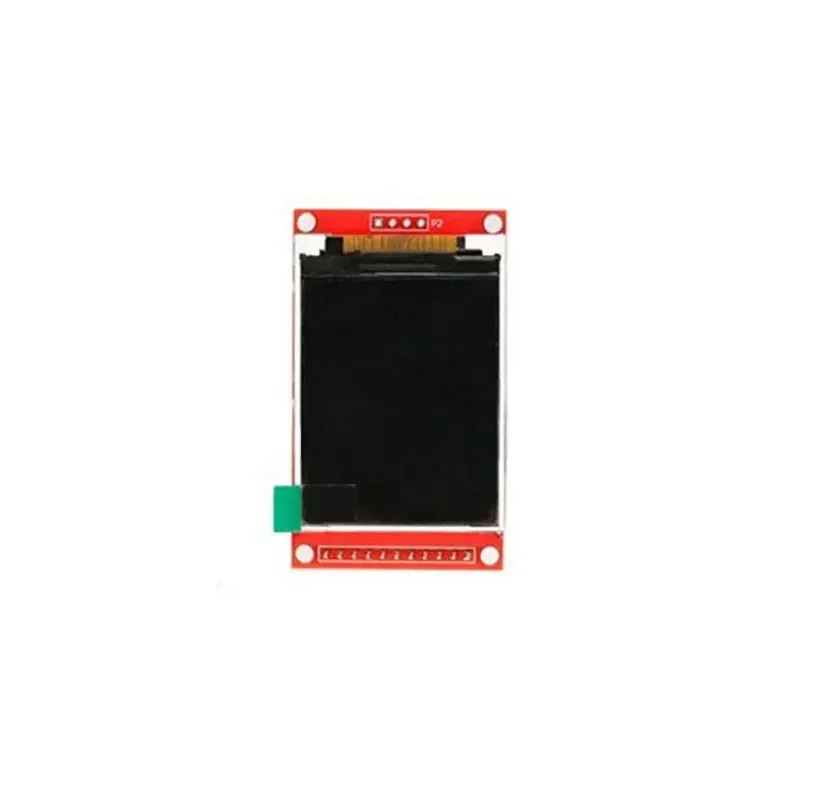
- 1.8-inch full-color TFT LCD display.
- 128 × 160 pixel resolution.
- Driven by the ST7735S TFT controller.
- SPI interface for high-speed communication.
- Supports 65K RGB colors.
- Integrated LED backlight.
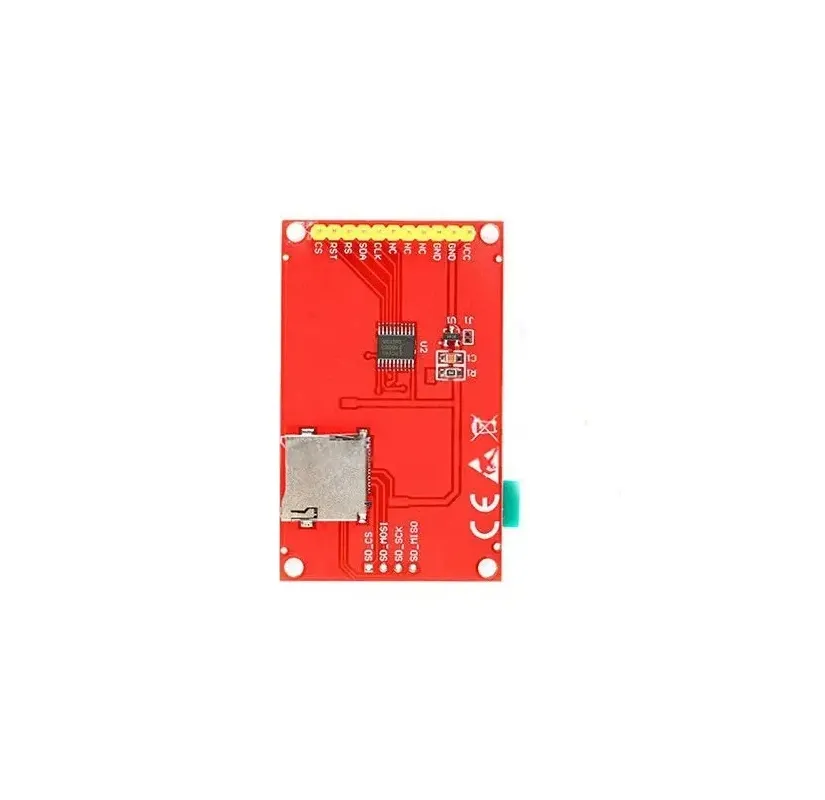
- Onboard MicroSD card slot for image and data storage.
- Requires only a few GPIO pins.
- Compatible with Arduino, ESP32, STM32, Raspberry Pi, and other SPI-capable controllers.
- Compact module suitable for portable and embedded applications.
Principle of Operation
The display communicates with a host microcontroller using the SPI (Serial Peripheral Interface) bus. Commands and pixel data are transmitted to the onboard ST7735S controller, which stores the image in display memory and continuously refreshes the TFT panel.
The RS (Data/Command) pin selects whether transmitted bytes represent commands or display data, while the CS pin enables communication with the display. The RESET pin initializes the controller during startup, and the LED pin powers the display backlight. If equipped, the onboard MicroSD card communicates through a separate SPI chip-select line while sharing the SPI clock and data lines.
Pinout
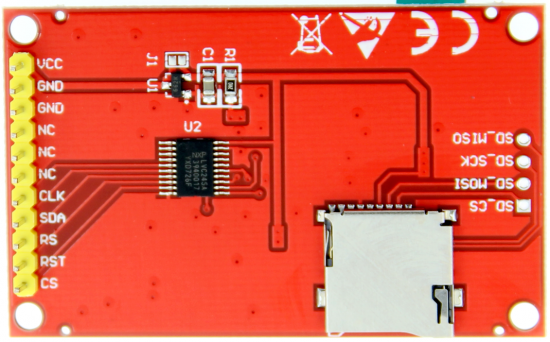
| Pin | Function | Typical Connection |
|---|---|---|
| VCC | Power input (3.3V–5V depending on module version) | 3.3V or 5V |
| GND | Ground | GND |
| GND | Additional ground connection | GND |
| NC | No connection | Leave unconnected |
| NC | No connection | Leave unconnected |
| NC | No connection | Leave unconnected |
| CLK | SPI clock input | SPI SCK |
| SDA | SPI data input (MOSI) | SPI MOSI |
| RS (DC) | Data / Command selection | Digital GPIO |
| RST | Display reset input | Digital GPIO |
| CS | Display chip select | SPI CS / SS |
MicroSD Card SPI Pins
| Pin | Function | Typical Connection |
|---|---|---|
| SD_MISO | SPI data output from MicroSD card | SPI MISO |
| SD_SCK | SPI clock for MicroSD card | SPI SCK |
| SD_MOSI | SPI data input to MicroSD card | SPI MOSI |
| SD_CS | MicroSD chip select | Digital GPIO (SPI CS) |
Hardware Connections:
| LCD Pin | Arduino Pin |
|---|---|
| 1 - Vcc | 3.3V or 5V |
| 2 - GND | GND |
| 3 - GND or N/C | GND / Not Connected |
| 4 - N/C | Not Connected |
| 5 - N/C | Not Connected |
| 6 - LED | 3.3V |
| 7 - CLK (SCK) | D13 |
| 8 - SDI (MOSI) | D11 |
| 9 - RS (DC) | D9 |
| 10 - RST | D8 |
| 11 - CS (SS) | D10 |
Sample Arduino Code:
#include "UTFT.h"

// Declare font
extern uint8_t SmallFont[];

// Create an instance of UTFT
UTFT myGLCD(ITDB18SP, 11, 13, 10, 8, 9);

void setup() {
  myGLCD.InitLCD(PORTRAIT);
  myGLCD.setFont(SmallFont);
  myGLCD.clrScr();
  myGLCD.setContrast(64);
  myGLCD.setColor(255, 255, 255);
  myGLCD.setBackColor(255, 100, 0);
  myGLCD.print("Mooper", CENTER, 0);
}

void loop() {
  // Custom drawing or graphics routines can be placed here.
}
Library:
Make sure to download and install the UTFT library by Henning Karlsen from the Arduino Library Manager or GitHub.
Applications
- Arduino graphical user interfaces.
- IoT dashboards and status displays.
- Portable measuring instruments.
- Robotics control panels.
- Industrial monitoring systems.
- Menu-driven embedded applications.
- Image and icon display from MicroSD cards.
- Educational electronics projects.
Specifications
| Parameter | Value |
|---|---|
| Display Size | 1.8 Inch |
| Resolution | 128 × 160 pixels |
| Driver IC | ST7735S |
| Display Type | TFT LCD |
| Interface | SPI |
| Color Depth | 65K RGB Colors |
| Supply Voltage | 3.3V–5V (module dependent) |
| Backlight | LED |
| MicroSD Support | Yes (SPI Interface) |
| Operating Temperature | -20°C to +70°C (typical) |
Resources
- ST7735/ST7735S Controller Datasheet
- Adafruit ST7735 Arduino Library
- Adafruit GFX Graphics Library
- WiKi
Features
- 1.8-inch full-color TFT LCD display.
- 128 × 160 pixel resolution.
- Driven by the ST7735S TFT controller.
- SPI interface for high-speed communication.
- Supports 65K RGB colors.
- Integrated LED backlight.
- Onboard MicroSD card slot for image and data storage.
- Requires only a few GPIO pins.
- Compatible with Arduino, ESP32, STM32, Raspberry Pi, and other SPI-capable controllers.
- Compact module suitable for portable and embedded applications.
Principle of Operation
The display communicates with a host microcontroller using the SPI (Serial Peripheral Interface) bus. Commands and pixel data are transmitted to the onboard ST7735S controller, which stores the image in display memory and continuously refreshes the TFT panel.
The RS (Data/Command) pin selects whether transmitted bytes represent commands or display data, while the CS pin enables communication with the display. The RESET pin initializes the controller during startup, and the LED pin powers the display backlight. If equipped, the onboard MicroSD card communicates through a separate SPI chip-select line while sharing the SPI clock and data lines.
Pinout
| Pin | Function | Typical Connection |
|---|---|---|
| VCC | Power input (3.3V–5V depending on module version) | 3.3V or 5V |
| GND | Ground | GND |
| GND | Additional ground connection | GND |
| NC | No connection | Leave unconnected |
| NC | No connection | Leave unconnected |
| NC | No connection | Leave unconnected |
| CLK | SPI clock input | SPI SCK |
| SDA | SPI data input (MOSI) | SPI MOSI |
| RS (DC) | Data / Command selection | Digital GPIO |
| RST | Display reset input | Digital GPIO |
| CS | Display chip select | SPI CS / SS |
MicroSD Card SPI Pins
| Pin | Function | Typical Connection |
|---|---|---|
| SD_MISO | SPI data output from MicroSD card | SPI MISO |
| SD_SCK | SPI clock for MicroSD card | SPI SCK |
| SD_MOSI | SPI data input to MicroSD card | SPI MOSI |
| SD_CS | MicroSD chip select | Digital GPIO (SPI CS) |
Hardware Connections:
| LCD Pin | Arduino Pin |
|---|---|
| 1 - Vcc | 3.3V or 5V |
| 2 - GND | GND |
| 3 - GND or N/C | GND / Not Connected |
| 4 - N/C | Not Connected |
| 5 - N/C | Not Connected |
| 6 - LED | 3.3V |
| 7 - CLK (SCK) | D13 |
| 8 - SDI (MOSI) | D11 |
| 9 - RS (DC) | D9 |
| 10 - RST | D8 |
| 11 - CS (SS) | D10 |
Sample Arduino Code:
#include "UTFT.h"

// Declare font
extern uint8_t SmallFont[];

// Create an instance of UTFT
UTFT myGLCD(ITDB18SP, 11, 13, 10, 8, 9);

void setup() {
  myGLCD.InitLCD(PORTRAIT);
  myGLCD.setFont(SmallFont);
  myGLCD.clrScr();
  myGLCD.setContrast(64);
  myGLCD.setColor(255, 255, 255);
  myGLCD.setBackColor(255, 100, 0);
  myGLCD.print("Mooper", CENTER, 0);
}

void loop() {
  // Custom drawing or graphics routines can be placed here.
}
Library:
Make sure to download and install the UTFT library by Henning Karlsen from the Arduino Library Manager or GitHub.
Applications
- Arduino graphical user interfaces.
- IoT dashboards and status displays.
- Portable measuring instruments.
- Robotics control panels.
- Industrial monitoring systems.
- Menu-driven embedded applications.
- Image and icon display from MicroSD cards.
- Educational electronics projects.
Specifications
| Parameter | Value |
|---|---|
| Display Size | 1.8 Inch |
| Resolution | 128 × 160 pixels |
| Driver IC | ST7735S |
| Display Type | TFT LCD |
| Interface | SPI |
| Color Depth | 65K RGB Colors |
| Supply Voltage | 3.3V–5V (module dependent) |
| Backlight | LED |
| MicroSD Support | Yes (SPI Interface) |
| Operating Temperature | -20°C to +70°C (typical) |