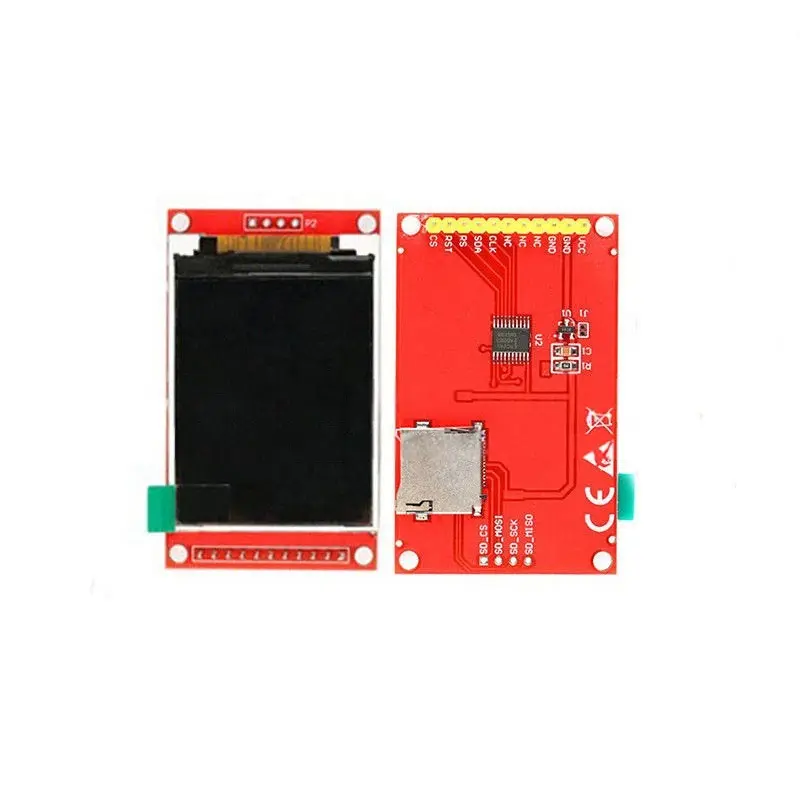
Features:
- Size: Compact 1.8-inch screen, ideal for portable or embedded projects.
- Resolution: 128×160 pixels – clear and sharp display for text, graphics, and images.
- Driver IC: ST7735 – a widely supported and efficient TFT controller with full-color support.
- Interface: SPI (Serial Peripheral Interface) – fast and simple communication with microcontrollers.
- Power Supply: Compatible with both 5V and 3.3V input voltages via onboard voltage regulator.
- Level Shifting: Built-in level shifting for 5V/3.3V IO compatibility – no need for external logic shifters.
- SD Card Slot: Integrated SD card interface for image or data logging applications.
Specifications:
- Display Size: 1.8 inches
- Resolution: 128 × 160 pixels
- Driver IC: ST7735
- Interface: SPI
- Power: 5V/3.3V input (regulated internally)
- Extras: Integrated SD card reader
Hardware Connections:
| LCD Pin |
Arduino Pin |
| 1 - Vcc |
3.3V or 5V |
| 2 - GND |
GND |
| 3 - GND or N/C |
GND / Not Connected |
| 4 - N/C |
Not Connected |
| 5 - N/C |
Not Connected |
| 6 - LED |
3.3V |
| 7 - CLK (SCK) |
D13 |
| 8 - SDI (MOSI) |
D11 |
| 9 - RS (DC) |
D9 |
| 10 - RST |
D8 |
| 11 - CS (SS) |
D10 |
Sample Arduino Code:
#include "UTFT.h"

// Declare font
extern uint8_t SmallFont[];

// Create an instance of UTFT
UTFT myGLCD(ITDB18SP, 11, 13, 10, 8, 9);

void setup() {
  myGLCD.InitLCD(PORTRAIT);
  myGLCD.setFont(SmallFont);
  myGLCD.clrScr();
  myGLCD.setContrast(64);
  myGLCD.setColor(255, 255, 255);
  myGLCD.setBackColor(255, 100, 0);
  myGLCD.print("Mooper", CENTER, 0);
}

void loop() {
  // Custom drawing or graphics routines can be placed here.
}
Library:
Make sure to download and install the UTFT library by Henning Karlsen from the Arduino Library Manager or GitHub.
Applications:
- Embedded display interfaces
- Graphical user interfaces (GUI)
- Sensor data visualization
- Game development on microcontrollers
- Portable electronic devices
Features:
- Size: Compact 1.8-inch screen, ideal for portable or embedded projects.
- Resolution: 128×160 pixels – clear and sharp display for text, graphics, and images.
- Driver IC: ST7735 – a widely supported and efficient TFT controller with full-color support.
- Interface: SPI (Serial Peripheral Interface) – fast and simple communication with microcontrollers.
- Power Supply: Compatible with both 5V and 3.3V input voltages via onboard voltage regulator.
- Level Shifting: Built-in level shifting for 5V/3.3V IO compatibility – no need for external logic shifters.
- SD Card Slot: Integrated SD card interface for image or data logging applications.
Specifications:
- Display Size: 1.8 inches
- Resolution: 128 × 160 pixels
- Driver IC: ST7735
- Interface: SPI
- Power: 5V/3.3V input (regulated internally)
- Extras: Integrated SD card reader
Hardware Connections:
| LCD Pin |
Arduino Pin |
| 1 - Vcc |
3.3V or 5V |
| 2 - GND |
GND |
| 3 - GND or N/C |
GND / Not Connected |
| 4 - N/C |
Not Connected |
| 5 - N/C |
Not Connected |
| 6 - LED |
3.3V |
| 7 - CLK (SCK) |
D13 |
| 8 - SDI (MOSI) |
D11 |
| 9 - RS (DC) |
D9 |
| 10 - RST |
D8 |
| 11 - CS (SS) |
D10 |
Sample Arduino Code:
#include "UTFT.h"

// Declare font
extern uint8_t SmallFont[];

// Create an instance of UTFT
UTFT myGLCD(ITDB18SP, 11, 13, 10, 8, 9);

void setup() {
  myGLCD.InitLCD(PORTRAIT);
  myGLCD.setFont(SmallFont);
  myGLCD.clrScr();
  myGLCD.setContrast(64);
  myGLCD.setColor(255, 255, 255);
  myGLCD.setBackColor(255, 100, 0);
  myGLCD.print("Mooper", CENTER, 0);
}

void loop() {
  // Custom drawing or graphics routines can be placed here.
}
Library:
Make sure to download and install the UTFT library by Henning Karlsen from the Arduino Library Manager or GitHub.
Applications:
- Embedded display interfaces
- Graphical user interfaces (GUI)
- Sensor data visualization
- Game development on microcontrollers
- Portable electronic devices