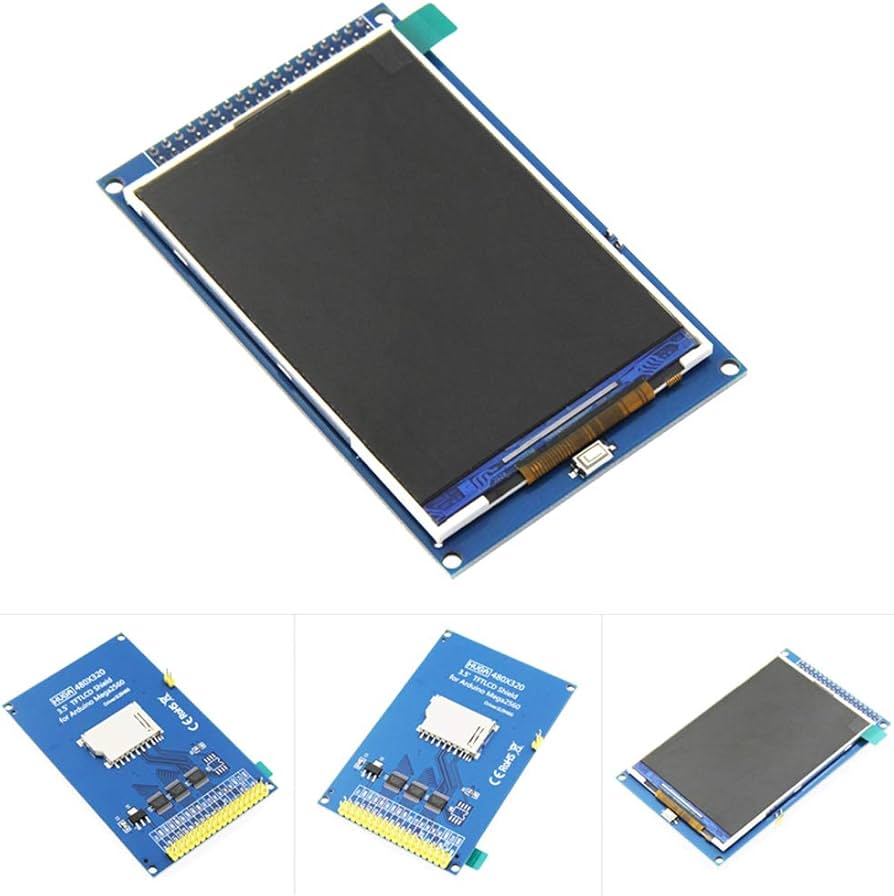
Features
- The HX8357C driver IC offers excellent color reproduction and fast refresh rates, ideal for multimedia applications and games.
- 16-bit parallel data bus allows high-speed data transfer between the display and the host device.
- Compatible with both 5V and 3.3V logic levels for flexible integration.
- SD card adapter on the back enables easy storage and retrieval of images, videos, or other data without additional hardware.
- Simple plug-and-play setup with Arduino Mega or Arduino Due boards.
- Does not include touch functionality, suitable for display-only applications.
- 3.2-inch display provides sufficient space for detailed visuals while maintaining a compact form factor.
- Backlight composed of 6 LEDs ensures even illumination across the display.
- Low power consumption, with a maximum draw of 110 mA, suitable for battery-powered projects.
Principle of Work
The Display Shield operates through the combination of the 3.2-inch TFT display and the HX8357C driver IC. The display module consists of layers including a glass substrate, color filter, and thin-film transistor layer. Applying electrical signals to the TFT layer controls the light passage through the color filters to generate the image. The HX8357C driver converts digital signals from the microcontroller into analog signals for the display and manages advanced features like hardware scrolling, windowing, and anti-aliasing. The SD card adapter on the rear allows convenient data storage without extra hardware.
Pinout of the Module
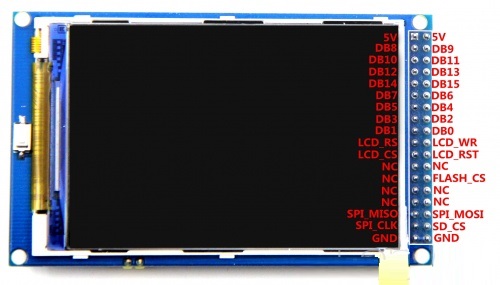
- 3.2-inch TFT display module, 480x320 pixels
- HX8357C driver IC
- 16-bit parallel data bus
- SD card adapter for data storage
- 6-LED backlight
- 36-pin header for Arduino Mega or Due
- 3.3V regulator for 5V/3.3V logic compatibility
- Power and ground pins
- Reset button
- Contrast adjustment potentiometer
Applications
- Multimedia: Store and display images and videos directly via SD card adapter.
- Data Visualization: High resolution and display size suitable for charts and graphs.
- Industrial Automation: Display machine status, process parameters, and operational data.
- Medical Devices: Show vital signs, medical images, or other critical information.
- Home Automation: Display control information and monitor energy usage.
- Educational Projects: Present text, images, and educational content.
- DIY Electronics: Ideal for hobby projects needing high-quality graphical output.
Circuit
No external circuit required. Simply plug the shield into an Arduino Mega or Due, and it is ready to use.
Library
Pre-built libraries by Henning Karlsen are available for Arduino Mega and Due:
- Arduino Mega: https://github.com/Bodmer/TFT_HX8357
- Arduino Due: https://github.com/Bodmer/TFT_HX8357_Due
To install: Open Arduino IDE → Sketch > Include Library > Add .ZIP Library → select downloaded .ZIP → Click Open. Include the library in your project via Sketch > Include Library > TFT_HX8357.
Code
#include "TFT_HX8357.h"

TFT_HX8357 tft = TFT_HX8357(); // Create an instance of the library

void setup() {
tft.init();                // Initialize the display
tft.setRotation(1);        // Set landscape orientation
tft.fillScreen(TFT_BLACK); // Fill screen with black
tft.setTextSize(2);        // Set text size
tft.setTextColor(TFT_WHITE); // Set text color
tft.setCursor(80, 120);      // Center cursor
tft.print("Techmaze.ae");    // Print text
}

void loop() {
// Nothing to do here
}
- #include "TFT_HX8357.h": Includes the library for interacting with the display.
- TFT_HX8357 tft = TFT_HX8357(); Creates a display object.
- tft.init(); Initializes the display and communicates with the driver IC.
- tft.setRotation(1); Sets the display in landscape mode.
- tft.fillScreen(TFT_BLACK); Fills screen with black.
- tft.setTextSize(2); Sets medium text size.
- tft.setTextColor(TFT_WHITE); Sets text color to white.
- tft.setCursor(80, 120); Positions text cursor at center.
- tft.print("Techmaze.ae"); Prints the text on display.
Technical Details
- Size: 3.2 inches
- Resolution: 480x320 pixels
- Active View Size: 67.68(W) × 42.12(L) mm
- Driver IC: HX8357C
- Pin Count: 36 (Arduino Mega/Due compatible)
- Backlight: 6 LEDs
- Touch: No
- Data Bus: 16-bit parallel
- Module Power: 5V / 3.3V
- Power Consumption: 80–110 mA
- SD Card Adapter: Onboard
- Logic Level Compatibility: 5V and 3.3V
Comparisons
The HX8357C and ILI9481 are both popular driver ICs for microcontroller projects. Differences include:
- Color Reproduction: HX8357 supports 16 million colors versus ILI9481's 65K colors for more accurate and vibrant visuals.
- Refresh Rate: HX8357 offers faster refresh rates, reducing lag and motion blur for fast-moving graphics.
- Price: HX8357 is generally more expensive than ILI9481, which may influence project budget considerations.
Features
- The HX8357C driver IC offers excellent color reproduction and fast refresh rates, ideal for multimedia applications and games.
- 16-bit parallel data bus allows high-speed data transfer between the display and the host device.
- Compatible with both 5V and 3.3V logic levels for flexible integration.
- SD card adapter on the back enables easy storage and retrieval of images, videos, or other data without additional hardware.
- Simple plug-and-play setup with Arduino Mega or Arduino Due boards.
- Does not include touch functionality, suitable for display-only applications.
- 3.2-inch display provides sufficient space for detailed visuals while maintaining a compact form factor.
- Backlight composed of 6 LEDs ensures even illumination across the display.
- Low power consumption, with a maximum draw of 110 mA, suitable for battery-powered projects.
Principle of Work
The Display Shield operates through the combination of the 3.2-inch TFT display and the HX8357C driver IC. The display module consists of layers including a glass substrate, color filter, and thin-film transistor layer. Applying electrical signals to the TFT layer controls the light passage through the color filters to generate the image. The HX8357C driver converts digital signals from the microcontroller into analog signals for the display and manages advanced features like hardware scrolling, windowing, and anti-aliasing. The SD card adapter on the rear allows convenient data storage without extra hardware.
Pinout of the Module
- 3.2-inch TFT display module, 480x320 pixels
- HX8357C driver IC
- 16-bit parallel data bus
- SD card adapter for data storage
- 6-LED backlight
- 36-pin header for Arduino Mega or Due
- 3.3V regulator for 5V/3.3V logic compatibility
- Power and ground pins
- Reset button
- Contrast adjustment potentiometer
Applications
- Multimedia: Store and display images and videos directly via SD card adapter.
- Data Visualization: High resolution and display size suitable for charts and graphs.
- Industrial Automation: Display machine status, process parameters, and operational data.
- Medical Devices: Show vital signs, medical images, or other critical information.
- Home Automation: Display control information and monitor energy usage.
- Educational Projects: Present text, images, and educational content.
- DIY Electronics: Ideal for hobby projects needing high-quality graphical output.
Circuit
No external circuit required. Simply plug the shield into an Arduino Mega or Due, and it is ready to use.
Library
Pre-built libraries by Henning Karlsen are available for Arduino Mega and Due:
- Arduino Mega: https://github.com/Bodmer/TFT_HX8357
- Arduino Due: https://github.com/Bodmer/TFT_HX8357_Due
To install: Open Arduino IDE → Sketch > Include Library > Add .ZIP Library → select downloaded .ZIP → Click Open. Include the library in your project via Sketch > Include Library > TFT_HX8357.
Code
#include "TFT_HX8357.h"

TFT_HX8357 tft = TFT_HX8357(); // Create an instance of the library

void setup() {
tft.init();                // Initialize the display
tft.setRotation(1);        // Set landscape orientation
tft.fillScreen(TFT_BLACK); // Fill screen with black
tft.setTextSize(2);        // Set text size
tft.setTextColor(TFT_WHITE); // Set text color
tft.setCursor(80, 120);      // Center cursor
tft.print("Techmaze.ae");    // Print text
}

void loop() {
// Nothing to do here
} - #include "TFT_HX8357.h": Includes the library for interacting with the display.
- TFT_HX8357 tft = TFT_HX8357(); Creates a display object.
- tft.init(); Initializes the display and communicates with the driver IC.
- tft.setRotation(1); Sets the display in landscape mode.
- tft.fillScreen(TFT_BLACK); Fills screen with black.
- tft.setTextSize(2); Sets medium text size.
- tft.setTextColor(TFT_WHITE); Sets text color to white.
- tft.setCursor(80, 120); Positions text cursor at center.
- tft.print("Techmaze.ae"); Prints the text on display.
Technical Details
- Size: 3.2 inches
- Resolution: 480x320 pixels
- Active View Size: 67.68(W) × 42.12(L) mm
- Driver IC: HX8357C
- Pin Count: 36 (Arduino Mega/Due compatible)
- Backlight: 6 LEDs
- Touch: No
- Data Bus: 16-bit parallel
- Module Power: 5V / 3.3V
- Power Consumption: 80–110 mA
- SD Card Adapter: Onboard
- Logic Level Compatibility: 5V and 3.3V
Comparisons
The HX8357C and ILI9481 are both popular driver ICs for microcontroller projects. Differences include:
- Color Reproduction: HX8357 supports 16 million colors versus ILI9481's 65K colors for more accurate and vibrant visuals.
- Refresh Rate: HX8357 offers faster refresh rates, reducing lag and motion blur for fast-moving graphics.
- Price: HX8357 is generally more expensive than ILI9481, which may influence project budget considerations.