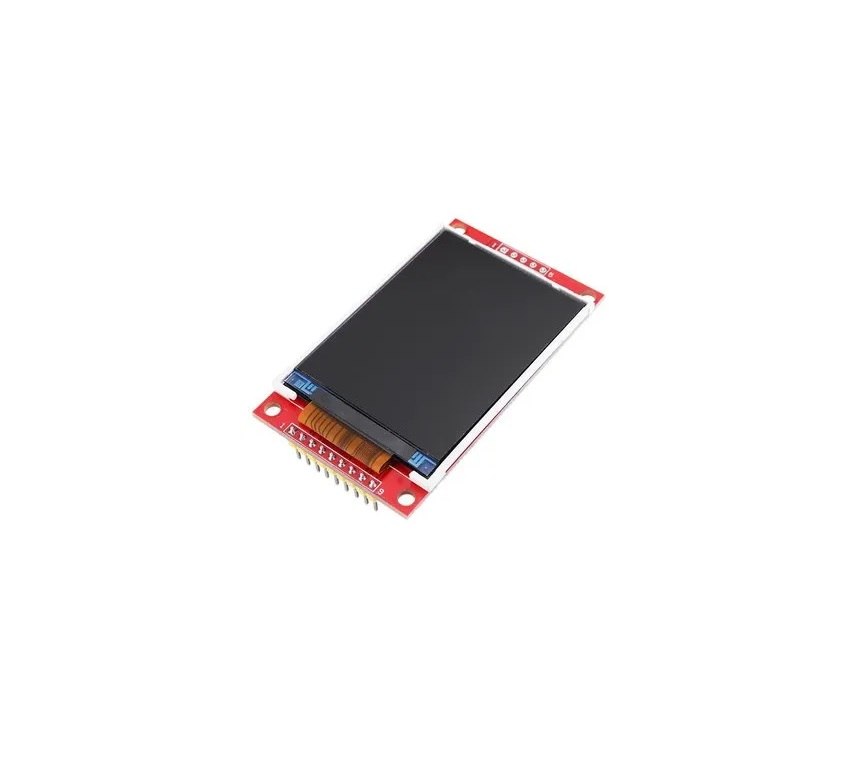
Features:
- 2.8-inch TFT LCD with resistive touch functionality
- 320 x 240 pixel resolution for clear and detailed display output
- ILI9341 high-performance TFT driver chip
- 8-bit parallel interface for fast communication
- 262,144 color depth for rich and vivid graphics
- Integrated micro SD card slot for storage and expansion
- Onboard 3.3V 300mA LDO voltage regulator
- Compatible with both 3.3V and 5V logic systems
- Wide operating temperature range from -20°C to 70°C
- Compact PCB size for easy installation in small enclosures
- Arduino libraries provided with multiple example programs
Specifications:
- Display type: TFT LCD
- Screen size: 2.8 inches
- Resolution: 320 x 240 pixels
- Touch type: 4-wire resistive touchscreen
- Display controller: ILI9341
- Interface: 8-bit parallel
- Color depth: 18-bit (262K colors)
- Effective display area: 57.6 x 43.2 mm
- PCB dimensions: 78.22 x 52.7 mm
- Operating voltage: 5V
- Logic level: 3.3V / 5V compatible
- Operating temperature: -20°C to 70°C
- Micro SD card support: up to 2GB TF card
- Backlight: 4 white LEDs
Principle of Work:
This display module operates using the ILI9341 TFT controller, which manages pixel addressing, color depth, refresh timing, and power control. The controller communicates with the host microcontroller via an 8-bit parallel data bus, allowing rapid screen updates and smooth animations. Touch input is handled by the resistive touchscreen layer, which detects pressure and outputs analog signals corresponding to the touch coordinates. These values are processed by the microcontroller to determine user interaction.
The ILI9341 supports multiple interface modes, up to 240 x 320 resolution, and up to 262,144 colors. It also includes power-saving features to reduce energy consumption, making it suitable for portable and battery-powered devices.
Pinout of the Module:

- LCD_RST: Display reset input
- LCD_CS: Chip select for display communication
- LCD_RS: Register select (command or data)
- LCD_WR: Write control signal
- LCD_RD: Read control signal
- GND: Ground reference
- 5V: 5V power supply input
- 3V3: 3.3V regulated output
- LCD_D0 – LCD_D7: 8-bit data bus lines
- SD_SS: SD card slave select
- SD_DI: SD card data input
- SD_DO: SD card data output
- SD_SCK: SD card clock signal
Applications:
- Graphical user interfaces for electronics and microcontroller projects
- Handheld and portable devices such as GPS units and game consoles
- Industrial monitoring and control systems
- Automotive dashboards and infotainment displays
- Consumer electronics including media players and photo frames
Circuit Example:
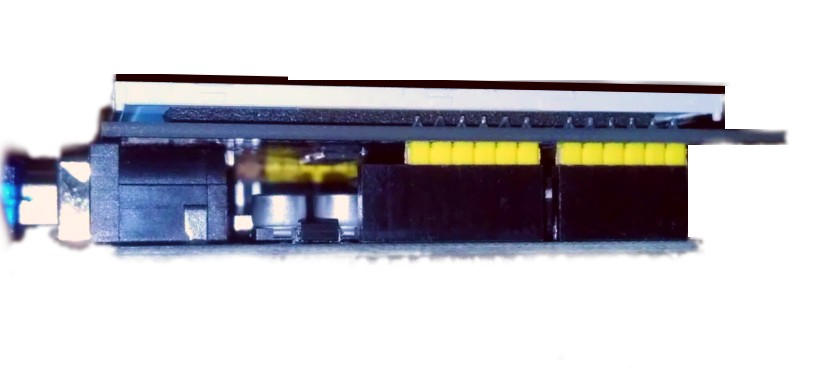
For basic operation, the module can be plugged directly onto an Arduino UNO as a shield, requiring no additional wiring.
Libraries:
- Open the Arduino IDE
- Go to Sketch > Include Library > Manage Libraries
- Install Adafruit GFX Library
- Install Adafruit TFTLCD Library
- Install Adafruit TouchScreen Library
Once installed, these libraries allow full access to graphics rendering, touch detection, and display control functions.
Arduino Example Code:
#include "TouchScreen.h"
#include "Adafruit_GFX.h"
#include "Adafruit_TFTLCD.h"

// LCD control pins
#define LCD_CS A3
#define LCD_CD A2
#define LCD_WR A1
#define LCD_RD A0
#define LCD_RESET A4

// Touch pins
#define YP A3
#define XM A2
#define YM 9
#define XP 8

#define MINPRESSURE 1
#define MAXPRESSURE 1000

#define TS_MINX 210
#define TS_MINY 210
#define TS_MAXX 915
#define TS_MAXY 910

#define BLACK 0x0000
#define BLUE 0x001F
#define RED 0xF800
#define GREEN 0x07E0
#define CYAN 0x07FF
#define MAGENTA 0xF81F
#define YELLOW 0xFFE0
#define WHITE 0xFFFF

const char* touchMeStr = "Touch Me / Press Button";

Adafruit_TFTLCD tft(LCD_CS, LCD_CD, LCD_WR, LCD_RD, LCD_RESET);
TouchScreen ts = TouchScreen(XP, YP, XM, YM, 300);

int touchCnt = 0;
int buttonState = 0;
long int timeCnt;
char drawChars[] = {'a','b','c','d','e','f','g','h','i','j'};
const int SCREEN_TIMEOUT = 10000;

void setup() {
  tft.reset();
  uint16_t identifier = tft.readID();
  tft.begin(identifier);
  tft.fillScreen(BLACK);
  tft.setRotation(1);
  tft.setCursor(30,100);
  tft.setTextColor(RED);
  tft.setTextSize(2);
  tft.println("LCD driver chip:");
  tft.setCursor(100,150);
  tft.setTextColor(BLUE);
  tft.println(identifier, HEX);
  delay(3000);
  tft.fillScreen(BLACK);
  tft.setTextColor(YELLOW);
  tft.setCursor(0,0);
  tft.println(touchMeStr);
  timeCnt = millis();
}

void loop() {
  TSPoint p = ts.getPoint();
  pinMode(XM, OUTPUT);
  pinMode(YP, OUTPUT);

  if (millis() > (timeCnt + SCREEN_TIMEOUT)) {
    RunScreenSaver();
  } else {
    drawButtons();
  }

  if (p.z > MINPRESSURE && p.z < MAXPRESSURE) {
    tft.fillScreen(BLACK);
    tft.setCursor(0,0);
    tft.setTextSize(2);
    tft.println(touchMeStr);

    long colorPressure = YELLOW;

    int YY = tft.height() - (map(p.x, TS_MINX, TS_MAXX, 0, tft.height()));
    int XX = tft.width() - (map(p.y, TS_MINY, TS_MAXY, 0, tft.width()));

    // Determine button presses (example logic)
    if (XX > 295 && YY < 30) buttonState = 0;
    if ((XX >= 295 && YY >=30) && (YY < 60)) buttonState = 1;
    if ((XX >= 295 && YY >=60) && (YY < 100)) buttonState = 2;
    if ((XX > 295 && YY >=100) && (YY < 120)) buttonState = 3;
    if ((XX > 295 && YY >= 120) && (YY < 155)) buttonState = 4;
    if ((XX >= 295 && YY >= 155) && (YY < 200)) buttonState = 5;

    touchCnt++;
    if(touchCnt > 9) touchCnt = 0;
    timeCnt = millis();
  }
}

// Define the drawButtons, RunScreenSaver, TriangleDesign, DrawDesign functions here
Technical Details:
- 2.8-inch LCD TFT display
- Bright white LED backlight
- 18-bit color depth with 262,000 shades
- 4-wire resistive touchscreen with individual pixel control
- No soldering required when used as an Arduino shield
- Onboard 3.3V 300mA regulator
- Supports 3.3V and 5V logic levels
- Micro SD TF card support up to 2GB
- Overall size: approximately 7.8 x 5.3 cm
Comparisons:
Compared to 2.8-inch Nextion touch displays, this module relies on the host microcontroller for all graphics processing, providing maximum flexibility and full control through custom firmware. Nextion displays include an onboard processor and simplified GUI tools, making them easier for rapid interface development. The Geekcreit TFT module is better suited for users who prefer direct hardware control, custom graphics, and deeper integration with their application logic.
Features:
- 2.8-inch TFT LCD with resistive touch functionality
- 320 x 240 pixel resolution for clear and detailed display output
- ILI9341 high-performance TFT driver chip
- 8-bit parallel interface for fast communication
- 262,144 color depth for rich and vivid graphics
- Integrated micro SD card slot for storage and expansion
- Onboard 3.3V 300mA LDO voltage regulator
- Compatible with both 3.3V and 5V logic systems
- Wide operating temperature range from -20°C to 70°C
- Compact PCB size for easy installation in small enclosures
- Arduino libraries provided with multiple example programs
Specifications:
- Display type: TFT LCD
- Screen size: 2.8 inches
- Resolution: 320 x 240 pixels
- Touch type: 4-wire resistive touchscreen
- Display controller: ILI9341
- Interface: 8-bit parallel
- Color depth: 18-bit (262K colors)
- Effective display area: 57.6 x 43.2 mm
- PCB dimensions: 78.22 x 52.7 mm
- Operating voltage: 5V
- Logic level: 3.3V / 5V compatible
- Operating temperature: -20°C to 70°C
- Micro SD card support: up to 2GB TF card
- Backlight: 4 white LEDs
Principle of Work:
This display module operates using the ILI9341 TFT controller, which manages pixel addressing, color depth, refresh timing, and power control. The controller communicates with the host microcontroller via an 8-bit parallel data bus, allowing rapid screen updates and smooth animations. Touch input is handled by the resistive touchscreen layer, which detects pressure and outputs analog signals corresponding to the touch coordinates. These values are processed by the microcontroller to determine user interaction.
The ILI9341 supports multiple interface modes, up to 240 x 320 resolution, and up to 262,144 colors. It also includes power-saving features to reduce energy consumption, making it suitable for portable and battery-powered devices.
Pinout of the Module:
- LCD_RST: Display reset input
- LCD_CS: Chip select for display communication
- LCD_RS: Register select (command or data)
- LCD_WR: Write control signal
- LCD_RD: Read control signal
- GND: Ground reference
- 5V: 5V power supply input
- 3V3: 3.3V regulated output
- LCD_D0 – LCD_D7: 8-bit data bus lines
- SD_SS: SD card slave select
- SD_DI: SD card data input
- SD_DO: SD card data output
- SD_SCK: SD card clock signal
Applications:
- Graphical user interfaces for electronics and microcontroller projects
- Handheld and portable devices such as GPS units and game consoles
- Industrial monitoring and control systems
- Automotive dashboards and infotainment displays
- Consumer electronics including media players and photo frames
Circuit Example:
For basic operation, the module can be plugged directly onto an Arduino UNO as a shield, requiring no additional wiring.
Libraries:
- Open the Arduino IDE
- Go to Sketch > Include Library > Manage Libraries
- Install Adafruit GFX Library
- Install Adafruit TFTLCD Library
- Install Adafruit TouchScreen Library
Once installed, these libraries allow full access to graphics rendering, touch detection, and display control functions.
Arduino Example Code:
#include "TouchScreen.h"
#include "Adafruit_GFX.h"
#include "Adafruit_TFTLCD.h"

// LCD control pins
#define LCD_CS A3
#define LCD_CD A2
#define LCD_WR A1
#define LCD_RD A0
#define LCD_RESET A4

// Touch pins
#define YP A3
#define XM A2
#define YM 9
#define XP 8

#define MINPRESSURE 1
#define MAXPRESSURE 1000

#define TS_MINX 210
#define TS_MINY 210
#define TS_MAXX 915
#define TS_MAXY 910

#define BLACK 0x0000
#define BLUE 0x001F
#define RED 0xF800
#define GREEN 0x07E0
#define CYAN 0x07FF
#define MAGENTA 0xF81F
#define YELLOW 0xFFE0
#define WHITE 0xFFFF

const char* touchMeStr = "Touch Me / Press Button";

Adafruit_TFTLCD tft(LCD_CS, LCD_CD, LCD_WR, LCD_RD, LCD_RESET);
TouchScreen ts = TouchScreen(XP, YP, XM, YM, 300);

int touchCnt = 0;
int buttonState = 0;
long int timeCnt;
char drawChars[] = {'a','b','c','d','e','f','g','h','i','j'};
const int SCREEN_TIMEOUT = 10000;

void setup() {
  tft.reset();
  uint16_t identifier = tft.readID();
  tft.begin(identifier);
  tft.fillScreen(BLACK);
  tft.setRotation(1);
  tft.setCursor(30,100);
  tft.setTextColor(RED);
  tft.setTextSize(2);
  tft.println("LCD driver chip:");
  tft.setCursor(100,150);
  tft.setTextColor(BLUE);
  tft.println(identifier, HEX);
  delay(3000);
  tft.fillScreen(BLACK);
  tft.setTextColor(YELLOW);
  tft.setCursor(0,0);
  tft.println(touchMeStr);
  timeCnt = millis();
}

void loop() {
  TSPoint p = ts.getPoint();
  pinMode(XM, OUTPUT);
  pinMode(YP, OUTPUT);

  if (millis() > (timeCnt + SCREEN_TIMEOUT)) {
    RunScreenSaver();
  } else {
    drawButtons();
  }

  if (p.z > MINPRESSURE && p.z < MAXPRESSURE) {
    tft.fillScreen(BLACK);
    tft.setCursor(0,0);
    tft.setTextSize(2);
    tft.println(touchMeStr);

    long colorPressure = YELLOW;

    int YY = tft.height() - (map(p.x, TS_MINX, TS_MAXX, 0, tft.height()));
    int XX = tft.width() - (map(p.y, TS_MINY, TS_MAXY, 0, tft.width()));

    // Determine button presses (example logic)
    if (XX > 295 && YY < 30) buttonState = 0;
    if ((XX >= 295 && YY >=30) && (YY < 60)) buttonState = 1;
    if ((XX >= 295 && YY >=60) && (YY < 100)) buttonState = 2;
    if ((XX > 295 && YY >=100) && (YY < 120)) buttonState = 3;
    if ((XX > 295 && YY >= 120) && (YY < 155)) buttonState = 4;
    if ((XX >= 295 && YY >= 155) && (YY < 200)) buttonState = 5;

    touchCnt++;
    if(touchCnt > 9) touchCnt = 0;
    timeCnt = millis();
  }
}

// Define the drawButtons, RunScreenSaver, TriangleDesign, DrawDesign functions here
Technical Details:
- 2.8-inch LCD TFT display
- Bright white LED backlight
- 18-bit color depth with 262,000 shades
- 4-wire resistive touchscreen with individual pixel control
- No soldering required when used as an Arduino shield
- Onboard 3.3V 300mA regulator
- Supports 3.3V and 5V logic levels
- Micro SD TF card support up to 2GB
- Overall size: approximately 7.8 x 5.3 cm
Comparisons:
Compared to 2.8-inch Nextion touch displays, this module relies on the host microcontroller for all graphics processing, providing maximum flexibility and full control through custom firmware. Nextion displays include an onboard processor and simplified GUI tools, making them easier for rapid interface development. The Geekcreit TFT module is better suited for users who prefer direct hardware control, custom graphics, and deeper integration with their application logic.