Features
- Supports mono and stereo audio output
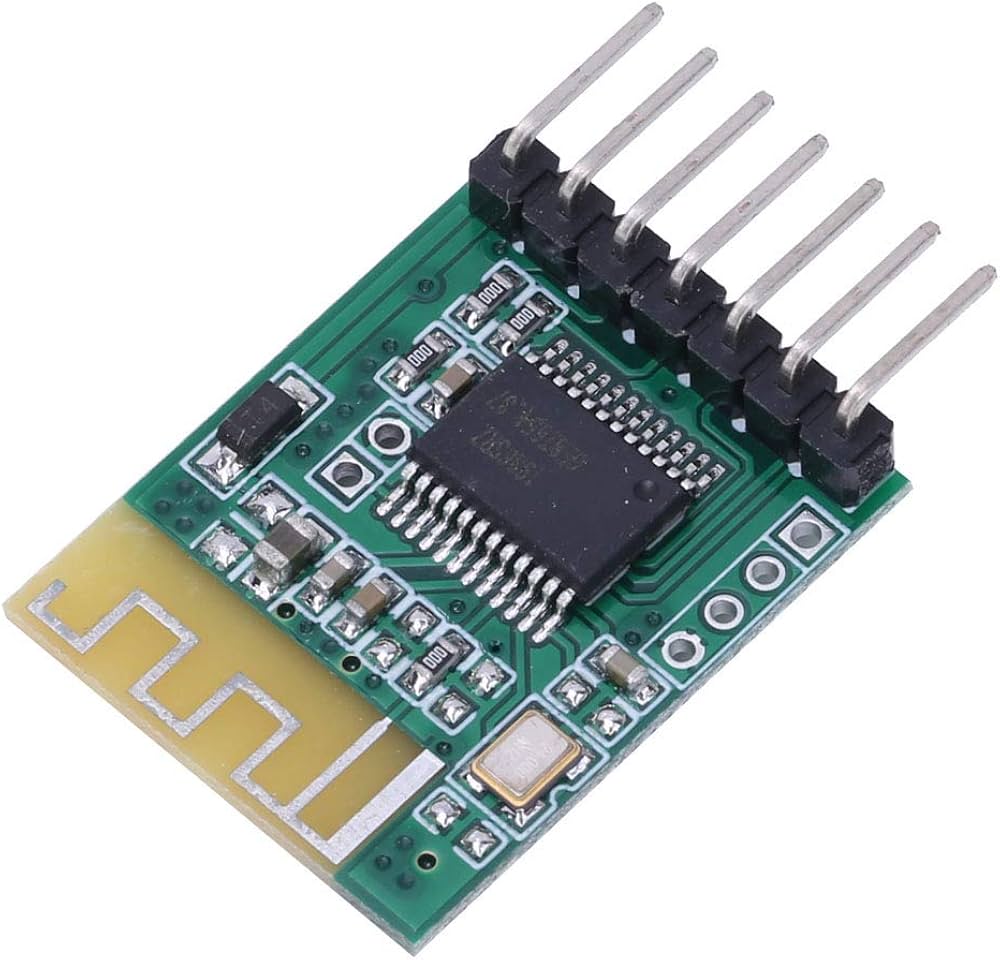
- Integrated Bluetooth antenna for a stable wireless connection
- Compact low-profile design for easy integration
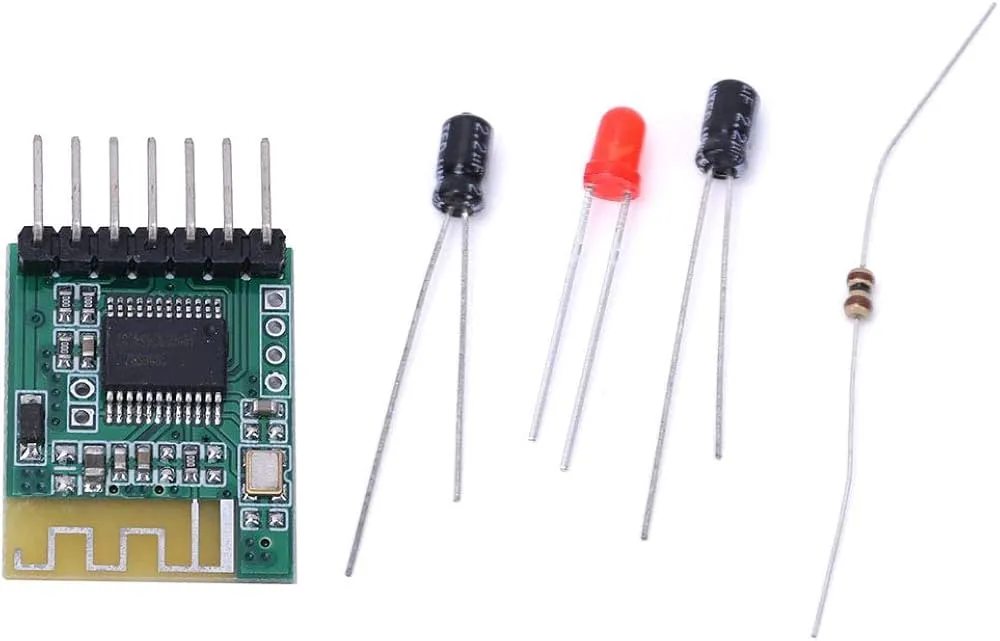
- Seven-pin output interface with clear signal separation
- LED status indicator for Bluetooth connection state
- Wide operating voltage range from four point one to five volts
- Suitable for power amplifiers and active speaker systems
- Low power consumption
- Ideal for DIY audio and custom speaker projects
Specifications
- Power supply voltage is four point one to five volts, do not exceed five point one volts
- Dimensions: thirty millimeters by twenty millimeters by three millimeters
- Output interface seven-pin two-point five-four millimeter through hole
- Bluetooth status LED rapid flashing when not connected, slow flashing when paired
Pinout and Wiring
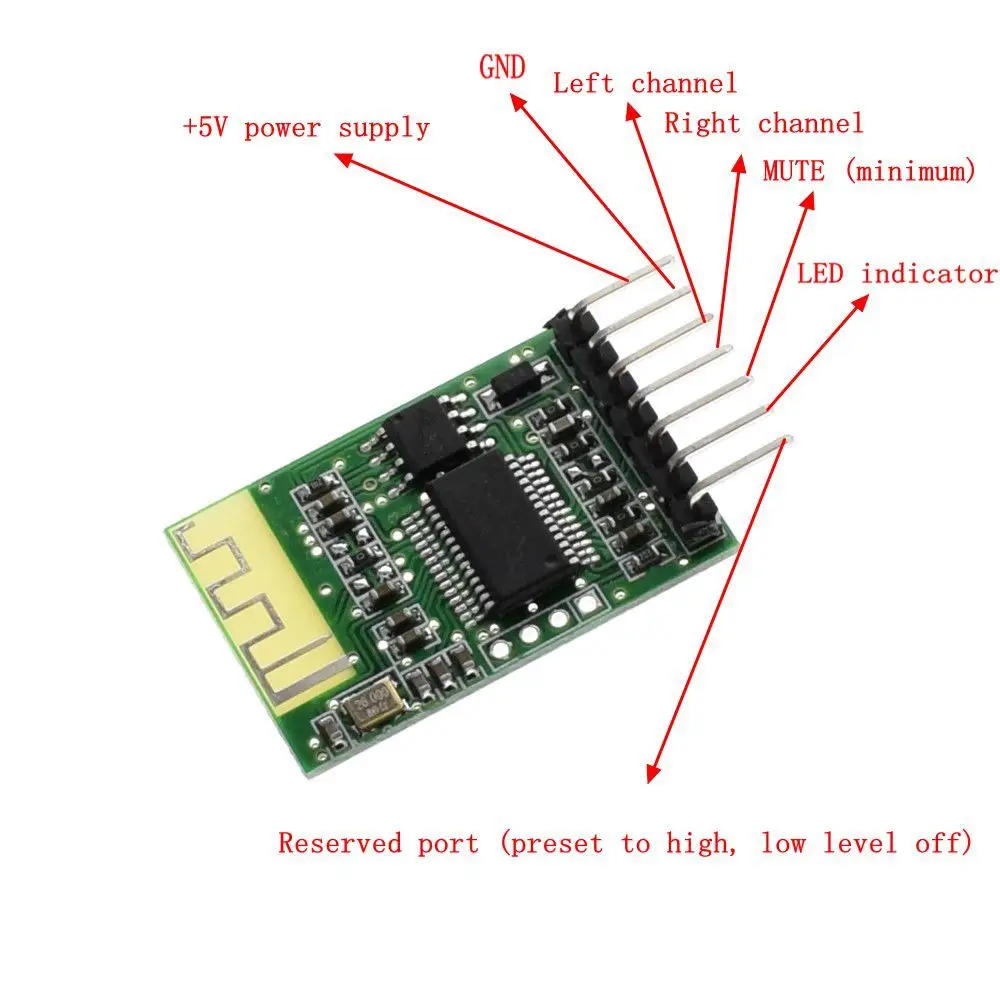
- Five volt power supply connected to a four-point one to five-volt power source
- Ground the negative terminal of the power supply and the audio ground
- Left channel audio output connects to the left input of the amplifier or headphones
- The right channel audio output connects to the right input of the amplifier or headphones
- Mute output port outputs high level by default and low level when muted
- The status indicator LED flashes rapidly when not connected and slowly when paired
- A reserved port pulled up to five volts triggers a shutdown when set to a low level
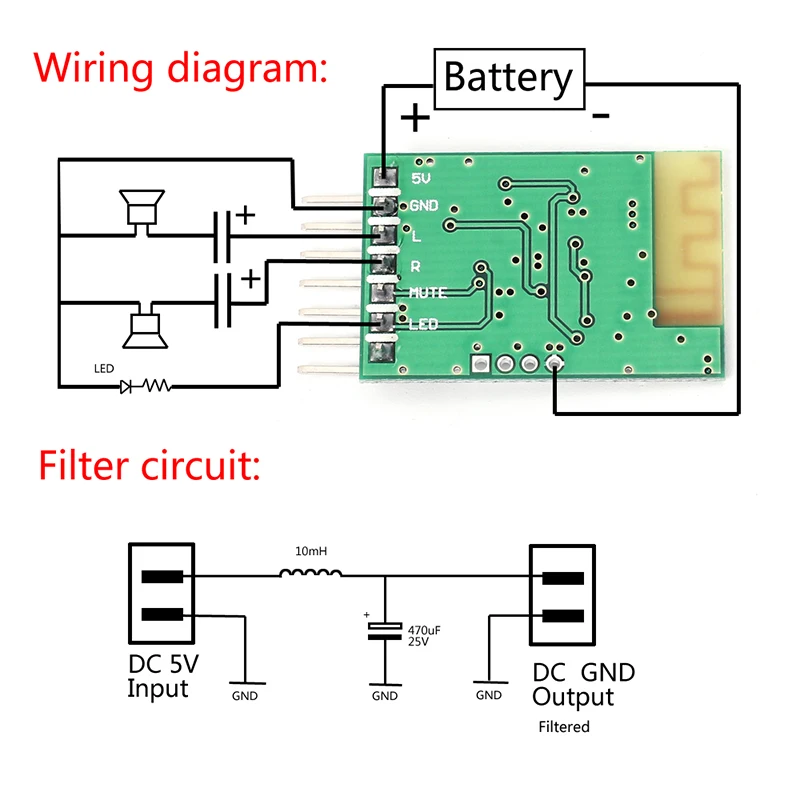
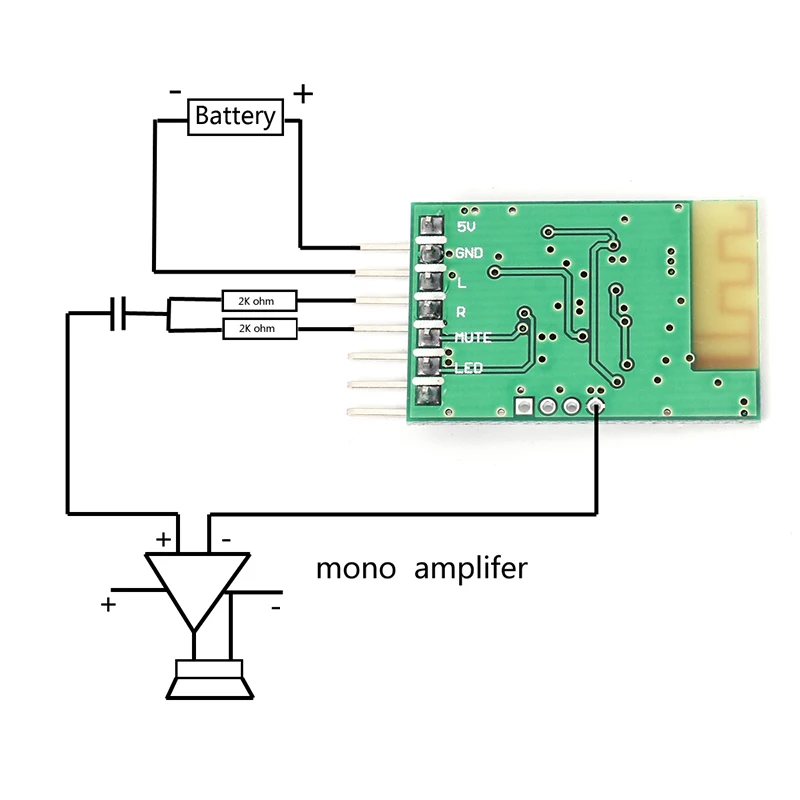
Note: that soldered connections are recommended to avoid noise caused by contact resistance. Ensure the power supply voltage remains within the specified range to prevent damage to the module.
Precautions
- Power supply the module is sensitive to high-frequency interference. For best results, use a linear regulated power supply. If a DC-DC converter is used, add an LC filter to reduce harmonic interference. Avoid switch-mode chargers as their output voltage may exceed safe limits.
- Proper grounding is critical to prevent audio noise. Use two separate ground connections, one to the power supply ground and one to the amplifier audio ground. Avoid long lead wires, which can introduce interference.
- Antenna interference keeps the Bluetooth antenna away from high-frequency and strong electromagnetic sources, such as amplifier boards. Avoid placing the antenna near metal objects.
- Enclosure considerations: Metal enclosures can weaken Bluetooth signals. Provide openings or expose the antenna to improve reception. If noise persists, consider using separate power supplies for the amplifier and the Bluetooth module.
Common Issues and Solutions
- Current noise is usually caused by grounding issues. Ensure all output terminals, especially ground, are properly soldered using short, thick wires. Separate power, ground, and audio ground paths where possible.
- A weak Bluetooth signal is often caused by power supply interference. Use a stable, clean voltage source and add filtering components such as a diode and a capacitor if required.
- Bluetooth not detected can result from voltage ripple or instability. Ensure proper regulation and delete old Bluetooth pairings on the phone before searching again.
- Noise issues standby noise can be reduced using the mute function. Interference noise is usually caused by poor wiring or grounding and can be minimized with short, direct ground connections.
Features
- Supports mono and stereo audio output
- Integrated Bluetooth antenna for a stable wireless connection
- Compact low-profile design for easy integration
- Seven-pin output interface with clear signal separation
- LED status indicator for Bluetooth connection state
- Wide operating voltage range from four point one to five volts
- Suitable for power amplifiers and active speaker systems
- Low power consumption
- Ideal for DIY audio and custom speaker projects
Specifications
- Power supply voltage is four point one to five volts, do not exceed five point one volts
- Dimensions: thirty millimeters by twenty millimeters by three millimeters
- Output interface seven-pin two-point five-four millimeter through hole
- Bluetooth status LED rapid flashing when not connected, slow flashing when paired
Pinout and Wiring
- Five volt power supply connected to a four-point one to five-volt power source
- Ground the negative terminal of the power supply and the audio ground
- Left channel audio output connects to the left input of the amplifier or headphones
- The right channel audio output connects to the right input of the amplifier or headphones
- Mute output port outputs high level by default and low level when muted
- The status indicator LED flashes rapidly when not connected and slowly when paired
- A reserved port pulled up to five volts triggers a shutdown when set to a low level
Note: that soldered connections are recommended to avoid noise caused by contact resistance. Ensure the power supply voltage remains within the specified range to prevent damage to the module.
Precautions
- Power supply the module is sensitive to high-frequency interference. For best results, use a linear regulated power supply. If a DC-DC converter is used, add an LC filter to reduce harmonic interference. Avoid switch-mode chargers as their output voltage may exceed safe limits.
- Proper grounding is critical to prevent audio noise. Use two separate ground connections, one to the power supply ground and one to the amplifier audio ground. Avoid long lead wires, which can introduce interference.
- Antenna interference keeps the Bluetooth antenna away from high-frequency and strong electromagnetic sources, such as amplifier boards. Avoid placing the antenna near metal objects.
- Enclosure considerations: Metal enclosures can weaken Bluetooth signals. Provide openings or expose the antenna to improve reception. If noise persists, consider using separate power supplies for the amplifier and the Bluetooth module.
Common Issues and Solutions
- Current noise is usually caused by grounding issues. Ensure all output terminals, especially ground, are properly soldered using short, thick wires. Separate power, ground, and audio ground paths where possible.
- A weak Bluetooth signal is often caused by power supply interference. Use a stable, clean voltage source and add filtering components such as a diode and a capacitor if required.
- Bluetooth not detected can result from voltage ripple or instability. Ensure proper regulation and delete old Bluetooth pairings on the phone before searching again.
- Noise issues standby noise can be reduced using the mute function. Interference noise is usually caused by poor wiring or grounding and can be minimized with short, direct ground connections.