Features
- Integrated MAX7219 LED driver for simplified control and stable brightness
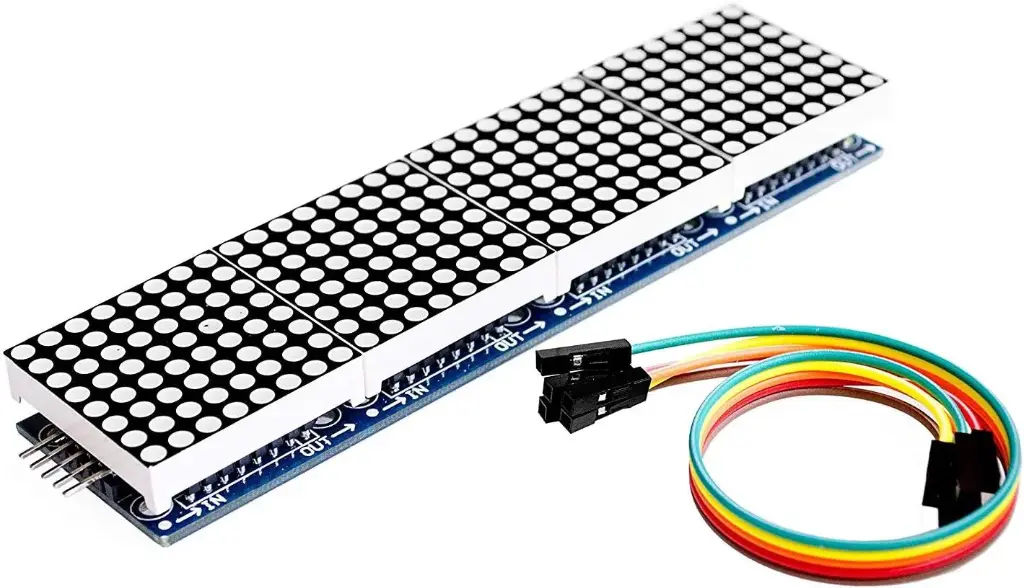
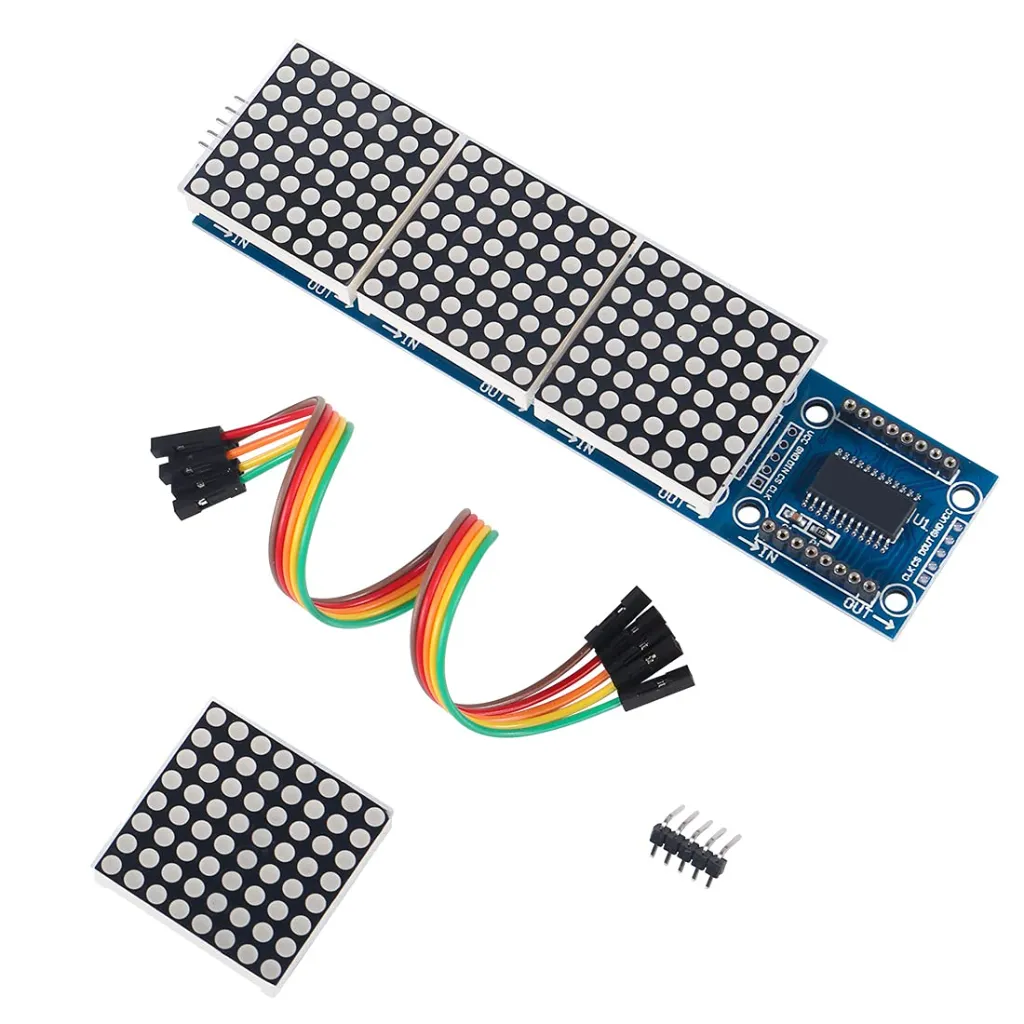
- Four 8 x 8 LED dot matrix displays forming a 32 x 8 LED panel
- Requires only three control lines (DIN, CS, CLK)
- Supports cascading of multiple modules for extended displays
- Adjustable brightness control via software
- Low power consumption with efficient current regulation
- Compact and lightweight PCB design
- Onboard M3 mounting holes for secure mechanical installation
Specifications
- Driver IC: MAX7219
- Operating Voltage: 5V DC
- Maximum Operating Current: 320mA
- LED Color: Red
- Matrix Configuration: 4 x (8 x 8)
- Display Resolution: 32 x 8 dots
- Single Matrix Size: 32 x 32 x 6 mm
- PCB Size: 12.8 x 12.8 x 1.3 cm
- Interface Type: SPI-compatible (DIN, CS, CLK)
Pinout Connection with Arduino

| Pin | Description |
|---|---|
| VCC | Connect to Arduino 5V pin for power supply |
| GND | Connect to Arduino GND pin |
| DIN | Data input pin, connect to Arduino digital pin 11 |
| CS | Chip select pin, connect to Arduino digital pin 10 |
| CLK | Clock pin, connect to Arduino digital pin 13 |
Applications
- Scrolling text displays and message boards
- Digital clocks and timers
- Counters and scoreboards
- Status indicators and system feedback displays
- Educational and DIY electronics projects
Library Installation
Controlling the MAX7219 module is a complex task and requires a lot of lines of code. Fortunately, the MD_Parola library is available to remove those complexities so that we can issue simple commands to control the display.
To install the library navigate to Sketch > Include Library > Manage Libraries. From the Search, options look for ‘max72xx’ and click on install.This MD_MAX72XX library is a hardware-specific library that handles lower-level functions. It needs to be paired with MD_Parola Library to create many different text animations like scrolling and sprite text effects. Install this library as well.
Code:
 #include <MD_Parola.h>
#include <MD_MAX72xx.h>
#include <SPI.h>

#define HARDWARE_TYPE MD_MAX72XX::FC16_HW
//#define HARDWARE_TYPE MD_MAX72XX::GENERIC_HW

#define MAX_DEVICES 4
#define CS_PIN 10

MD_Parola myDisplay = MD_Parola(HARDWARE_TYPE, CS_PIN, MAX_DEVICES);

void setup() {

 myDisplay.begin();
 myDisplay.setIntensity(4);
 myDisplay.displayClear();
 myDisplay.displayScroll("How To Electronics", PA_CENTER, PA_SCROLL_LEFT, 200);
}

void loop() {
 if (myDisplay.displayAnimate()) {
 myDisplay.displayReset();
 }
}
Tutorial Reference
Features
- Integrated MAX7219 LED driver for simplified control and stable brightness
- Four 8 x 8 LED dot matrix displays forming a 32 x 8 LED panel
- Requires only three control lines (DIN, CS, CLK)
- Supports cascading of multiple modules for extended displays
- Adjustable brightness control via software
- Low power consumption with efficient current regulation
- Compact and lightweight PCB design
- Onboard M3 mounting holes for secure mechanical installation
Specifications
- Driver IC: MAX7219
- Operating Voltage: 5V DC
- Maximum Operating Current: 320mA
- LED Color: Red
- Matrix Configuration: 4 x (8 x 8)
- Display Resolution: 32 x 8 dots
- Single Matrix Size: 32 x 32 x 6 mm
- PCB Size: 12.8 x 12.8 x 1.3 cm
- Interface Type: SPI-compatible (DIN, CS, CLK)
Pinout Connection with Arduino
| Pin | Description |
|---|---|
| VCC | Connect to Arduino 5V pin for power supply |
| GND | Connect to Arduino GND pin |
| DIN | Data input pin, connect to Arduino digital pin 11 |
| CS | Chip select pin, connect to Arduino digital pin 10 |
| CLK | Clock pin, connect to Arduino digital pin 13 |
Applications
- Scrolling text displays and message boards
- Digital clocks and timers
- Counters and scoreboards
- Status indicators and system feedback displays
- Educational and DIY electronics projects
Library Installation
Controlling the MAX7219 module is a complex task and requires a lot of lines of code. Fortunately, the MD_Parola library is available to remove those complexities so that we can issue simple commands to control the display.
To install the library navigate to Sketch > Include Library > Manage Libraries. From the Search, options look for ‘max72xx’ and click on install.This MD_MAX72XX library is a hardware-specific library that handles lower-level functions. It needs to be paired with MD_Parola Library to create many different text animations like scrolling and sprite text effects. Install this library as well.
Code:
 #include <MD_Parola.h>
#include <MD_MAX72xx.h>
#include <SPI.h>

#define HARDWARE_TYPE MD_MAX72XX::FC16_HW
//#define HARDWARE_TYPE MD_MAX72XX::GENERIC_HW

#define MAX_DEVICES 4
#define CS_PIN 10

MD_Parola myDisplay = MD_Parola(HARDWARE_TYPE, CS_PIN, MAX_DEVICES);

void setup() {

 myDisplay.begin();
 myDisplay.setIntensity(4);
 myDisplay.displayClear();
 myDisplay.displayScroll("How To Electronics", PA_CENTER, PA_SCROLL_LEFT, 200);
}

void loop() {
 if (myDisplay.displayAnimate()) {
 myDisplay.displayReset();
 }
}