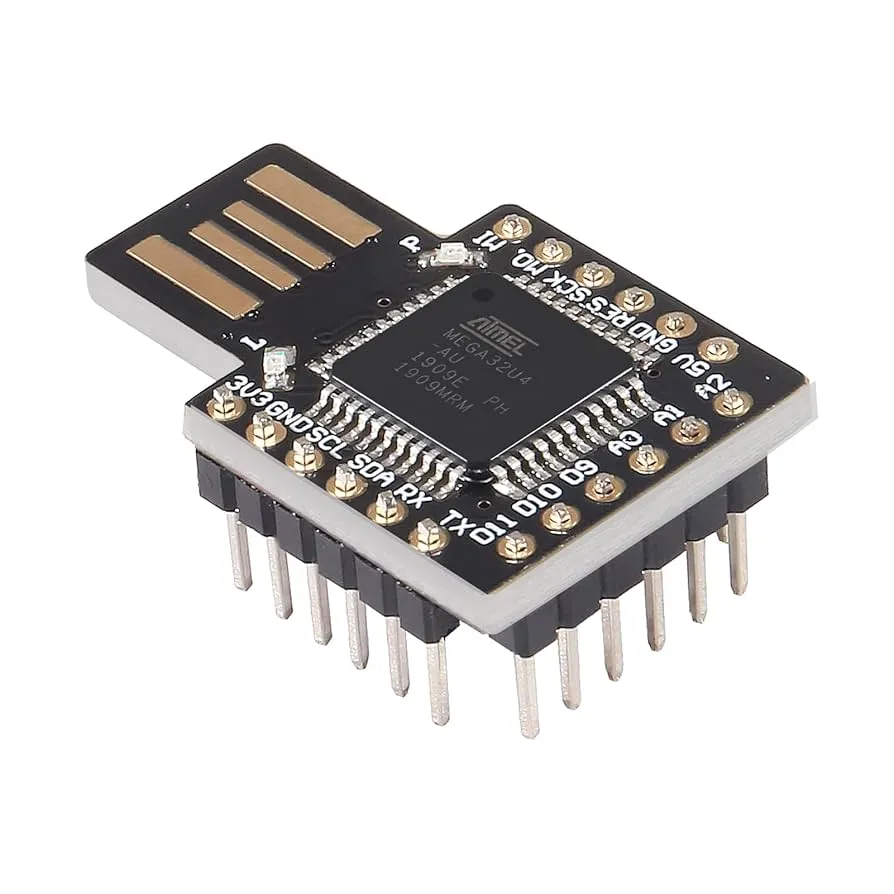
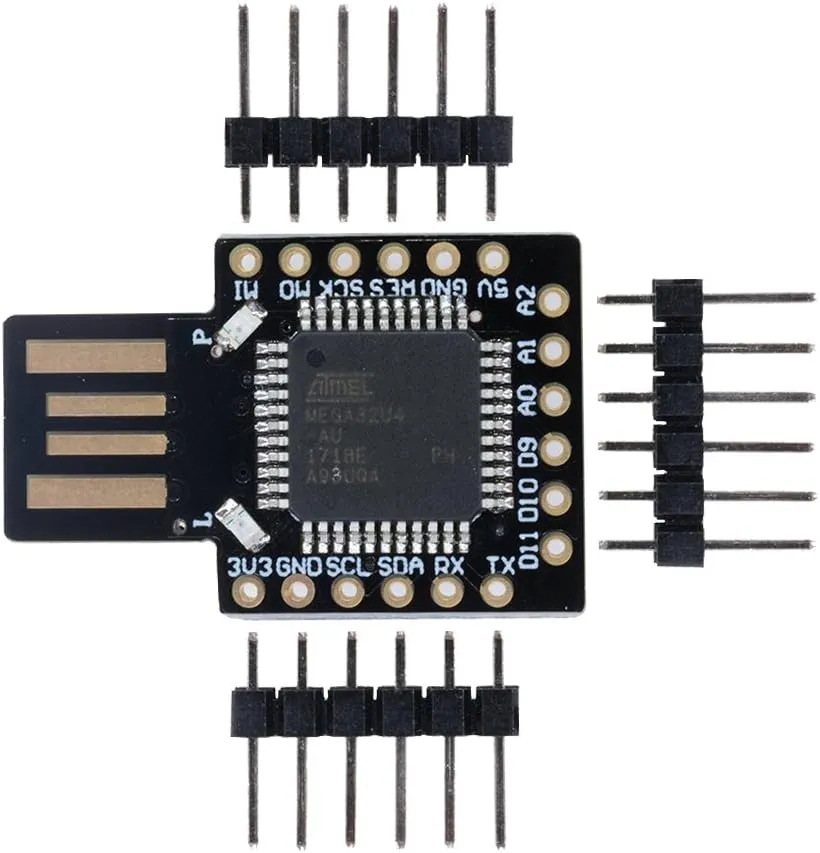
Thanks to its Micro USB interface and Arduino IDE compatibility the board is easy to program and deploy. In addition to standard microcontroller tasks it supports advanced USB human interface device functions such as keyboard and mouse emulation making it suitable for creative input devices automation and security related experiments.
Features
- Compact and lightweight design suitable for portable projects
- Compatible with Arduino Leonardo sketches and libraries
- Low cost solution for students makers and educational use
- ATmega32U4 microcontroller running at sixteen megahertz
- Ten digital input and output pins for general purpose use
- Five analog input pins for sensor interfacing
- Four PWM channels for motor and LED control
- Micro USB connector for programming and power
- Supports mouse and keyboard emulation over USB
- Small enough to attach to a key chain or carry in a wallet
- Can be used for security related demonstrations such as virtual keyboards
Specifications
- Microcontroller ATmega32U4
- Clock speed sixteen megahertz
- Operating voltage five volt DC
- Digital input and output pins ten
- PWM channels four
- Analog input channels five
- UART one
- I2C one
- Micro USB port one
- Power ports two
- Flash memory thirty two kilobyte with four kilobyte used by bootloader
- SRAM two point five kilobyte
- EEPROM one kilobyte
Pinout

How It Works
The board operates as a general purpose microcontroller platform with native USB capability. It runs at five volt and can be programmed directly using the Arduino IDE. Digital and analog pins allow connection to sensors actuators and modules while the USB interface enables direct communication with a computer.
Code Example
The following example demonstrates how the board can emulate a USB keyboard and automatically type predefined commands when connected to a computer.
#include "Keyboard.h"

void setup() {
  Keyboard.begin();
  delay(1000);
  Keyboard.press(KEY_LEFT_GUI);
  Keyboard.press('r');
  delay(10);
  Keyboard.releaseAll();
  delay(200);
  Keyboard.print("notepad");
  Keyboard.press(KEY_RETURN);
  delay(10);
  Keyboard.releaseAll();
  delay(500);
  Keyboard.print("This message will self destruct in 5 seconds!");
  delay(5000);
  Keyboard.press(KEY_LEFT_CTRL);
  Keyboard.press('a');
  delay(10);
  Keyboard.releaseAll();
  Keyboard.press(KEY_DELETE);
  delay(10);
  Keyboard.releaseAll();
  Keyboard.press(KEY_LEFT_ALT);
  Keyboard.press(KEY_F4);
  delay(10);
  Keyboard.releaseAll();
  Keyboard.end();
}

void loop() {
}
Thanks to its Micro USB interface and Arduino IDE compatibility the board is easy to program and deploy. In addition to standard microcontroller tasks it supports advanced USB human interface device functions such as keyboard and mouse emulation making it suitable for creative input devices automation and security related experiments.
Features
- Compact and lightweight design suitable for portable projects
- Compatible with Arduino Leonardo sketches and libraries
- Low cost solution for students makers and educational use
- ATmega32U4 microcontroller running at sixteen megahertz
- Ten digital input and output pins for general purpose use
- Five analog input pins for sensor interfacing
- Four PWM channels for motor and LED control
- Micro USB connector for programming and power
- Supports mouse and keyboard emulation over USB
- Small enough to attach to a key chain or carry in a wallet
- Can be used for security related demonstrations such as virtual keyboards
Specifications
- Microcontroller ATmega32U4
- Clock speed sixteen megahertz
- Operating voltage five volt DC
- Digital input and output pins ten
- PWM channels four
- Analog input channels five
- UART one
- I2C one
- Micro USB port one
- Power ports two
- Flash memory thirty two kilobyte with four kilobyte used by bootloader
- SRAM two point five kilobyte
- EEPROM one kilobyte
Pinout
How It Works
The board operates as a general purpose microcontroller platform with native USB capability. It runs at five volt and can be programmed directly using the Arduino IDE. Digital and analog pins allow connection to sensors actuators and modules while the USB interface enables direct communication with a computer.
Code Example
The following example demonstrates how the board can emulate a USB keyboard and automatically type predefined commands when connected to a computer.
#include "Keyboard.h"

void setup() {
  Keyboard.begin();
  delay(1000);
  Keyboard.press(KEY_LEFT_GUI);
  Keyboard.press('r');
  delay(10);
  Keyboard.releaseAll();
  delay(200);
  Keyboard.print("notepad");
  Keyboard.press(KEY_RETURN);
  delay(10);
  Keyboard.releaseAll();
  delay(500);
  Keyboard.print("This message will self destruct in 5 seconds!");
  delay(5000);
  Keyboard.press(KEY_LEFT_CTRL);
  Keyboard.press('a');
  delay(10);
  Keyboard.releaseAll();
  Keyboard.press(KEY_DELETE);
  delay(10);
  Keyboard.releaseAll();
  Keyboard.press(KEY_LEFT_ALT);
  Keyboard.press(KEY_F4);
  delay(10);
  Keyboard.releaseAll();
  Keyboard.end();
}

void loop() {
}