Features
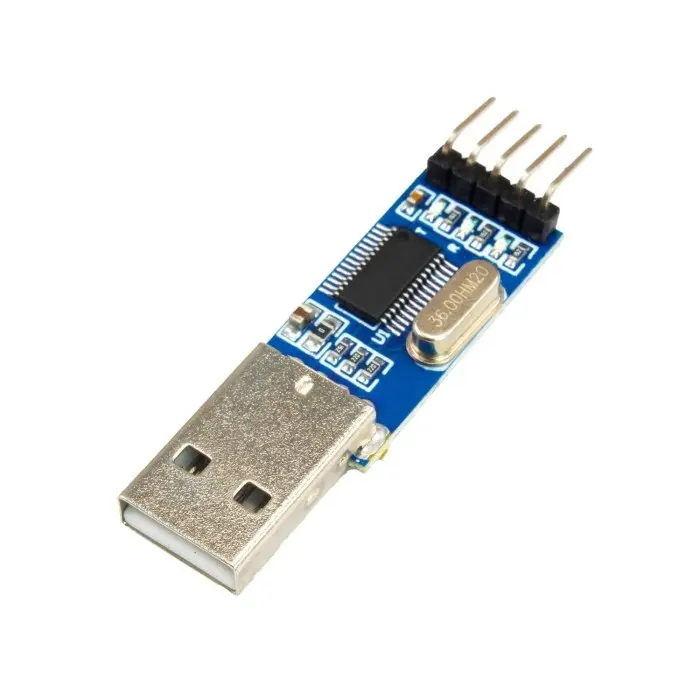
- High-Speed Flash Programming: Rapidly program flash memory through RS232 TTL interface.
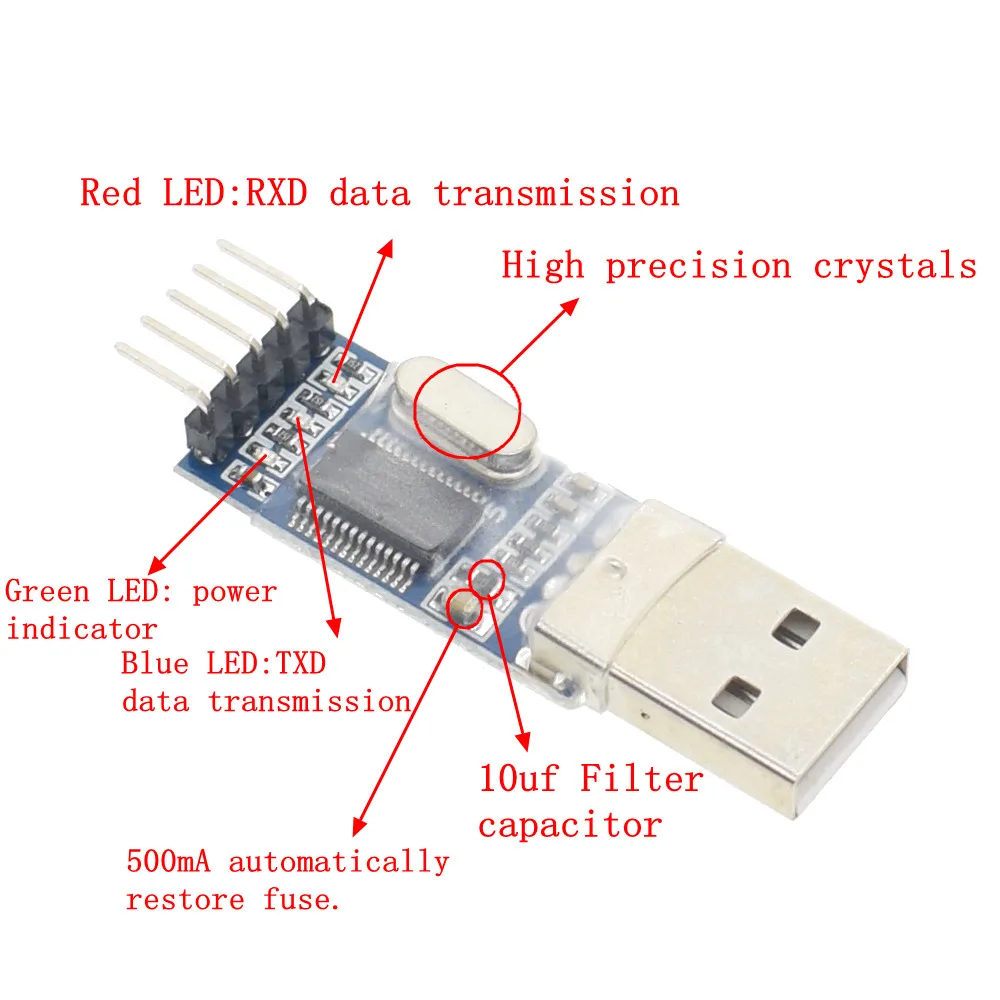
- Fuse Protection: Built-in 500mA self-recovery fuse safeguards both module and connected devices.
- Real-Time Monitoring: Dual transmission indicators provide instant feedback during read/write operations.
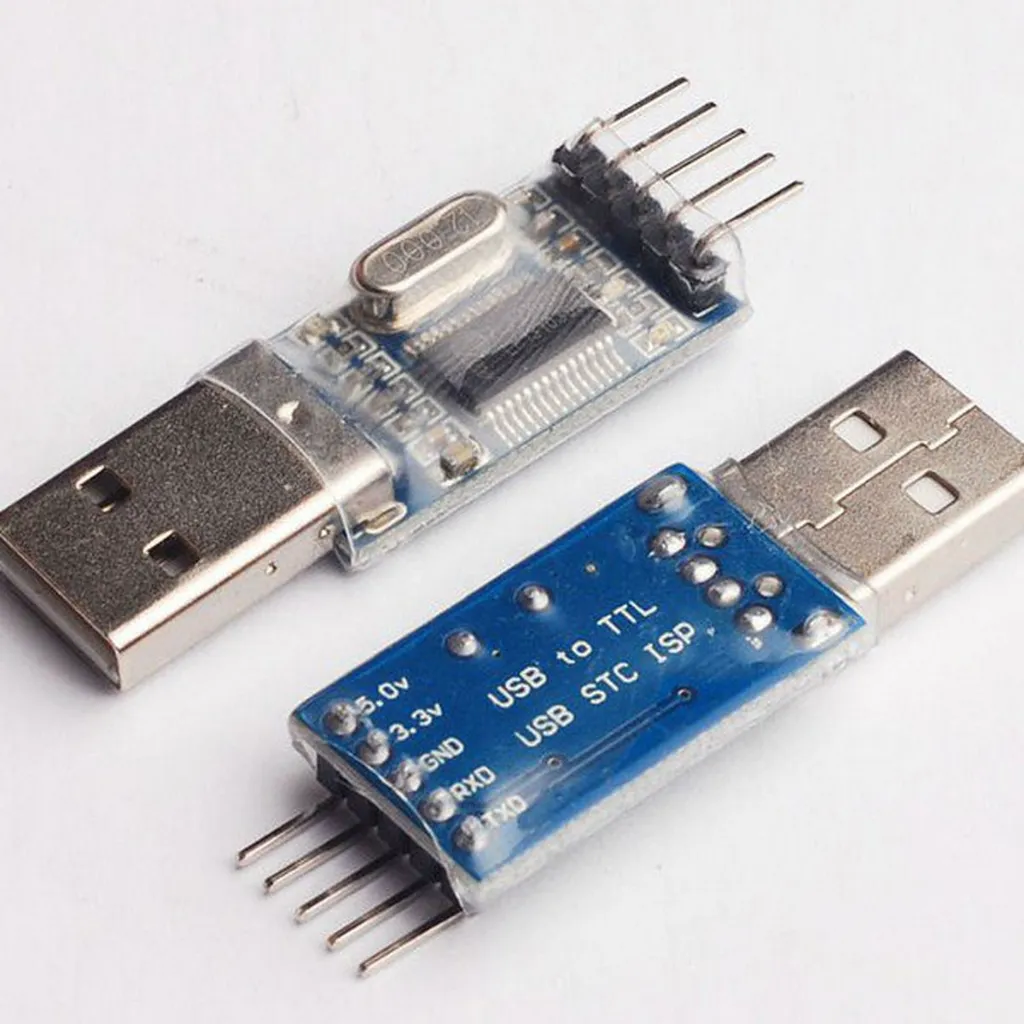
- Voltage Compatibility: Reserved 3.3V and 5V pins for broad system compatibility, including DDWRT and embedded boards.
- Quality Insulation: Transparent heat-shrink sleeve protects the PCB from shorts and external damage.
- Electrostatic Protection: Anti-static packaging prevents damage during handling and transport.
- System Compatibility: Works with Windows 7 and newer OS for easy software interfacing.
Specifications
- Dimensions: 50 × 15 × 7 mm
- Net Weight: 5 g
- Package Weight: 15 g
- Interface: RS232 TTL
- Operating Voltage: 3.3V / 5V selectable
- Protection: 500mA self-recovery fuse
- Indicators: Dual data transmission LEDs
Pinout
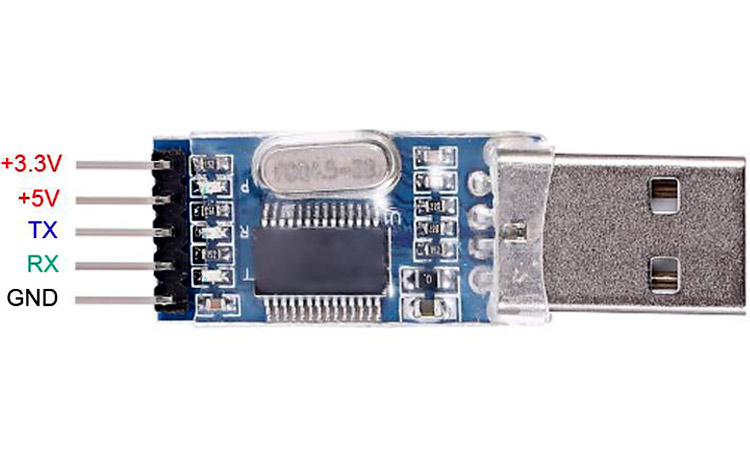
| Pin | Description |
|---|---|
| VCC | Power input, selectable 3.3V or 5V |
| GND | Ground connection |
| TXD | Transmit data to target device |
| RXD | Receive data from target device |
| 3.3V / 5V | Voltage selection pin for target device |
Library / Software
For Driver Download from: Here
No special library is required. This module can communicate with any serial terminal software such as:
- Arduino Serial Monitor
- Tera Term
- PuTTY
- Other RS232 serial programming software
Simply set the baud rate and connect TX/RX correctly for programming or data transfer.
Arduino Example Code
RS232 TTL Flash Module Test with Arduino
Connect TX/RX pins of the module to the Arduino RX/TX, respectively
void setup() {
  Serial.begin(9600);  // Initialize serial communication
  Serial.println("RS232 TTL Flash Module Ready");
}

void loop() {
  if (Serial.available()) {
    char data = Serial.read();   // Read incoming data
    Serial.print("Received: ");
    Serial.println(data);        // Echo back data
  }
}
Applications
- Programming microcontrollers and flash memory chips
- EEPROM and firmware updates
- Data logging and monitoring
- Embedded system development and testing
- DIY electronics and hobbyist projects
Features
- High-Speed Flash Programming: Rapidly program flash memory through RS232 TTL interface.
- Fuse Protection: Built-in 500mA self-recovery fuse safeguards both module and connected devices.
- Real-Time Monitoring: Dual transmission indicators provide instant feedback during read/write operations.
- Voltage Compatibility: Reserved 3.3V and 5V pins for broad system compatibility, including DDWRT and embedded boards.
- Quality Insulation: Transparent heat-shrink sleeve protects the PCB from shorts and external damage.
- Electrostatic Protection: Anti-static packaging prevents damage during handling and transport.
- System Compatibility: Works with Windows 7 and newer OS for easy software interfacing.
Specifications
- Dimensions: 50 × 15 × 7 mm
- Net Weight: 5 g
- Package Weight: 15 g
- Interface: RS232 TTL
- Operating Voltage: 3.3V / 5V selectable
- Protection: 500mA self-recovery fuse
- Indicators: Dual data transmission LEDs
Pinout
| Pin | Description |
|---|---|
| VCC | Power input, selectable 3.3V or 5V |
| GND | Ground connection |
| TXD | Transmit data to target device |
| RXD | Receive data from target device |
| 3.3V / 5V | Voltage selection pin for target device |
Library / Software
For Driver Download from: Here
No special library is required. This module can communicate with any serial terminal software such as:
- Arduino Serial Monitor
- Tera Term
- PuTTY
- Other RS232 serial programming software
Simply set the baud rate and connect TX/RX correctly for programming or data transfer.
Arduino Example Code
RS232 TTL Flash Module Test with Arduino
Connect TX/RX pins of the module to the Arduino RX/TX, respectively
void setup() {
  Serial.begin(9600);  // Initialize serial communication
  Serial.println("RS232 TTL Flash Module Ready");
}

void loop() {
  if (Serial.available()) {
    char data = Serial.read();   // Read incoming data
    Serial.print("Received: ");
    Serial.println(data);        // Echo back data
  }
}
Applications
- Programming microcontrollers and flash memory chips
- EEPROM and firmware updates
- Data logging and monitoring
- Embedded system development and testing
- DIY electronics and hobbyist projects