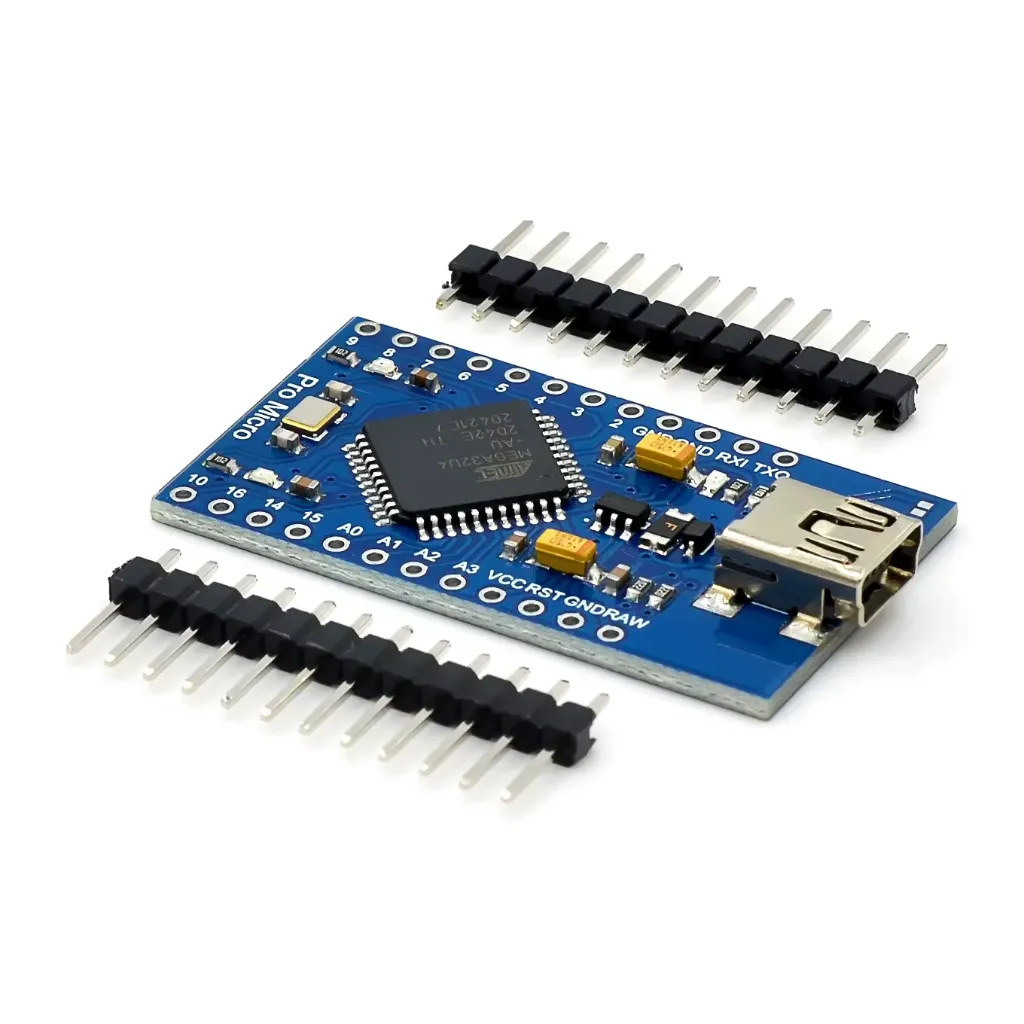
Features
- ATmega32U4 Microcontroller: Core MCU providing robust processing capabilities.
- Compact Size: Ideal for space-constrained projects.
- Mini USB Connector: Easy connection to PC for programming and data transfer.
- Digital and Analog I/O: Connect sensors, actuators, and other components.
- Built-in USB HID Profile: Emulate keyboard or mouse via USB.
- PWM Support: Precise control of analog devices like motors and LEDs.
- UART Communication: Serial data exchange with other devices.
- Integrated Clock Oscillator: Simplifies timing and synchronization.
- Compatible with Arduino IDE: Easy programming and code upload.
- Open-Source & Extensible: Modify hardware and software freely.
- Low Power Consumption: Suitable for battery-powered projects.
- Supportive Community: Access to resources, tutorials, and forums.
Specifications
- Microcontroller: ATmega32U4
- Operating Voltage: 5V
- Input Voltage: 5–12V (via RAW pin)
- Mini USB Connector
- Digital I/O Pins: 18
- Analog Input Pins: 9 (10-bit ADC)
- PWM Pins: 5
- UART Serial Port: Rx/Tx
- Flash Memory: 32KB
- SRAM: 2.5KB
- Clock Speed: 16MHz
- 5V Regulated Output
- Onboard LED: Pin 13
- Dimensions: 3.98 cm x 2.29 cm
Pinout of the Module

Principle of Work
Arduino Micro Pro operates based on input and output principles:
- Microcontroller: Processes inputs, executes code, controls outputs.
- Input: Reads sensors, switches, and buttons.
- Code Execution: Executes uploaded programs via Arduino IDE.
- Output: Controls LEDs, motors, displays, and modules.
- Power Supply: Can be powered via USB, battery, or external source.
- Programming Interface: Mini USB for uploading code and debugging.
- I/O Pins: Digital and analog pins for sensor and actuator connectivity.
Applications
- IoT Projects (smart home, remote sensing, environmental monitoring)
- Robotics (motors, servos, autonomous robots)
- Home Automation
- Wearable Electronics (smartwatches, fitness trackers)
- Interactive Art Installations
- Gaming Devices (custom controllers, arcade cabinets)
- Data Logging and Environmental Monitoring
- Educational Projects (programming and electronics learning)
- Automation and Control Systems
- Prototyping and Rapid Development
- Remote Control Applications
Circuit Example
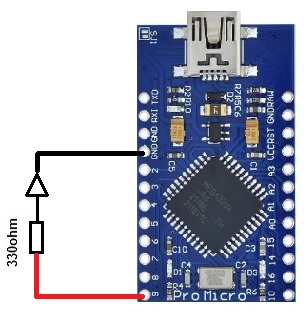
Connect an LED to pin 9 via a 330Ω resistor:
Code
// Define the LED pin
const int ledPin = 9;

void setup() {
  // Initialize the LED pin as output
  pinMode(ledPin, OUTPUT);

  // Start Serial communication at 9600 bps
  Serial.begin(9600);
}

void loop() {
  // Turn the LED on
  digitalWrite(ledPin, HIGH);
  Serial.println("LED is ON");
  delay(1000);

  // Turn the LED off
  digitalWrite(ledPin, LOW);
  Serial.println("LED is OFF");
  delay(1000);
}
Resources
- Arduino Language Reference
- Getting Started Tutorial
- Sparkfun Pro Micro Tutorial
- Arduino Board Selection
- Arduino IDE Download
Comparisons
The Arduino Pro Micro vs. Arduino Leonardo:
- Size: Pro Micro 34×18mm, Leonardo 68×53mm
- Microcontroller: Both use ATmega32U4 (32KB flash, 2.5KB SRAM)
- USB Port: Pro Micro Mini USB, Leonardo Type-B USB
- Digital/Analog Pins: Pro Micro: 18/9, Leonardo: 20/12
- PWM Pins: Pro Micro: 5, Leonardo: 7
- Operating Voltage: Pro Micro: 5V, Leonardo: 5V/3.3V
- Compatibility: Both Arduino IDE compatible and follow Arduino principles
Features
- ATmega32U4 Microcontroller: Core MCU providing robust processing capabilities.
- Compact Size: Ideal for space-constrained projects.
- Mini USB Connector: Easy connection to PC for programming and data transfer.
- Digital and Analog I/O: Connect sensors, actuators, and other components.
- Built-in USB HID Profile: Emulate keyboard or mouse via USB.
- PWM Support: Precise control of analog devices like motors and LEDs.
- UART Communication: Serial data exchange with other devices.
- Integrated Clock Oscillator: Simplifies timing and synchronization.
- Compatible with Arduino IDE: Easy programming and code upload.
- Open-Source & Extensible: Modify hardware and software freely.
- Low Power Consumption: Suitable for battery-powered projects.
- Supportive Community: Access to resources, tutorials, and forums.
Specifications
- Microcontroller: ATmega32U4
- Operating Voltage: 5V
- Input Voltage: 5–12V (via RAW pin)
- Mini USB Connector
- Digital I/O Pins: 18
- Analog Input Pins: 9 (10-bit ADC)
- PWM Pins: 5
- UART Serial Port: Rx/Tx
- Flash Memory: 32KB
- SRAM: 2.5KB
- Clock Speed: 16MHz
- 5V Regulated Output
- Onboard LED: Pin 13
- Dimensions: 3.98 cm x 2.29 cm
Pinout of the Module
Principle of Work
Arduino Micro Pro operates based on input and output principles:
- Microcontroller: Processes inputs, executes code, controls outputs.
- Input: Reads sensors, switches, and buttons.
- Code Execution: Executes uploaded programs via Arduino IDE.
- Output: Controls LEDs, motors, displays, and modules.
- Power Supply: Can be powered via USB, battery, or external source.
- Programming Interface: Mini USB for uploading code and debugging.
- I/O Pins: Digital and analog pins for sensor and actuator connectivity.
Applications
- IoT Projects (smart home, remote sensing, environmental monitoring)
- Robotics (motors, servos, autonomous robots)
- Home Automation
- Wearable Electronics (smartwatches, fitness trackers)
- Interactive Art Installations
- Gaming Devices (custom controllers, arcade cabinets)
- Data Logging and Environmental Monitoring
- Educational Projects (programming and electronics learning)
- Automation and Control Systems
- Prototyping and Rapid Development
- Remote Control Applications
Circuit Example
Connect an LED to pin 9 via a 330Ω resistor:
Code
// Define the LED pin
const int ledPin = 9;

void setup() {
  // Initialize the LED pin as output
  pinMode(ledPin, OUTPUT);

  // Start Serial communication at 9600 bps
  Serial.begin(9600);
}

void loop() {
  // Turn the LED on
  digitalWrite(ledPin, HIGH);
  Serial.println("LED is ON");
  delay(1000);

  // Turn the LED off
  digitalWrite(ledPin, LOW);
  Serial.println("LED is OFF");
  delay(1000);
}
Resources
- Arduino Language Reference
- Getting Started Tutorial
- Sparkfun Pro Micro Tutorial
- Arduino Board Selection
- Arduino IDE Download
Comparisons
The Arduino Pro Micro vs. Arduino Leonardo:
- Size: Pro Micro 34×18mm, Leonardo 68×53mm
- Microcontroller: Both use ATmega32U4 (32KB flash, 2.5KB SRAM)
- USB Port: Pro Micro Mini USB, Leonardo Type-B USB
- Digital/Analog Pins: Pro Micro: 18/9, Leonardo: 20/12
- PWM Pins: Pro Micro: 5, Leonardo: 7
- Operating Voltage: Pro Micro: 5V, Leonardo: 5V/3.3V
- Compatibility: Both Arduino IDE compatible and follow Arduino principles