Features
- Uses ST FlightSense™ Time-of-Flight (TOF) technology
- Laser-based distance measurement for high accuracy
- Measures distances up to 2 meters (6.6 feet)
- High measurement resolution of 1 mm
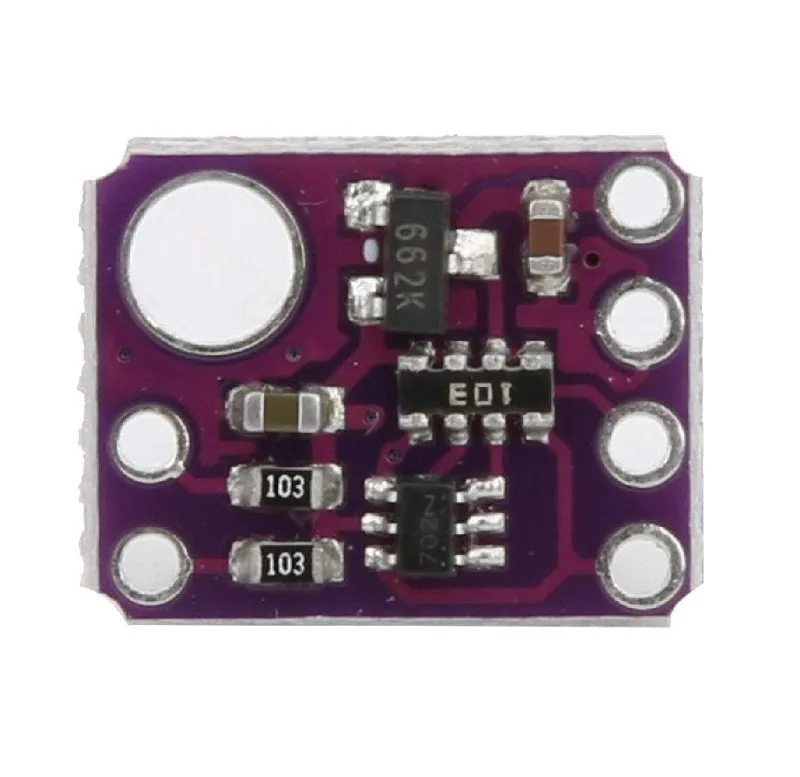
- Built around the reliable VL53L0X ranging sensor chip
- Operates over a wide power supply range
- I2C communication interface for easy microcontroller integration
- Compatible with both 3V and 5V systems
- Compact size, ideal for space-constrained projects
- Performance is minimally affected by object reflectance
Specifications
- Model: GY-VL53L0X
- Sensor Chip: VL53L0X
- Distance Range: Up to 2 meters (6.6 feet)
- Resolution: 1 mm
- Measurement Principle: Time-of-Flight (TOF)
- Light Source: Infrared laser
- Power Supply Voltage: 2.8V – 5V
- Communication Protocol: I2C (Inter-Integrated Circuit)
- Logic Level Compatibility: 3V / 5V
- Module Dimensions: 10.5 mm × 13.3 mm
Applications
- Distance and proximity measurement systems
- Robotics and obstacle detection
- Gesture and presence detection
- Smart devices and automation projects
- Arduino, Raspberry Pi, and microcontroller-based projects
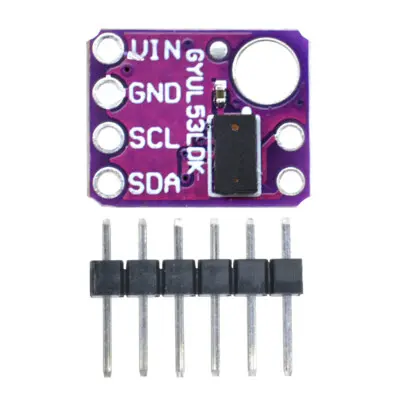
Pinout:
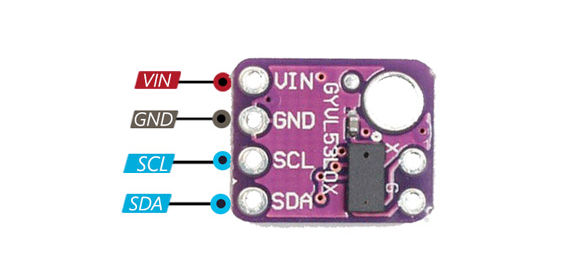
Arduino Library
For Arduino projects, it is recommended to use the official Adafruit VL53L0X library. This library simplifies sensor initialization and distance measurement via the I2C interface.
- Library Name: Adafruit VL53L0X
- Installation: Arduino IDE → Sketch → Include Library → Manage Libraries → Search for “Adafruit VL53L0X”
- Dependency: Adafruit BusIO library
Arduino Connections
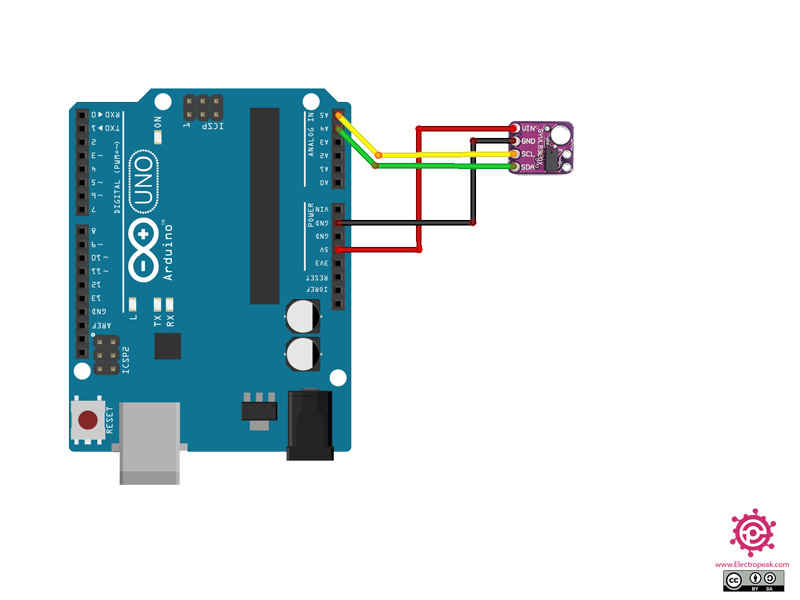
- VCC: Arduino 5V or 3.3V
- GND: Arduino GND
- SDA: Arduino SDA (A4 on Arduino Uno)
- SCL: Arduino SCL (A5 on Arduino Uno)
Arduino Code Example
The example below demonstrates how to read distance measurements from the GY-VL53L0X sensor and display the distance in millimeters using the Arduino Serial Monitor.
#include <Wire.h>
#include <Adafruit_VL53L0X.h>

Adafruit_VL53L0X lox = Adafruit_VL53L0X();

void setup() {
  Serial.begin(9600);
  while (!Serial) {
    delay(1);
  }

  Serial.println("VL53L0X Distance Sensor Test");

  if (!lox.begin()) {
    Serial.println("Failed to initialize VL53L0X");
    while (1);
  }

  Serial.println("VL53L0X ready");
}

void loop() {
  VL53L0X_RangingMeasurementData_t measure;

  lox.rangingTest(&measure, false);

  if (measure.RangeStatus != 4) {
    Serial.print("Distance: ");
    Serial.print(measure.RangeMilliMeter);
    Serial.println(" mm");
  } else {
    Serial.println("Out of range");
  }

  delay(500);
}
Applications
- Distance and proximity measurement systems
- Robotics and obstacle avoidance
- Gesture and presence detection
- Smart automation and IoT devices
- Arduino and microcontroller-based projects
Features
- Uses ST FlightSense™ Time-of-Flight (TOF) technology
- Laser-based distance measurement for high accuracy
- Measures distances up to 2 meters (6.6 feet)
- High measurement resolution of 1 mm
- Built around the reliable VL53L0X ranging sensor chip
- Operates over a wide power supply range
- I2C communication interface for easy microcontroller integration
- Compatible with both 3V and 5V systems
- Compact size, ideal for space-constrained projects
- Performance is minimally affected by object reflectance
Specifications
- Model: GY-VL53L0X
- Sensor Chip: VL53L0X
- Distance Range: Up to 2 meters (6.6 feet)
- Resolution: 1 mm
- Measurement Principle: Time-of-Flight (TOF)
- Light Source: Infrared laser
- Power Supply Voltage: 2.8V – 5V
- Communication Protocol: I2C (Inter-Integrated Circuit)
- Logic Level Compatibility: 3V / 5V
- Module Dimensions: 10.5 mm × 13.3 mm
Applications
- Distance and proximity measurement systems
- Robotics and obstacle detection
- Gesture and presence detection
- Smart devices and automation projects
- Arduino, Raspberry Pi, and microcontroller-based projects
Pinout:
Arduino Library
For Arduino projects, it is recommended to use the official Adafruit VL53L0X library. This library simplifies sensor initialization and distance measurement via the I2C interface.
- Library Name: Adafruit VL53L0X
- Installation: Arduino IDE → Sketch → Include Library → Manage Libraries → Search for “Adafruit VL53L0X”
- Dependency: Adafruit BusIO library
Arduino Connections
- VCC: Arduino 5V or 3.3V
- GND: Arduino GND
- SDA: Arduino SDA (A4 on Arduino Uno)
- SCL: Arduino SCL (A5 on Arduino Uno)
Arduino Code Example
The example below demonstrates how to read distance measurements from the GY-VL53L0X sensor and display the distance in millimeters using the Arduino Serial Monitor.
#include <Wire.h>
#include <Adafruit_VL53L0X.h>

Adafruit_VL53L0X lox = Adafruit_VL53L0X();

void setup() {
  Serial.begin(9600);
  while (!Serial) {
    delay(1);
  }

  Serial.println("VL53L0X Distance Sensor Test");

  if (!lox.begin()) {
    Serial.println("Failed to initialize VL53L0X");
    while (1);
  }

  Serial.println("VL53L0X ready");
}

void loop() {
  VL53L0X_RangingMeasurementData_t measure;

  lox.rangingTest(&measure, false);

  if (measure.RangeStatus != 4) {
    Serial.print("Distance: ");
    Serial.print(measure.RangeMilliMeter);
    Serial.println(" mm");
  } else {
    Serial.println("Out of range");
  }

  delay(500);
}
Applications
- Distance and proximity measurement systems
- Robotics and obstacle avoidance
- Gesture and presence detection
- Smart automation and IoT devices
- Arduino and microcontroller-based projects