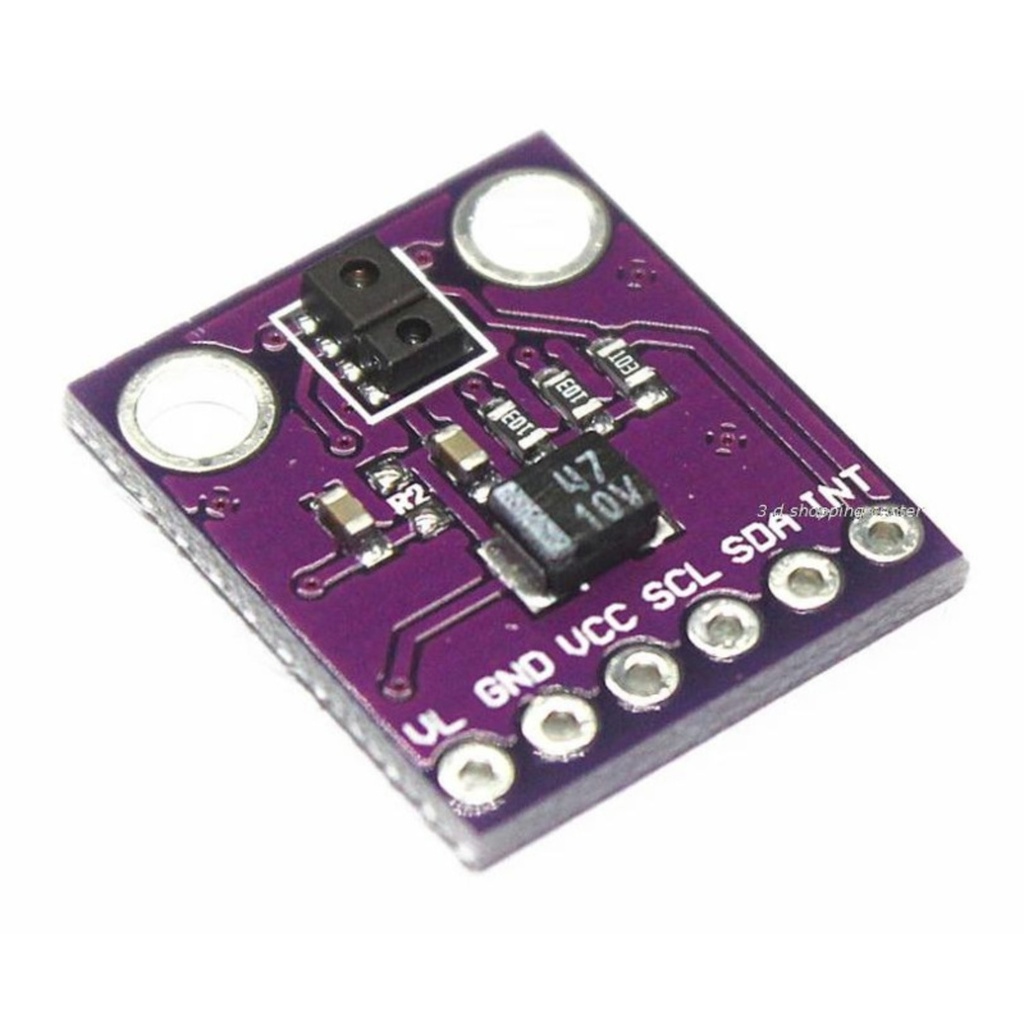
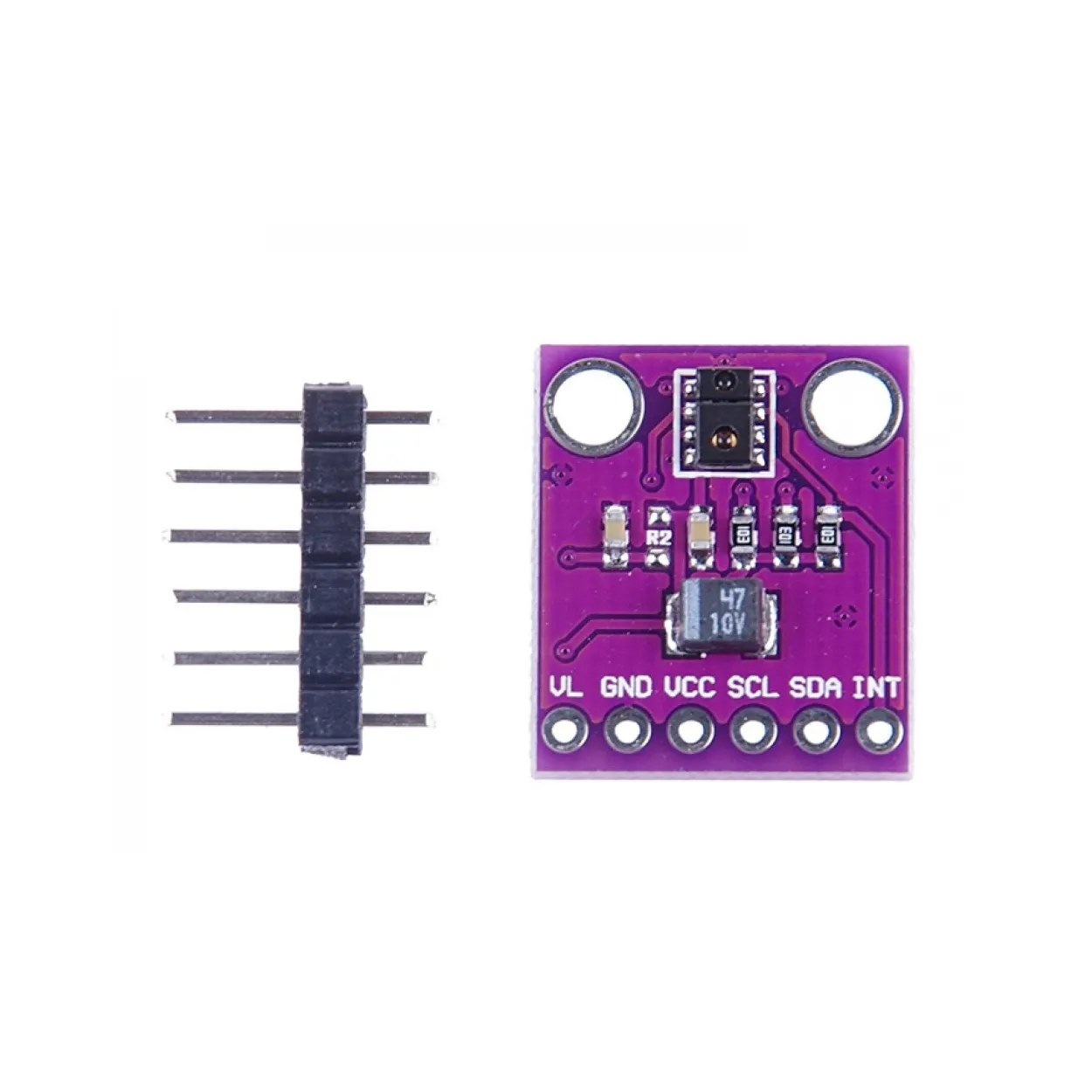
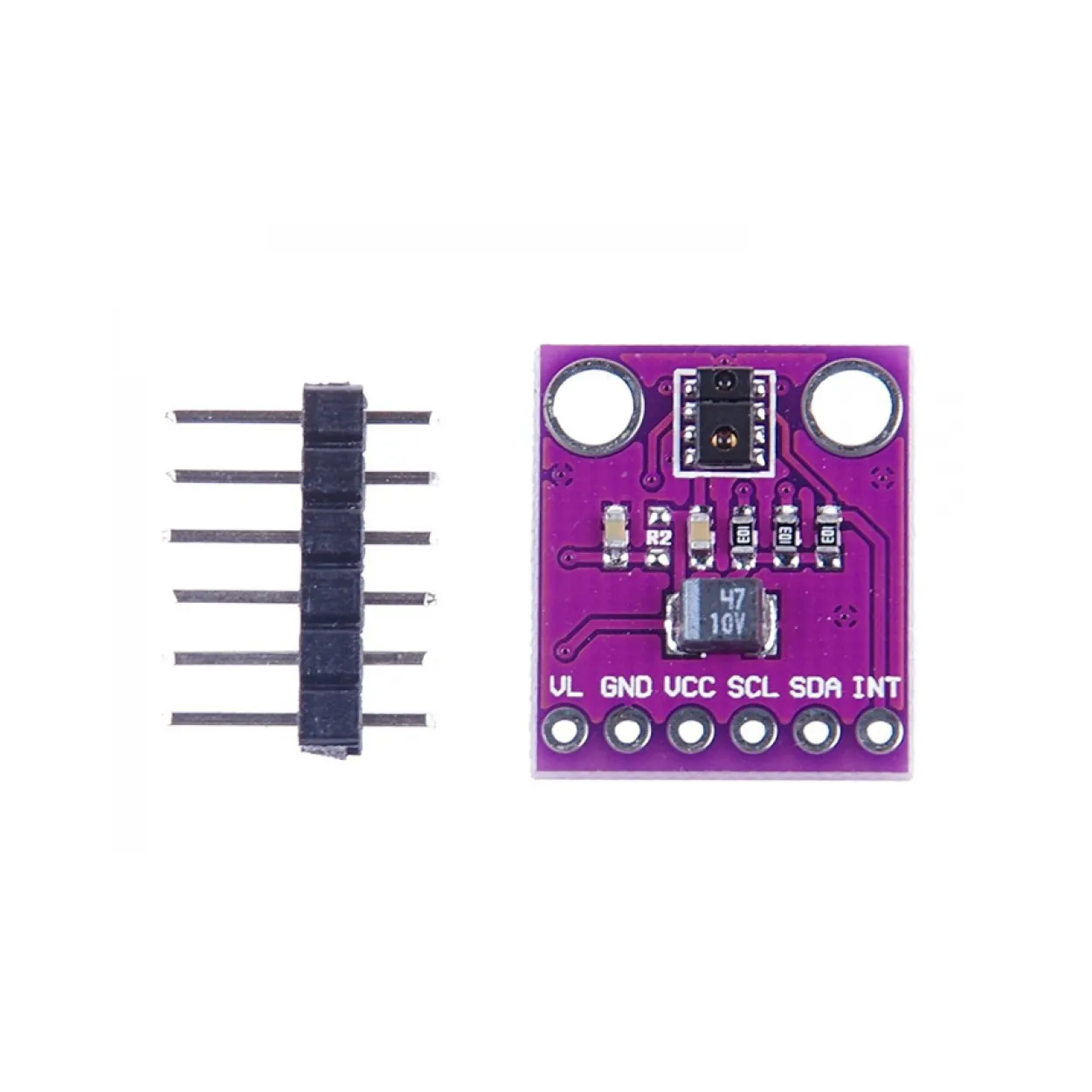
The proximity function supports plug-and-play detection up to 100 mm without the need for factory calibration, making it ideal for fast development and production-ready designs. It operates reliably in environments ranging from bright sunlight to complete darkness and can even function behind dark glass, such as smartphone front panels. The internal state machine enables ultra-low power operation by switching between active measurement and sleep modes, ensuring minimal average power consumption.
Features
- Ambient Light Sensing (ALS): Approximate human eye response with high sensitivity.
- High Resolution: Up to 16-bit resolution for precise light measurements.
- Low Light Performance: Detects down to 0.01 lux.
- Proximity Detection: Fully calibrated up to 100 mm without factory calibration.
- Integrated IR LED: Includes synchronous LED driver.
- Wide Dynamic Range: Works in bright light, darkness, and behind dark glass.
- Low Power Operation: Intelligent power management with sleep mode.
- I2C Interface: Fast-mode compatible up to 400 kHz.
- Dedicated Interrupt Pin: For efficient event-driven designs.
Specifications
- Ambient Light Sensing: Photopic response, programmable interrupts, 16-bit resolution
- Low Light Sensitivity: 0.01 lux
- Proximity Range: Up to 100 mm (no front glass)
- IR LED Supply (VL): 3.0 – 4.5 V
- VCC Supply: 2.4 – 3.6 V
- Wait Timer: Programmable from 2.7 ms to >8 seconds
- Wait State Power Consumption: 90 µA (typical)
- Sleep Mode Power: 2.2 µA (typical)
- Communication: I2C up to 400 kHz
- Package Size: 3.94 x 2.36 x 1.35 mm
Applications
- Automatic mobile phone backlight adjustment
- Notebook and display security systems
- Hands-free mode detection
- Automatic menu popup detection
- Digital camera eye and proximity sensors
Pinout of the Module
| Pin Label | Description |
|---|---|
| VL | Optional power for IR LED (3.0 – 4.5V) |
| GND | Ground |
| VCC | Power supply (2.4 – 3.6V) |
| SDA | I2C Data |
| SCL | I2C Clock |
| INT | External interrupt pin |
Connections
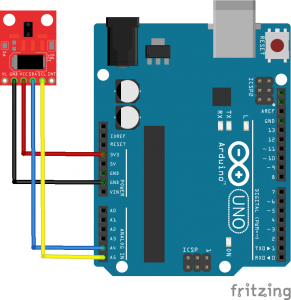
Arduino to APDS-9930 Wiring:
| Arduino Pin | APDS-9930 Pin | Function |
|---|---|---|
| 3.3V | VCC | Power |
| GND | GND | Ground |
| A4 | SDA | I2C Data |
| A5 | SCL | I2C Clock |
Wiring Diagram:
Code
To use this module, install the APDS-9930 library:
https://github.com/Davideddu/APDS9930
You may also explore the SparkFun library and examples for additional features:
https://github.com/sparkfun/APDS-9960_RGB_and_Gesture_Sensor/
#define DUMP_REGS
#include "Wire.h"
#include "APDS9930.h"

// Global Variables
APDS9930 apds = APDS9930();
float ambient_light = 0;
uint16_t ch0 = 0;
uint16_t ch1 = 1;

void setup() {

  Serial.begin(9600);
  Serial.println();

  // Initialize APDS-9930
  if (apds.init()) {
    Serial.println(F("APDS-9930 initialization complete"));
  } else {
    Serial.println(F("Something went wrong during APDS-9930 init!"));
  }

  // Enable ambient light sensor
  if (apds.enableLightSensor(false)) {
    Serial.println(F("Light sensor is now running"));
  } else {
    Serial.println(F("Something went wrong during light sensor init!"));
  }

  delay(500);
}

void loop() {

  if (!apds.readAmbientLightLux(ambient_light) ||
      !apds.readCh0Light(ch0) ||
      !apds.readCh1Light(ch1)) {

    Serial.println(F("Error reading light values"));
  } else {
    Serial.print(F("Ambient: "));
    Serial.print(ambient_light);
    Serial.print(F(" Ch0: "));
    Serial.print(ch0);
    Serial.print(F(" Ch1: "));
    Serial.println(ch1);
  }

  delay(1000);
}
The proximity function supports plug-and-play detection up to 100 mm without the need for factory calibration, making it ideal for fast development and production-ready designs. It operates reliably in environments ranging from bright sunlight to complete darkness and can even function behind dark glass, such as smartphone front panels. The internal state machine enables ultra-low power operation by switching between active measurement and sleep modes, ensuring minimal average power consumption.
Features
- Ambient Light Sensing (ALS): Approximate human eye response with high sensitivity.
- High Resolution: Up to 16-bit resolution for precise light measurements.
- Low Light Performance: Detects down to 0.01 lux.
- Proximity Detection: Fully calibrated up to 100 mm without factory calibration.
- Integrated IR LED: Includes synchronous LED driver.
- Wide Dynamic Range: Works in bright light, darkness, and behind dark glass.
- Low Power Operation: Intelligent power management with sleep mode.
- I2C Interface: Fast-mode compatible up to 400 kHz.
- Dedicated Interrupt Pin: For efficient event-driven designs.
Specifications
- Ambient Light Sensing: Photopic response, programmable interrupts, 16-bit resolution
- Low Light Sensitivity: 0.01 lux
- Proximity Range: Up to 100 mm (no front glass)
- IR LED Supply (VL): 3.0 – 4.5 V
- VCC Supply: 2.4 – 3.6 V
- Wait Timer: Programmable from 2.7 ms to >8 seconds
- Wait State Power Consumption: 90 µA (typical)
- Sleep Mode Power: 2.2 µA (typical)
- Communication: I2C up to 400 kHz
- Package Size: 3.94 x 2.36 x 1.35 mm
Applications
- Automatic mobile phone backlight adjustment
- Notebook and display security systems
- Hands-free mode detection
- Automatic menu popup detection
- Digital camera eye and proximity sensors
Pinout of the Module
| Pin Label | Description |
|---|---|
| VL | Optional power for IR LED (3.0 – 4.5V) |
| GND | Ground |
| VCC | Power supply (2.4 – 3.6V) |
| SDA | I2C Data |
| SCL | I2C Clock |
| INT | External interrupt pin |
Connections
Arduino to APDS-9930 Wiring:
| Arduino Pin | APDS-9930 Pin | Function |
|---|---|---|
| 3.3V | VCC | Power |
| GND | GND | Ground |
| A4 | SDA | I2C Data |
| A5 | SCL | I2C Clock |
Wiring Diagram:
Code
To use this module, install the APDS-9930 library:
https://github.com/Davideddu/APDS9930
You may also explore the SparkFun library and examples for additional features:
https://github.com/sparkfun/APDS-9960_RGB_and_Gesture_Sensor/
#define DUMP_REGS
#include "Wire.h"
#include "APDS9930.h"

// Global Variables
APDS9930 apds = APDS9930();
float ambient_light = 0;
uint16_t ch0 = 0;
uint16_t ch1 = 1;

void setup() {

  Serial.begin(9600);
  Serial.println();

  // Initialize APDS-9930
  if (apds.init()) {
    Serial.println(F("APDS-9930 initialization complete"));
  } else {
    Serial.println(F("Something went wrong during APDS-9930 init!"));
  }

  // Enable ambient light sensor
  if (apds.enableLightSensor(false)) {
    Serial.println(F("Light sensor is now running"));
  } else {
    Serial.println(F("Something went wrong during light sensor init!"));
  }

  delay(500);
}

void loop() {

  if (!apds.readAmbientLightLux(ambient_light) ||
      !apds.readCh0Light(ch0) ||
      !apds.readCh1Light(ch1)) {

    Serial.println(F("Error reading light values"));
  } else {
    Serial.print(F("Ambient: "));
    Serial.print(ambient_light);
    Serial.print(F(" Ch0: "));
    Serial.print(ch0);
    Serial.print(F(" Ch1: "));
    Serial.println(ch1);
  }

  delay(1000);
}