Features
- ATmega328P microcontroller.
- 14 digital input/output pins.
- 6 PWM-capable digital pins.
- 6 analog input pins.
- ATmega16U2 USB-to-serial interface.
- USB Type-B connector for programming and power.
- 7–12V recommended external input voltage.
- 32 KB Flash memory, 2 KB SRAM, and 1 KB EEPROM.
- 16 MHz clock speed.
- ICSP header for programming and SPI communication.
- Onboard D13 LED.
- Reset button.
- Arduino Shield-compatible headers.
- Open-source hardware and software ecosystem.
Principle of Work
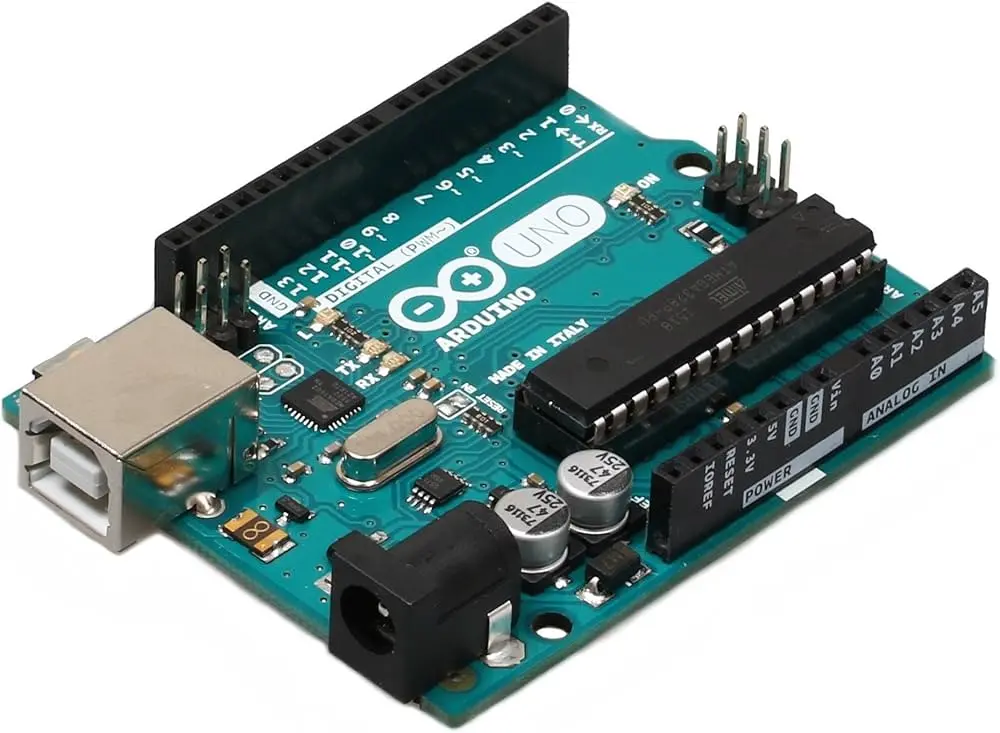
The Arduino UNO Rev3 operates by executing a program stored in the ATmega328P microcontroller. The program can read inputs from sensors, switches, and other devices, process the received information, and control outputs such as LEDs, motors, displays, and relays.

- Connect Components: Connect sensors, modules, displays, actuators, or other components to the appropriate Arduino pins.
- Write Code: Create a sketch using the Arduino IDE and Arduino-compatible libraries.
- Connect to the Computer: Connect the Arduino UNO to a computer using a USB Type-B cable.
- Select the Board and Port: Select Arduino UNO in the Arduino IDE and choose the correct serial port.
- Upload the Sketch: The Arduino IDE compiles the program and transfers it to the ATmega328P through the USB-to-serial interface and bootloader.
- Execute the Program: After uploading, the ATmega328P starts executing the program and controlling the connected components.
- Develop and Test: The program can be modified and uploaded again as the project is developed.
Pinout
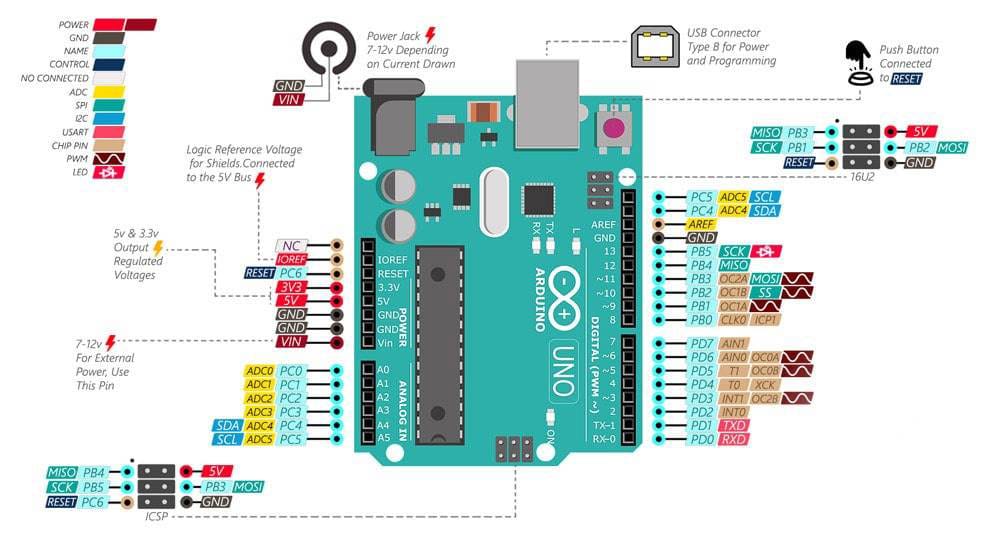
- USB Input
The USB Type-B connector is used to connect the Arduino UNO Rev3 to a computer for programming and serial communication. It can also provide power to the board. - USB-to-Serial Converter
The onboard ATmega16U2 provides USB-to-serial communication between the computer and the ATmega328P. The ATmega328P includes the Arduino bootloader, allowing programs to be uploaded through the USB connection without an external hardware programmer. The ATmega328P can also be programmed directly through the ICSP header when required. - Power Pins
Vin: Input voltage to the board when using an external power source. It can also provide access to the voltage supplied through the DC power jack. - 5V: Regulated 5V output from the board's power system. Do not apply an external voltage to this pin unless the correct regulated 5V supply is being used.
- 3V3: Regulated 3.3V output with a maximum recommended current of 50 mA.
- GND: Ground connections for the board and external circuits.
- IOREF: Provides the voltage reference used by compatible shields to determine the board's operating logic voltage.
- ICSP
The ICSP header provides direct access to the ATmega328P programming interface and SPI communication. The SPI signals are also available on digital pins D11, D12, and D13.
MOSI: D11
MISO: D12
SCK: D13 - LED-D13
The onboard LED is connected to digital pin 13. It can be controlled directly from an Arduino sketch and is useful for testing the board without connecting an external LED. - RX/TX Indicators
The RX and TX LEDs provide visual indication of serial communication through the USB interface. - Reset
The reset button restarts the ATmega328P and begins execution of the uploaded sketch again. The button is positioned so it can remain accessible when a compatible shield is installed. - USB Protection
The Arduino UNO Rev3 includes a resettable polyfuse on the USB power line to help protect the computer's USB port against short circuits and excessive current.
Applications
- Electronic prototyping
- Arduino learning and education
- Sensor projects
- Home automation
- Robotics
- Motor and actuator control
- Data logging
- Environmental monitoring
- Display projects
- IoT prototypes with external communication modules
- Interactive art and installations
Circuit
No external circuit is required for the example below. The onboard LED connected to digital pin 13 is used for testing.
Connecting with Arduino for the First Time
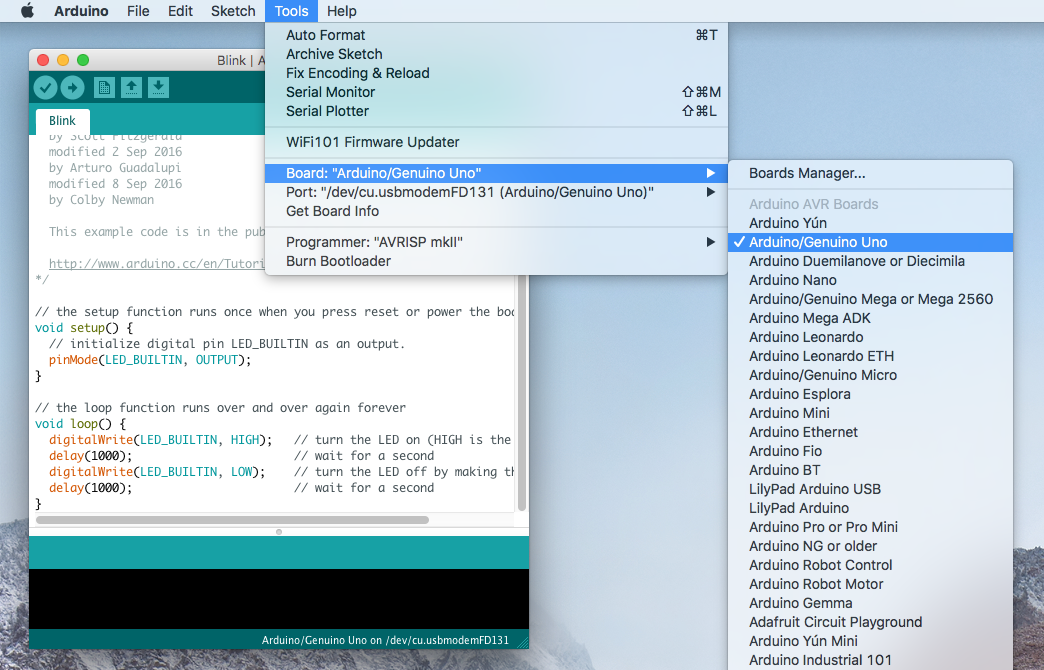
- Install Arduino IDE: Download and install the Arduino IDE from the official Arduino website.
- Connect the Board: Connect the Arduino UNO Rev3 to the computer using a USB Type-B data cable.
- Select the Board: Open the Arduino IDE and select Arduino UNO from the board selection menu.
- Select the Port: Select the serial port assigned to the Arduino UNO.
- Open an Example: Go to File > Examples > 01.Basics > Blink or create your own sketch.
- Verify the Code: Click Verify to compile the sketch and check for errors.
- Upload the Code: Click Upload to transfer the program to the ATmega328P.
After the upload is complete, the Arduino UNO will start executing the sketch. The program will normally run again each time the board is powered on or reset.
Library
No special library is required for the Arduino UNO itself. The board can be programmed using the standard Arduino IDE and built-in Arduino functions.
Code
The following example uses the onboard LED on pin 13 and prints a message to the Serial Monitor every second.
const int LED_PIN = 13;
bool ledState = false;

void setup() {
  pinMode(LED_PIN, OUTPUT);
  Serial.begin(9600);
}

void loop() {
  digitalWrite(LED_PIN, ledState);
  ledState = !ledState;

  Serial.println("LED is blinking!");

  delay(1000);
}
Code Explanation
LED_PIN = 13defines digital pin 13, which is connected to the onboard LED.ledStatestores the current ON/OFF state of the LED.pinMode()configures pin 13 as an output.Serial.begin(9600)starts serial communication at 9600 baud.digitalWrite()changes the state of the LED.ledState = !ledStatetoggles the LED state.Serial.println()sends a message to the Serial Monitor.delay(1000)waits one second before repeating the process.
Specifications
- Microcontroller: ATmega328P
- USB-to-Serial Converter: ATmega16U2
- Operating Voltage: 5V
- Recommended Input Voltage: 7–12V
- Input Voltage Limit: 6–20V
- Digital I/O Pins: 14
- PWM Pins: 6
- Analog Input Pins: 6
- DC Current per I/O Pin: 20 mA recommended
- DC Current for 3.3V Pin: 50 mA maximum
- Flash Memory: 32 KB, including 0.5 KB used by the bootloader
- SRAM: 2 KB
- EEPROM: 1 KB
- Clock Speed: 16 MHz
- LED_BUILTIN: D13
- USB Connector: USB Type-B
- Length: 68.6 mm
- Width: 53.4 mm
- Weight: 25 g
Resources
- Datasheet: ATmega328P Datasheet
- Datasheet: ATmega16U2 Datasheet
- More Reading: Getting Started with Arduino
- More Reading: Arduino Language Reference
- More Reading: Download Arduino IDE
- More Reading: Arduino FAQ
- More Reading: Arduino Introduction
- More Reading: Wikipedia - Arduino
Comparison with Arduino Mega 2560
The Arduino UNO Rev3 and Arduino Mega 2560 are both Arduino-compatible development boards, but they are designed for different project requirements.
- Microcontroller: The UNO uses the ATmega328P, while the Mega 2560 uses the ATmega2560.
- Flash Memory: The UNO provides 32 KB, while the Mega 2560 provides 256 KB.
- SRAM: The UNO provides 2 KB, while the Mega 2560 provides 8 KB.
- Digital I/O: The UNO provides 14 digital I/O pins, while the Mega 2560 provides 54.
- PWM Outputs: The UNO provides 6 PWM pins, while the Mega 2560 provides 15.
- Analog Inputs: The UNO provides 6 analog inputs, while the Mega 2560 provides 16.
- Operating Voltage: Both boards operate at 5V.
- Input Voltage: Both boards support a recommended external input range of 7–12V.
- Form Factor: The UNO is smaller and more suitable for compact projects, while the Mega 2560 provides considerably more I/O for larger projects.
The Arduino UNO Rev3 is a good choice for projects requiring a compact and well-supported Arduino platform with a moderate number of I/O pins. The Arduino Mega 2560 is better suited to projects requiring more GPIO pins, analog inputs, memory, or multiple serial interfaces.
Features
- ATmega328P microcontroller.
- 14 digital input/output pins.
- 6 PWM-capable digital pins.
- 6 analog input pins.
- ATmega16U2 USB-to-serial interface.
- USB Type-B connector for programming and power.
- 7–12V recommended external input voltage.
- 32 KB Flash memory, 2 KB SRAM, and 1 KB EEPROM.
- 16 MHz clock speed.
- ICSP header for programming and SPI communication.
- Onboard D13 LED.
- Reset button.
- Arduino Shield-compatible headers.
- Open-source hardware and software ecosystem.
Principle of Work
The Arduino UNO Rev3 operates by executing a program stored in the ATmega328P microcontroller. The program can read inputs from sensors, switches, and other devices, process the received information, and control outputs such as LEDs, motors, displays, and relays.
- Connect Components: Connect sensors, modules, displays, actuators, or other components to the appropriate Arduino pins.
- Write Code: Create a sketch using the Arduino IDE and Arduino-compatible libraries.
- Connect to the Computer: Connect the Arduino UNO to a computer using a USB Type-B cable.
- Select the Board and Port: Select Arduino UNO in the Arduino IDE and choose the correct serial port.
- Upload the Sketch: The Arduino IDE compiles the program and transfers it to the ATmega328P through the USB-to-serial interface and bootloader.
- Execute the Program: After uploading, the ATmega328P starts executing the program and controlling the connected components.
- Develop and Test: The program can be modified and uploaded again as the project is developed.
Pinout
- USB Input
The USB Type-B connector is used to connect the Arduino UNO Rev3 to a computer for programming and serial communication. It can also provide power to the board. - USB-to-Serial Converter
The onboard ATmega16U2 provides USB-to-serial communication between the computer and the ATmega328P. The ATmega328P includes the Arduino bootloader, allowing programs to be uploaded through the USB connection without an external hardware programmer. The ATmega328P can also be programmed directly through the ICSP header when required. - Power Pins
Vin: Input voltage to the board when using an external power source. It can also provide access to the voltage supplied through the DC power jack. - 5V: Regulated 5V output from the board's power system. Do not apply an external voltage to this pin unless the correct regulated 5V supply is being used.
- 3V3: Regulated 3.3V output with a maximum recommended current of 50 mA.
- GND: Ground connections for the board and external circuits.
- IOREF: Provides the voltage reference used by compatible shields to determine the board's operating logic voltage.
- ICSP
The ICSP header provides direct access to the ATmega328P programming interface and SPI communication. The SPI signals are also available on digital pins D11, D12, and D13.
MOSI: D11
MISO: D12
SCK: D13 - LED-D13
The onboard LED is connected to digital pin 13. It can be controlled directly from an Arduino sketch and is useful for testing the board without connecting an external LED. - RX/TX Indicators
The RX and TX LEDs provide visual indication of serial communication through the USB interface. - Reset
The reset button restarts the ATmega328P and begins execution of the uploaded sketch again. The button is positioned so it can remain accessible when a compatible shield is installed. - USB Protection
The Arduino UNO Rev3 includes a resettable polyfuse on the USB power line to help protect the computer's USB port against short circuits and excessive current.
Applications
- Electronic prototyping
- Arduino learning and education
- Sensor projects
- Home automation
- Robotics
- Motor and actuator control
- Data logging
- Environmental monitoring
- Display projects
- IoT prototypes with external communication modules
- Interactive art and installations
Circuit
No external circuit is required for the example below. The onboard LED connected to digital pin 13 is used for testing.
Connecting with Arduino for the First Time
- Install Arduino IDE: Download and install the Arduino IDE from the official Arduino website.
- Connect the Board: Connect the Arduino UNO Rev3 to the computer using a USB Type-B data cable.
- Select the Board: Open the Arduino IDE and select Arduino UNO from the board selection menu.
- Select the Port: Select the serial port assigned to the Arduino UNO.
- Open an Example: Go to File > Examples > 01.Basics > Blink or create your own sketch.
- Verify the Code: Click Verify to compile the sketch and check for errors.
- Upload the Code: Click Upload to transfer the program to the ATmega328P.
After the upload is complete, the Arduino UNO will start executing the sketch. The program will normally run again each time the board is powered on or reset.
Library
No special library is required for the Arduino UNO itself. The board can be programmed using the standard Arduino IDE and built-in Arduino functions.
Code
The following example uses the onboard LED on pin 13 and prints a message to the Serial Monitor every second.
const int LED_PIN = 13;
bool ledState = false;

void setup() {
  pinMode(LED_PIN, OUTPUT);
  Serial.begin(9600);
}

void loop() {
  digitalWrite(LED_PIN, ledState);
  ledState = !ledState;

  Serial.println("LED is blinking!");

  delay(1000);
}
Code Explanation
LED_PIN = 13defines digital pin 13, which is connected to the onboard LED.ledStatestores the current ON/OFF state of the LED.pinMode()configures pin 13 as an output.Serial.begin(9600)starts serial communication at 9600 baud.digitalWrite()changes the state of the LED.ledState = !ledStatetoggles the LED state.Serial.println()sends a message to the Serial Monitor.delay(1000)waits one second before repeating the process.
Specifications
- Microcontroller: ATmega328P
- USB-to-Serial Converter: ATmega16U2
- Operating Voltage: 5V
- Recommended Input Voltage: 7–12V
- Input Voltage Limit: 6–20V
- Digital I/O Pins: 14
- PWM Pins: 6
- Analog Input Pins: 6
- DC Current per I/O Pin: 20 mA recommended
- DC Current for 3.3V Pin: 50 mA maximum
- Flash Memory: 32 KB, including 0.5 KB used by the bootloader
- SRAM: 2 KB
- EEPROM: 1 KB
- Clock Speed: 16 MHz
- LED_BUILTIN: D13
- USB Connector: USB Type-B
- Length: 68.6 mm
- Width: 53.4 mm
- Weight: 25 g
Resources
- Datasheet: ATmega328P Datasheet
- Datasheet: ATmega16U2 Datasheet
- More Reading: Getting Started with Arduino
- More Reading: Arduino Language Reference
- More Reading: Download Arduino IDE
- More Reading: Arduino FAQ
- More Reading: Arduino Introduction
- More Reading: Wikipedia - Arduino
Comparison with Arduino Mega 2560
The Arduino UNO Rev3 and Arduino Mega 2560 are both Arduino-compatible development boards, but they are designed for different project requirements.
- Microcontroller: The UNO uses the ATmega328P, while the Mega 2560 uses the ATmega2560.
- Flash Memory: The UNO provides 32 KB, while the Mega 2560 provides 256 KB.
- SRAM: The UNO provides 2 KB, while the Mega 2560 provides 8 KB.
- Digital I/O: The UNO provides 14 digital I/O pins, while the Mega 2560 provides 54.
- PWM Outputs: The UNO provides 6 PWM pins, while the Mega 2560 provides 15.
- Analog Inputs: The UNO provides 6 analog inputs, while the Mega 2560 provides 16.
- Operating Voltage: Both boards operate at 5V.
- Input Voltage: Both boards support a recommended external input range of 7–12V.
- Form Factor: The UNO is smaller and more suitable for compact projects, while the Mega 2560 provides considerably more I/O for larger projects.
The Arduino UNO Rev3 is a good choice for projects requiring a compact and well-supported Arduino platform with a moderate number of I/O pins. The Arduino Mega 2560 is better suited to projects requiring more GPIO pins, analog inputs, memory, or multiple serial interfaces.