Features
- Integrated control circuit and WS2812B RGB chips in 5050 package.
- Built-in signal reshaping circuit to prevent waveform distortion when cascading.
- Built-in electric reset and power-loss reset circuits.
- Each pixel supports 256 brightness levels for red, green, and blue channels, allowing 16,777,216 color combinations.
- Scan frequency not less than 400Hz/s.
- Voltage: DC 4-7V, standard 5V recommended.
- Single-line communication for easy digital control.
- Compatible with Arduino and Raspberry Pi platforms.
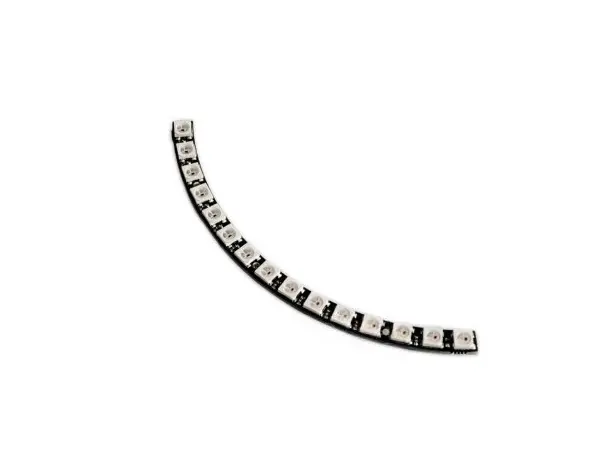
- Quarter ring consists of 4 solderable pieces; pegs included for assembly.
- Can be chained for larger displays using only 1 data pin.
Technical Specifications
- LED Driver: WS2812B (built-in)
- LED Type: 5050 RGB
- Number of LEDs: 15
- Voltage: DC 4-7V (5V recommended)
- Color: Full RGB
- Communication: Single-line digital
- Frequency: ≥ 400Hz
- Quarter ring design; four modules must be soldered together
Pinout

| Pin | Description |
|---|---|
| VCC | Power supply (+5V recommended, 4-7V acceptable) |
| GND | Ground |
| DIN | Data input, connect to Arduino digital pin |
| DOUT | Data output, connect to DIN of next module for cascading |
Arduino Wiring
- VCC → 5V on Arduino
- GND → GND on Arduino
- DIN → Digital Pin 6 (example) on Arduino
- DOUT → Connect to DIN of next module if chaining
Arduino Example Code
Uses the Adafruit NeoPixel Library.
#include <Adafruit_NeoPixel.h>

#define LED_PIN    6
#define NUM_LEDS   15

Adafruit_NeoPixel strip(NUM_LEDS, LED_PIN, NEO_GRB + NEO_KHZ800);

void setup() {
  strip.begin();
  strip.show(); // Initialize all pixels to 'off'
}

void loop() {
  // Simple color wipe animation
  for(int i=0; i < NUM_LEDS; i++) {
    strip.setPixelColor(i, strip.Color(255, 0, 0)); // Red
    strip.show();
    delay(100);
    strip.setPixelColor(i, strip.Color(0, 0, 0)); // Off
  }
}
Installation of Library
To install the Adafruit_NeoPixel library:
- Open Arduino IDE → Sketch → Include Library → Manage Libraries.
- Search for Adafruit NeoPixel.
- Click Install.
- Alternatively, download ZIP from GitHub and install via Sketch → Include Library → Add .ZIP Library.
Technical Specifications
- LED Driver: WS2812B (built-in)
- LED Type: 5050 RGB
- Number of LEDs: 15
- Voltage: DC 4-7V (5V recommended)
- Color: Full RGB
- Communication: Single-line digital
- Frequency: ≥ 400Hz
- Quarter ring design; four modules must be soldered together
Features
- Integrated control circuit and WS2812B RGB chips in 5050 package.
- Built-in signal reshaping circuit to prevent waveform distortion when cascading.
- Built-in electric reset and power-loss reset circuits.
- Each pixel supports 256 brightness levels for red, green, and blue channels, allowing 16,777,216 color combinations.
- Scan frequency not less than 400Hz/s.
- Voltage: DC 4-7V, standard 5V recommended.
- Single-line communication for easy digital control.
- Compatible with Arduino and Raspberry Pi platforms.
- Quarter ring consists of 4 solderable pieces; pegs included for assembly.
- Can be chained for larger displays using only 1 data pin.
Technical Specifications
- LED Driver: WS2812B (built-in)
- LED Type: 5050 RGB
- Number of LEDs: 15
- Voltage: DC 4-7V (5V recommended)
- Color: Full RGB
- Communication: Single-line digital
- Frequency: ≥ 400Hz
- Quarter ring design; four modules must be soldered together
Pinout
| Pin | Description |
|---|---|
| VCC | Power supply (+5V recommended, 4-7V acceptable) |
| GND | Ground |
| DIN | Data input, connect to Arduino digital pin |
| DOUT | Data output, connect to DIN of next module for cascading |
Arduino Wiring
- VCC → 5V on Arduino
- GND → GND on Arduino
- DIN → Digital Pin 6 (example) on Arduino
- DOUT → Connect to DIN of next module if chaining
Arduino Example Code
Uses the Adafruit NeoPixel Library.
#include <Adafruit_NeoPixel.h>

#define LED_PIN    6
#define NUM_LEDS   15

Adafruit_NeoPixel strip(NUM_LEDS, LED_PIN, NEO_GRB + NEO_KHZ800);

void setup() {
  strip.begin();
  strip.show(); // Initialize all pixels to 'off'
}

void loop() {
  // Simple color wipe animation
  for(int i=0; i < NUM_LEDS; i++) {
    strip.setPixelColor(i, strip.Color(255, 0, 0)); // Red
    strip.show();
    delay(100);
    strip.setPixelColor(i, strip.Color(0, 0, 0)); // Off
  }
}
Installation of Library
To install the Adafruit_NeoPixel library:
- Open Arduino IDE → Sketch → Include Library → Manage Libraries.
- Search for Adafruit NeoPixel.
- Click Install.
- Alternatively, download ZIP from GitHub and install via Sketch → Include Library → Add .ZIP Library.
Technical Specifications
- LED Driver: WS2812B (built-in)
- LED Type: 5050 RGB
- Number of LEDs: 15
- Voltage: DC 4-7V (5V recommended)
- Color: Full RGB
- Communication: Single-line digital
- Frequency: ≥ 400Hz
- Quarter ring design; four modules must be soldered together