Features
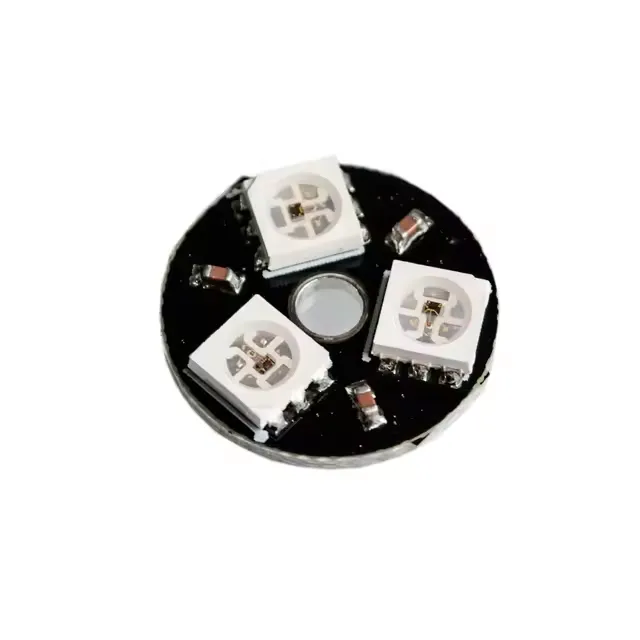
- 3 individually addressable RGB LEDs.
- Integrated WS2812 driver IC inside each 5050 LED.
- NeoPixel compatible communication protocol.
- Single-wire digital control interface.
- Built-in signal reshaping circuit.
- Power-on reset and brown-out protection.
- Uniform brightness and consistent color output.
- Supports cascading additional WS2812 modules.
- Data transfer speeds up to 800Kbps.
Specifications
- Operating Voltage: 5V DC
- LED Type: 5050 RGB with integrated WS2812 IC
- Number of LEDs: 3
- Brightness Resolution: 256 levels per color
- Color Depth: 24-bit (16,777,216 colors)
- Communication Interface: Single-wire digital
- Data Rate: Up to 800Kbps
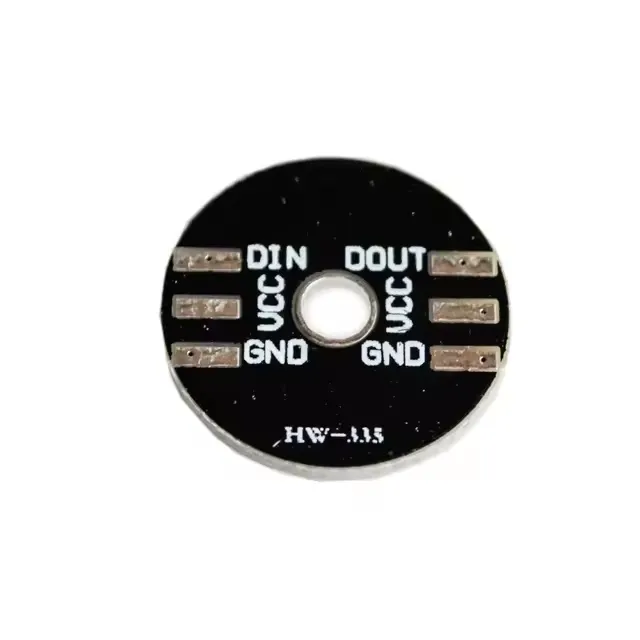
Pinout:
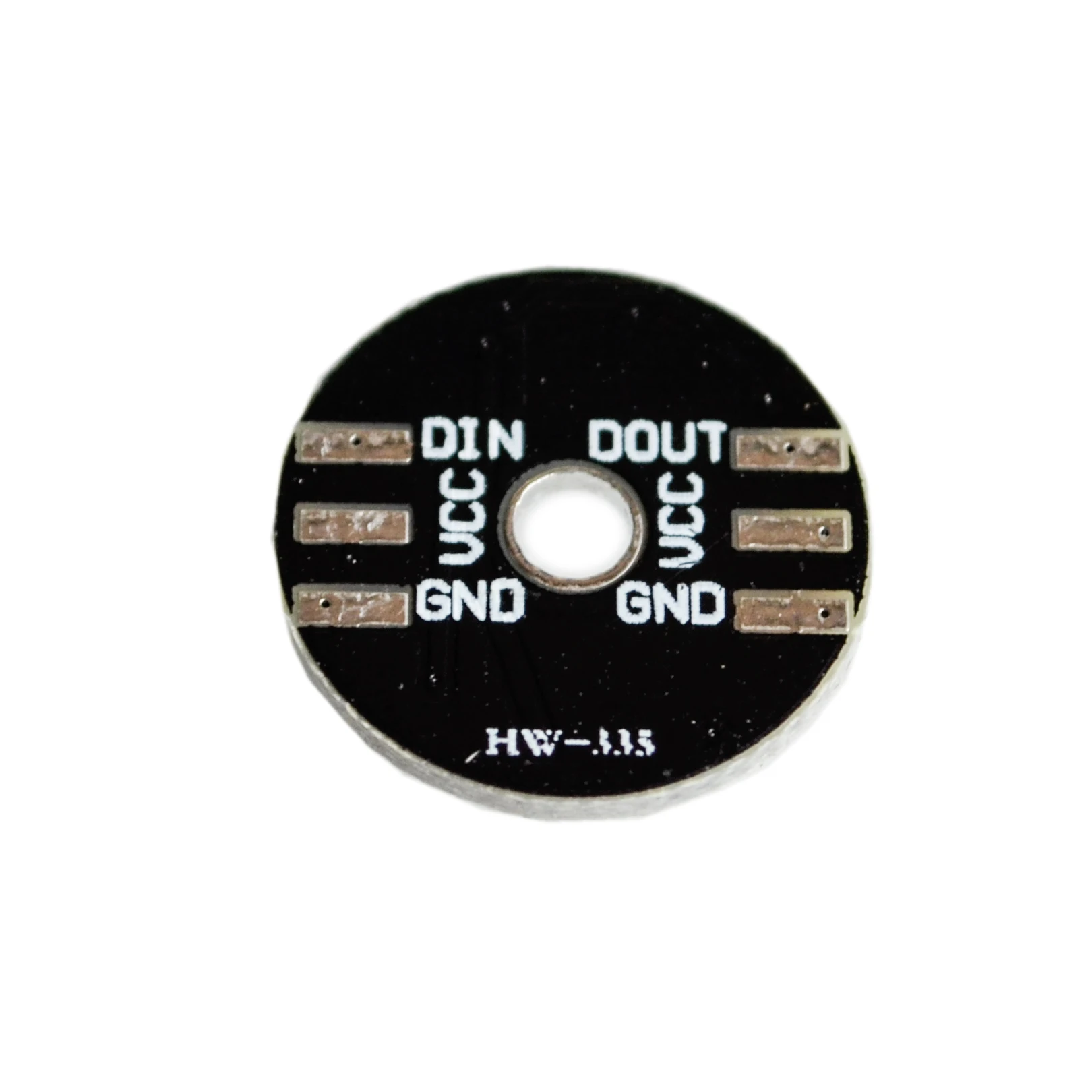
Arduino Wiring
- VCC → 5V on Arduino
- GND → GND on Arduino
- DIN → Digital Pin (example: D6)
- DOUT → Optional cascading output
Arduino Example Code
Installation of Library
To install the Adafruit_NeoPixel library:
- Open Arduino IDE → Sketch → Include Library → Manage Libraries.
- Search for Adafruit NeoPixel.
- Click Install.
- Alternatively, download ZIP from GitHub and install via Sketch → Include Library → Add .ZIP Library.
#include <Adafruit_NeoPixel.h>

#ifdef __AVR__
  #include <avr/power.h>
#endif

#define LED_PIN     6
#define NUMPIXELS   3
#define DELAYVAL    500

Adafruit_NeoPixel pixels(NUMPIXELS, LED_PIN, NEO_GRB + NEO_KHZ800);

void setup() {
  #if defined(__AVR_ATtiny85__) && (F_CPU == 16000000)
    clock_prescale_set(clock_div_1);
  #endif

  pixels.begin();
}

void loop() {
  pixels.clear();

  for(int i = 0; i < NUMPIXELS; i++) {
    pixels.setPixelColor(i, pixels.Color(0, 0, 255)); // Blue
    pixels.show();
    delay(DELAYVAL);
    pixels.setPixelColor(i, 0);
  }
}
Applications
- Decorative and ambient lighting.
- LED animations and visual effects.
- Status indicators and dashboards.
- Wearable electronics.
- DIY and embedded projects.
Resources
Features
- 3 individually addressable RGB LEDs.
- Integrated WS2812 driver IC inside each 5050 LED.
- NeoPixel compatible communication protocol.
- Single-wire digital control interface.
- Built-in signal reshaping circuit.
- Power-on reset and brown-out protection.
- Uniform brightness and consistent color output.
- Supports cascading additional WS2812 modules.
- Data transfer speeds up to 800Kbps.
Specifications
- Operating Voltage: 5V DC
- LED Type: 5050 RGB with integrated WS2812 IC
- Number of LEDs: 3
- Brightness Resolution: 256 levels per color
- Color Depth: 24-bit (16,777,216 colors)
- Communication Interface: Single-wire digital
- Data Rate: Up to 800Kbps
Pinout:
Arduino Wiring
- VCC → 5V on Arduino
- GND → GND on Arduino
- DIN → Digital Pin (example: D6)
- DOUT → Optional cascading output
Arduino Example Code
Installation of Library
To install the Adafruit_NeoPixel library:
- Open Arduino IDE → Sketch → Include Library → Manage Libraries.
- Search for Adafruit NeoPixel.
- Click Install.
- Alternatively, download ZIP from GitHub and install via Sketch → Include Library → Add .ZIP Library.
#include <Adafruit_NeoPixel.h>

#ifdef __AVR__
  #include <avr/power.h>
#endif

#define LED_PIN     6
#define NUMPIXELS   3
#define DELAYVAL    500

Adafruit_NeoPixel pixels(NUMPIXELS, LED_PIN, NEO_GRB + NEO_KHZ800);

void setup() {
  #if defined(__AVR_ATtiny85__) && (F_CPU == 16000000)
    clock_prescale_set(clock_div_1);
  #endif

  pixels.begin();
}

void loop() {
  pixels.clear();

  for(int i = 0; i < NUMPIXELS; i++) {
    pixels.setPixelColor(i, pixels.Color(0, 0, 255)); // Blue
    pixels.show();
    delay(DELAYVAL);
    pixels.setPixelColor(i, 0);
  }
}
Applications
- Decorative and ambient lighting.
- LED animations and visual effects.
- Status indicators and dashboards.
- Wearable electronics.
- DIY and embedded projects.