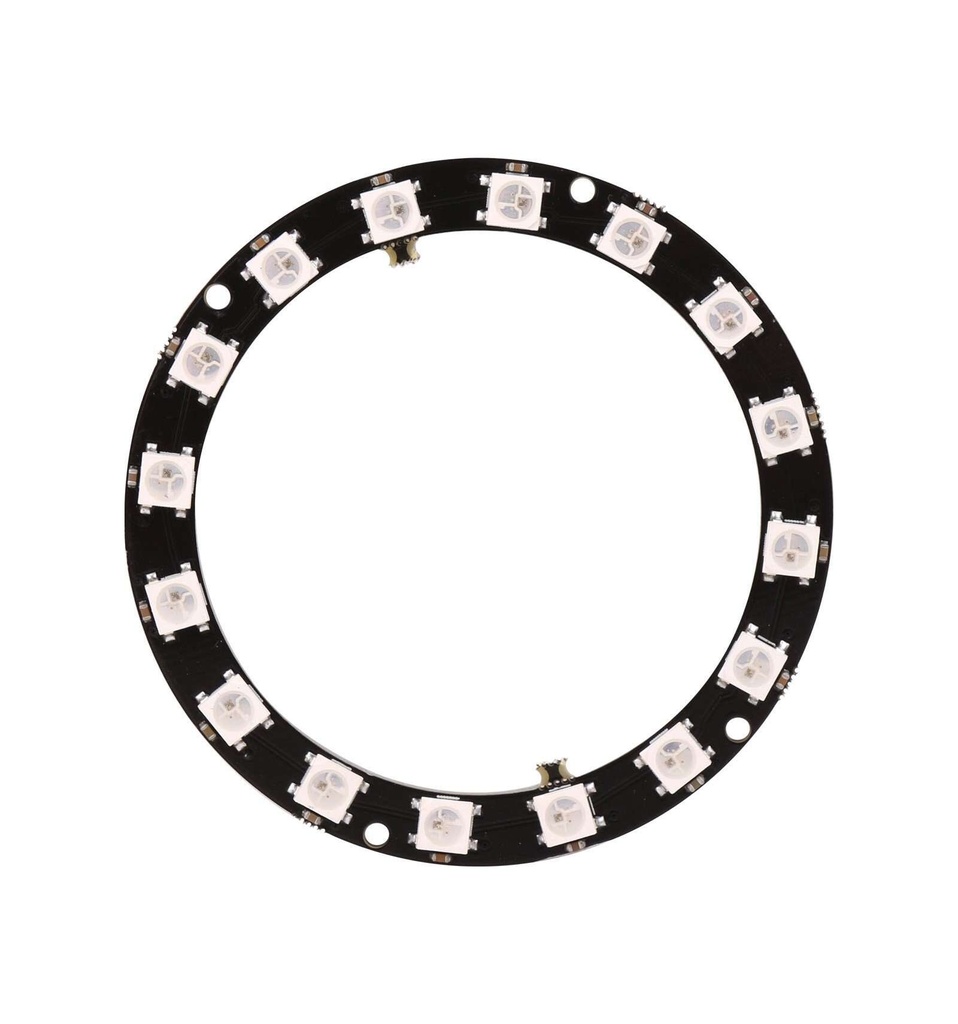
Features
- 16 individually addressable RGB LEDs.
- Integrated WS2812 driver IC inside each 5050 LED.
- NeoPixel compatible single-wire digital control interface.
- Uniform brightness and consistent color output.
- Supports cascading additional WS2812 modules.
- Data transfer speeds up to 800Kbps.
- Compatible with common NeoPixel libraries.
Specifications
- Operating Voltage: 5V DC
- LED Type: 5050 RGB with integrated WS2812 IC
- Number of LEDs: 16
- Brightness Resolution: 256 levels per color
- Color Depth: 24-bit (16,777,216 colors)
- Communication Interface: Single-wire digital
- Data Rate: Up to 800Kbps
Pinout
- GND – Ground connection
- VCC – 5V power supply
- IN – Digital data input from microcontroller
- OUT – Digital data output for cascading modules
Arduino Wiring

- VCC → 5V on Arduino
- GND → GND on Arduino
- DIN → Digital Pin (example: D6)
- DOUT → Optional cascading output
Arduino Example Code
Installation of Library
To install the Adafruit_NeoPixel library:
- Open Arduino IDE → Sketch → Include Library → Manage Libraries.
- Search for Adafruit NeoPixel.
- Click Install.
- Alternatively, download ZIP from GitHub and install via Sketch → Include Library → Add .ZIP Library.
#include "Adafruit_NeoPixel.h"

#define LED_PIN 6 // Pin connected to DIN of LED ring
#define NUMPIXELS 16 // Number of LEDs in the ring

Adafruit_NeoPixel strip(NUMPIXELS, LED_PIN, NEO_GRB + NEO_KHZ800);

// Simple delay for animations
#define DELAY_MS 50

void setup() {
 strip.begin(); // Initialize the LED strip
 strip.show(); // Turn OFF all LEDs
}

// Fill strip with one color
void colorWipe(uint32_t color, int wait) {
 for (int i = 0; i < strip.numPixels(); i++) {
 strip.setPixelColor(i, color);
 strip.show();
 delay(wait);
 }
}

// Generate rainbow colors across 0-255 positions
uint32_t Wheel(byte pos) {
 if(pos < 85) {
 return strip.Color(pos * 3, 255 - pos * 3, 0);
 } else if(pos < 170) {
 pos -= 85;
 return strip.Color(255 - pos * 3, 0, pos * 3);
 } else {
 pos -= 170;
 return strip.Color(0, pos * 3, 255 - pos * 3);
 }
}

// Rainbow cycle across all LEDs
void rainbowCycle(int wait) {
 for(long j=0; j<256*5; j++) { // 5 cycles of all colors
 for(int i=0; i<strip.numPixels(); i++) {
 strip.setPixelColor(i, Wheel(((i * 256 / strip.numPixels()) + j) & 255));
 }
 strip.show();
 delay(wait);
 }
}

void loop() {
 colorWipe(strip.Color(255, 0, 0), DELAY_MS); // Red
 colorWipe(strip.Color(0, 255, 0), DELAY_MS); // Green
 colorWipe(strip.Color(0, 0, 255), DELAY_MS); // Blue
 rainbowCycle(20); // Rainbow animation
}
Applications
- Decorative and ambient lighting
- LED animations and visual effects
- Status indicators and dashboards
- Wearable electronics
- DIY and embedded projects
Resources
Features
- 16 individually addressable RGB LEDs.
- Integrated WS2812 driver IC inside each 5050 LED.
- NeoPixel compatible single-wire digital control interface.
- Uniform brightness and consistent color output.
- Supports cascading additional WS2812 modules.
- Data transfer speeds up to 800Kbps.
- Compatible with common NeoPixel libraries.
Specifications
- Operating Voltage: 5V DC
- LED Type: 5050 RGB with integrated WS2812 IC
- Number of LEDs: 16
- Brightness Resolution: 256 levels per color
- Color Depth: 24-bit (16,777,216 colors)
- Communication Interface: Single-wire digital
- Data Rate: Up to 800Kbps
Pinout
- GND – Ground connection
- VCC – 5V power supply
- IN – Digital data input from microcontroller
- OUT – Digital data output for cascading modules
Arduino Wiring
- VCC → 5V on Arduino
- GND → GND on Arduino
- DIN → Digital Pin (example: D6)
- DOUT → Optional cascading output
Arduino Example Code
Installation of Library
To install the Adafruit_NeoPixel library:
- Open Arduino IDE → Sketch → Include Library → Manage Libraries.
- Search for Adafruit NeoPixel.
- Click Install.
- Alternatively, download ZIP from GitHub and install via Sketch → Include Library → Add .ZIP Library.
#include "Adafruit_NeoPixel.h"

#define LED_PIN 6 // Pin connected to DIN of LED ring
#define NUMPIXELS 16 // Number of LEDs in the ring

Adafruit_NeoPixel strip(NUMPIXELS, LED_PIN, NEO_GRB + NEO_KHZ800);

// Simple delay for animations
#define DELAY_MS 50

void setup() {
 strip.begin(); // Initialize the LED strip
 strip.show(); // Turn OFF all LEDs
}

// Fill strip with one color
void colorWipe(uint32_t color, int wait) {
 for (int i = 0; i < strip.numPixels(); i++) {
 strip.setPixelColor(i, color);
 strip.show();
 delay(wait);
 }
}

// Generate rainbow colors across 0-255 positions
uint32_t Wheel(byte pos) {
 if(pos < 85) {
 return strip.Color(pos * 3, 255 - pos * 3, 0);
 } else if(pos < 170) {
 pos -= 85;
 return strip.Color(255 - pos * 3, 0, pos * 3);
 } else {
 pos -= 170;
 return strip.Color(0, pos * 3, 255 - pos * 3);
 }
}

// Rainbow cycle across all LEDs
void rainbowCycle(int wait) {
 for(long j=0; j<256*5; j++) { // 5 cycles of all colors
 for(int i=0; i<strip.numPixels(); i++) {
 strip.setPixelColor(i, Wheel(((i * 256 / strip.numPixels()) + j) & 255));
 }
 strip.show();
 delay(wait);
 }
}

void loop() {
 colorWipe(strip.Color(255, 0, 0), DELAY_MS); // Red
 colorWipe(strip.Color(0, 255, 0), DELAY_MS); // Green
 colorWipe(strip.Color(0, 0, 255), DELAY_MS); // Blue
 rainbowCycle(20); // Rainbow animation
}
Applications
- Decorative and ambient lighting
- LED animations and visual effects
- Status indicators and dashboards
- Wearable electronics
- DIY and embedded projects