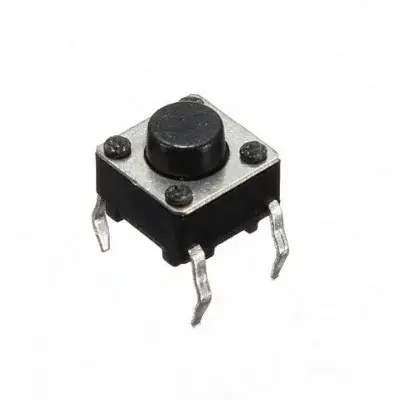
Features
- Compact 6x6x9mm size for space-saving applications.
- 2-pin design for easy connection to microcontrollers.
- Momentary push button with tactile feedback.
- Long operational life and durable mechanical design.
- Easy to integrate into breadboards or PCB designs.
- Low operating voltage and current requirement.
Specifications
- Switch Type: Momentary push button (normally open, NO)
- Pin Count: 2
- Dimensions: 6 x 6 x 9 mm
- Actuation Force: ~160–200 g
- Operating Voltage: ≤12V DC
- Operating Current: ≤50mA
- Lifespan: >100,000 presses
Pinout

| Pin | Description |
|---|---|
| 1 | Input / Connected to the microcontroller digital pin |
| 2 | Ground (GND) |
Arduino Wiring
![Using a Button with Arduino [Guide + Code]](https://i0.wp.com/www.programmingelectronics.com/wp-content/uploads/2014/01/13-Debounce-Resized-1024x781.jpg)
- Connect one pin of the switch to a digital input pin on the Arduino (example: D2).
- Connect the other pin to GND.
- Enable the internal pull-up resistor in Arduino to read HIGH when the button is not pressed.
Arduino Example Code
const int buttonPin = 2;    // Pin connected to switch
const int ledPin = 13;      // Pin connected to onboard LED

int buttonState = 0;

void setup() {
  pinMode(buttonPin, INPUT_PULLUP); // Enable internal pull-up resistor
  pinMode(ledPin, OUTPUT);
  Serial.begin(9600);
}

void loop() {
  // Read the state of the push button
  buttonState = digitalRead(buttonPin);

  if (buttonState == LOW) { // Button pressed (active LOW)
    digitalWrite(ledPin, HIGH); // Turn on LED
    Serial.println("Button Pressed");
  } else {
    digitalWrite(ledPin, LOW);  // Turn off LED
  }

  delay(50); // Debounce delay
}
Tips & Information
- The switch is active LOW when using internal pull-up resistors: pressing connects the pin to GND.
- Debouncing is important; a simple software delay or a hardware capacitor can help prevent false triggering.
- This tactile switch can be mounted directly on a breadboard for rapid prototyping.
- Combine multiple switches with arrays or keypads for advanced user interfaces.
- Ensure not to exceed the rated current (50mA) to avoid damage.
Features
- Compact 6x6x9mm size for space-saving applications.
- 2-pin design for easy connection to microcontrollers.
- Momentary push button with tactile feedback.
- Long operational life and durable mechanical design.
- Easy to integrate into breadboards or PCB designs.
- Low operating voltage and current requirement.
Specifications
- Switch Type: Momentary push button (normally open, NO)
- Pin Count: 2
- Dimensions: 6 x 6 x 9 mm
- Actuation Force: ~160–200 g
- Operating Voltage: ≤12V DC
- Operating Current: ≤50mA
- Lifespan: >100,000 presses
Pinout
| Pin | Description |
|---|---|
| 1 | Input / Connected to the microcontroller digital pin |
| 2 | Ground (GND) |
Arduino Wiring
- Connect one pin of the switch to a digital input pin on the Arduino (example: D2).
- Connect the other pin to GND.
- Enable the internal pull-up resistor in Arduino to read HIGH when the button is not pressed.
Arduino Example Code
const int buttonPin = 2;    // Pin connected to switch
const int ledPin = 13;      // Pin connected to onboard LED

int buttonState = 0;

void setup() {
  pinMode(buttonPin, INPUT_PULLUP); // Enable internal pull-up resistor
  pinMode(ledPin, OUTPUT);
  Serial.begin(9600);
}

void loop() {
  // Read the state of the push button
  buttonState = digitalRead(buttonPin);

  if (buttonState == LOW) { // Button pressed (active LOW)
    digitalWrite(ledPin, HIGH); // Turn on LED
    Serial.println("Button Pressed");
  } else {
    digitalWrite(ledPin, LOW);  // Turn off LED
  }

  delay(50); // Debounce delay
}
Tips & Information
- The switch is active LOW when using internal pull-up resistors: pressing connects the pin to GND.
- Debouncing is important; a simple software delay or a hardware capacitor can help prevent false triggering.
- This tactile switch can be mounted directly on a breadboard for rapid prototyping.
- Combine multiple switches with arrays or keypads for advanced user interfaces.
- Ensure not to exceed the rated current (50mA) to avoid damage.