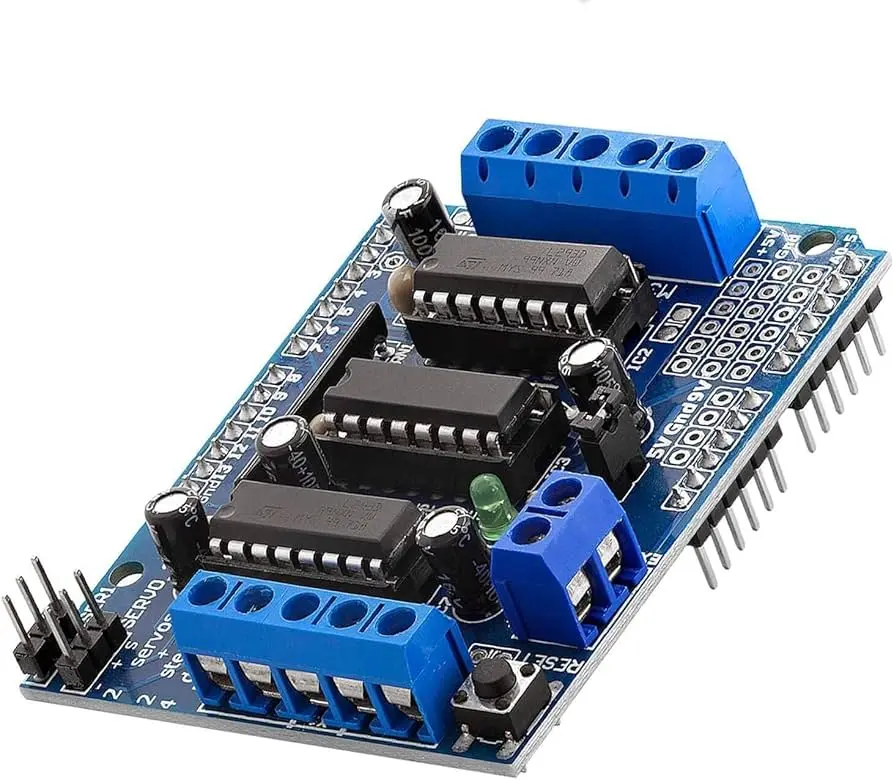
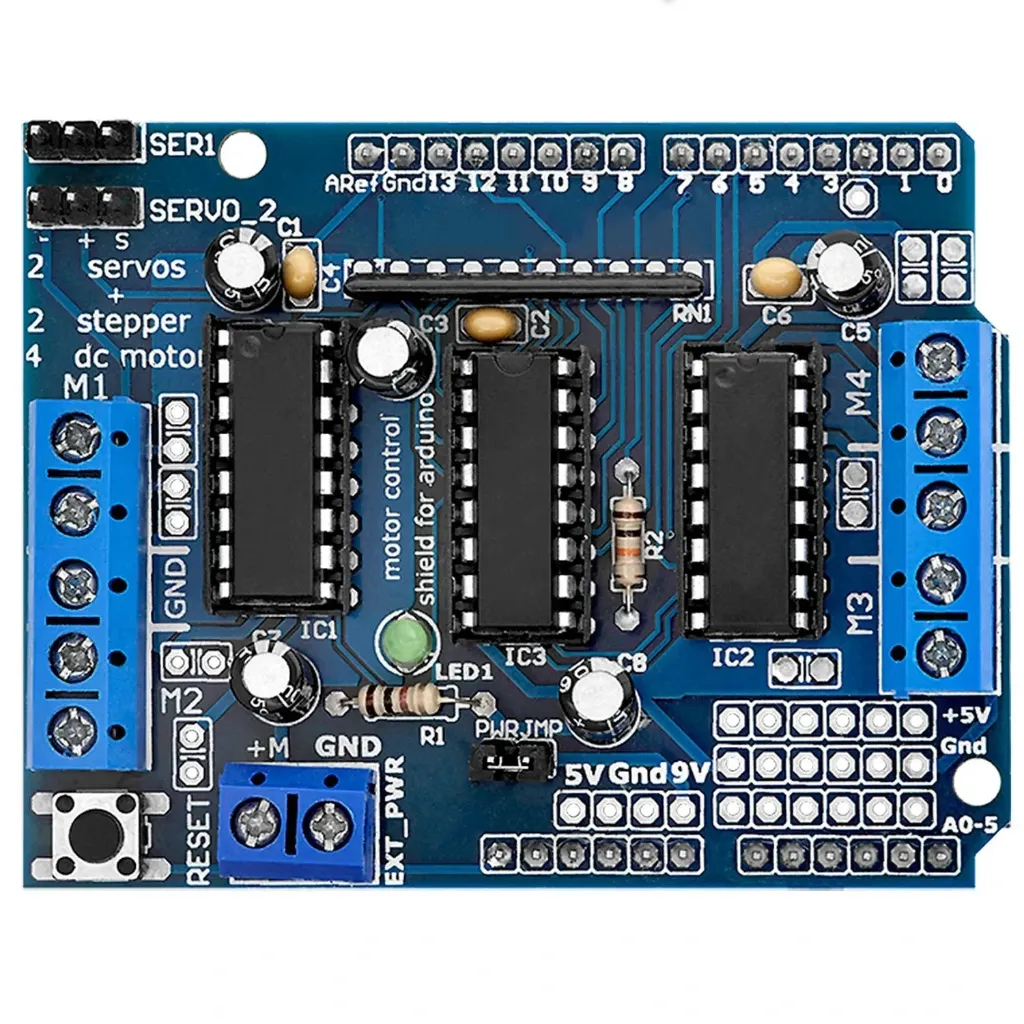
The L293D Motor Shield is a versatile motor control expansion board designed for seamless integration with Arduino platforms. Built around dual L293D driver ICs, the shield enables reliable control of multiple motors including DC motors, stepper motors, and hobby servos. With onboard protection circuitry and convenient terminal block connectors, this shield provides a simple and efficient solution for robotics, automation, and motion control projects.
Features
- Multi-Motor Support: Control up to 4 DC motors, 2 stepper motors, or 2 servo motors.
- Dual L293D Drivers: Integrated motor driver ICs with thermal protection.
- Four H-Bridges: 0.6A continuous current per channel (1.2A peak).
- Wide Voltage Range: Supports motors from 4.5V to 25V DC.
- User-Friendly Connectors: Large terminal blocks for easy motor wiring.
- Servo Interfaces: Dedicated 5V headers for jitter-free servo control.
- External Power Input: Separate motor power supply connection.
- Arduino Reset Button: Convenient onboard reset access.
- Library Compatibility: Works with common Arduino motor libraries.
Specifications
- Motor Driver IC: L293D
- Drive Current: 0.6A per channel (1.2A peak)
- Motor Voltage: 4.5V – 25V DC
- Motor Channels: 4 DC motors / 2 Stepper motors
- Servo Outputs: 2 × 5V servo headers
- Protection: Thermal shutdown & Back-EMF diodes
- Dimensions: 70 × 53 × 20 mm
Pinout
| Pin | Function |
|---|---|
| GND | Ground |
| VCC | Logic Supply (5V) |
| EN1 | Motor Enable Channel 1 |
| IN1 / IN2 | Motor 1 Control Inputs |
| IN3 / IN4 | Motor 2 Control Inputs |
| EN2 | Motor Enable Channel 2 |
| VCC1 | External Motor Supply |
| GND1 | External Motor Ground |

Arduino Wiring
No additional logic wiring is required. The shield mounts directly onto the Arduino board. Only motors and external power connections are needed.
- Motors → Connect to M1 – M4 terminal blocks
- External Motor Power → Connect to EXT_PWR terminals
- Servos (Optional) → Connect to Servo 1 / Servo 2 headers
Library Installation
Install the AFMotor library for simplified motor control:
- Open Arduino IDE → Sketch → Include Library → Manage Libraries
- Search for Adafruit Motor Shield Library
- Click Install
Sample Arduino Code
#include "AFMotor.h"

AF_DCMotor motor(4);

void setup() {
  motor.setSpeed(200);
  motor.run(RELEASE);
}

void loop() {
  motor.run(FORWARD);
  delay(2000);

  motor.run(BACKWARD);
  delay(2000);

  motor.run(RELEASE);
  delay(1000);
}
Applications
- Robotics systems
- Automation projects
- Motorized mechanisms
- Stepper motor control
- Educational experiments
Tips & Information
- Always use an external power supply for motors.
- Avoid powering motors directly from Arduino 5V.
- Ensure motor voltage matches specifications.
- Heat buildup under load is normal.
- Peak current ratings should not be used continuously.
The L293D Motor Shield is a versatile motor control expansion board designed for seamless integration with Arduino platforms. Built around dual L293D driver ICs, the shield enables reliable control of multiple motors including DC motors, stepper motors, and hobby servos. With onboard protection circuitry and convenient terminal block connectors, this shield provides a simple and efficient solution for robotics, automation, and motion control projects.
Features
- Multi-Motor Support: Control up to 4 DC motors, 2 stepper motors, or 2 servo motors.
- Dual L293D Drivers: Integrated motor driver ICs with thermal protection.
- Four H-Bridges: 0.6A continuous current per channel (1.2A peak).
- Wide Voltage Range: Supports motors from 4.5V to 25V DC.
- User-Friendly Connectors: Large terminal blocks for easy motor wiring.
- Servo Interfaces: Dedicated 5V headers for jitter-free servo control.
- External Power Input: Separate motor power supply connection.
- Arduino Reset Button: Convenient onboard reset access.
- Library Compatibility: Works with common Arduino motor libraries.
Specifications
- Motor Driver IC: L293D
- Drive Current: 0.6A per channel (1.2A peak)
- Motor Voltage: 4.5V – 25V DC
- Motor Channels: 4 DC motors / 2 Stepper motors
- Servo Outputs: 2 × 5V servo headers
- Protection: Thermal shutdown & Back-EMF diodes
- Dimensions: 70 × 53 × 20 mm
Pinout
| Pin | Function |
|---|---|
| GND | Ground |
| VCC | Logic Supply (5V) |
| EN1 | Motor Enable Channel 1 |
| IN1 / IN2 | Motor 1 Control Inputs |
| IN3 / IN4 | Motor 2 Control Inputs |
| EN2 | Motor Enable Channel 2 |
| VCC1 | External Motor Supply |
| GND1 | External Motor Ground |
Arduino Wiring
No additional logic wiring is required. The shield mounts directly onto the Arduino board. Only motors and external power connections are needed.
- Motors → Connect to M1 – M4 terminal blocks
- External Motor Power → Connect to EXT_PWR terminals
- Servos (Optional) → Connect to Servo 1 / Servo 2 headers
Library Installation
Install the AFMotor library for simplified motor control:
- Open Arduino IDE → Sketch → Include Library → Manage Libraries
- Search for Adafruit Motor Shield Library
- Click Install
Sample Arduino Code
#include "AFMotor.h"

AF_DCMotor motor(4);

void setup() {
  motor.setSpeed(200);
  motor.run(RELEASE);
}

void loop() {
  motor.run(FORWARD);
  delay(2000);

  motor.run(BACKWARD);
  delay(2000);

  motor.run(RELEASE);
  delay(1000);
}
Applications
- Robotics systems
- Automation projects
- Motorized mechanisms
- Stepper motor control
- Educational experiments
Tips & Information
- Always use an external power supply for motors.
- Avoid powering motors directly from Arduino 5V.
- Ensure motor voltage matches specifications.
- Heat buildup under load is normal.
- Peak current ratings should not be used continuously.