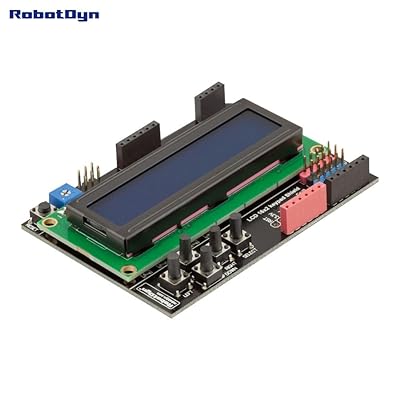
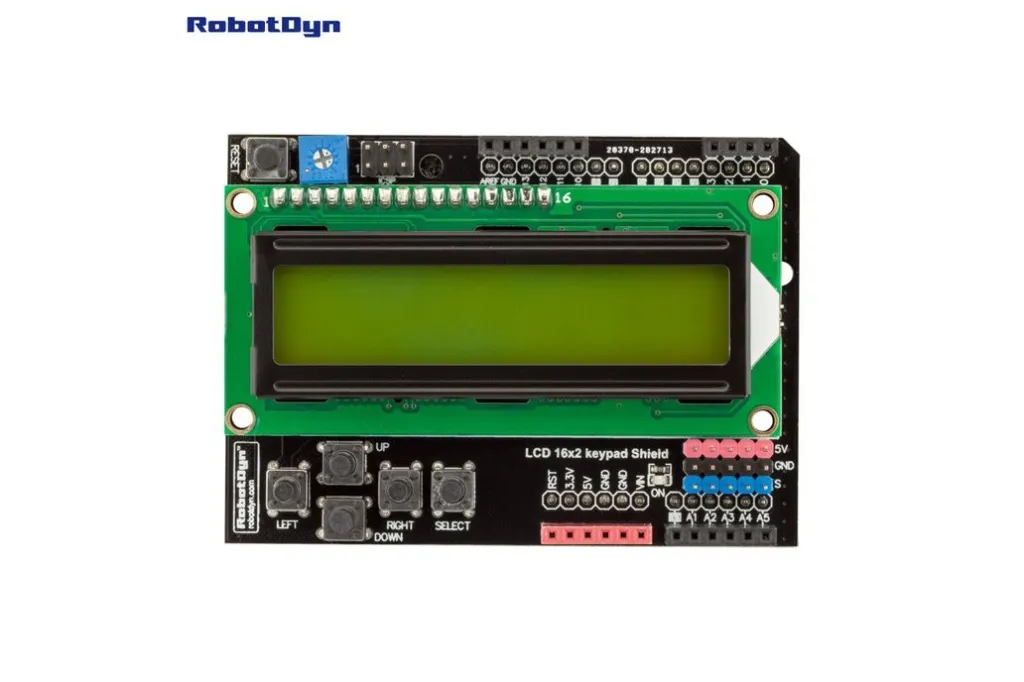
The display is based on the industry-standard HD44780 controller, ensuring full compatibility with the Arduino LiquidCrystal library. The onboard buttons are connected through a resistor ladder network to a single analogue input, allowing multiple button readings using only one Arduino pin.
Features
- 16×2 character LCD (blue backlight).
- HD44780-compatible controller.
- Adjustable display contrast via potentiometer.
- Five navigation buttons (Up, Down, Left, Right, Select).
- Buttons connected to a single analogue input (A0).
- Uses standard Arduino LiquidCrystal library.
- Direct shield mounting – no wiring required.
- Additional breakout pins for peripherals.
Specifications
- Display Type: 16×2 Character LCD
- Controller: HD44780 Compatible
- Backlight Color: Blue
- Operating Voltage: 5V
- Interface: 4-bit parallel
- Buttons: 5 navigation keys
LCD Interface Pinouts
- RS → D8
- Enable → D9
- D4 → D4
- D5 → D5
- D6 → D6
- D7 → D7
Initialization in Arduino sketch:
LiquidCrystal lcd(8, 9, 4, 5, 6, 7);
Buttons Interface
All five buttons are connected to analogue input A0 using a resistor ladder. Each button generates a different voltage level:
- RIGHT
- UP
- DOWN
- LEFT
- SELECT
Note: Accurate reading is only possible when a single button is pressed. Simultaneous presses may produce undefined values.
Power Supply
The shield is powered directly from the Arduino 5V supply.
Library
Uses the standard Arduino LiquidCrystal library (included with Arduino IDE).
#include <LiquidCrystal.h>
Sample Arduino Code
#include <LiquidCrystal.h>

LiquidCrystal lcd(8, 9, 4, 5, 6, 7);

int lcd_key = 0;
int adc_key_in = 0;

#define btnRIGHT  0
#define btnUP     1
#define btnDOWN   2
#define btnLEFT   3
#define btnSELECT 4
#define btnNONE   5

int read_LCD_buttons() {
  adc_key_in = analogRead(0);

  if (adc_key_in > 1000) return btnNONE;
  if (adc_key_in < 50)   return btnRIGHT;
  if (adc_key_in < 250)  return btnUP;
  if (adc_key_in < 450)  return btnDOWN;
  if (adc_key_in < 650)  return btnLEFT;
  if (adc_key_in < 850)  return btnSELECT;

  return btnNONE;
}

void setup() {
  lcd.begin(16, 2);
  lcd.setCursor(0, 0);
  lcd.print("Push buttons");
}

void loop() {
  lcd.setCursor(0, 1);
  lcd_key = read_LCD_buttons();

  switch (lcd_key) {
    case btnRIGHT:  lcd.print("RIGHT "); break;
    case btnLEFT:   lcd.print("LEFT  "); break;
    case btnUP:     lcd.print("UP    "); break;
    case btnDOWN:   lcd.print("DOWN  "); break;
    case btnSELECT: lcd.print("SELECT"); break;
    default:        lcd.print("NONE  "); break;
  }
}
Applications
- User interface panels
- Menu systems
- Sensor monitoring
- Embedded projects
- Arduino learning platforms
Tips & Information
- Adjust contrast using the onboard potentiometer if text is not visible.
- Avoid pressing multiple buttons simultaneously.
- Backlight brightness depends on shield design (may be fixed).
- Compatible with most Arduino Uno-type boards.
- Custom characters can be created using LiquidCrystal functions.
The display is based on the industry-standard HD44780 controller, ensuring full compatibility with the Arduino LiquidCrystal library. The onboard buttons are connected through a resistor ladder network to a single analogue input, allowing multiple button readings using only one Arduino pin.
Features
- 16×2 character LCD (blue backlight).
- HD44780-compatible controller.
- Adjustable display contrast via potentiometer.
- Five navigation buttons (Up, Down, Left, Right, Select).
- Buttons connected to a single analogue input (A0).
- Uses standard Arduino LiquidCrystal library.
- Direct shield mounting – no wiring required.
- Additional breakout pins for peripherals.
Specifications
- Display Type: 16×2 Character LCD
- Controller: HD44780 Compatible
- Backlight Color: Blue
- Operating Voltage: 5V
- Interface: 4-bit parallel
- Buttons: 5 navigation keys
LCD Interface Pinouts
- RS → D8
- Enable → D9
- D4 → D4
- D5 → D5
- D6 → D6
- D7 → D7
Initialization in Arduino sketch:
LiquidCrystal lcd(8, 9, 4, 5, 6, 7);
Buttons Interface
All five buttons are connected to analogue input A0 using a resistor ladder. Each button generates a different voltage level:
- RIGHT
- UP
- DOWN
- LEFT
- SELECT
Note: Accurate reading is only possible when a single button is pressed. Simultaneous presses may produce undefined values.
Power Supply
The shield is powered directly from the Arduino 5V supply.
Library
Uses the standard Arduino LiquidCrystal library (included with Arduino IDE).
#include <LiquidCrystal.h>
Sample Arduino Code
#include <LiquidCrystal.h>

LiquidCrystal lcd(8, 9, 4, 5, 6, 7);

int lcd_key = 0;
int adc_key_in = 0;

#define btnRIGHT  0
#define btnUP     1
#define btnDOWN   2
#define btnLEFT   3
#define btnSELECT 4
#define btnNONE   5

int read_LCD_buttons() {
  adc_key_in = analogRead(0);

  if (adc_key_in > 1000) return btnNONE;
  if (adc_key_in < 50)   return btnRIGHT;
  if (adc_key_in < 250)  return btnUP;
  if (adc_key_in < 450)  return btnDOWN;
  if (adc_key_in < 650)  return btnLEFT;
  if (adc_key_in < 850)  return btnSELECT;

  return btnNONE;
}

void setup() {
  lcd.begin(16, 2);
  lcd.setCursor(0, 0);
  lcd.print("Push buttons");
}

void loop() {
  lcd.setCursor(0, 1);
  lcd_key = read_LCD_buttons();

  switch (lcd_key) {
    case btnRIGHT:  lcd.print("RIGHT "); break;
    case btnLEFT:   lcd.print("LEFT  "); break;
    case btnUP:     lcd.print("UP    "); break;
    case btnDOWN:   lcd.print("DOWN  "); break;
    case btnSELECT: lcd.print("SELECT"); break;
    default:        lcd.print("NONE  "); break;
  }
}
Applications
- User interface panels
- Menu systems
- Sensor monitoring
- Embedded projects
- Arduino learning platforms
Tips & Information
- Adjust contrast using the onboard potentiometer if text is not visible.
- Avoid pressing multiple buttons simultaneously.
- Backlight brightness depends on shield design (may be fixed).
- Compatible with most Arduino Uno-type boards.
- Custom characters can be created using LiquidCrystal functions.