Features
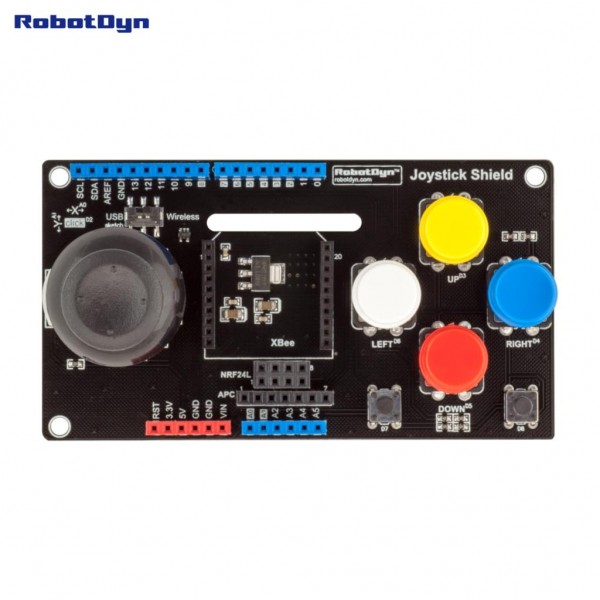
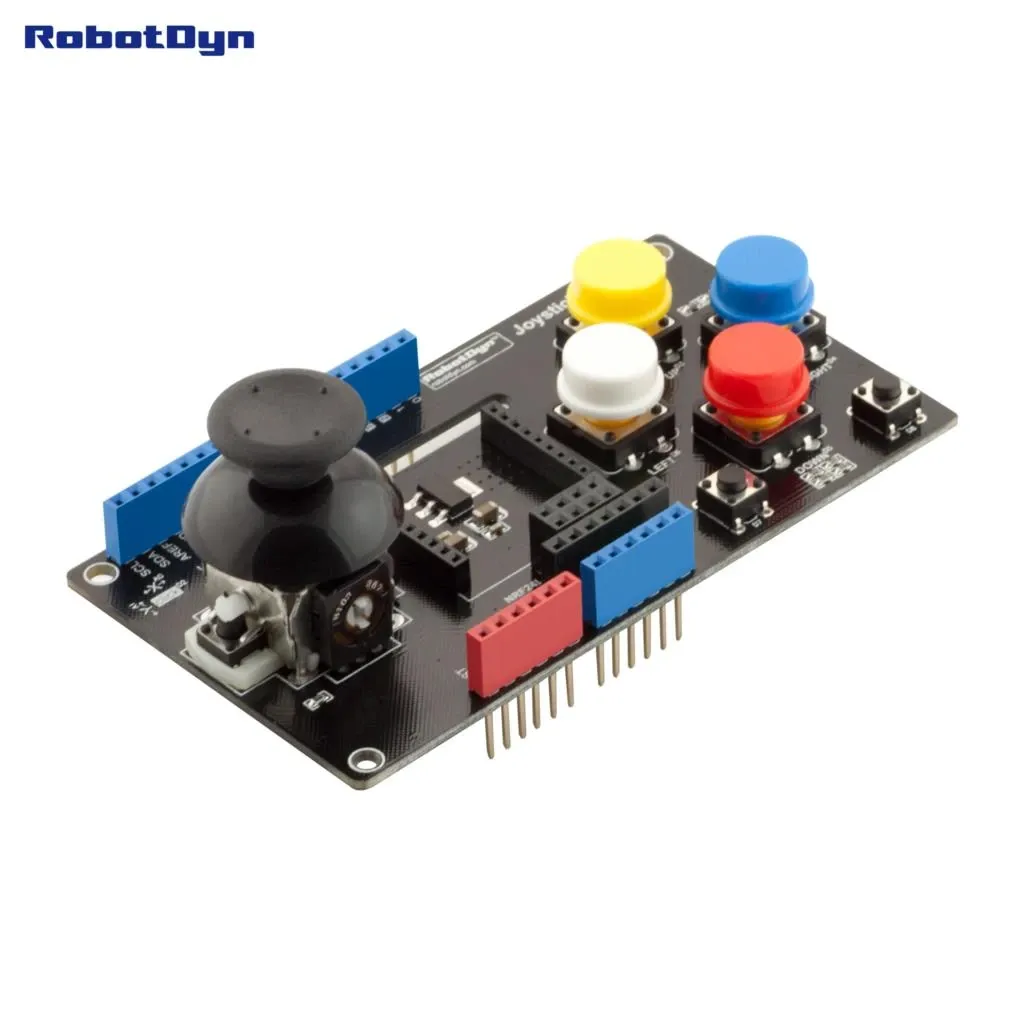
- Compatible with Arduino Uno and Arduino Mega
- Two-axis analog joystick (X and Y output)
- Six digital push buttons
- Wireless module support (UART or SPI based)
- Stackable shield form factor
- Plug-and-play installation
Specifications
- Operating Voltage: 5V (from Arduino)
- Joystick Output: Analog (0–5V range)
- Button Output: Digital (LOW/HIGH)
- Communication Interfaces: UART (xBee/APC200), SPI (NRF24L01)
- Board Compatibility: Arduino Uno / Mega (R3 standard layout)
Pinout
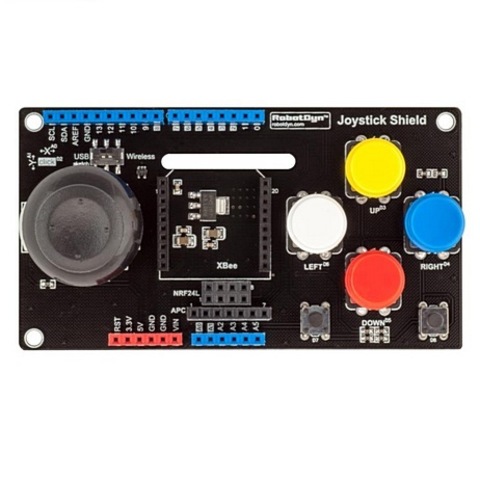

- A0 – Joystick X-axis
- A1 – Joystick Y-axis
- D2–D7 – Digital button inputs (varies by revision)
- D10–D13 – SPI interface (NRF24L01)
- D0–D1 – UART (xBee / APC200)
- 5V – Power
- 3.3V – Power for NRF24L01
- GND – Ground
Library Support
- No dedicated library required for joystick (uses analogRead() and digitalRead())
- NRF24L01: RF24 Library
- xBee: Arduino XBee Library or Serial communication
- APC200: Standard UART communication
Connection
- Align the shield with Arduino headers and press firmly into place
- Install the wireless module in the designated socket
- Power Arduino via USB or external adapter
- Read the joystick via A0 and A1
- Read buttons via assigned digital pins
Schematics

- Joystick potentiometers connected to analog inputs
- Push buttons connected to digital I/O pins
- Wireless module interface routed to SPI or UART lines
- Powered directly from Arduino 5V and 3.3V rails
Applications
- Wireless robotics control
- Remote-controlled vehicles
- Industrial prototype control panels
- Educational Arduino projects
- Custom game controllers
Resources & Libraries
- Arduino IDE: https://www.arduino.cc/en/software
- Arduino Reference (analogRead / digitalRead): https://www.arduino.cc/reference/en/
- RF24 Library (NRF24L01): https://github.com/nRF24/RF24
- Arduino XBee Library: https://github.com/andrewrapp/xbee-arduino
- NRF24L01 Documentation: https://www.nordicsemi.com/Products/nRF24-series
- xBee Documentation: https://www.digi.com/resources/documentation/digidocs
Features
- Compatible with Arduino Uno and Arduino Mega
- Two-axis analog joystick (X and Y output)
- Six digital push buttons
- Wireless module support (UART or SPI based)
- Stackable shield form factor
- Plug-and-play installation
Specifications
- Operating Voltage: 5V (from Arduino)
- Joystick Output: Analog (0–5V range)
- Button Output: Digital (LOW/HIGH)
- Communication Interfaces: UART (xBee/APC200), SPI (NRF24L01)
- Board Compatibility: Arduino Uno / Mega (R3 standard layout)
Pinout
- A0 – Joystick X-axis
- A1 – Joystick Y-axis
- D2–D7 – Digital button inputs (varies by revision)
- D10–D13 – SPI interface (NRF24L01)
- D0–D1 – UART (xBee / APC200)
- 5V – Power
- 3.3V – Power for NRF24L01
- GND – Ground
Library Support
- No dedicated library required for joystick (uses analogRead() and digitalRead())
- NRF24L01: RF24 Library
- xBee: Arduino XBee Library or Serial communication
- APC200: Standard UART communication
Connection
- Align the shield with Arduino headers and press firmly into place
- Install the wireless module in the designated socket
- Power Arduino via USB or external adapter
- Read the joystick via A0 and A1
- Read buttons via assigned digital pins
Schematics
- Joystick potentiometers connected to analog inputs
- Push buttons connected to digital I/O pins
- Wireless module interface routed to SPI or UART lines
- Powered directly from Arduino 5V and 3.3V rails
Applications
- Wireless robotics control
- Remote-controlled vehicles
- Industrial prototype control panels
- Educational Arduino projects
- Custom game controllers
Resources & Libraries
- Arduino IDE: https://www.arduino.cc/en/software
- Arduino Reference (analogRead / digitalRead): https://www.arduino.cc/reference/en/
- RF24 Library (NRF24L01): https://github.com/nRF24/RF24
- Arduino XBee Library: https://github.com/andrewrapp/xbee-arduino
- NRF24L01 Documentation: https://www.nordicsemi.com/Products/nRF24-series
- xBee Documentation: https://www.digi.com/resources/documentation/digidocs