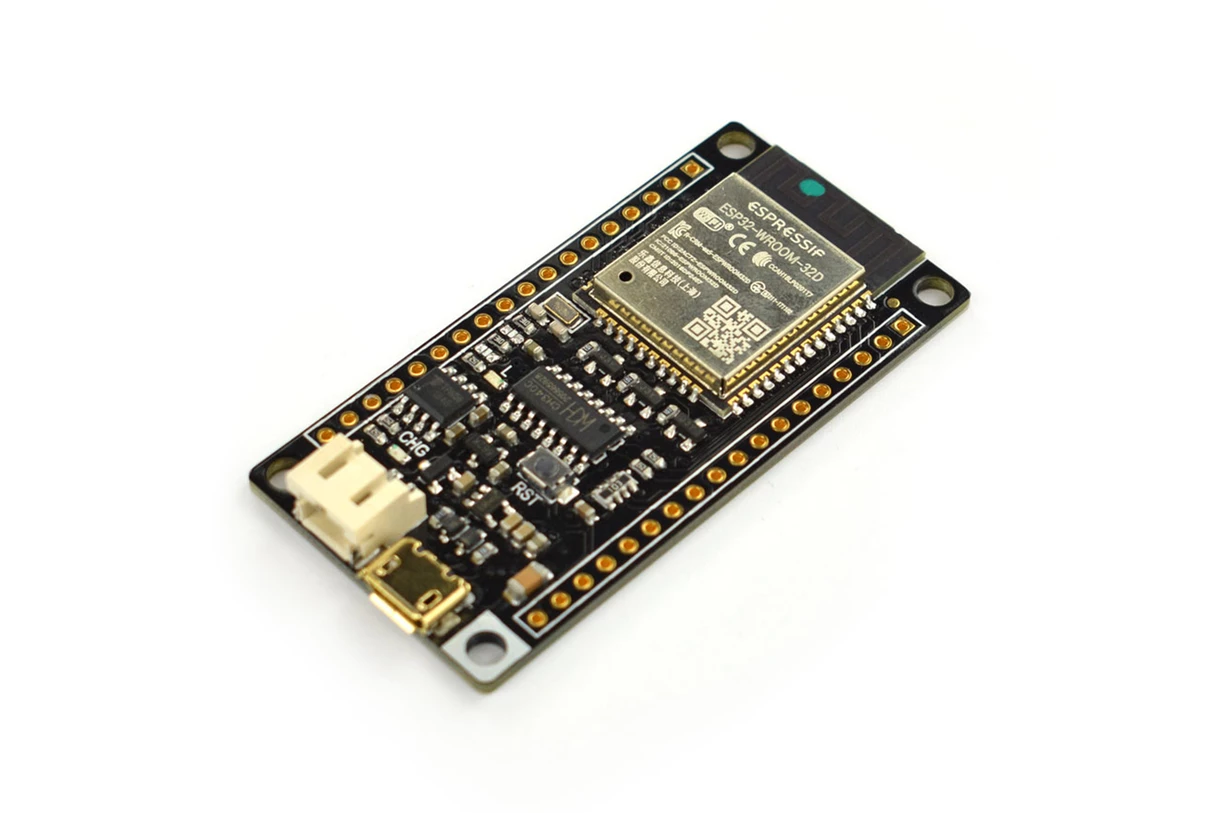
The board supports dual power supply options including USB power and a 3.7V lithium battery. Both USB and external DC power sources can directly charge the onboard LiPo battery through the integrated charging circuit. With its small size, efficient power management, and wireless connectivity features, the FireBeetle ESP32 is an excellent platform for building smart sensors, wireless monitoring systems, and low power IoT devices. The board is compatible with other products in the FireBeetle ecosystem and also follows the Arduino UNO style interface, which reduces the learning curve for developers. Although the core functions such as GPIO control and I2C and SPI communication are stable in the Arduino IDE environment, some advanced functions are still under development. Therefore the board is recommended primarily for experienced developers and engineers.
Features
- Compatible with DFRobot FireBeetle series expansion boards.
- Ultra low power consumption with deep sleep current around 10 microampere.
- Dual core ESP32 processor supporting WiFi and Bluetooth communication.
- Supports Arduino IDE, ESP IDF, and MicroPython development environments.
- Integrated LiPo battery charging circuit.
- Supports USB and external lithium battery power supply.
- Small size and lightweight design suitable for IoT devices.
- Fast response with communication speeds up to 400KHz.
- Arduino compatible pin mapping using Dx pin naming.
- One key program downloading without manual boot mode switching.
Specifications
- Operating Voltage: 3.3V
- Input Voltage: 3.3V to 5.5V
- Deep Sleep Current: 10 microampere
- Maximum Discharge Current: 600 mA at 3.3V LDO
- Maximum Charge Current: 500 mA
- USB Charging: Supported
- Processor: Tensilica LX6 dual core processor
- Processor Frequency: Up to 240 MHz
- SRAM: 520 KB
- Flash Memory: 16 Mbit
- WiFi Standard: FCC CE TELEC KCC certified
- WiFi Protocol: 802.11 b g n d e i k r
- Maximum WiFi Speed: Up to 150 Mbps
- WiFi Frequency Range: 2.4 to 2.5 GHz
- Bluetooth Version: Bluetooth v4.2 BR EDR BLE
- Bluetooth Audio Low Power Current: 10 microampere
- Operating Current: Approximately 80 mA average
- On Chip Clock: 40 MHz crystal and 32.768 kHz crystal
- Digital I O Pins: 10 default Arduino mapping
- Analog Input Pins: 5 default Arduino mapping
- SPI Interface: 1
- I2C Interface: 1
- I2S Interface: 1
- Built in LED Pin: D9
- Operating Temperature: -40 C to +85 C
- Board Dimensions: 24 mm x 53 mm
- Mounting Hole Inner Diameter: 3.1 mm
- Mounting Hole Outer Diameter: 6 mm
Board Overview and Pinout
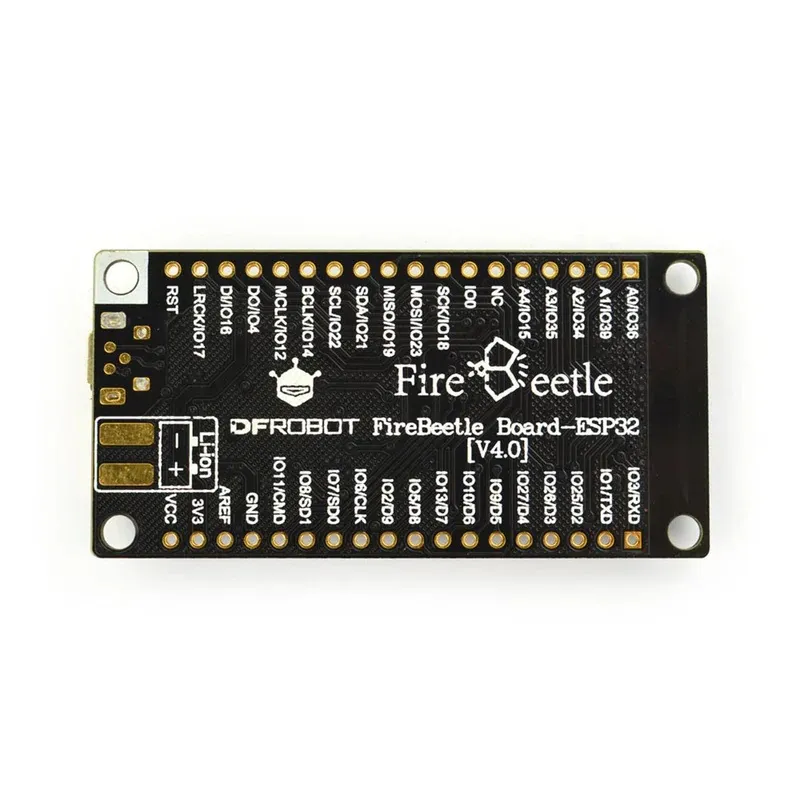
FireBeetle ESP32 supports both the standard ESP32 pin layout and the Arduino IDE pin mapping system. When programming in Arduino IDE, developers can directly use Dx notation where x represents the pin number from 0 to 9 to access the corresponding GPIO pins.

Note: NC means empty pin. VCC provides 5V when powered via USB and approximately 3.7V when powered by a 3.7V LiPo battery.
Driver Installation
FireBeetle ESP32 uses the CH340 USB to serial chip which is automatically supported on most systems. If the driver is not installed automatically after connecting the board to the computer, it can be installed manually.
Requirements
Hardware
- FireBeetle ESP32 IoT Microcontroller x1
- Micro USB Cable x1
Software
- Arduino IDE latest version
- FireBeetle ESP32 Windows Driver
Arduino IDE Development Environment Setup
- Connect the FireBeetle ESP32 board to your computer using a Micro USB cable.
- Install the CH340 driver manually if the system does not install it automatically.
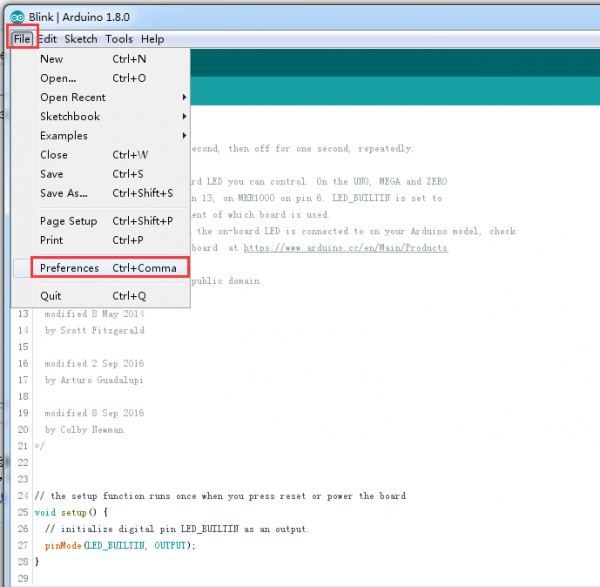
- Open Arduino IDE and go to File then Preferences.
- Find the Additional Boards Manager URLs field.
- Paste the following link:
http://download.dfrobot.top/FireBeetle/package_esp32_index.json
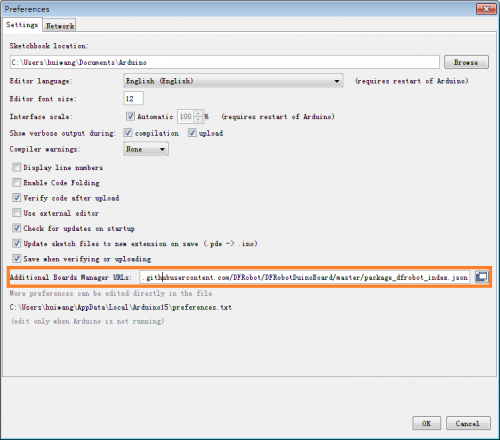
- Click OK.
- Go to Tools then Board then Boards Manager.
- Search for FireBeetle ESP32 and click Install.
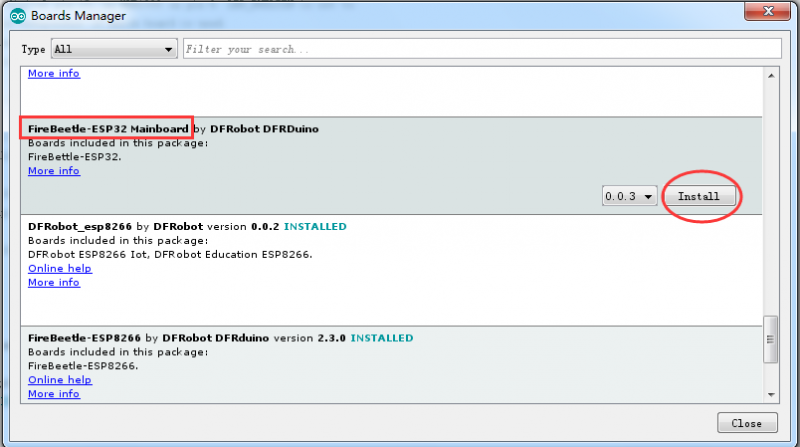
After installation, the development environment is ready and the board can be used like a standard Arduino board.
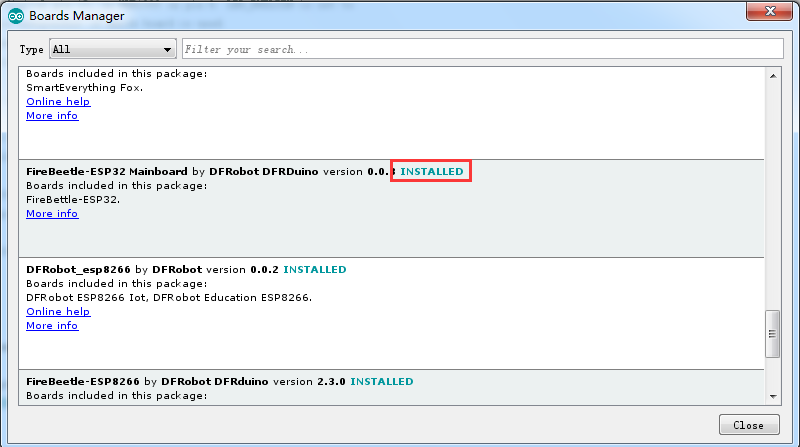
Note: When using Linux or macOS systems, install the pyserial module using the following command in the terminal.
sudo easy_install pyserial
Arduino Example Code Blink
void setup() {
  pinMode(LED_BUILTIN, OUTPUT);
}

void loop() {
  digitalWrite(LED_BUILTIN, HIGH);
  delay(1000);
  digitalWrite(LED_BUILTIN, LOW);
  delay(1000);
}
Dimensions
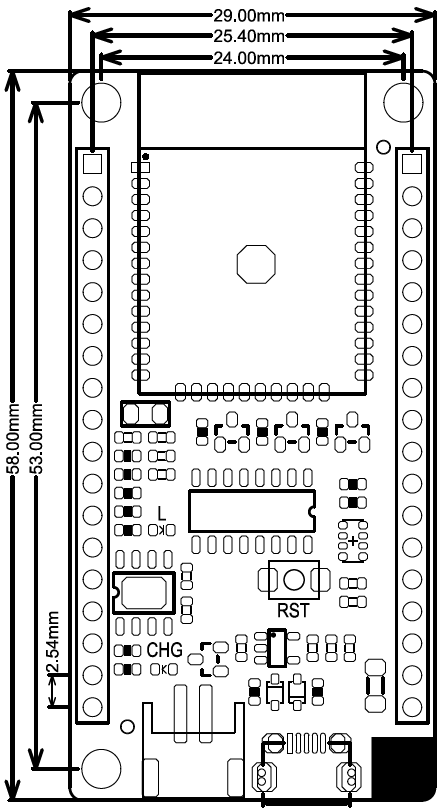
- Pin Spacing: 2.54 mm
- Mounting Hole Space: 24 mm by 53 mm
- Mounting Hole Size: 29 mm by 58 mm
- Board Thickness: 1.6 mm
More Documents and Resources
The board supports dual power supply options including USB power and a 3.7V lithium battery. Both USB and external DC power sources can directly charge the onboard LiPo battery through the integrated charging circuit. With its small size, efficient power management, and wireless connectivity features, the FireBeetle ESP32 is an excellent platform for building smart sensors, wireless monitoring systems, and low power IoT devices. The board is compatible with other products in the FireBeetle ecosystem and also follows the Arduino UNO style interface, which reduces the learning curve for developers. Although the core functions such as GPIO control and I2C and SPI communication are stable in the Arduino IDE environment, some advanced functions are still under development. Therefore the board is recommended primarily for experienced developers and engineers.
Features
- Compatible with DFRobot FireBeetle series expansion boards.
- Ultra low power consumption with deep sleep current around 10 microampere.
- Dual core ESP32 processor supporting WiFi and Bluetooth communication.
- Supports Arduino IDE, ESP IDF, and MicroPython development environments.
- Integrated LiPo battery charging circuit.
- Supports USB and external lithium battery power supply.
- Small size and lightweight design suitable for IoT devices.
- Fast response with communication speeds up to 400KHz.
- Arduino compatible pin mapping using Dx pin naming.
- One key program downloading without manual boot mode switching.
Specifications
- Operating Voltage: 3.3V
- Input Voltage: 3.3V to 5.5V
- Deep Sleep Current: 10 microampere
- Maximum Discharge Current: 600 mA at 3.3V LDO
- Maximum Charge Current: 500 mA
- USB Charging: Supported
- Processor: Tensilica LX6 dual core processor
- Processor Frequency: Up to 240 MHz
- SRAM: 520 KB
- Flash Memory: 16 Mbit
- WiFi Standard: FCC CE TELEC KCC certified
- WiFi Protocol: 802.11 b g n d e i k r
- Maximum WiFi Speed: Up to 150 Mbps
- WiFi Frequency Range: 2.4 to 2.5 GHz
- Bluetooth Version: Bluetooth v4.2 BR EDR BLE
- Bluetooth Audio Low Power Current: 10 microampere
- Operating Current: Approximately 80 mA average
- On Chip Clock: 40 MHz crystal and 32.768 kHz crystal
- Digital I O Pins: 10 default Arduino mapping
- Analog Input Pins: 5 default Arduino mapping
- SPI Interface: 1
- I2C Interface: 1
- I2S Interface: 1
- Built in LED Pin: D9
- Operating Temperature: -40 C to +85 C
- Board Dimensions: 24 mm x 53 mm
- Mounting Hole Inner Diameter: 3.1 mm
- Mounting Hole Outer Diameter: 6 mm
Board Overview and Pinout
FireBeetle ESP32 supports both the standard ESP32 pin layout and the Arduino IDE pin mapping system. When programming in Arduino IDE, developers can directly use Dx notation where x represents the pin number from 0 to 9 to access the corresponding GPIO pins.
Note: NC means empty pin. VCC provides 5V when powered via USB and approximately 3.7V when powered by a 3.7V LiPo battery.
Driver Installation
FireBeetle ESP32 uses the CH340 USB to serial chip which is automatically supported on most systems. If the driver is not installed automatically after connecting the board to the computer, it can be installed manually.
Requirements
Hardware
- FireBeetle ESP32 IoT Microcontroller x1
- Micro USB Cable x1
Software
- Arduino IDE latest version
- FireBeetle ESP32 Windows Driver
Arduino IDE Development Environment Setup
- Connect the FireBeetle ESP32 board to your computer using a Micro USB cable.
- Install the CH340 driver manually if the system does not install it automatically.
- Open Arduino IDE and go to File then Preferences.
- Find the Additional Boards Manager URLs field.
- Paste the following link:
http://download.dfrobot.top/FireBeetle/package_esp32_index.json
- Click OK.
- Go to Tools then Board then Boards Manager.
- Search for FireBeetle ESP32 and click Install.
After installation, the development environment is ready and the board can be used like a standard Arduino board.
Note: When using Linux or macOS systems, install the pyserial module using the following command in the terminal.
sudo easy_install pyserial
Arduino Example Code Blink
void setup() {
  pinMode(LED_BUILTIN, OUTPUT);
}

void loop() {
  digitalWrite(LED_BUILTIN, HIGH);
  delay(1000);
  digitalWrite(LED_BUILTIN, LOW);
  delay(1000);
}
Dimensions
- Pin Spacing: 2.54 mm
- Mounting Hole Space: 24 mm by 53 mm
- Mounting Hole Size: 29 mm by 58 mm
- Board Thickness: 1.6 mm