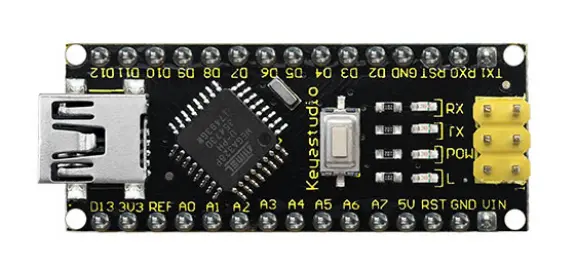
Keyestudio Nano KS0173
The keyestudio Nano CH340 is an Arduino-compatible board based on the ATmega328P-AU microcontroller. It features 14 digital I/O pins, 8 analog inputs, and a 16 MHz crystal oscillator for accurate timing. The board uses the CH340G USB-to-serial chip for seamless computer or device connectivity, and offers power options through a Mini-B USB port or DC power source (7-12V). It also includes an ICSP header for in-circuit programming, a reset button, and LED indicators for RX, TX, power, and onboard LED. The keyestudio Nano CH340 is compact and breadboard-friendly, making it ideal for prototyping and DIY projects.
Features
- Compact & Breadboard-Friendly design
- ATmega328P-AU microcontroller
- CH340G USB-to-Serial chip
- 8 Analog input pins (A0–A7)
- 14 Digital I/O pins (6 PWM-capable)
- 16 MHz crystal oscillator
- Mini-B USB connector
- Onboard LEDs: RX, TX, Power, and D13
- ICSP header for in-circuit programming
- Reset button
- AMS1117 voltage regulator (5V output)
Principle of Operation
- Microcontroller: Executes program instructions and controls peripherals.
- USB-to-Serial: CH340G enables communication with a computer.
- Power Supply: Powered via Mini-B USB or 7–12V through Vin/GND.
- Clock: 16 MHz crystal oscillator ensures accurate timing.
- Digital I/O: 14 pins for digital input/output.
- Analog Inputs: 8 pins for analog signal measurement.
- Indicators: LEDs show power and serial activity.
- Reset & ICSP: Supports reset and firmware programming.
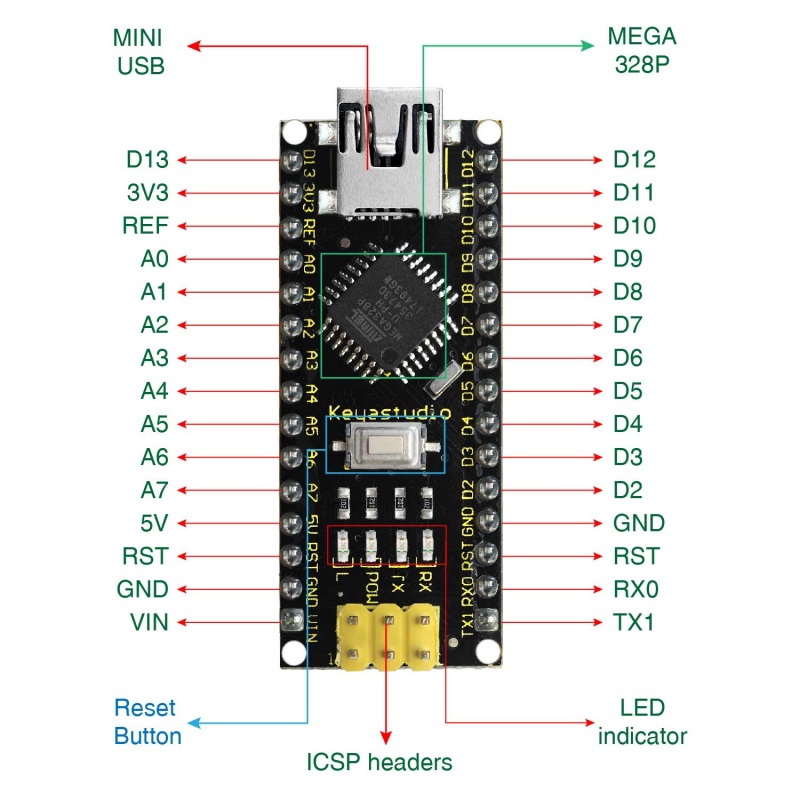
Pinout
Applications
- Prototyping
- Electronics education
- IoT projects
- Automation & robotics
- DIY electronics
- Data acquisition
- Embedded systems
- Wearable technology
- Smart home automation
- Interactive art installations
Getting Started
- Connect the board using a Mini-B USB cable
- Install the CH340 driver
- Install Arduino IDE
- Select Arduino Nano under Tools → Board
- Select the correct COM port
- Write, verify, and upload your sketch
Example Code
// Blink Code with Serial Status
const int ledPin = 13;
int blinkInterval = 1000;

void setup() {
pinMode(ledPin, OUTPUT);
Serial.begin(9600);
Serial.println("Blink with Serial Status");
}

void loop() {
digitalWrite(ledPin, HIGH);
Serial.println("LED ON");
delay(blinkInterval);

digitalWrite(ledPin, LOW);
Serial.println("LED OFF");
delay(blinkInterval);
} Technical Specifications
- Operating Voltage: 5V
- Input Voltage: 7–12V
- Flash Memory: 32 KB
- SRAM: 2 KB
- EEPROM: 1 KB
- Clock Speed: 16 MHz
- PCB Size: 18 × 45 mm
- Weight: ~7 g
Comparison with Arduino Nano
| Feature | Keyestudio Nano CH340 | Arduino Nano |
|---|---|---|
| Microcontroller | ATmega328P-AU | ATmega328P |
| USB Chip | CH340G | FT232RL / CH340G |
| Operating Voltage | 5V | 5V |
| Digital I/O | 14 | 14 |
| Analog Inputs | 8 | 8 |
| Clock Speed | 16 MHz | 16 MHz |
Features
- Compact & Breadboard-Friendly design
- ATmega328P-AU microcontroller
- CH340G USB-to-Serial chip
- 8 Analog input pins (A0–A7)
- 14 Digital I/O pins (6 PWM-capable)
- 16 MHz crystal oscillator
- Mini-B USB connector
- Onboard LEDs: RX, TX, Power, and D13
- ICSP header for in-circuit programming
- Reset button
- AMS1117 voltage regulator (5V output)
Principle of Operation
- Microcontroller: Executes program instructions and controls peripherals.
- USB-to-Serial: CH340G enables communication with a computer.
- Power Supply: Powered via Mini-B USB or 7–12V through Vin/GND.
- Clock: 16 MHz crystal oscillator ensures accurate timing.
- Digital I/O: 14 pins for digital input/output.
- Analog Inputs: 8 pins for analog signal measurement.
- Indicators: LEDs show power and serial activity.
- Reset & ICSP: Supports reset and firmware programming.
Pinout
Applications
- Prototyping
- Electronics education
- IoT projects
- Automation & robotics
- DIY electronics
- Data acquisition
- Embedded systems
- Wearable technology
- Smart home automation
- Interactive art installations
Getting Started
- Connect the board using a Mini-B USB cable
- Install the CH340 driver
- Install Arduino IDE
- Select Arduino Nano under Tools → Board
- Select the correct COM port
- Write, verify, and upload your sketch
Example Code
// Blink Code with Serial Status
const int ledPin = 13;
int blinkInterval = 1000;

void setup() {
pinMode(ledPin, OUTPUT);
Serial.begin(9600);
Serial.println("Blink with Serial Status");
}

void loop() {
digitalWrite(ledPin, HIGH);
Serial.println("LED ON");
delay(blinkInterval);

digitalWrite(ledPin, LOW);
Serial.println("LED OFF");
delay(blinkInterval);
}
Technical Specifications
- Operating Voltage: 5V
- Input Voltage: 7–12V
- Flash Memory: 32 KB
- SRAM: 2 KB
- EEPROM: 1 KB
- Clock Speed: 16 MHz
- PCB Size: 18 × 45 mm
- Weight: ~7 g
Comparison with Arduino Nano
| Feature | Keyestudio Nano CH340 | Arduino Nano |
|---|---|---|
| Microcontroller | ATmega328P-AU | ATmega328P |
| USB Chip | CH340G | FT232RL / CH340G |
| Operating Voltage | 5V | 5V |
| Digital I/O | 14 | 14 |
| Analog Inputs | 8 | 8 |
| Clock Speed | 16 MHz | 16 MHz |