NodeMCU supports multiple development environments including Lua scripting and the Arduino IDE with the ESP8266 Arduino core. This flexibility allows both beginners and advanced developers to build IoT systems efficiently. The board includes a built-in USB-to-Serial converter, making programming and communication with a computer simple and reliable. With built-in Wi-Fi support, multiple GPIO pins, and compatibility with many sensors and modules, NodeMCU is widely used for smart home devices, wireless monitoring systems, automation projects, and IoT prototypes.
Features:
- Open-source ESP8266-based development board
- Built-in Wi-Fi support (802.11 b/g/n)
- Programmable using Arduino IDE or Lua scripting
- Integrated USB-to-TTL converter for plug-and-play programming
- 10 GPIO pins supporting PWM, I2C, and 1-Wire communication
- 1 Analog input pin (ADC)
- Built-in PCB antenna for wireless communication
- Low-cost and easy-to-use IoT development platform
- Advanced API for hardware control and networking
- Node.js-style network API for event-driven applications
Principle of Work:
The NodeMCU board uses the ESP8266 microcontroller, which integrates a powerful processor and Wi-Fi connectivity into a single chip. The microcontroller reads data from sensors through its GPIO pins and processes the information using user programs.
The processed data can then be transmitted over Wi-Fi to cloud platforms, servers, or mobile devices. This allows NodeMCU to act as a wireless controller or monitoring device in IoT systems.
Programs written using Arduino IDE or Lua scripts control how the board reads inputs, processes data, and communicates with other devices over the internet or local networks.
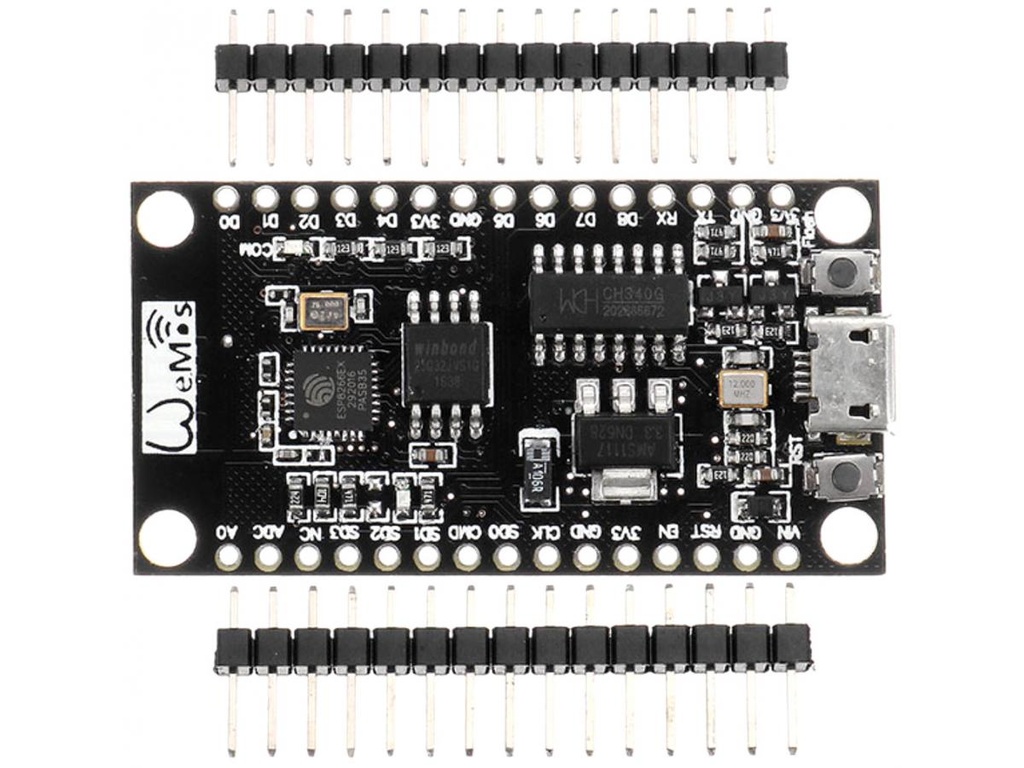
Pinout of the Module:
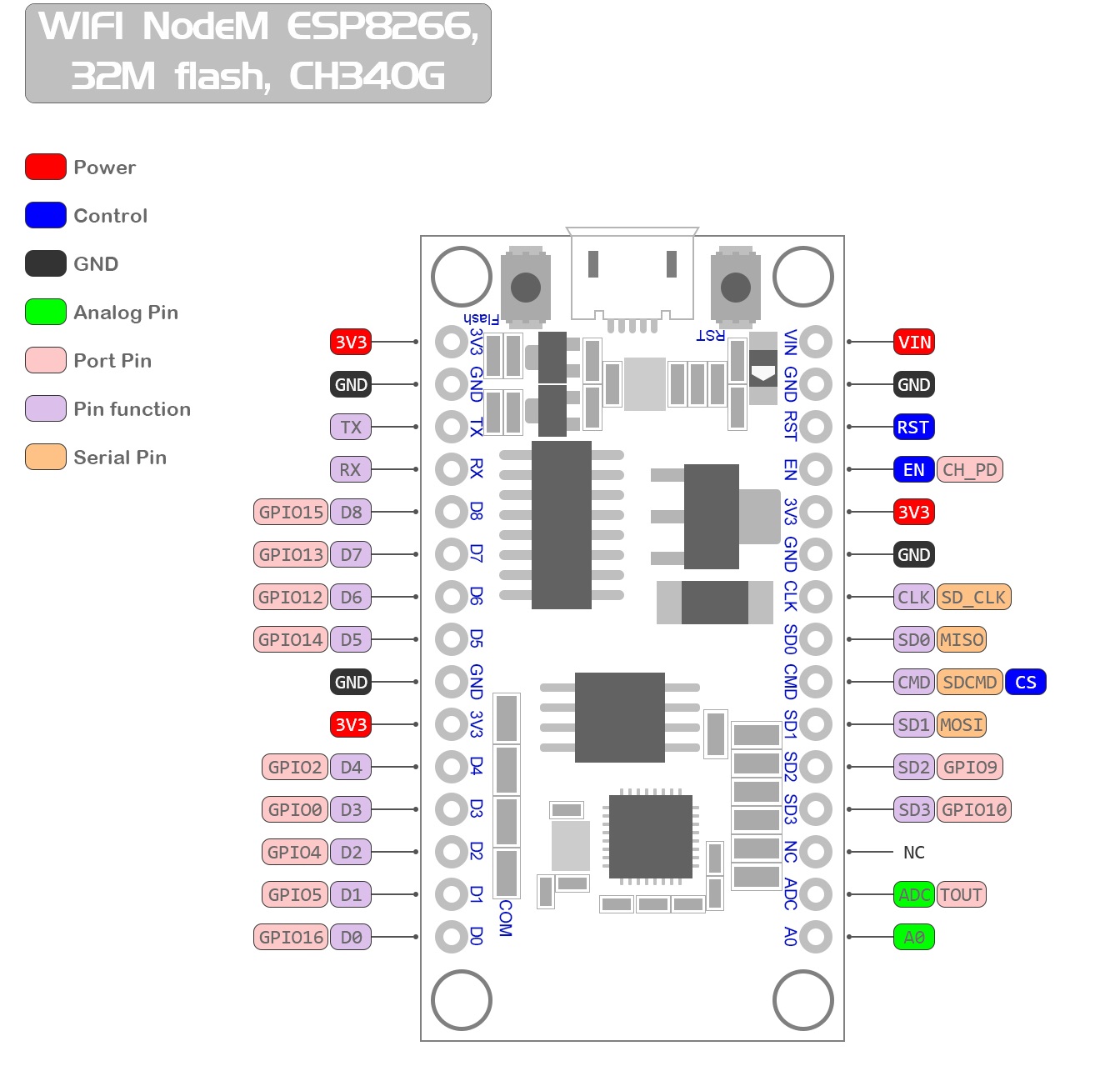
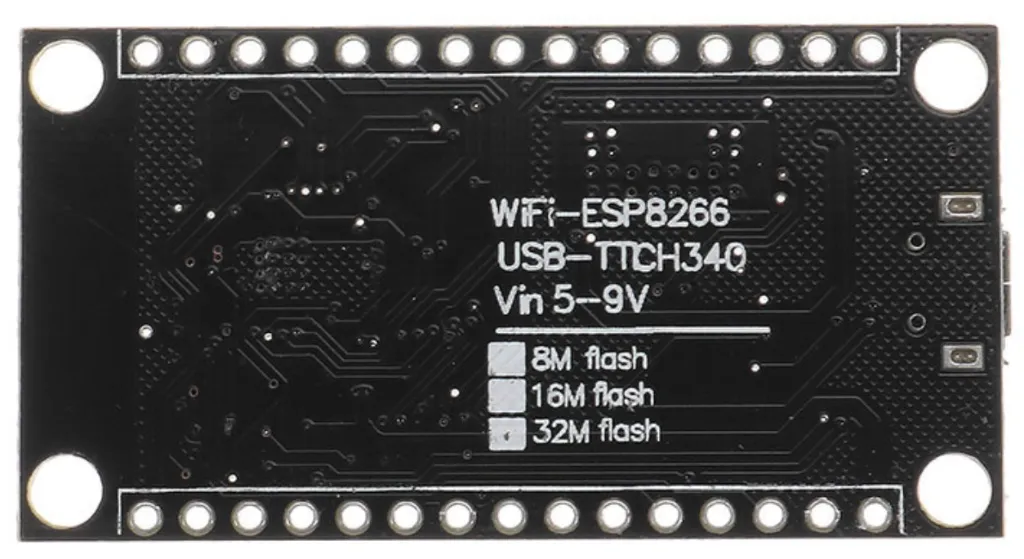
- Vin: External power input (5V)
- 3V3: Regulated 3.3V output
- GND: Ground connection
- D0 – D10: Digital GPIO pins supporting PWM, I2C, and 1-Wire communication
- A0: Analog input pin (ADC)
- RST: Reset pin
- EN: Chip enable pin

Applications:
- Smart home automation
- IoT sensor monitoring systems
- Wireless data logging
- Home automation controllers
- Remote monitoring systems
- Wi-Fi enabled robotics projects
- Industrial IoT devices
Circuit:
The NodeMCU board can be powered directly through its Micro USB connector or through the VIN pin. Sensors and modules can be connected directly to the GPIO pins using jumper wires or a breadboard. The board communicates with a computer using the built-in USB-to-Serial converter.
Connecting with Arduino for the First Time
- Install the Arduino IDE on your computer.
- Open Arduino IDE and go to File → Preferences.
- Add the ESP8266 board manager URL:
http://arduino.esp8266.com/stable/package_esp8266com_index.json
- Go to Tools → Board → Boards Manager.
- Search for ESP8266 and install the ESP8266 board package.
- Select NodeMCU 1.0 (ESP-12E Module) from the board list.
- Connect the NodeMCU board to the computer using a Micro USB cable.
- Go to Tools → Port and select the correct COM port.
- Upload your program to the board.
Code:
The following example connects the NodeMCU to a Wi-Fi network and prints the assigned IP address to the Serial Monitor.
#include <ESP8266WiFi.h>

const char* ssid = "YOUR_WIFI_NAME";
const char* password = "YOUR_WIFI_PASSWORD";

void setup() {
  Serial.begin(115200);
  WiFi.begin(ssid, password);

  Serial.print("Connecting to WiFi");

  while (WiFi.status() != WL_CONNECTED) {
    delay(500);
    Serial.print(".");
  }

  Serial.println();
  Serial.println("WiFi Connected");
  Serial.print("IP Address: ");
  Serial.println(WiFi.localIP());
}

void loop() {

}
Technical Details:
- Microcontroller: ESP8266
- Operating Voltage: 3.3V
- Input Voltage (VIN): 5V
- Digital I/O Pins: 10
- Analog Input Pins: 1 (ADC)
- Wi-Fi Standard: 802.11 b/g/n
- USB Interface: Built-in USB-to-TTL converter
- Antenna: PCB Antenna
Resources:
| NodeMCU Official Website |
| NodeMCU GitHub Repository |
| ESP8266 Arduino Core Documentation |
| MicroPython for ESP8266 |
| ESPlorer IDE for Lua Development |
Comparisons:
Compared with traditional microcontroller boards like Arduino UNO, NodeMCU offers built-in wireless communication and additional networking capabilities:
- Built-in Wi-Fi: No external Wi-Fi module is required.
- Lower Cost: Provides both microcontroller and wireless connectivity in a single board.
- IoT Ready: Designed specifically for internet-connected devices.
- Multiple Programming Options: Supports Arduino IDE, Lua scripting, and MicroPython.
- Compact Size: Small form factor suitable for embedded IoT devices.
NodeMCU supports multiple development environments including Lua scripting and the Arduino IDE with the ESP8266 Arduino core. This flexibility allows both beginners and advanced developers to build IoT systems efficiently. The board includes a built-in USB-to-Serial converter, making programming and communication with a computer simple and reliable. With built-in Wi-Fi support, multiple GPIO pins, and compatibility with many sensors and modules, NodeMCU is widely used for smart home devices, wireless monitoring systems, automation projects, and IoT prototypes.
Features:
- Open-source ESP8266-based development board
- Built-in Wi-Fi support (802.11 b/g/n)
- Programmable using Arduino IDE or Lua scripting
- Integrated USB-to-TTL converter for plug-and-play programming
- 10 GPIO pins supporting PWM, I2C, and 1-Wire communication
- 1 Analog input pin (ADC)
- Built-in PCB antenna for wireless communication
- Low-cost and easy-to-use IoT development platform
- Advanced API for hardware control and networking
- Node.js-style network API for event-driven applications
Principle of Work:
The NodeMCU board uses the ESP8266 microcontroller, which integrates a powerful processor and Wi-Fi connectivity into a single chip. The microcontroller reads data from sensors through its GPIO pins and processes the information using user programs.
The processed data can then be transmitted over Wi-Fi to cloud platforms, servers, or mobile devices. This allows NodeMCU to act as a wireless controller or monitoring device in IoT systems.
Programs written using Arduino IDE or Lua scripts control how the board reads inputs, processes data, and communicates with other devices over the internet or local networks.
Pinout of the Module:
- Vin: External power input (5V)
- 3V3: Regulated 3.3V output
- GND: Ground connection
- D0 – D10: Digital GPIO pins supporting PWM, I2C, and 1-Wire communication
- A0: Analog input pin (ADC)
- RST: Reset pin
- EN: Chip enable pin
Applications:
- Smart home automation
- IoT sensor monitoring systems
- Wireless data logging
- Home automation controllers
- Remote monitoring systems
- Wi-Fi enabled robotics projects
- Industrial IoT devices
Circuit:
The NodeMCU board can be powered directly through its Micro USB connector or through the VIN pin. Sensors and modules can be connected directly to the GPIO pins using jumper wires or a breadboard. The board communicates with a computer using the built-in USB-to-Serial converter.
Connecting with Arduino for the First Time
- Install the Arduino IDE on your computer.
- Open Arduino IDE and go to File → Preferences.
- Add the ESP8266 board manager URL:
http://arduino.esp8266.com/stable/package_esp8266com_index.json
- Go to Tools → Board → Boards Manager.
- Search for ESP8266 and install the ESP8266 board package.
- Select NodeMCU 1.0 (ESP-12E Module) from the board list.
- Connect the NodeMCU board to the computer using a Micro USB cable.
- Go to Tools → Port and select the correct COM port.
- Upload your program to the board.
Code:
The following example connects the NodeMCU to a Wi-Fi network and prints the assigned IP address to the Serial Monitor.
#include <ESP8266WiFi.h>

const char* ssid = "YOUR_WIFI_NAME";
const char* password = "YOUR_WIFI_PASSWORD";

void setup() {
  Serial.begin(115200);
  WiFi.begin(ssid, password);

  Serial.print("Connecting to WiFi");

  while (WiFi.status() != WL_CONNECTED) {
    delay(500);
    Serial.print(".");
  }

  Serial.println();
  Serial.println("WiFi Connected");
  Serial.print("IP Address: ");
  Serial.println(WiFi.localIP());
}

void loop() {

}
Technical Details:
- Microcontroller: ESP8266
- Operating Voltage: 3.3V
- Input Voltage (VIN): 5V
- Digital I/O Pins: 10
- Analog Input Pins: 1 (ADC)
- Wi-Fi Standard: 802.11 b/g/n
- USB Interface: Built-in USB-to-TTL converter
- Antenna: PCB Antenna
Resources:
| NodeMCU Official Website |
| NodeMCU GitHub Repository |
| ESP8266 Arduino Core Documentation |
| MicroPython for ESP8266 |
| ESPlorer IDE for Lua Development |
Comparisons:
Compared with traditional microcontroller boards like Arduino UNO, NodeMCU offers built-in wireless communication and additional networking capabilities:
- Built-in Wi-Fi: No external Wi-Fi module is required.
- Lower Cost: Provides both microcontroller and wireless connectivity in a single board.
- IoT Ready: Designed specifically for internet-connected devices.
- Multiple Programming Options: Supports Arduino IDE, Lua scripting, and MicroPython.
- Compact Size: Small form factor suitable for embedded IoT devices.