Skip to Content

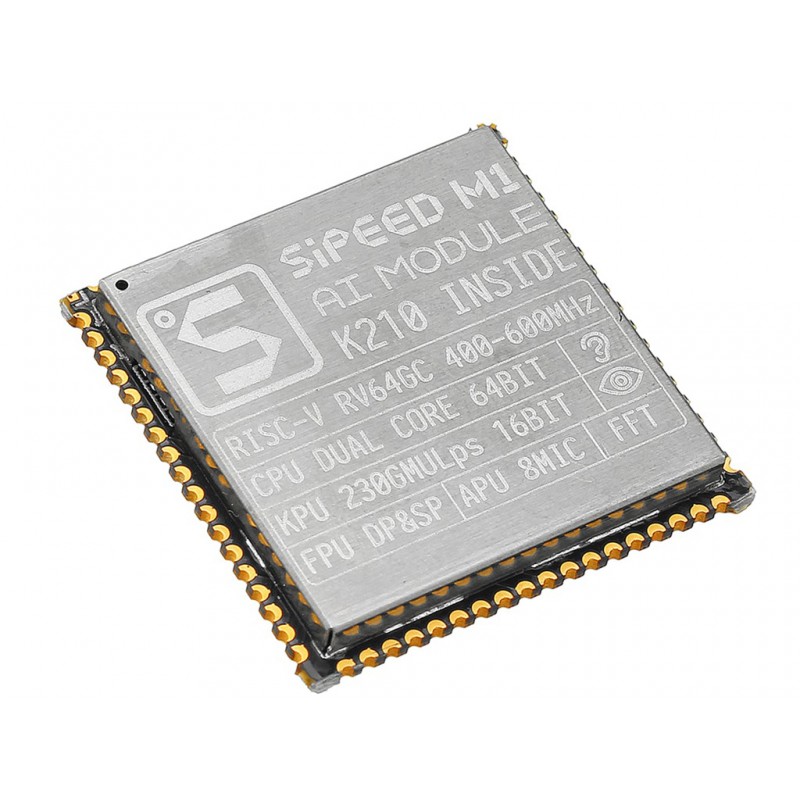
Wifi Sipeed MAIX-I module w/o WiFi ( 1st RISC-V 64 AI Module, K210 inside )

The Sipeed MAix module is a compact and powerful AIoT development platform designed to bring artificial intelligence directly to edge devices. Built around the Kendryte K210 dual-core RISC-V processor, it integrates a neural network accelerator (KPU) and audio processor (APU), enabling real-time AI processing such as object detection and voice recognition without cloud dependency. With its small footprint, low power consumption, and high performance, the MAix module is ideal for deploying intelligent applications in IoT, robotics, and smart systems.

Package Includes:

  • 1 × Sipeed MAix (M1) Module
68.25 AED 68.25 AED (Tax included)

Terms and Conditions
30-day money-back guarantee
Shipping: 2-3 Business Days


Features:

  • Dual-core 64-bit RISC-V processor (Kendryte K210)
  • Integrated KPU for AI acceleration (up to 0.5 TOPS)
  • Real-time object recognition up to 60 FPS (VGA)
  • Built-in APU supporting up to 8 microphones
  • Flexible FPIOA mapping (255 functions on 48 GPIOs)
  • DVP camera interface and LCD support
  • Hardware accelerators: AES, SHA256, FFT
  • 16MB onboard Flash (WiFi version includes ESP8285)
  • Selectable IO voltage: 3.3V / 1.8V
  • Compact module with 1.27 mm pitch pins

Specifications:

  • Processor: Kendryte K210 (Dual-core RISC-V 64-bit)
  • Frequency: 400 MHz (up to 800 MHz)
  • AI Performance: 0.25 TOPS @ 400 MHz, 0.5 TOPS @ 800 MHz
  • Memory: 8 MB SRAM
  • Storage: 16 MB Flash
  • GPIO: 48 pins (FPIOA configurable)
  • Camera: DVP interface
  • Display: MCU LCD interface
  • Audio: Up to 8 microphones, 192 kHz sampling
  • Interfaces: UART, SPI, I2C, I2S, PWM, RTC, Timer
  • Security: AES, SHA256 acceleration
  • Voltage: 3.3V / 1.8V selectable

Pinout of the Module:

Sipeed MAix Pinout

  1. Power: 3.3V / 1.8V input
  2. GPIO: 48 configurable pins
  3. UART: Serial communication
  4. SPI / I2C: Peripheral interfaces
  5. DVP: Camera interface
  6. LCD: Display interface
  7. Audio: Microphone input

Applications:

  • Machine vision and object detection
  • Voice recognition systems
  • Robotics and automation
  • Smart home and IoT devices
  • Industrial monitoring and anomaly detection
  • Edge AI applications requiring low latency

Circuit:

Provide stable power (3.3V or 1.8V) and connect peripherals such as camera modules, LCD displays, or sensors. Ensure proper IO voltage selection and adequate power for AI workloads.

Connecting with MAix for the First Time:

  • Mount the module on a compatible board (e.g., M1 Dock)
  • Connect via USB or external power supply
  • Use USB-to-UART for serial communication
  • Install MaixPy or MaixDuino firmware
  • Upload and run test applications

Code Example (MaixPy - Basic AI Loop):

 import sensor, image, lcd, KPU as kpu

lcd.init()
sensor.reset()
sensor.set_pixformat(sensor.RGB565)
sensor.set_framesize(sensor.QVGA)
sensor.run(1)

task = kpu.load("model.kmodel")

while(True):
img = sensor.snapshot()
kpu.run(task, img)
lcd.display(img)

Arduino-Like Support (MaixDuino):

The MAix module supports Arduino-style development using MaixDuino, allowing quick prototyping with simplified APIs while still accessing advanced AI features.

Install Arduino IDE:

Install MaixDuino Board Support:

  • Open Arduino IDE → File → Preferences
  • Add the following URL:
https://dl.sipeed.com/MAIX/Maixduino/package_maixduino_k210_index.json
  • Go to Tools → Board → Boards Manager
  • Search "MaixDuino" and install

Upload Code:

  • Select MAix board (e.g., Maix Dock)
  • Choose COM port
  • Press BOOT if required during upload
  • Click Upload

Example Code (Blink LED):

 #define LED_PIN 13

void setup() {
pinMode(LED_PIN, OUTPUT);
}

void loop() {
digitalWrite(LED_PIN, HIGH);
delay(500);
digitalWrite(LED_PIN, LOW);
delay(500);
}

Resources: