- All products
- Communication & IoT
- GSM
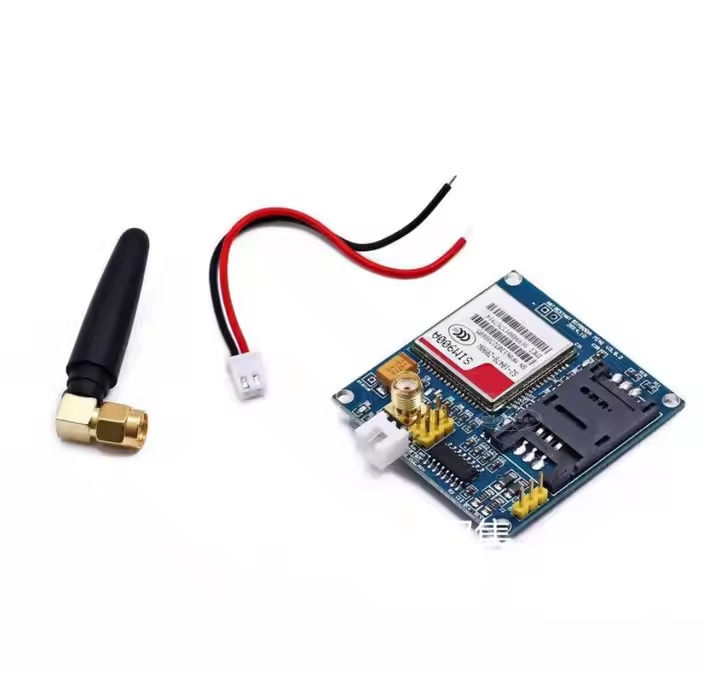
- GSM SIM900A GPRS IoT Module
- GSM
Features
- Supports SMS, voice calls, and GPRS data communication
- Dual-band GSM operation (900/1800 MHz)
- Controlled via standard AT commands
- Low power consumption with sleep mode support
- Embedded TCP/UDP, FTP, and HTTP protocols
- Supports SIM Application Toolkit
- Compact design suitable for embedded applications
- Supports external SIM card via flip slot
- TTL serial interface compatible with 3.3V and 5V logic
- Multiple audio codecs including AMR, HR, FR, and EFR
Specifications
- Frequency Bands: GSM 900 / 1800 MHz
- GPRS Class: Class 10 (max 85.6 kbps downlink)
- GPRS Multi-slot: Class 10/8
- Mobile Station Class: B
- Output Power: Class 4 (2W @ 900 MHz), Class 1 (1W @ 1800 MHz)
- Supply Voltage: 3.2V – 4.8V
- Logic Level: 3.3V / 5V TTL compatible
- Power Consumption: ~1 mA (sleep mode)
- Operating Temperature: -40°C to +85°C
- Data Modes: GPRS, CSD (up to 14.4 kbps), USSD
- SMS: Text and PDU mode, point-to-point and broadcast
- Voice: Tricodec, AMR, HR, FR, EFR
- Protocols: TCP/UDP, FTP, HTTP, PPP stack
Physical Details
- Module Size: 24 mm × 24 mm × 3 mm
- Board Size: 49 mm × 50 mm
- Weight: Approx. 3.4 g (module)
- SIM Slot: Flip-type SIM holder
- Mounting: 4 × 3.5 mm mounting holes
- Antenna: External antenna connection (keep short and straight for best signal)
Applications
- Vehicle tracking systems
- Remote automation and control
- IoT communication and monitoring
- Wireless alarm and security systems
- Smart agriculture and remote feeding systems
Pinout & Interfaces

- UART Serial Interface (TX/RX)
- Power Input Pins (VCC, GND)
- SIM Card Interface (1.8V / 3V)
- Analog Audio Interface
- Optional SPI Interface
- RTC Backup
- Antenna Pad
Connecting with Arduino

- Connect VCC to an external 4V power supply (not directly from Arduino 5V)
- Connect GND to Arduino GND
- Connect the TX of SIM900A to the RX of Arduino
- Connect RX of the SIM900A to TX of Arduino (use a voltage divider if needed)
- Insert a valid SIM card with GSM support
- Attach the antenna before powering the module
Arduino IDE Usage
- Install Arduino IDE
- Use Serial communication (SoftwareSerial or HardwareSerial)
- Send AT commands via Serial Monitor
- Baud rate is typically set to 9600
Example AT Commands
AT // Check communication AT+CSQ // Check signal quality AT+CMGF=1 // Set SMS text mode AT+CMGS="+1234567890" Hello World
Resources
Features
- Supports SMS, voice calls, and GPRS data communication
- Dual-band GSM operation (900/1800 MHz)
- Controlled via standard AT commands
- Low power consumption with sleep mode support
- Embedded TCP/UDP, FTP, and HTTP protocols
- Supports SIM Application Toolkit
- Compact design suitable for embedded applications
- Supports external SIM card via flip slot
- TTL serial interface compatible with 3.3V and 5V logic
- Multiple audio codecs including AMR, HR, FR, and EFR
Specifications
- Frequency Bands: GSM 900 / 1800 MHz
- GPRS Class: Class 10 (max 85.6 kbps downlink)
- GPRS Multi-slot: Class 10/8
- Mobile Station Class: B
- Output Power: Class 4 (2W @ 900 MHz), Class 1 (1W @ 1800 MHz)
- Supply Voltage: 3.2V – 4.8V
- Logic Level: 3.3V / 5V TTL compatible
- Power Consumption: ~1 mA (sleep mode)
- Operating Temperature: -40°C to +85°C
- Data Modes: GPRS, CSD (up to 14.4 kbps), USSD
- SMS: Text and PDU mode, point-to-point and broadcast
- Voice: Tricodec, AMR, HR, FR, EFR
- Protocols: TCP/UDP, FTP, HTTP, PPP stack
Physical Details
- Module Size: 24 mm × 24 mm × 3 mm
- Board Size: 49 mm × 50 mm
- Weight: Approx. 3.4 g (module)
- SIM Slot: Flip-type SIM holder
- Mounting: 4 × 3.5 mm mounting holes
- Antenna: External antenna connection (keep short and straight for best signal)
Applications
- Vehicle tracking systems
- Remote automation and control
- IoT communication and monitoring
- Wireless alarm and security systems
- Smart agriculture and remote feeding systems
Pinout & Interfaces

- UART Serial Interface (TX/RX)
- Power Input Pins (VCC, GND)
- SIM Card Interface (1.8V / 3V)
- Analog Audio Interface
- Optional SPI Interface
- RTC Backup
- Antenna Pad
Connecting with Arduino

- Connect VCC to an external 4V power supply (not directly from Arduino 5V)
- Connect GND to Arduino GND
- Connect the TX of SIM900A to the RX of Arduino
- Connect RX of the SIM900A to TX of Arduino (use a voltage divider if needed)
- Insert a valid SIM card with GSM support
- Attach the antenna before powering the module
Arduino IDE Usage
- Install Arduino IDE
- Use Serial communication (SoftwareSerial or HardwareSerial)
- Send AT commands via Serial Monitor
- Baud rate is typically set to 9600
Example AT Commands
AT // Check communication AT+CSQ // Check signal quality AT+CMGF=1 // Set SMS text mode AT+CMGS="+1234567890" Hello World