Features
- Raspberry Pi 4 Model B with 4GB RAM: Provides substantial processing and memory resources for desktop and embedded applications.
- Quad-core 64-bit processor: Based on the Broadcom BCM2711 Cortex-A72 ARM processor.
- 4GB LPDDR4 SDRAM: Supports multitasking and memory-intensive applications.
- Dual-band wireless: Supports 2.4GHz and 5GHz 802.11ac wireless networking.
- Bluetooth 5.0: Enables wireless connection to compatible peripherals and devices.
- Gigabit Ethernet: Provides high-speed wired network connectivity.
- USB connectivity: Includes two USB 3.0 and two USB 2.0 ports.
- Dual micro-HDMI outputs: Supports connection to displays, including high-resolution output up to 4Kp60.
- 40-pin GPIO header: Provides access to GPIO, I²C, SPI, UART, power, and ground connections.
- Camera and display interfaces: Includes CSI camera and DSI display interfaces.
- MicroSD storage: Used for operating-system installation, booting, and data storage.
- Audio and composite video: Provides a 4-pole connector for analogue audio and composite video.
- PoE support: Supports Power over Ethernet when used with a compatible PoE HAT.
- Expandable platform: Suitable for connecting sensors, displays, cameras, HATs, and other peripherals.
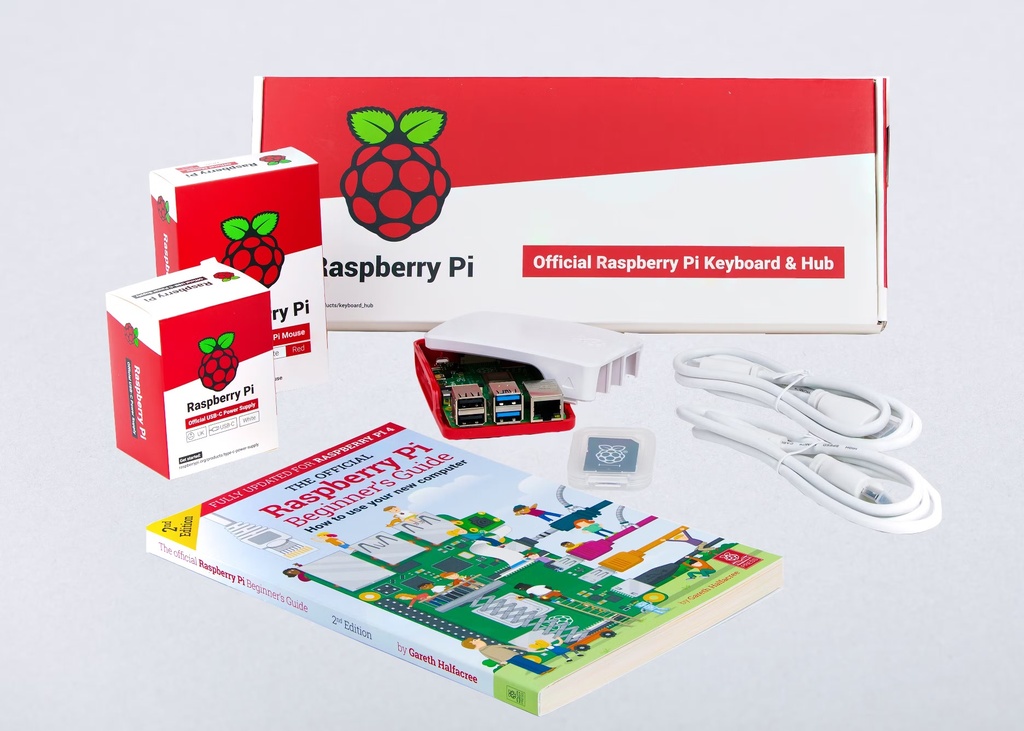
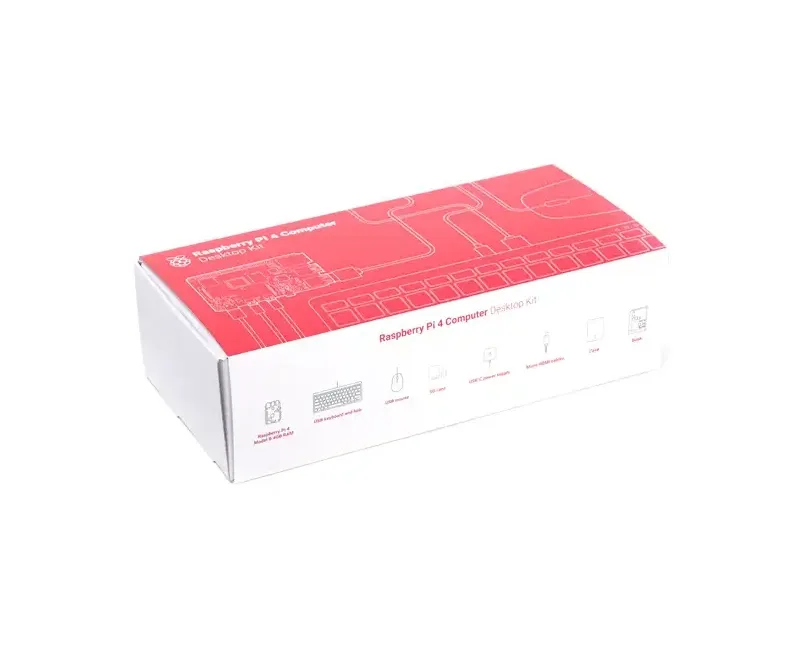
- Complete desktop accessories: Includes keyboard, mouse, case, power supply, HDMI cables, and microSD card.
Principle of Operation
The Raspberry Pi 4 Model B functions as a compact single-board computer. Its Broadcom BCM2711 processor executes the operating system and applications, while the 4GB LPDDR4 SDRAM provides working memory for running programs and handling data.
The operating system is loaded from the microSD card when the Raspberry Pi is powered on. The included NOOBS card provides an operating-system installation environment that allows the user to select and install a supported operating system.
Once the operating system has been installed and configured, the included keyboard and mouse provide standard desktop input. A monitor or TV can be connected through one of the micro-HDMI ports, while the USB, Ethernet, Wi-Fi, Bluetooth, and GPIO interfaces allow the Raspberry Pi to connect to additional peripherals, networks, sensors, and expansion hardware.
Applications
- Desktop computer: Web browsing, programming, document editing, and general computing.
- Home media center: Media playback and streaming applications.
- Retro gaming: Can be configured with compatible emulation software and controllers.
- Home automation: Control and monitoring of connected smart-home devices.
- Robotics: Processing sensor information and controlling robotic systems.
- Programming and education: Learning Linux, Python, electronics, and embedded computing.
- IoT projects: Network-connected monitoring and control systems.
- DIY projects: Weather stations, security systems, data loggers, and custom computer projects.
- Embedded applications: Custom systems using the GPIO, camera, display, and communication interfaces.
Pinout
The Raspberry Pi 4 Model B provides a standard 40-pin GPIO header. The following pinout identifies the power, ground, GPIO, I²C, UART, and SPI functions referenced in the supplied specifications.


| Pin | Function | Pin | Function |
|---|---|---|---|
| 1 | 3.3V Power | 2 | 5V Power |
| 3 | BCM 2 (SDA1, I²C) | 4 | 5V Power |
| 5 | BCM 3 (SCL1, I²C) | 6 | GND |
| 7 | BCM 4 (GPIO_GCLK) | 8 | BCM 14 (TXD0, UART) |
| 9 | GND | 10 | BCM 15 (RXD0, UART) |
| 11 | BCM 17 | 12 | BCM 18 |
| 13 | BCM 27 | 14 | GND |
| 15 | BCM 22 | 16 | BCM 23 |
| 17 | 3.3V Power | 18 | BCM 24 |
| 19 | BCM 10 (MOSI, SPI) | 20 | GND |
| 21 | BCM 9 (MISO, SPI) | 22 | BCM 25 |
| 23 | BCM 11 (SCLK, SPI) | 24 | BCM 8 (CE0_N) |
| 25 | GND | 26 | BCM 7 (CE1_N) |
| 27 | BCM 0 (ID_SD) | 28 | BCM 1 (ID_SC) |
| 29 | BCM 5 | 30 | GND |
| 31 | BCM 6 | 32 | BCM 12 |
| 33 | BCM 13 | 34 | GND |
| 35 | BCM 19 | 36 | BCM 16 (CE2_N) |
| 37 | BCM 26 | 38 | BCM 20 |
| 39 | GND | 40 | BCM 21 |
Wiring
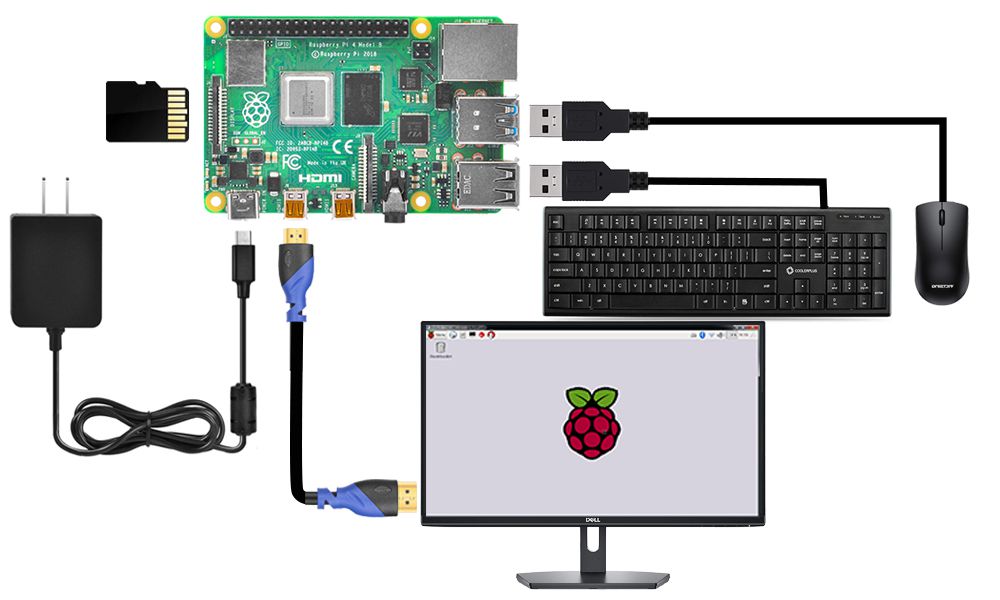
To use the Raspberry Pi 4 as a desktop computer, connect a display to one of the micro-HDMI ports, connect the keyboard and mouse to the USB ports, insert the microSD card, and connect the USB-C power supply.
For electronics projects, sensors and modules can be connected to the 40-pin GPIO header. The GPIO header provides digital I/O as well as common communication interfaces such as I²C, SPI, and UART. Always verify the voltage requirements and pin assignments of external modules before making connections.

Getting Started
- Insert the microSD card: Insert the supplied 16GB microSD card into the Raspberry Pi's microSD slot.
- Install the board in the case: Place the Raspberry Pi 4 Model B into the supplied protective case.
- Connect the display: Use a micro-HDMI to HDMI cable to connect the Raspberry Pi to a monitor or TV.
- Connect the keyboard and mouse: Connect the included USB keyboard and mouse to the Raspberry Pi USB ports.
- Connect the network: Use Gigabit Ethernet or configure the built-in dual-band Wi-Fi connection.
- Power the Raspberry Pi: Connect the supplied USB-C power supply.
- Configure the operating system: Follow the installation and configuration prompts presented during the initial setup.
- Start using the system: Once setup is complete, use the desktop environment for programming, browsing, electronics development, and other applications.
Specifications
| Board | Raspberry Pi 4 Model B |
|---|---|
| RAM | 4GB LPDDR4 SDRAM |
| Processor | Broadcom BCM2711, quad-core 64-bit ARM Cortex-A72 |
| CPU Clock | 1.5GHz |
| Wireless | Dual-band 802.11ac Wi-Fi |
| Bluetooth | Bluetooth 5.0 |
| Ethernet | Gigabit Ethernet |
| USB Ports | 2 × USB 3.0, 2 × USB 2.0 |
| Display Outputs | 2 × micro-HDMI, up to 4Kp60 |
| GPIO | 40-pin GPIO header |
| Storage | microSD card |
| Camera Interface | CSI |
| Display Interface | DSI |
| Audio/Video | 4-pole stereo audio and composite video |
| Power Supply | USB-C, 5.1V / 3A |
| microSD Card | 16GB, NOOBS |
| Keyboard | 78-key US English, wired USB |
| Mouse | Optical, wired USB |
| HDMI Cables | 2 × micro-HDMI to standard HDMI, 1m |
| PoE Support | Supported with separate PoE HAT |
Resources
- Raspberry Pi Documentation: https://www.raspberrypi.com/documentation/
- Raspberry Pi OS: https://www.raspberrypi.com/software/
- Raspberry Pi GPIO Documentation: https://www.raspberrypi.com/documentation/computers/os.html#gpio-and-linux
Features
- Raspberry Pi 4 Model B with 4GB RAM: Provides substantial processing and memory resources for desktop and embedded applications.
- Quad-core 64-bit processor: Based on the Broadcom BCM2711 Cortex-A72 ARM processor.
- 4GB LPDDR4 SDRAM: Supports multitasking and memory-intensive applications.
- Dual-band wireless: Supports 2.4GHz and 5GHz 802.11ac wireless networking.
- Bluetooth 5.0: Enables wireless connection to compatible peripherals and devices.
- Gigabit Ethernet: Provides high-speed wired network connectivity.
- USB connectivity: Includes two USB 3.0 and two USB 2.0 ports.
- Dual micro-HDMI outputs: Supports connection to displays, including high-resolution output up to 4Kp60.
- 40-pin GPIO header: Provides access to GPIO, I²C, SPI, UART, power, and ground connections.
- Camera and display interfaces: Includes CSI camera and DSI display interfaces.
- MicroSD storage: Used for operating-system installation, booting, and data storage.
- Audio and composite video: Provides a 4-pole connector for analogue audio and composite video.
- PoE support: Supports Power over Ethernet when used with a compatible PoE HAT.
- Expandable platform: Suitable for connecting sensors, displays, cameras, HATs, and other peripherals.
- Complete desktop accessories: Includes keyboard, mouse, case, power supply, HDMI cables, and microSD card.
Principle of Operation
The Raspberry Pi 4 Model B functions as a compact single-board computer. Its Broadcom BCM2711 processor executes the operating system and applications, while the 4GB LPDDR4 SDRAM provides working memory for running programs and handling data.
The operating system is loaded from the microSD card when the Raspberry Pi is powered on. The included NOOBS card provides an operating-system installation environment that allows the user to select and install a supported operating system.
Once the operating system has been installed and configured, the included keyboard and mouse provide standard desktop input. A monitor or TV can be connected through one of the micro-HDMI ports, while the USB, Ethernet, Wi-Fi, Bluetooth, and GPIO interfaces allow the Raspberry Pi to connect to additional peripherals, networks, sensors, and expansion hardware.
Applications
- Desktop computer: Web browsing, programming, document editing, and general computing.
- Home media center: Media playback and streaming applications.
- Retro gaming: Can be configured with compatible emulation software and controllers.
- Home automation: Control and monitoring of connected smart-home devices.
- Robotics: Processing sensor information and controlling robotic systems.
- Programming and education: Learning Linux, Python, electronics, and embedded computing.
- IoT projects: Network-connected monitoring and control systems.
- DIY projects: Weather stations, security systems, data loggers, and custom computer projects.
- Embedded applications: Custom systems using the GPIO, camera, display, and communication interfaces.
Pinout
The Raspberry Pi 4 Model B provides a standard 40-pin GPIO header. The following pinout identifies the power, ground, GPIO, I²C, UART, and SPI functions referenced in the supplied specifications.
| Pin | Function | Pin | Function |
|---|---|---|---|
| 1 | 3.3V Power | 2 | 5V Power |
| 3 | BCM 2 (SDA1, I²C) | 4 | 5V Power |
| 5 | BCM 3 (SCL1, I²C) | 6 | GND |
| 7 | BCM 4 (GPIO_GCLK) | 8 | BCM 14 (TXD0, UART) |
| 9 | GND | 10 | BCM 15 (RXD0, UART) |
| 11 | BCM 17 | 12 | BCM 18 |
| 13 | BCM 27 | 14 | GND |
| 15 | BCM 22 | 16 | BCM 23 |
| 17 | 3.3V Power | 18 | BCM 24 |
| 19 | BCM 10 (MOSI, SPI) | 20 | GND |
| 21 | BCM 9 (MISO, SPI) | 22 | BCM 25 |
| 23 | BCM 11 (SCLK, SPI) | 24 | BCM 8 (CE0_N) |
| 25 | GND | 26 | BCM 7 (CE1_N) |
| 27 | BCM 0 (ID_SD) | 28 | BCM 1 (ID_SC) |
| 29 | BCM 5 | 30 | GND |
| 31 | BCM 6 | 32 | BCM 12 |
| 33 | BCM 13 | 34 | GND |
| 35 | BCM 19 | 36 | BCM 16 (CE2_N) |
| 37 | BCM 26 | 38 | BCM 20 |
| 39 | GND | 40 | BCM 21 |
Wiring
To use the Raspberry Pi 4 as a desktop computer, connect a display to one of the micro-HDMI ports, connect the keyboard and mouse to the USB ports, insert the microSD card, and connect the USB-C power supply.
For electronics projects, sensors and modules can be connected to the 40-pin GPIO header. The GPIO header provides digital I/O as well as common communication interfaces such as I²C, SPI, and UART. Always verify the voltage requirements and pin assignments of external modules before making connections.
Getting Started
- Insert the microSD card: Insert the supplied 16GB microSD card into the Raspberry Pi's microSD slot.
- Install the board in the case: Place the Raspberry Pi 4 Model B into the supplied protective case.
- Connect the display: Use a micro-HDMI to HDMI cable to connect the Raspberry Pi to a monitor or TV.
- Connect the keyboard and mouse: Connect the included USB keyboard and mouse to the Raspberry Pi USB ports.
- Connect the network: Use Gigabit Ethernet or configure the built-in dual-band Wi-Fi connection.
- Power the Raspberry Pi: Connect the supplied USB-C power supply.
- Configure the operating system: Follow the installation and configuration prompts presented during the initial setup.
- Start using the system: Once setup is complete, use the desktop environment for programming, browsing, electronics development, and other applications.
Specifications
| Board | Raspberry Pi 4 Model B |
|---|---|
| RAM | 4GB LPDDR4 SDRAM |
| Processor | Broadcom BCM2711, quad-core 64-bit ARM Cortex-A72 |
| CPU Clock | 1.5GHz |
| Wireless | Dual-band 802.11ac Wi-Fi |
| Bluetooth | Bluetooth 5.0 |
| Ethernet | Gigabit Ethernet |
| USB Ports | 2 × USB 3.0, 2 × USB 2.0 |
| Display Outputs | 2 × micro-HDMI, up to 4Kp60 |
| GPIO | 40-pin GPIO header |
| Storage | microSD card |
| Camera Interface | CSI |
| Display Interface | DSI |
| Audio/Video | 4-pole stereo audio and composite video |
| Power Supply | USB-C, 5.1V / 3A |
| microSD Card | 16GB, NOOBS |
| Keyboard | 78-key US English, wired USB |
| Mouse | Optical, wired USB |
| HDMI Cables | 2 × micro-HDMI to standard HDMI, 1m |
| PoE Support | Supported with separate PoE HAT |
Resources
- Raspberry Pi Documentation: https://www.raspberrypi.com/documentation/
- Raspberry Pi OS: https://www.raspberrypi.com/software/
- Raspberry Pi GPIO Documentation: https://www.raspberrypi.com/documentation/computers/os.html#gpio-and-linux