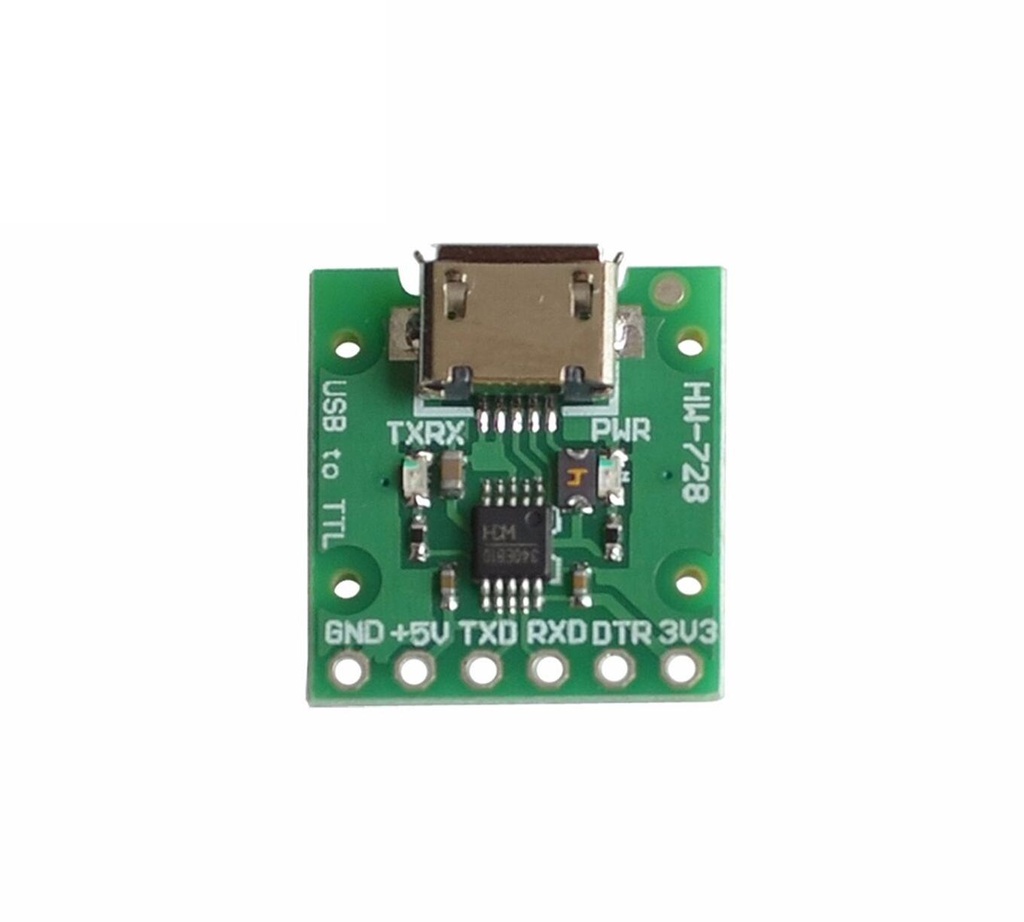
Features:
- Full-speed USB device interface, compatible with USB V2.0.
- Emulates a standard UART interface, useful for upgrading serial peripherals or expanding UART interfaces via USB.
- Fully compatible with existing serial applications on Windows — no software modifications required.
- Hardware full-duplex UART interface with built-in transmit and receive buffers.
- Supports baud rates from 50bps up to 2Mbps.
- Supports standard MODEM signals: RTS, DTR, DCD, RI, DSR, CTS.
- Can be used with external level conversion chips to provide RS232, RS485, RS422 interfaces.
- CH340R variant supports IrDA SIR infrared communication, with baud rates from 2400bps to 115200bps.
- Software compatible with CH341, using the same driver.
- Supports 5V, 3.3V, and even 3.0V power supply.
- CH340E includes a built-in crystal oscillator — no external crystal required.

STC Microcontroller Download Mode:
- Connect the following three wires:
- TXD (from USB downloader) → P3.0 (RX) on STC MCU
- RXD (from USB downloader) → P3.1 (TX) on STC MCU
- GND (from USB downloader) → GND on STC MCU
- Power the development board separately.
Note: Even with the board's power switch off, the power LED may dimly light up — this is normal. Use serial mode to download firmware. Ensure the system is cold started after powering.
STM32 Microcontroller Download Mode:
- Connect the following three wires:
- TXD (from USB downloader) → PA10 (RX1) on STM32
- RXD (from USB downloader) → PA9 (TX1) on STM32
- GND (from USB downloader) → GND on STM32
- Power the STM32 board either separately or through 5V via the USB downloader.
During download:- Set BOOT0 to VCC
- After download, set BOOT0 back to GND
- Press the reset button to complete the process
Operating System Support:
- Windows 7 (32-bit and 64-bit)
- Windows XP
Features:
- Full-speed USB device interface, compatible with USB V2.0.
- Emulates a standard UART interface, useful for upgrading serial peripherals or expanding UART interfaces via USB.
- Fully compatible with existing serial applications on Windows — no software modifications required.
- Hardware full-duplex UART interface with built-in transmit and receive buffers.
- Supports baud rates from 50bps up to 2Mbps.
- Supports standard MODEM signals: RTS, DTR, DCD, RI, DSR, CTS.
- Can be used with external level conversion chips to provide RS232, RS485, RS422 interfaces.
- CH340R variant supports IrDA SIR infrared communication, with baud rates from 2400bps to 115200bps.
- Software compatible with CH341, using the same driver.
- Supports 5V, 3.3V, and even 3.0V power supply.
- CH340E includes a built-in crystal oscillator — no external crystal required.
STC Microcontroller Download Mode:
- Connect the following three wires:
- TXD (from USB downloader) → P3.0 (RX) on STC MCU
- RXD (from USB downloader) → P3.1 (TX) on STC MCU
- GND (from USB downloader) → GND on STC MCU
- Power the development board separately.
Note: Even with the board's power switch off, the power LED may dimly light up — this is normal. Use serial mode to download firmware. Ensure the system is cold started after powering.
STM32 Microcontroller Download Mode:
- Connect the following three wires:
- TXD (from USB downloader) → PA10 (RX1) on STM32
- RXD (from USB downloader) → PA9 (TX1) on STM32
- GND (from USB downloader) → GND on STM32
- Power the STM32 board either separately or through 5V via the USB downloader.
During download:- Set BOOT0 to VCC
- After download, set BOOT0 back to GND
- Press the reset button to complete the process
Operating System Support:
- Windows 7 (32-bit and 64-bit)
- Windows XP