- All products
- Development Boards
- Arduino
- Arduino Boards
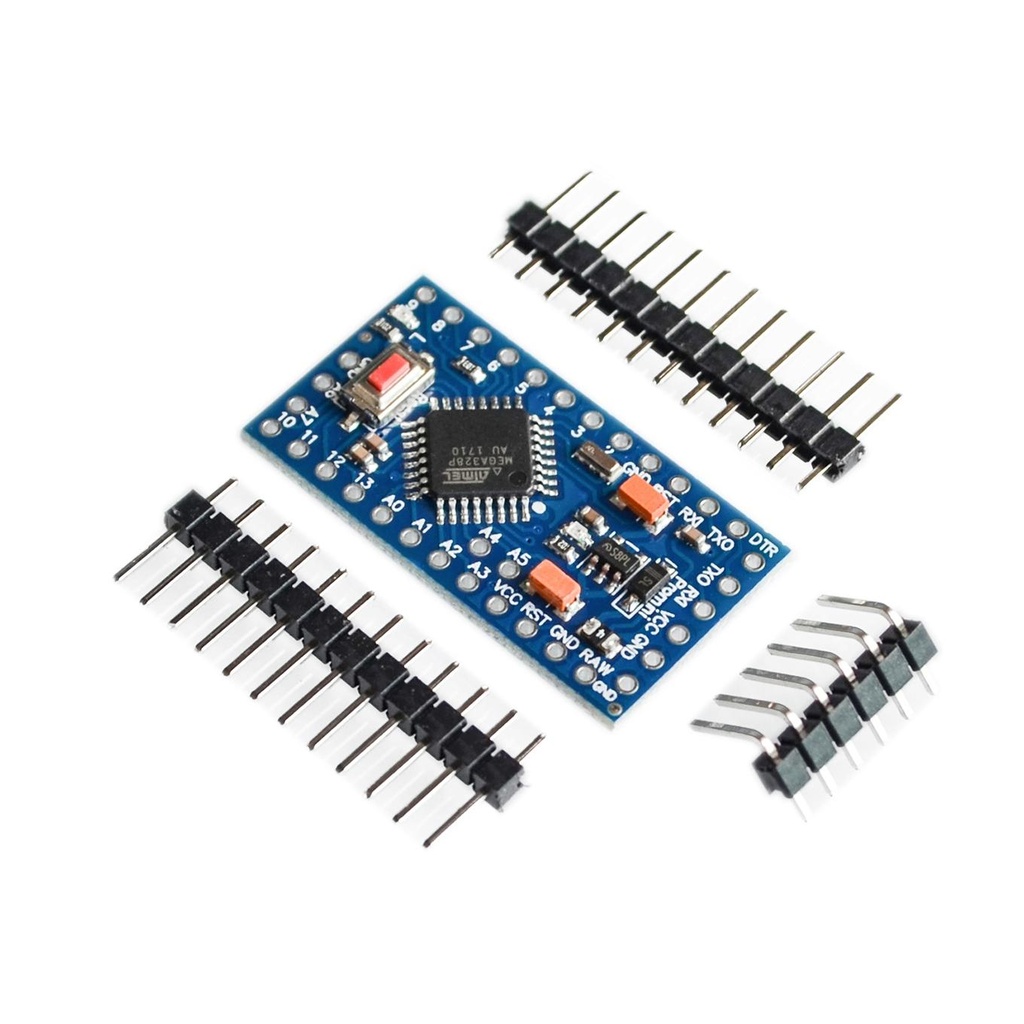
- Arduino Pro Mini Atmega328P 3.3v/8MHz Blue (Compatible)
- Arduino Boards
Features
- Microcontroller: ATmega328
- Operating Voltage: 3.3V
- Clock Speed: 8 MHz
- Flash Memory: 32 KB (0.5 KB used by bootloader)
- SRAM: 2 KB
- EEPROM: 1 KB
- Digital I/O Pins: 14 (of which 6 provide PWM output)
- Analog Input Pins: 8
- No USB interface – requires external FTDI/USB-to-Serial adapter for programming
- Low power consumption – great for battery-operated projects
- Compact size: 18mm x 33mm
Applications
- Wearable electronics
- IoT devices
- Battery-powered projects
- Sensor monitoring systems
- Embedded systems and compact robotics
Pin Description
- Digital I/O: D0 to D13 (PWM on D3, D5, D6, D9, D10, D11)
- Analog Inputs: A0 to A7
- Power Pins: VCC (3.3V), GND
- Reset: Active-low reset pin
- TX/RX: Serial communication pins (D0 for RX, D1 for TX)
Wiring and Programming
To program the Arduino Pro Mini, you need an FTDI USB-to-Serial adapter. Connect the following pins:
- FTDI VCC (3.3V) → VCC
- FTDI GND → GND
- FTDI TX → RXI (D0)
- FTDI RX → TXO (D1)
- FTDI DTR → GRN (auto-reset)
In the Arduino IDE:
- Select Board: “Arduino Pro or Pro Mini”
- Select Processor: “ATmega328P (3.3V, 8 MHz)”
- Select the correct COM port and upload code as usual.
Supported Protocols
- UART (Serial)
- I2C (Wire library, SDA on A4, SCL on A5)
- SPI (Pins 10-13)
Example Code
This basic sketch blinks the onboard LED (usually on pin 13):
void setup() {
pinMode(13, OUTPUT);
}
void loop() {
digitalWrite(13, HIGH); // LED ON
delay(1000); // Wait 1 second
digitalWrite(13, LOW); // LED OFF
delay(1000); // Wait 1 second
}
Important Notes
- This board does not include a built-in USB interface. You need a 3.3V FTDI or USB-to-Serial adapter.
- Ensure the FTDI adapter matches the board's voltage (3.3V only).
- Use a regulated power supply if powering through VCC.
Features
- Microcontroller: ATmega328
- Operating Voltage: 3.3V
- Clock Speed: 8 MHz
- Flash Memory: 32 KB (0.5 KB used by bootloader)
- SRAM: 2 KB
- EEPROM: 1 KB
- Digital I/O Pins: 14 (of which 6 provide PWM output)
- Analog Input Pins: 8
- No USB interface – requires external FTDI/USB-to-Serial adapter for programming
- Low power consumption – great for battery-operated projects
- Compact size: 18mm x 33mm
Applications
- Wearable electronics
- IoT devices
- Battery-powered projects
- Sensor monitoring systems
- Embedded systems and compact robotics
Pin Description
- Digital I/O: D0 to D13 (PWM on D3, D5, D6, D9, D10, D11)
- Analog Inputs: A0 to A7
- Power Pins: VCC (3.3V), GND
- Reset: Active-low reset pin
- TX/RX: Serial communication pins (D0 for RX, D1 for TX)
Wiring and Programming
To program the Arduino Pro Mini, you need an FTDI USB-to-Serial adapter. Connect the following pins:
- FTDI VCC (3.3V) → VCC
- FTDI GND → GND
- FTDI TX → RXI (D0)
- FTDI RX → TXO (D1)
- FTDI DTR → GRN (auto-reset)
In the Arduino IDE:
- Select Board: “Arduino Pro or Pro Mini”
- Select Processor: “ATmega328P (3.3V, 8 MHz)”
- Select the correct COM port and upload code as usual.
Supported Protocols
- UART (Serial)
- I2C (Wire library, SDA on A4, SCL on A5)
- SPI (Pins 10-13)
Example Code
This basic sketch blinks the onboard LED (usually on pin 13):
void setup() {
pinMode(13, OUTPUT);
}
void loop() {
digitalWrite(13, HIGH); // LED ON
delay(1000); // Wait 1 second
digitalWrite(13, LOW); // LED OFF
delay(1000); // Wait 1 second
}
Important Notes
- This board does not include a built-in USB interface. You need a 3.3V FTDI or USB-to-Serial adapter.
- Ensure the FTDI adapter matches the board's voltage (3.3V only).
- Use a regulated power supply if powering through VCC.