- All products
- Development Boards
- Arduino
- Shields
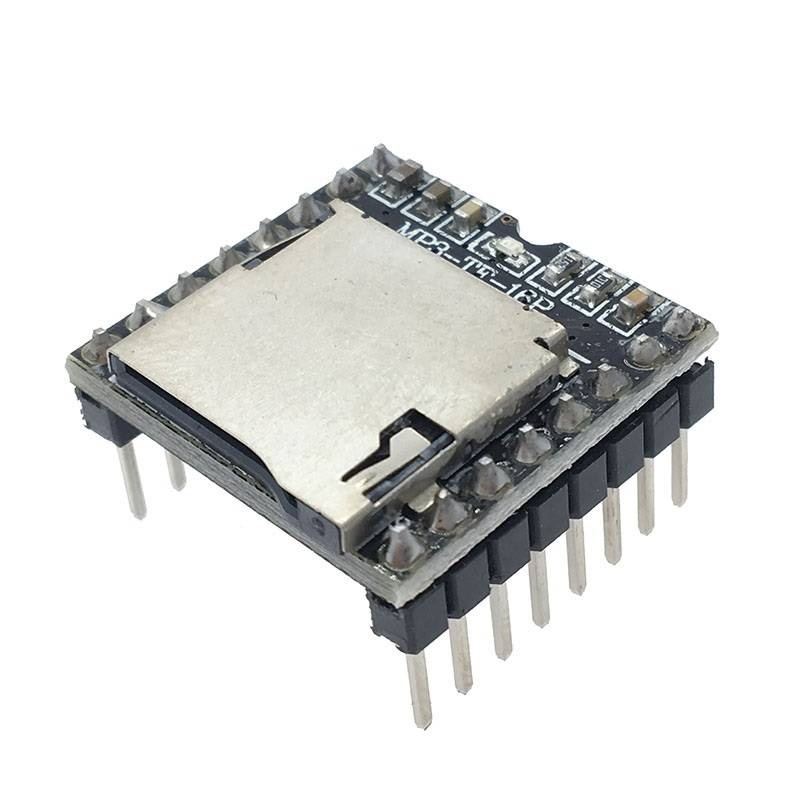
- MP3 Player Mini Module (MP3-TF-16P)
- Shields
Specifications
- Supported Sampling Rates (kHz): 8 / 11.025 / 12 / 16 / 22.05 / 24 / 32 / 44.1 / 48
- Audio Output: 24-bit DAC, Dynamic Range: 90dB, SNR: 85dB
- File System: FAT16/FAT32, supports microSD up to 32GB and USB flash drives
- Playback Features: Supports up to 100 folders, each with 255 songs; advertising sound priority
- Volume: 30-level adjustable
- EQ: 6-level equalizer settings
- Playback Control: UART, I/O trigger, AD key control
Pinout
| Pin | Description | Note |
|---|---|---|
| VCC | Power Supply + | DC 3.2V–5V |
| RX | Serial Input | UART |
| TX | Serial Output | UART |
| DAC_R | Right Audio Out | For amplifier/headphones |
| DAC_L | Left Audio Out | For amplifier/headphones |
| SPK2 | Speaker – | For 3W speaker |
| GND | Ground | Power GND |
| IO1 | Trigger 1 | Short press: Previous, Long: Volume– |
| IO2 | Trigger 2 | Short press: Next, Long: Volume+ |
| ADKEY1 | AD Key 1 | Trigger 1st MP3 |
| ADKEY2 | AD Key 2 | Trigger 5th MP3 |
| USB+ | USB+ DP | USB Port |
| USB– | USB– DM | USB Port |
| BUSY | Status Output | Low when playing |
Applications
- Voice-based alarms
- Car navigation announcements
- Talking blind cane projects
- Interactive toys and displays
- Educational and assistive devices
Important Notes:
- Only MP3 format files are supported.
- Use simple numeric file names like 001.mp3, 002.mp3, etc.
- Install DFPlayer Mini Library (v1.0) via the Arduino Library Manager for best compatibility.
Arduino Code
#include "Arduino.h"
#include "SoftwareSerial.h"
#include "DFRobotDFPlayerMini.h"
SoftwareSerial mySoftwareSerial(2, 3); // RX, TX
DFRobotDFPlayerMini myDFPlayer;
void setup() {
mySoftwareSerial.begin(9600);
Serial.begin(115200);
Serial.println(F("Initializing DFPlayer ..."));
if (!myDFPlayer.begin(mySoftwareSerial)) {
Serial.println(F("Unable to begin:"));
Serial.println(F("1. Recheck connection"));
Serial.println(F("2. Insert SD card"));
while (true);
}
Serial.println(F("DFPlayer Mini online."));
myDFPlayer.volume(20); // Volume range: 0–30
}
void loop() {
myDFPlayer.play(1); // Play first MP3
delay(2000);
myDFPlayer.next(); // Play next
delay(2000);
myDFPlayer.next(); // Play next
delay(2000);
myDFPlayer.next(); // Play next
delay(2000);
}
Specifications
- Supported Sampling Rates (kHz): 8 / 11.025 / 12 / 16 / 22.05 / 24 / 32 / 44.1 / 48
- Audio Output: 24-bit DAC, Dynamic Range: 90dB, SNR: 85dB
- File System: FAT16/FAT32, supports microSD up to 32GB and USB flash drives
- Playback Features: Supports up to 100 folders, each with 255 songs; advertising sound priority
- Volume: 30-level adjustable
- EQ: 6-level equalizer settings
- Playback Control: UART, I/O trigger, AD key control
Pinout
| Pin | Description | Note |
|---|---|---|
| VCC | Power Supply + | DC 3.2V–5V |
| RX | Serial Input | UART |
| TX | Serial Output | UART |
| DAC_R | Right Audio Out | For amplifier/headphones |
| DAC_L | Left Audio Out | For amplifier/headphones |
| SPK2 | Speaker – | For 3W speaker |
| GND | Ground | Power GND |
| IO1 | Trigger 1 | Short press: Previous, Long: Volume– |
| IO2 | Trigger 2 | Short press: Next, Long: Volume+ |
| ADKEY1 | AD Key 1 | Trigger 1st MP3 |
| ADKEY2 | AD Key 2 | Trigger 5th MP3 |
| USB+ | USB+ DP | USB Port |
| USB– | USB– DM | USB Port |
| BUSY | Status Output | Low when playing |
Applications
- Voice-based alarms
- Car navigation announcements
- Talking blind cane projects
- Interactive toys and displays
- Educational and assistive devices
Important Notes:
- Only MP3 format files are supported.
- Use simple numeric file names like 001.mp3, 002.mp3, etc.
- Install DFPlayer Mini Library (v1.0) via the Arduino Library Manager for best compatibility.
Arduino Code
#include "Arduino.h"
#include "SoftwareSerial.h"
#include "DFRobotDFPlayerMini.h"
SoftwareSerial mySoftwareSerial(2, 3); // RX, TX
DFRobotDFPlayerMini myDFPlayer;
void setup() {
mySoftwareSerial.begin(9600);
Serial.begin(115200);
Serial.println(F("Initializing DFPlayer ..."));
if (!myDFPlayer.begin(mySoftwareSerial)) {
Serial.println(F("Unable to begin:"));
Serial.println(F("1. Recheck connection"));
Serial.println(F("2. Insert SD card"));
while (true);
}
Serial.println(F("DFPlayer Mini online."));
myDFPlayer.volume(20); // Volume range: 0–30
}
void loop() {
myDFPlayer.play(1); // Play first MP3
delay(2000);
myDFPlayer.next(); // Play next
delay(2000);
myDFPlayer.next(); // Play next
delay(2000);
myDFPlayer.next(); // Play next
delay(2000);
}