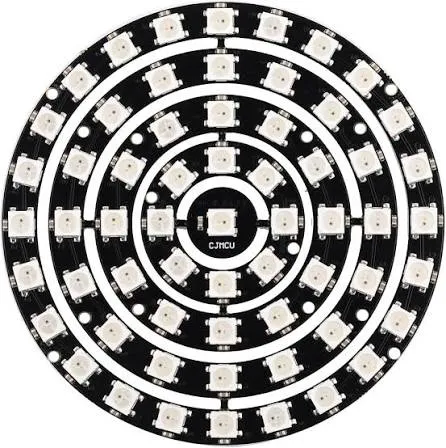
Features
- 61 individually addressable RGB LEDs
- WS2812-compatible integrated driver in each LED
- NeoPixel-compatible control
- Individual control of each LED for colors and lighting effects
- One-wire digital communication
- Constant-current drive of approximately 18mA per LED
- No external resistor required for the LED data input
- 5V DC operating voltage
- Suitable for Arduino and other microcontroller projects
Principle of Operation

The LED ring uses addressable RGB LEDs with integrated WS2812-compatible driver circuits. Color and brightness data is sent digitally through the data input using a one-wire communication protocol. Each LED receives its assigned data and passes the remaining data to the next LED, allowing all 61 LEDs to be controlled individually from a single microcontroller data pin.
Library
Use the Adafruit NeoPixel library to control the WS2812 LED ring with Arduino.
How to Install
- Open Arduino IDE.
- Go to Sketch → Include Library → Manage Libraries.
- Search for Adafruit NeoPixel.
- Click Install.
Include the Library
#include <Adafruit_NeoPixel.h>Simple Code
#include <Adafruit_NeoPixel.h>
#define LED_PIN 6
#define LED_COUNT 61
Adafruit_NeoPixel ring(LED_COUNT, LED_PIN, NEO_GRB + NEO_KHZ800);
void setup() {
 ring.begin();
 ring.show();
}
void loop() {
 for (int i = 0; i < LED_COUNT; i++) {
 ring.setPixelColor(i, ring.Color(255, 0, 0));
 }
 ring.show();
 delay(1000);
}Applications
- RGB lighting and decorative displays
- Wearable and costume lighting
- Arduino and microcontroller projects
- Custom clocks and displays
- LED signs and visual effects
- Interactive lighting projects
- Gaming and entertainment devices
Pinout
- 5V: Power input for the LED ring
- GND: Ground connection
- DIN: Digital data input from the microcontroller
- DOUT: Digital data output for connecting to another addressable LED section
Wiring

Connect the 5V pin of the LED ring to a suitable 5V DC power supply and connect GND to the power supply and the microcontroller ground. Connect DIN to a digital output pin on the microcontroller. If additional addressable LEDs are required, the DOUT connection can be connected to the data input of the next LED section.
Specifications
- LED Type: WS2812-compatible 5050 RGB LED
- Number of LEDs: 61
- LED Control: Individually addressable
- Driver: Integrated driver chip
- Drive Current: Approximately 18mA per LED
- Operating Voltage: 5V DC
- Communication: One-wire digital data
- Outer Diameter: 84mm
- Inner Diameter: 17mm
- Compatibility: WS2812, NeoPixel
Resources
Features
- 61 individually addressable RGB LEDs
- WS2812-compatible integrated driver in each LED
- NeoPixel-compatible control
- Individual control of each LED for colors and lighting effects
- One-wire digital communication
- Constant-current drive of approximately 18mA per LED
- No external resistor required for the LED data input
- 5V DC operating voltage
- Suitable for Arduino and other microcontroller projects
Principle of Operation
The LED ring uses addressable RGB LEDs with integrated WS2812-compatible driver circuits. Color and brightness data is sent digitally through the data input using a one-wire communication protocol. Each LED receives its assigned data and passes the remaining data to the next LED, allowing all 61 LEDs to be controlled individually from a single microcontroller data pin.
Library
Use the Adafruit NeoPixel library to control the WS2812 LED ring with Arduino.
How to Install
- Open Arduino IDE.
- Go to Sketch → Include Library → Manage Libraries.
- Search for Adafruit NeoPixel.
- Click Install.
Include the Library
#include <Adafruit_NeoPixel.h>Simple Code
#include <Adafruit_NeoPixel.h>
#define LED_PIN 6
#define LED_COUNT 61
Adafruit_NeoPixel ring(LED_COUNT, LED_PIN, NEO_GRB + NEO_KHZ800);
void setup() {
 ring.begin();
 ring.show();
}
void loop() {
 for (int i = 0; i < LED_COUNT; i++) {
 ring.setPixelColor(i, ring.Color(255, 0, 0));
 }
 ring.show();
 delay(1000);
}
Applications
- RGB lighting and decorative displays
- Wearable and costume lighting
- Arduino and microcontroller projects
- Custom clocks and displays
- LED signs and visual effects
- Interactive lighting projects
- Gaming and entertainment devices
Pinout
- 5V: Power input for the LED ring
- GND: Ground connection
- DIN: Digital data input from the microcontroller
- DOUT: Digital data output for connecting to another addressable LED section
Wiring
Connect the 5V pin of the LED ring to a suitable 5V DC power supply and connect GND to the power supply and the microcontroller ground. Connect DIN to a digital output pin on the microcontroller. If additional addressable LEDs are required, the DOUT connection can be connected to the data input of the next LED section.
Specifications
- LED Type: WS2812-compatible 5050 RGB LED
- Number of LEDs: 61
- LED Control: Individually addressable
- Driver: Integrated driver chip
- Drive Current: Approximately 18mA per LED
- Operating Voltage: 5V DC
- Communication: One-wire digital data
- Outer Diameter: 84mm
- Inner Diameter: 17mm
- Compatibility: WS2812, NeoPixel