Features
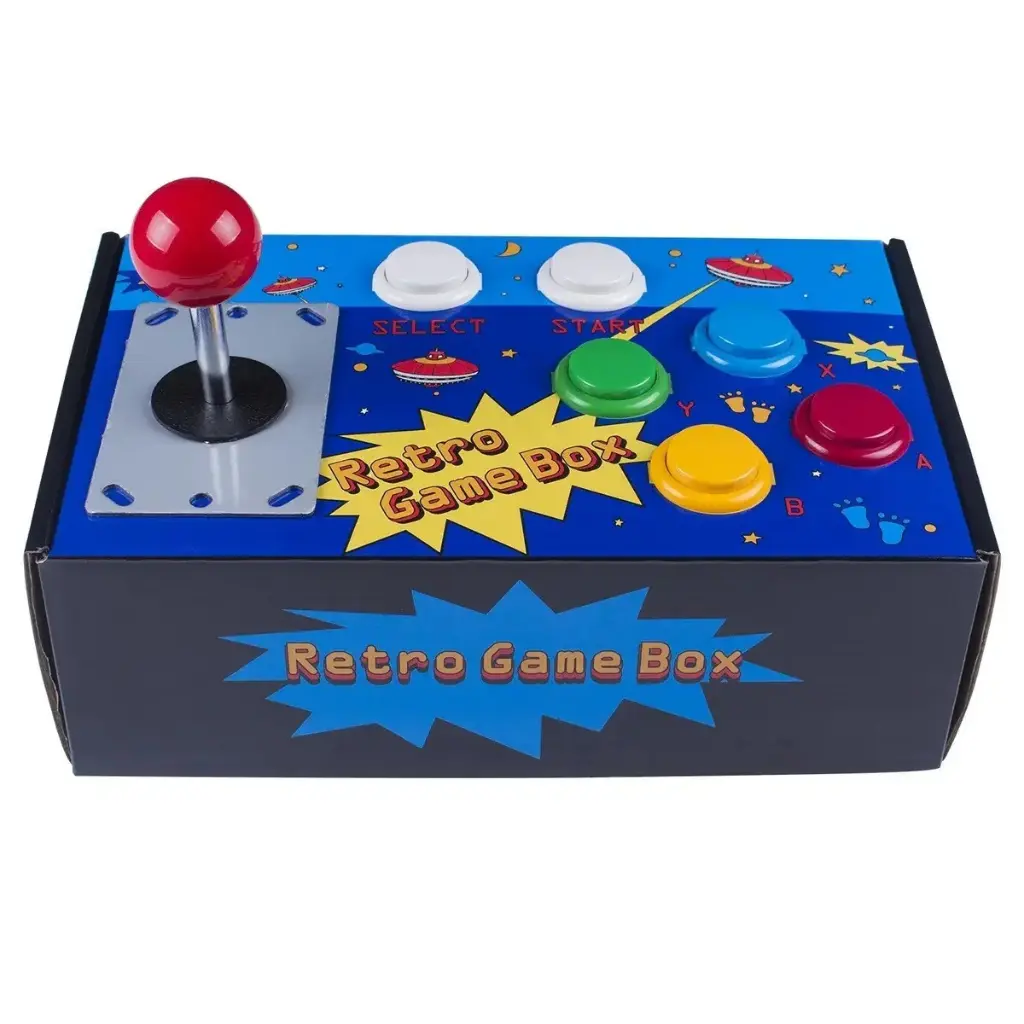
- Arcade-style enclosure and control panel
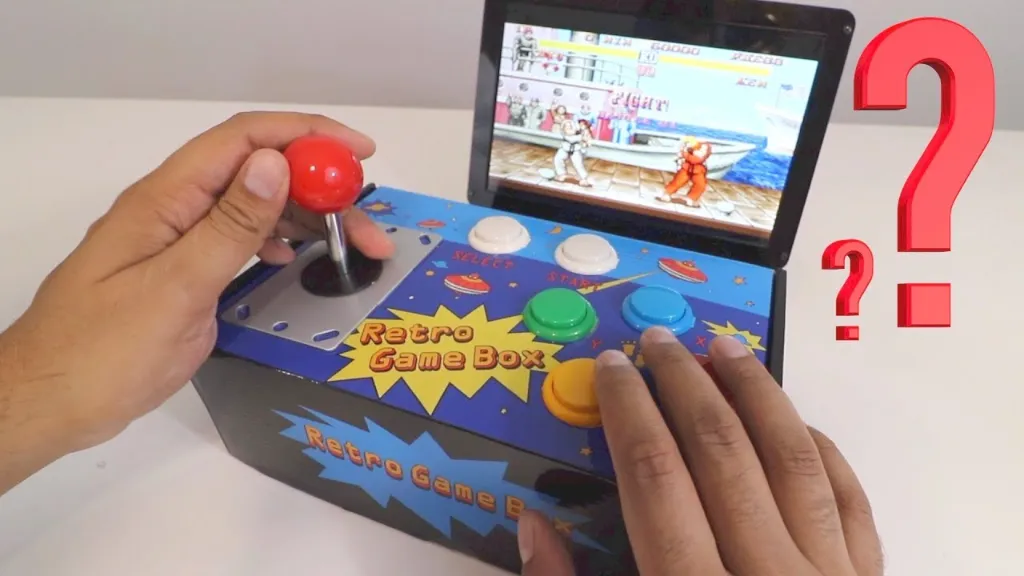
- HDMI output for connection to a monitor, TV, or projector
- Configurable display resolution
- Wi-Fi connectivity to reduce cable connections
- USB ports for gamepads, keyboards, mice, and other peripherals
- Built-in left and right stereo speakers
- Arcade joystick and 8 buttons
- Supports user-defined arcade control functions
- Compatible with RetroPie gaming systems
- Supports KODI home media center applications
Principle of Operation

The Arcade Retro Game Box uses a compatible Raspberry Pi as its main computing platform. The Raspberry Pi runs a supported gaming or media operating system and sends the video output through HDMI to a connected display. The built-in joystick and buttons provide arcade-style control, while the USB ports allow additional controllers and peripherals to be connected. The built-in stereo speakers provide audio output for games and media.
Library Needed
No specific programming library is required for normal operation. The kit is designed to work with Raspberry Pi software such as RetroPie for retro gaming and KODI for home media applications.
Code
No programming is required for normal gaming operation. The Raspberry Pi can be configured with compatible gaming or media software according to the intended application.
Applications
- Retro arcade gaming
- Home arcade systems
- Raspberry Pi gaming projects
- Classic game emulation
- Home media center
- Movies and music playback
- DIY arcade cabinet projects
Pinout


The arcade controls are connected internally to the compatible Raspberry Pi through its available interfaces. The kit includes an arcade joystick and 8 buttons for user input. Exact GPIO assignments depend on the Raspberry Pi model and the control board configuration used by the kit.
Wiring

Install a compatible Raspberry Pi inside the arcade enclosure and connect the required power, display, and control interfaces. Connect the HDMI output to a monitor, TV, or projector and use the USB ports for additional controllers or peripherals. The arcade joystick and buttons are connected through the internal control interface.
Specifications
- Required Raspberry Pi: Raspberry Pi 3B+
- Supported Raspberry Pi Models: Raspberry Pi A+, B+, 2B, 3B, 3B+
- Raspberry Pi Zero Compatibility: Raspberry Pi Zero, Zero W, Zero WH with additional HDMI cable
- Storage Support: 16GB–256GB TF Card
- Included Storage: 16GB SD Card
- Connectivity: HDMI, USB, Ethernet
- Wireless: Wi-Fi
- Arcade Controls: Joystick and 8 buttons
- Audio: Built-in left/right stereo speakers
- Power Supply: 5V
- Gaming System: RetroPie compatible
- Media Center: KODI compatible
- Dimensions: 30 x 21.5 x 7.5 cm
Resources
Features
- Arcade-style enclosure and control panel
- HDMI output for connection to a monitor, TV, or projector
- Configurable display resolution
- Wi-Fi connectivity to reduce cable connections
- USB ports for gamepads, keyboards, mice, and other peripherals
- Built-in left and right stereo speakers
- Arcade joystick and 8 buttons
- Supports user-defined arcade control functions
- Compatible with RetroPie gaming systems
- Supports KODI home media center applications
Principle of Operation
The Arcade Retro Game Box uses a compatible Raspberry Pi as its main computing platform. The Raspberry Pi runs a supported gaming or media operating system and sends the video output through HDMI to a connected display. The built-in joystick and buttons provide arcade-style control, while the USB ports allow additional controllers and peripherals to be connected. The built-in stereo speakers provide audio output for games and media.
Library Needed
No specific programming library is required for normal operation. The kit is designed to work with Raspberry Pi software such as RetroPie for retro gaming and KODI for home media applications.
Code
No programming is required for normal gaming operation. The Raspberry Pi can be configured with compatible gaming or media software according to the intended application.
Applications
- Retro arcade gaming
- Home arcade systems
- Raspberry Pi gaming projects
- Classic game emulation
- Home media center
- Movies and music playback
- DIY arcade cabinet projects
Pinout
The arcade controls are connected internally to the compatible Raspberry Pi through its available interfaces. The kit includes an arcade joystick and 8 buttons for user input. Exact GPIO assignments depend on the Raspberry Pi model and the control board configuration used by the kit.
Wiring
Install a compatible Raspberry Pi inside the arcade enclosure and connect the required power, display, and control interfaces. Connect the HDMI output to a monitor, TV, or projector and use the USB ports for additional controllers or peripherals. The arcade joystick and buttons are connected through the internal control interface.
Specifications
- Required Raspberry Pi: Raspberry Pi 3B+
- Supported Raspberry Pi Models: Raspberry Pi A+, B+, 2B, 3B, 3B+
- Raspberry Pi Zero Compatibility: Raspberry Pi Zero, Zero W, Zero WH with additional HDMI cable
- Storage Support: 16GB–256GB TF Card
- Included Storage: 16GB SD Card
- Connectivity: HDMI, USB, Ethernet
- Wireless: Wi-Fi
- Arcade Controls: Joystick and 8 buttons
- Audio: Built-in left/right stereo speakers
- Power Supply: 5V
- Gaming System: RetroPie compatible
- Media Center: KODI compatible
- Dimensions: 30 x 21.5 x 7.5 cm