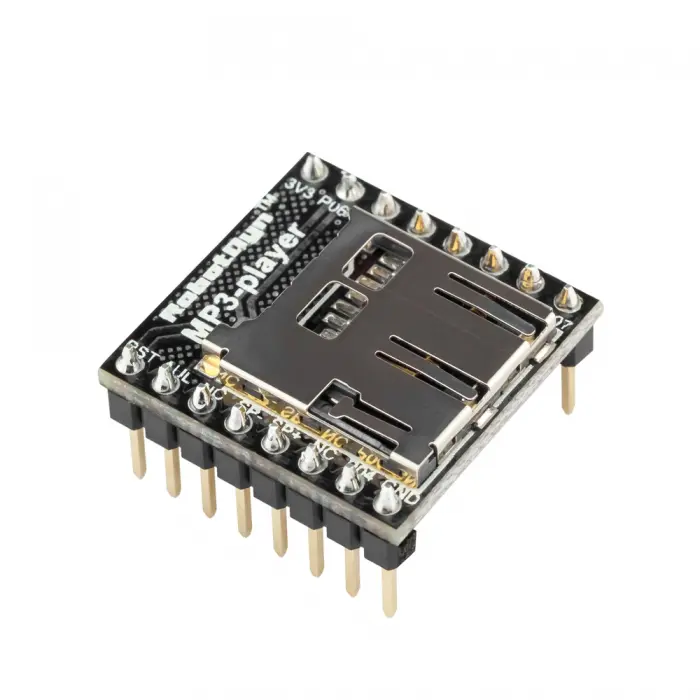
Features:
- Compact Audio Module: Small IC for embedding audio playback into projects.
- MicroSD Card Reader: Reads MP3 files directly from the SD card.
- Multiple Sound Files: Supports up to 512 unique audio files.
- Standalone or MCU Controlled: Can work independently or via UART with Arduino or other microcontrollers.
- Amplifier Compatible: Can be connected to an external amplifier like PAM8403 for boosted audio output.
- Custom Voice or Music: Ideal for robots, toys, or personal audio projects.
Specifications:
- IC: WTV020SD audio playback IC
- Audio Files: Supports up to 512 MP3/WAV files
- Storage: MicroSD card slot
- Control Interface: UART TX & RX for microcontroller communication
- Standalone Capability: Can play audio independently
- Amplifier Support: Compatible with PAM8403 or similar audio amplifiers
Pinout:
- VCC: Connect to 3.3V power supply
- GND: Ground
- TX: Serial transmit to Arduino RX
- RX: Serial receive from Arduino TX
- SPK+ / SPK-: Connect to a small speaker (optional, or use an amplifier)
Arduino Test Code:
#include <SoftwareSerial.h>
SoftwareSerial wtvSerial(10, 11); // RX, TX pins to WTV020SD module
void setup() {
Serial.begin(9600);
wtvSerial.begin(9600);
Serial.println("WTV020SD Test");
delay(1000);
// Play first audio file (001.wav / 001.mp3)
playTrack(1);
}
void loop() {
// Nothing else in loop
}
void playTrack(int track) {
byte cmd[4];
cmd[0] = 0xAA; // Start byte
cmd[1] = 0x07; // Command: Play track
cmd[2] = track; // Track number (1-255)
cmd[3] = 0xAB; // End byte
for(int i = 0; i < 4; i++) {
wtvSerial.write(cmd[i]);
}
Serial.print("Playing track: ");
Serial.println(track);
}
Notes:
- Use 3.3V for VCC, depending on your module version.
- Connect the TX of WTV020SD to Arduino RX and the RX of WTV020SD to Arduino TX.
- You can add an external amplifier (like PAM8403) if you need louder audio.
- MP3/WAV files should be named with 3-digit numbers: 001.wav, 002.wav, etc.
Features:
- Compact Audio Module: Small IC for embedding audio playback into projects.
- MicroSD Card Reader: Reads MP3 files directly from the SD card.
- Multiple Sound Files: Supports up to 512 unique audio files.
- Standalone or MCU Controlled: Can work independently or via UART with Arduino or other microcontrollers.
- Amplifier Compatible: Can be connected to an external amplifier like PAM8403 for boosted audio output.
- Custom Voice or Music: Ideal for robots, toys, or personal audio projects.
Specifications:
- IC: WTV020SD audio playback IC
- Audio Files: Supports up to 512 MP3/WAV files
- Storage: MicroSD card slot
- Control Interface: UART TX & RX for microcontroller communication
- Standalone Capability: Can play audio independently
- Amplifier Support: Compatible with PAM8403 or similar audio amplifiers
Pinout:
- VCC: Connect to 3.3V power supply
- GND: Ground
- TX: Serial transmit to Arduino RX
- RX: Serial receive from Arduino TX
- SPK+ / SPK-: Connect to a small speaker (optional, or use an amplifier)
Arduino Test Code:
#include <SoftwareSerial.h>
SoftwareSerial wtvSerial(10, 11); // RX, TX pins to WTV020SD module
void setup() {
Serial.begin(9600);
wtvSerial.begin(9600);
Serial.println("WTV020SD Test");
delay(1000);
// Play first audio file (001.wav / 001.mp3)
playTrack(1);
}
void loop() {
// Nothing else in loop
}
void playTrack(int track) {
byte cmd[4];
cmd[0] = 0xAA; // Start byte
cmd[1] = 0x07; // Command: Play track
cmd[2] = track; // Track number (1-255)
cmd[3] = 0xAB; // End byte
for(int i = 0; i < 4; i++) {
wtvSerial.write(cmd[i]);
}
Serial.print("Playing track: ");
Serial.println(track);
}
Notes:
- Use 3.3V for VCC, depending on your module version.
- Connect the TX of WTV020SD to Arduino RX and the RX of WTV020SD to Arduino TX.
- You can add an external amplifier (like PAM8403) if you need louder audio.
- MP3/WAV files should be named with 3-digit numbers: 001.wav, 002.wav, etc.