
Features
- Raspberry Pi computer integrated into a compact keyboard
- Based on the Raspberry Pi 4 platform
- UK keyboard layout
- Pink/White keyboard design
- Built-in keyboard eliminates the need for a separate USB keyboard
- Two micro-HDMI display outputs
- Two USB 3.0 ports for high-speed peripherals
- One USB 2.0 port
- Gigabit Ethernet connectivity
- MicroSD card storage
- 40-pin GPIO header for electronics and hardware projects
- Built-in heatsink for silent, fanless cooling
- Dedicated power on/off soft key
System Design
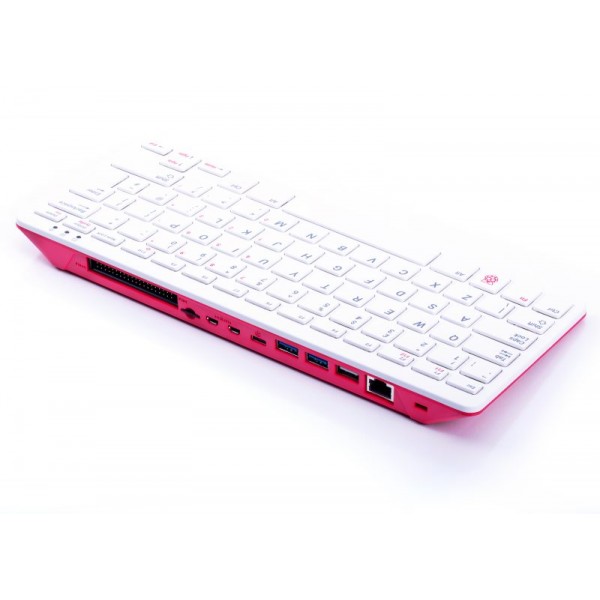
The Raspberry Pi 400 integrates the Raspberry Pi computer hardware directly into the keyboard enclosure. This removes the need for a separate computer case and provides a compact desktop computer with the keyboard already attached.
The integrated heatsink provides passive cooling without requiring a cooling fan. This allows the unit to operate without the mechanical noise associated with a fan.
Connections
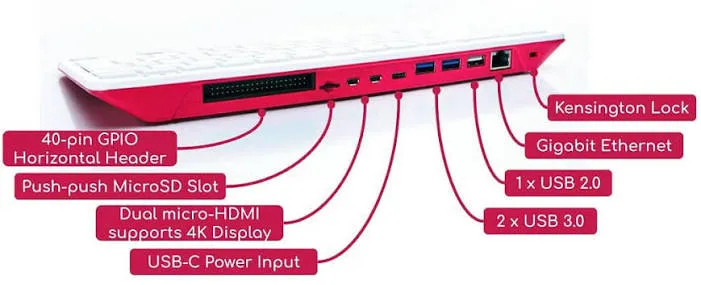
The Raspberry Pi 400 provides several external interfaces for displays, USB peripherals, networking, storage, and hardware development.
| Connection | Quantity | Purpose |
|---|---|---|
| Micro-HDMI | 2 | Display connection |
| USB 3.0 | 2 | High-speed USB peripherals |
| USB 2.0 | 1 | USB peripherals |
| Gigabit Ethernet | 1 | Wired network connection |
| MicroSD Card Slot | 1 | Operating system and storage |
| 40-Pin GPIO Header | 1 | Hardware and electronics projects |
40-Pin GPIO Header
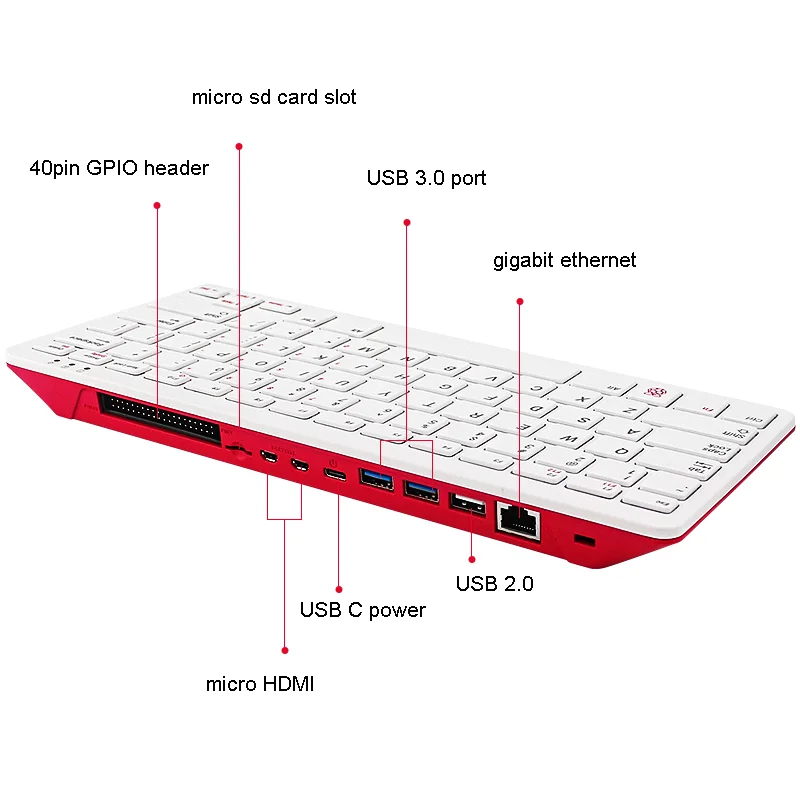
The 40-pin GPIO header provides access to the Raspberry Pi's hardware interfaces and digital input/output functions. It can be used to connect electronic components, sensors, modules, displays, and other compatible hardware.
The GPIO header makes the Raspberry Pi 400 suitable for electronics development and projects that require interaction with external hardware.
USB Connectivity
The Raspberry Pi 400 provides two USB 3.0 ports and one USB 2.0 port for connecting peripherals and accessories such as storage devices, keyboards, mice, USB adapters, and other compatible USB equipment.
The built-in keyboard uses an internal USB connection, while the external USB ports remain available for additional peripherals.
Display Connections
Two micro-HDMI connectors are provided for connecting compatible displays. Micro-HDMI cables or suitable adapters are required because the Raspberry Pi 400 uses micro-HDMI rather than full-size HDMI connectors.
Storage
The Raspberry Pi 400 uses a microSD card for operating system installation and primary storage. A microSD card is not included with this standalone unit.
Cooling
The Raspberry Pi 400 uses a large integrated heatsink for passive cooling. The fanless design eliminates the need for a cooling fan in the keyboard enclosure and provides silent operation.
Power On/Off
The keyboard includes a dedicated power on/off soft key located at F10. This provides a convenient way to control the computer's power functions when supported by the operating system and configuration.
Applications
- Desktop computing
- Programming and software development
- Electronics development
- Raspberry Pi GPIO projects
- Education and computer training
- Embedded systems development
- IoT projects
- Web browsing and general computing
- Hardware and software experimentation
Raspberry Pi 400 vs. Standard Raspberry Pi Board
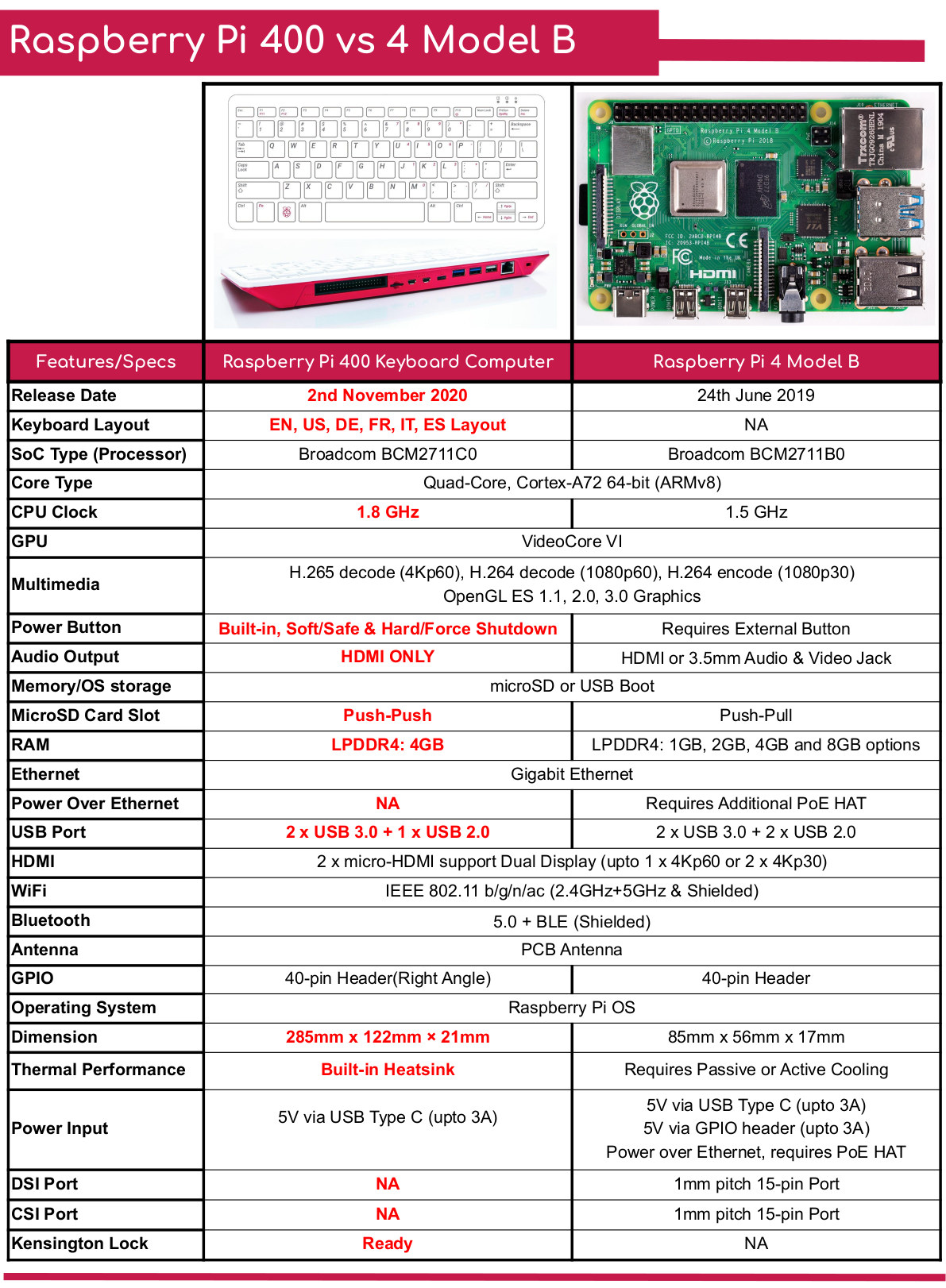
The main difference between the Raspberry Pi 400 and a standard Raspberry Pi board is the physical design. The Raspberry Pi 400 integrates the computer into a keyboard enclosure, while a standard Raspberry Pi board is supplied as a separate circuit board and requires an external case and keyboard.
The integrated keyboard and cooling system make the Raspberry Pi 400 a convenient option for desktop-style use while retaining access to the 40-pin GPIO header.
Technical Specifications
| Parameter | Specification |
|---|---|
| Product | Raspberry Pi 400 |
| Keyboard Layout | UK |
| Color | Pink/White |
| Platform | Raspberry Pi 4 compatible platform |
| Micro-HDMI | 2 ports |
| USB 3.0 | 2 ports |
| USB 2.0 | 1 port |
| Ethernet | 1 × Gigabit Ethernet |
| Storage Interface | MicroSD card slot |
| GPIO | 40-pin GPIO header |
| Cooling | Integrated heatsink, fanless |
| Power Connector | USB-C |
Important Notes
- This product is the standalone Raspberry Pi 400 keyboard computer.
- A USB-C power supply is required and is not included in the stated package.
- A micro-HDMI cable is required to connect the Raspberry Pi 400 to a display.
- A microSD card is required for operating system installation and storage.
- A monitor and mouse are required for a complete desktop setup.
- The Raspberry Pi 400 uses a UK keyboard layout.
- Do not confuse the micro-HDMI connectors with full-size HDMI connectors when selecting a display cable.
Features
- Raspberry Pi computer integrated into a compact keyboard
- Based on the Raspberry Pi 4 platform
- UK keyboard layout
- Pink/White keyboard design
- Built-in keyboard eliminates the need for a separate USB keyboard
- Two micro-HDMI display outputs
- Two USB 3.0 ports for high-speed peripherals
- One USB 2.0 port
- Gigabit Ethernet connectivity
- MicroSD card storage
- 40-pin GPIO header for electronics and hardware projects
- Built-in heatsink for silent, fanless cooling
- Dedicated power on/off soft key
System Design
The Raspberry Pi 400 integrates the Raspberry Pi computer hardware directly into the keyboard enclosure. This removes the need for a separate computer case and provides a compact desktop computer with the keyboard already attached.
The integrated heatsink provides passive cooling without requiring a cooling fan. This allows the unit to operate without the mechanical noise associated with a fan.
Connections
The Raspberry Pi 400 provides several external interfaces for displays, USB peripherals, networking, storage, and hardware development.
| Connection | Quantity | Purpose |
|---|---|---|
| Micro-HDMI | 2 | Display connection |
| USB 3.0 | 2 | High-speed USB peripherals |
| USB 2.0 | 1 | USB peripherals |
| Gigabit Ethernet | 1 | Wired network connection |
| MicroSD Card Slot | 1 | Operating system and storage |
| 40-Pin GPIO Header | 1 | Hardware and electronics projects |
40-Pin GPIO Header
The 40-pin GPIO header provides access to the Raspberry Pi's hardware interfaces and digital input/output functions. It can be used to connect electronic components, sensors, modules, displays, and other compatible hardware.
The GPIO header makes the Raspberry Pi 400 suitable for electronics development and projects that require interaction with external hardware.
USB Connectivity
The Raspberry Pi 400 provides two USB 3.0 ports and one USB 2.0 port for connecting peripherals and accessories such as storage devices, keyboards, mice, USB adapters, and other compatible USB equipment.
The built-in keyboard uses an internal USB connection, while the external USB ports remain available for additional peripherals.
Display Connections
Two micro-HDMI connectors are provided for connecting compatible displays. Micro-HDMI cables or suitable adapters are required because the Raspberry Pi 400 uses micro-HDMI rather than full-size HDMI connectors.
Storage
The Raspberry Pi 400 uses a microSD card for operating system installation and primary storage. A microSD card is not included with this standalone unit.
Cooling
The Raspberry Pi 400 uses a large integrated heatsink for passive cooling. The fanless design eliminates the need for a cooling fan in the keyboard enclosure and provides silent operation.
Power On/Off
The keyboard includes a dedicated power on/off soft key located at F10. This provides a convenient way to control the computer's power functions when supported by the operating system and configuration.
Applications
- Desktop computing
- Programming and software development
- Electronics development
- Raspberry Pi GPIO projects
- Education and computer training
- Embedded systems development
- IoT projects
- Web browsing and general computing
- Hardware and software experimentation
Raspberry Pi 400 vs. Standard Raspberry Pi Board
The main difference between the Raspberry Pi 400 and a standard Raspberry Pi board is the physical design. The Raspberry Pi 400 integrates the computer into a keyboard enclosure, while a standard Raspberry Pi board is supplied as a separate circuit board and requires an external case and keyboard.
The integrated keyboard and cooling system make the Raspberry Pi 400 a convenient option for desktop-style use while retaining access to the 40-pin GPIO header.
Technical Specifications
| Parameter | Specification |
|---|---|
| Product | Raspberry Pi 400 |
| Keyboard Layout | UK |
| Color | Pink/White |
| Platform | Raspberry Pi 4 compatible platform |
| Micro-HDMI | 2 ports |
| USB 3.0 | 2 ports |
| USB 2.0 | 1 port |
| Ethernet | 1 × Gigabit Ethernet |
| Storage Interface | MicroSD card slot |
| GPIO | 40-pin GPIO header |
| Cooling | Integrated heatsink, fanless |
| Power Connector | USB-C |
Important Notes
- This product is the standalone Raspberry Pi 400 keyboard computer.
- A USB-C power supply is required and is not included in the stated package.
- A micro-HDMI cable is required to connect the Raspberry Pi 400 to a display.
- A microSD card is required for operating system installation and storage.
- A monitor and mouse are required for a complete desktop setup.
- The Raspberry Pi 400 uses a UK keyboard layout.
- Do not confuse the micro-HDMI connectors with full-size HDMI connectors when selecting a display cable.