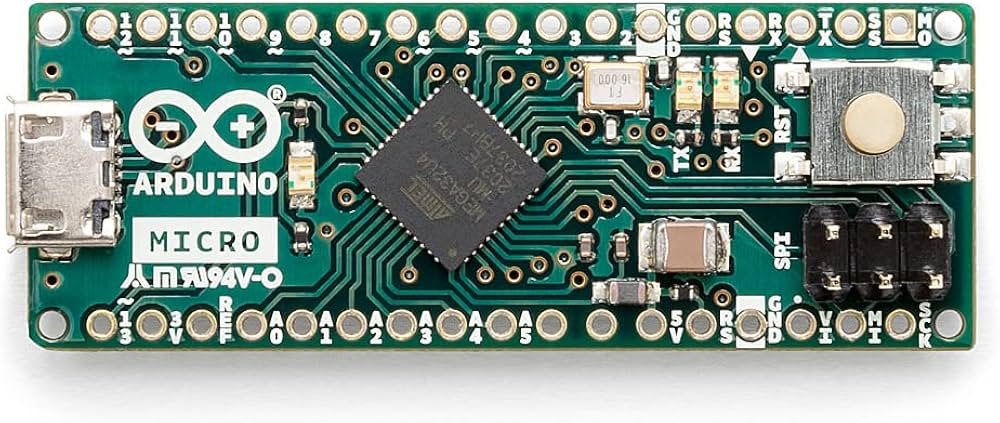
Features:
- ATmega32U4 MCU: Powered by the advanced ATmega32U4 microcontroller unit, offering high-performance capabilities and reliability.
- 20 Digital I/O Pins: Provides 20 flexible digital I/O pins for interfacing with a wide range of external components and devices.
- PWM Outputs: Includes seven Pulse Width Modulation outputs, enabling precise control over actuators, motors, and analog components.
- Analog Inputs: Offers twelve analog input channels for accurate sensing and measurement of real-world signals.
- 16MHz Clock Speed: Operates at a swift clock speed ensuring rapid execution of instructions and efficient data processing.
- Micro USB Connection: Features a micro USB interface for seamless connectivity with your computer, enabling easy programming and data transfer.
- Reset Button: Convenient reset button for quick rebooting during development and testing.
- User-Friendly Design: Designed for ease of use, setup, and integration with other hardware and software components.
- Extensive Documentation: Backed by comprehensive documentation and support from Adafruit and the Arduino community.
- Versatile Applications: Ideal for robotics, IoT devices, automation systems, sensor interfacing, and prototyping.
Principle of Work:
- Microcontroller: The ATmega32U4 executes code and controls the board's functions.
- Programming: Programmed via micro USB cable; uses built-in USB functionality for virtual COM port access.
- IDE: Arduino IDE offers a user-friendly environment with C/C++ based simplified language and extensive libraries.
- Pins and I/O: 20 digital I/O pins and 12 analog inputs to interface with sensors, actuators, and other components.
- USB Functionality: Functions as USB HID, enabling keyboard or mouse emulation.
- Powering: Powered through micro USB or external power source; operates at 5V.
- Open-Source: Hardware and software are freely available for modification and customization.
Pinout of the Module:
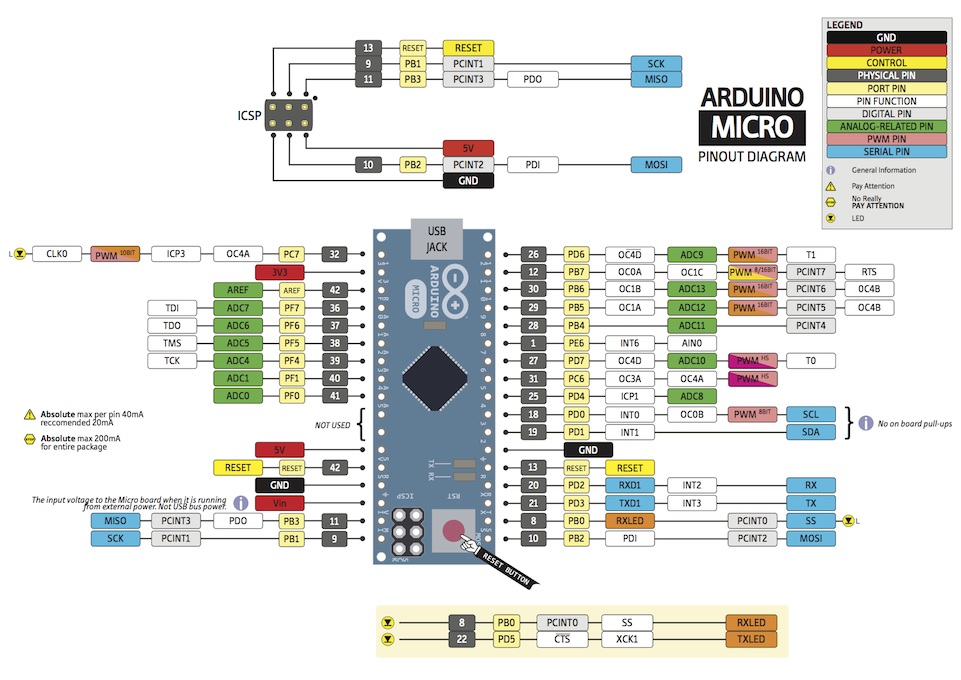
- Digital I/O Pins: 20 pins configurable as inputs or outputs, supporting HIGH (5V) or LOW (0V) states.
- Analog Pins: 12 pins with 10-bit ADC, enabling precise analog measurements.
- PWM Pins: 7 pins (3, 5, 6, 9, 10, 11, 13) for 8-bit PWM output.
- UART Pins: Rx and Tx pins for serial communication.
- SPI Pins: MOSI and MISO pins for SPI communication.
- I2C Pins: SDA and SCL pins for I2C communication protocol.
- Power Pins: VIN (up to 12V input), VCC (regulated 5V output), RS (reset), GND, and AREF (analog reference voltage).
- Inbuilt LED (Pin 13): Green LED connected to digital pin 13 for visual feedback.
- Micro USB Port: For programming, data transfer, and power supply.
Applications:
- Robotics: Motor control, sensor data reading, obstacle avoidance, and wireless communication.
- IoT: Data gathering, cloud communication, device control, and prototypes.
- Human-Computer Interaction (HCI): Custom input devices, multimedia control, automation, and interactive installations.
- Home Automation: Lighting, environmental monitoring, voice assistant integration, and remote device control.
- Wearable Technology: Sensor control, biometric monitoring, and small display interfaces.
- Education: Teaching electronics, programming, and physical computing.
- Prototyping & Development: Rapid product iteration with compatibility for shields and modules.
Getting Started:
- Download and install the Arduino IDE.
- Connect the Arduino Micro to your computer using a data-capable USB cable.
- In the IDE, select
Tools > Board > Arduino Micro. - Select the corresponding serial port via
Tools > Port. - Write or load your sketch, verify and upload it to the board.
- Use the Serial Monitor to view output or debug your code.
Sample Code (Blink LED on Pin 13):
// LED pin
const int ledPin = 13;

// Blink interval (milliseconds)
const int blinkInterval = 1000;

bool ledState = false;
unsigned long previousMillis = 0;

void setup() {
  pinMode(ledPin, OUTPUT);
  Serial.begin(9600);
}

void loop() {
  unsigned long currentMillis = millis();

  if (currentMillis - previousMillis >= blinkInterval) {
    previousMillis = currentMillis;

    ledState = !ledState;
    digitalWrite(ledPin, ledState);

    if (ledState) {
      Serial.println("LED ON");
    } else {
      Serial.println("LED OFF");
    }
  }
}
Technical Details:
| Board | Name |
|---|---|
| Microcontroller | ATmega32U4 |
| USB Connector | Micro USB |
| Built-in LED Pin | 13 |
| Digital I/O Pins | 20 |
| Analog Input Pins | 12 |
| PWM Pins | 7 |
| Communication | UART, I2C, SPI |
| I/O Voltage | 5V |
| Input Voltage (Nominal) | 7-12V |
| DC Current per I/O Pin | 10 mA |
| Clock Speed | 16 MHz |
| Memory | 2.5KB SRAM, 32KB FLASH, 1KB EEPROM |
| Weight | 13 g |
| Dimensions | 48 mm x 18 mm |
Resources:
Comparisons:
- Microcontroller: Both Arduino Micro and Pro Micro use ATmega32U4.
- Size: Micro is 48mm x 18mm; Pro Micro is 33mm x 18mm.
- I/O Pins: Micro has 20 digital and 12 analog inputs; Pro Micro has 18 digital and 8 analog inputs.
- Voltage: Micro runs at 5V; Pro Micro offers 5V or 3.3V versions.
- USB Connectivity: Micro has built-in USB; Pro Micro requires USB-to-Serial converter chip.
- Programming: Both programmable with Arduino IDE.
- Additional Features: Pro Micro may have onboard reset and status LEDs, and some versions include voltage regulator.
Features:
- ATmega32U4 MCU: Powered by the advanced ATmega32U4 microcontroller unit, offering high-performance capabilities and reliability.
- 20 Digital I/O Pins: Provides 20 flexible digital I/O pins for interfacing with a wide range of external components and devices.
- PWM Outputs: Includes seven Pulse Width Modulation outputs, enabling precise control over actuators, motors, and analog components.
- Analog Inputs: Offers twelve analog input channels for accurate sensing and measurement of real-world signals.
- 16MHz Clock Speed: Operates at a swift clock speed ensuring rapid execution of instructions and efficient data processing.
- Micro USB Connection: Features a micro USB interface for seamless connectivity with your computer, enabling easy programming and data transfer.
- Reset Button: Convenient reset button for quick rebooting during development and testing.
- User-Friendly Design: Designed for ease of use, setup, and integration with other hardware and software components.
- Extensive Documentation: Backed by comprehensive documentation and support from Adafruit and the Arduino community.
- Versatile Applications: Ideal for robotics, IoT devices, automation systems, sensor interfacing, and prototyping.
Principle of Work:
- Microcontroller: The ATmega32U4 executes code and controls the board's functions.
- Programming: Programmed via micro USB cable; uses built-in USB functionality for virtual COM port access.
- IDE: Arduino IDE offers a user-friendly environment with C/C++ based simplified language and extensive libraries.
- Pins and I/O: 20 digital I/O pins and 12 analog inputs to interface with sensors, actuators, and other components.
- USB Functionality: Functions as USB HID, enabling keyboard or mouse emulation.
- Powering: Powered through micro USB or external power source; operates at 5V.
- Open-Source: Hardware and software are freely available for modification and customization.
Pinout of the Module:
- Digital I/O Pins: 20 pins configurable as inputs or outputs, supporting HIGH (5V) or LOW (0V) states.
- Analog Pins: 12 pins with 10-bit ADC, enabling precise analog measurements.
- PWM Pins: 7 pins (3, 5, 6, 9, 10, 11, 13) for 8-bit PWM output.
- UART Pins: Rx and Tx pins for serial communication.
- SPI Pins: MOSI and MISO pins for SPI communication.
- I2C Pins: SDA and SCL pins for I2C communication protocol.
- Power Pins: VIN (up to 12V input), VCC (regulated 5V output), RS (reset), GND, and AREF (analog reference voltage).
- Inbuilt LED (Pin 13): Green LED connected to digital pin 13 for visual feedback.
- Micro USB Port: For programming, data transfer, and power supply.
Applications:
- Robotics: Motor control, sensor data reading, obstacle avoidance, and wireless communication.
- IoT: Data gathering, cloud communication, device control, and prototypes.
- Human-Computer Interaction (HCI): Custom input devices, multimedia control, automation, and interactive installations.
- Home Automation: Lighting, environmental monitoring, voice assistant integration, and remote device control.
- Wearable Technology: Sensor control, biometric monitoring, and small display interfaces.
- Education: Teaching electronics, programming, and physical computing.
- Prototyping & Development: Rapid product iteration with compatibility for shields and modules.
Getting Started:
- Download and install the Arduino IDE.
- Connect the Arduino Micro to your computer using a data-capable USB cable.
- In the IDE, select
Tools > Board > Arduino Micro. - Select the corresponding serial port via
Tools > Port. - Write or load your sketch, verify and upload it to the board.
- Use the Serial Monitor to view output or debug your code.
Sample Code (Blink LED on Pin 13):
// LED pin
const int ledPin = 13;

// Blink interval (milliseconds)
const int blinkInterval = 1000;

bool ledState = false;
unsigned long previousMillis = 0;

void setup() {
  pinMode(ledPin, OUTPUT);
  Serial.begin(9600);
}

void loop() {
  unsigned long currentMillis = millis();

  if (currentMillis - previousMillis >= blinkInterval) {
    previousMillis = currentMillis;

    ledState = !ledState;
    digitalWrite(ledPin, ledState);

    if (ledState) {
      Serial.println("LED ON");
    } else {
      Serial.println("LED OFF");
    }
  }
}
Technical Details:
| Board | Name |
|---|---|
| Microcontroller | ATmega32U4 |
| USB Connector | Micro USB |
| Built-in LED Pin | 13 |
| Digital I/O Pins | 20 |
| Analog Input Pins | 12 |
| PWM Pins | 7 |
| Communication | UART, I2C, SPI |
| I/O Voltage | 5V |
| Input Voltage (Nominal) | 7-12V |
| DC Current per I/O Pin | 10 mA |
| Clock Speed | 16 MHz |
| Memory | 2.5KB SRAM, 32KB FLASH, 1KB EEPROM |
| Weight | 13 g |
| Dimensions | 48 mm x 18 mm |
Resources:
Comparisons:
- Microcontroller: Both Arduino Micro and Pro Micro use ATmega32U4.
- Size: Micro is 48mm x 18mm; Pro Micro is 33mm x 18mm.
- I/O Pins: Micro has 20 digital and 12 analog inputs; Pro Micro has 18 digital and 8 analog inputs.
- Voltage: Micro runs at 5V; Pro Micro offers 5V or 3.3V versions.
- USB Connectivity: Micro has built-in USB; Pro Micro requires USB-to-Serial converter chip.
- Programming: Both programmable with Arduino IDE.
- Additional Features: Pro Micro may have onboard reset and status LEDs, and some versions include voltage regulator.