Features
- Designed specifically for Raspberry Pi boards.
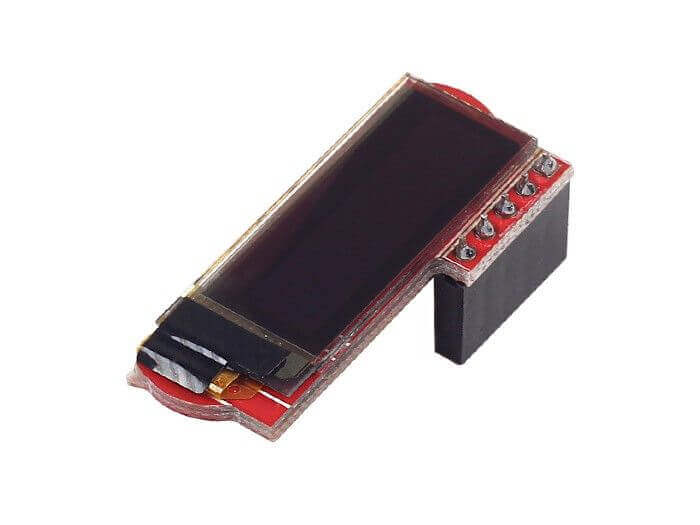
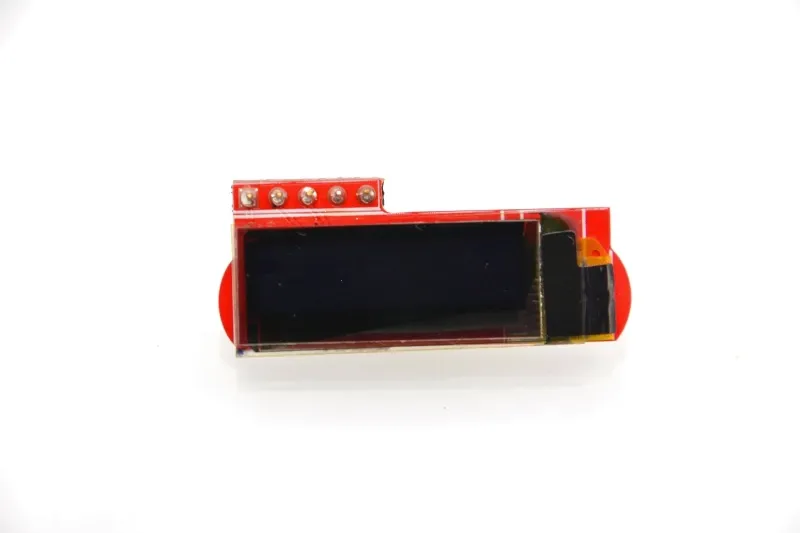
- SSD1306 OLED display controller.
- 128 × 32 pixel monochrome display.
- Uses the I²C communication interface.
- Operates directly from the Raspberry Pi 3.3V supply.
- Requires only a few GPIO pins.
- No backlight required for low power consumption.
- Excellent contrast with wide viewing angles.
- Compact size for embedded and portable projects.
- Compatible with Raspberry Pi Python libraries and Linux drivers.
Principle of Operation
The display uses the SSD1306 controller to drive an array of self-emitting OLED pixels. Display commands and image data are transferred from the Raspberry Pi through the I²C bus, where the SSD1306 stores the data in its internal display memory before refreshing the OLED pixels.

Unlike conventional LCD displays, each OLED pixel generates its own light, eliminating the need for a backlight. This provides deep blacks, excellent contrast, fast response times, and significantly lower power consumption.
Applications
- Raspberry Pi system status displays
- IoT monitoring devices
- Sensor data visualization
- Portable embedded systems
- Home automation controllers
- Weather stations
- Industrial monitoring equipment
- Robotics projects
- Educational electronics
- Linux embedded interfaces
Pinout

| Pin | Function |
|---|---|
| 3.3V | Power Supply |
| GND | Ground |
| SDA | I²C Data Line |
| SCL | I²C Clock Line |
| RST | Display Reset (if available) |
Wiring
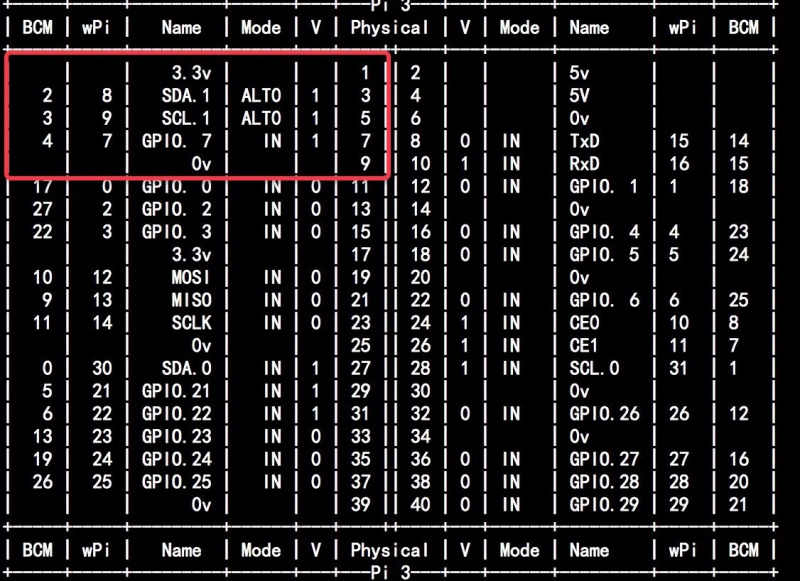
The module connects directly to the Raspberry Pi GPIO header using the I²C interface.
Just plug into GPIO in 3.3v, SDA, SCL, GND.
| OLED Module | Raspberry Pi GPIO |
|---|---|
| 3.3V | Pin 1 (3.3V) |
| GND | Pin 6 (GND) |
| SDA | GPIO2 (Pin 3) |
| SCL | GPIO3 (Pin 5) |
| RST (Optional) | Any Available GPIO (if required) |
Library Required
Simple Python Example
from luma.core.interface.serial import i2c
from luma.oled.device import ssd1306
from PIL import ImageDraw

serial = i2c(port=1, address=0x3C)
device = ssd1306(serial)

draw = ImageDraw.Draw(device.image)
draw.text((0,0), "Hello Pi!", fill="white")
device.show()
Specifications
| Product Type | OLED Display Module for Raspberry Pi |
| Display Controller | SSD1306 |
| Display Size | 0.91 Inch |
| Resolution | 128 × 32 Pixels |
| Display Technology | Monochrome OLED |
| Communication Interface | I²C |
| Operating Voltage | 3.3V |
| Frame Rate | Less than 1 fps |
| Operating Temperature | -40°C to +85°C |
| Active Display Area | 22.38 × 5.58 mm |
| Pixel Pitch | 0.17 × 0.17 mm |
| Pixel Size | 0.15 × 0.15 mm |
| Module Dimensions | 35.1 × 15.12 × 11.8 mm |
| Overall Dimensions | 36.56 × 14.87 × 11.70 mm |
| Weight | Approximately 2.9 g |
Resources
- Wiki: https://wiki.52pi.com/index.php?title=EP-0060
- SSD1306 Datasheet: https://cdn-shop.adafruit.com/datasheets/SSD1306.pdf
- luma.oled Documentation: https://luma-oled.readthedocs.io/
- luma.oled GitHub: https://github.com/rm-hull/luma.oled
- Pillow :(Python Imaging Library)
Features
- Designed specifically for Raspberry Pi boards.
- SSD1306 OLED display controller.
- 128 × 32 pixel monochrome display.
- Uses the I²C communication interface.
- Operates directly from the Raspberry Pi 3.3V supply.
- Requires only a few GPIO pins.
- No backlight required for low power consumption.
- Excellent contrast with wide viewing angles.
- Compact size for embedded and portable projects.
- Compatible with Raspberry Pi Python libraries and Linux drivers.
Principle of Operation
The display uses the SSD1306 controller to drive an array of self-emitting OLED pixels. Display commands and image data are transferred from the Raspberry Pi through the I²C bus, where the SSD1306 stores the data in its internal display memory before refreshing the OLED pixels.
Unlike conventional LCD displays, each OLED pixel generates its own light, eliminating the need for a backlight. This provides deep blacks, excellent contrast, fast response times, and significantly lower power consumption.
Applications
- Raspberry Pi system status displays
- IoT monitoring devices
- Sensor data visualization
- Portable embedded systems
- Home automation controllers
- Weather stations
- Industrial monitoring equipment
- Robotics projects
- Educational electronics
- Linux embedded interfaces
Pinout
| Pin | Function |
|---|---|
| 3.3V | Power Supply |
| GND | Ground |
| SDA | I²C Data Line |
| SCL | I²C Clock Line |
| RST | Display Reset (if available) |
Wiring
The module connects directly to the Raspberry Pi GPIO header using the I²C interface.
Just plug into GPIO in 3.3v, SDA, SCL, GND.
| OLED Module | Raspberry Pi GPIO |
|---|---|
| 3.3V | Pin 1 (3.3V) |
| GND | Pin 6 (GND) |
| SDA | GPIO2 (Pin 3) |
| SCL | GPIO3 (Pin 5) |
| RST (Optional) | Any Available GPIO (if required) |
Library Required
Simple Python Example
from luma.core.interface.serial import i2c
from luma.oled.device import ssd1306
from PIL import ImageDraw

serial = i2c(port=1, address=0x3C)
device = ssd1306(serial)

draw = ImageDraw.Draw(device.image)
draw.text((0,0), "Hello Pi!", fill="white")
device.show()
Specifications
| Product Type | OLED Display Module for Raspberry Pi |
| Display Controller | SSD1306 |
| Display Size | 0.91 Inch |
| Resolution | 128 × 32 Pixels |
| Display Technology | Monochrome OLED |
| Communication Interface | I²C |
| Operating Voltage | 3.3V |
| Frame Rate | Less than 1 fps |
| Operating Temperature | -40°C to +85°C |
| Active Display Area | 22.38 × 5.58 mm |
| Pixel Pitch | 0.17 × 0.17 mm |
| Pixel Size | 0.15 × 0.15 mm |
| Module Dimensions | 35.1 × 15.12 × 11.8 mm |
| Overall Dimensions | 36.56 × 14.87 × 11.70 mm |
| Weight | Approximately 2.9 g |
Resources
- Wiki: https://wiki.52pi.com/index.php?title=EP-0060
- SSD1306 Datasheet: https://cdn-shop.adafruit.com/datasheets/SSD1306.pdf
- luma.oled Documentation: https://luma-oled.readthedocs.io/
- luma.oled GitHub: https://github.com/rm-hull/luma.oled
- Pillow :(Python Imaging Library)