Features

- Transforms a smartphone into more than 40 virtual Arduino shields.
- Built-in Bluetooth Low Energy (BLE 4.0) communication module.
- Compatible with iOS and Android smartphones through the 1Sheeld application.
- Provides access to smartphone hardware including camera, microphone, GPS, accelerometer, and internet connection.
- Supports virtual sensor, input/output, communication, and social media shields.
- Works with Arduino UNO, Mega, Due, RedBoard, and compatible boards.
- Compatible with both 5V and 3.3V Arduino systems.
- Reduces the need for multiple external hardware modules.
- Supports wireless Arduino project control and monitoring.
- Compatible with Arduino IDE using the official 1Sheeld library.
Principle of Operation
The 1Sheeld+ works as a wireless communication bridge between an Arduino board and a smartphone. The Arduino communicates with the shield through the serial interface, while the shield exchanges data with the smartphone using Bluetooth Low Energy.

After installing the 1Sheeld application, users can select virtual shields such as GPS, camera, microphone, buttons, sensors, notifications, or displays. The smartphone collects or sends data through the app, and the 1Sheeld+ transfers this information to the Arduino in real time. This allows developers to use advanced smartphone capabilities inside Arduino projects without adding dedicated sensors or communication modules.
Applications
- Smartphone-controlled Arduino projects
- IoT prototype development
- Home automation systems
- Wireless robotics control
- Smart security systems
- GPS tracking projects
- Voice-controlled applications
- Camera-based Arduino projects
- Educational electronics projects
- Rapid hardware prototyping
Pinout
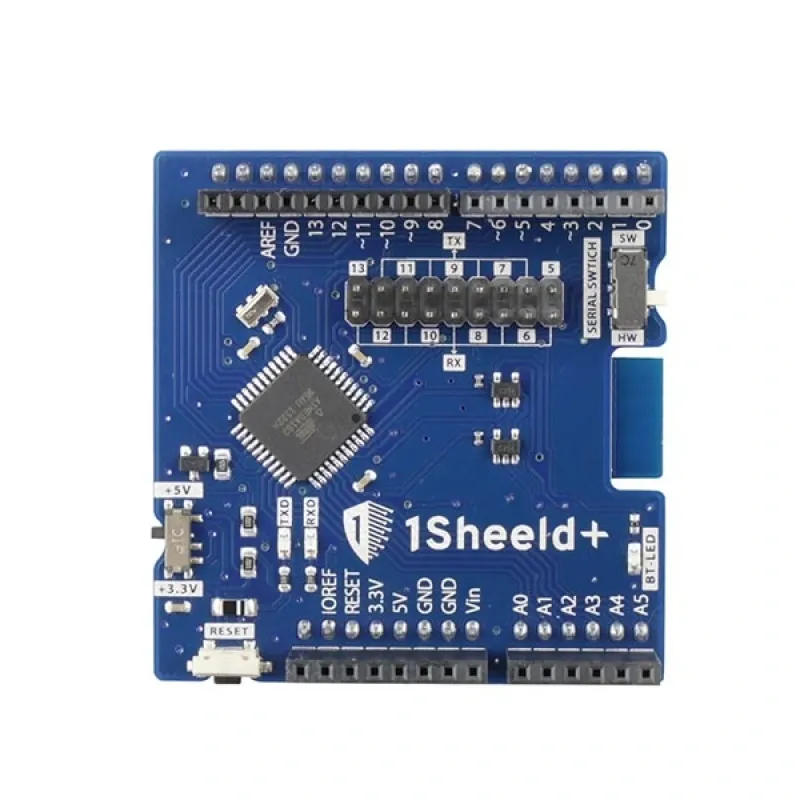
The 1Sheeld+ uses the standard Arduino shield header and communicates with the Arduino through serial communication.

| Pin | Function |
|---|---|
| VCC | Power supply input (5V / 3.3V depending on Arduino board) |
| GND | Ground connection |
| TX | Serial data transmission from 1Sheeld+ to Arduino |
| RX | Serial data reception from Arduino to 1Sheeld+ |
| SPI / Digital Pins | Used by selected virtual shields depending on configuration |
Wiring
The 1Sheeld+ is designed as an Arduino shield and connects directly onto the Arduino headers without additional wiring.

| 1Sheeld+ | Arduino |
|---|---|
| VCC | 5V / 3.3V |
| GND | GND |
| TX | Arduino RX |
| RX | Arduino TX |
First Time Setup
- Connect the 1Sheeld+ directly to the Arduino board.
- Download the 1Sheeld application from the iOS App Store or Google Play Store.
- Enable Bluetooth on your smartphone.
- Power the Arduino board.
- Open the 1Sheeld application and pair with the board.
- Install the 1Sheeld Arduino library.
- Select the required virtual shield from the mobile application.
- Upload your Arduino program and start communication.
Arduino Library Required
Example Code
#include <OneSheeld.h>

void setup()
{
  OneSheeld.begin();
}

void loop()
{
  OneSheeld.delay(1000);
}
Specifications
| Product Type | Arduino Smartphone Expansion Shield |
| Brand | 1Sheeld |
| Communication | Bluetooth Low Energy BLE 4.0 |
| Wireless Module | HM-10 Compatible BLE Module |
| Operating Voltage | 3.3V / 5V Compatible |
| Supported Boards | Arduino UNO, Mega, Due, RedBoard and compatible boards |
| Mobile Support | iOS 9+ and Android 4.3+ |
| Interface | Arduino Shield Header / Serial Communication |
| Virtual Shields | 40+ Smartphone-Based Shields |
Resources
- 1Sheeld+ Tutorials
- iOS APP
- Android APP
- 1Sheeld Library
- 1Sheeld Documentation: https://1sheeld.com/docs/
- Arduino IDE: https://www.arduino.cc/en/software
Features
- Transforms a smartphone into more than 40 virtual Arduino shields.
- Built-in Bluetooth Low Energy (BLE 4.0) communication module.
- Compatible with iOS and Android smartphones through the 1Sheeld application.
- Provides access to smartphone hardware including camera, microphone, GPS, accelerometer, and internet connection.
- Supports virtual sensor, input/output, communication, and social media shields.
- Works with Arduino UNO, Mega, Due, RedBoard, and compatible boards.
- Compatible with both 5V and 3.3V Arduino systems.
- Reduces the need for multiple external hardware modules.
- Supports wireless Arduino project control and monitoring.
- Compatible with Arduino IDE using the official 1Sheeld library.
Principle of Operation
The 1Sheeld+ works as a wireless communication bridge between an Arduino board and a smartphone. The Arduino communicates with the shield through the serial interface, while the shield exchanges data with the smartphone using Bluetooth Low Energy.
After installing the 1Sheeld application, users can select virtual shields such as GPS, camera, microphone, buttons, sensors, notifications, or displays. The smartphone collects or sends data through the app, and the 1Sheeld+ transfers this information to the Arduino in real time. This allows developers to use advanced smartphone capabilities inside Arduino projects without adding dedicated sensors or communication modules.
Applications
- Smartphone-controlled Arduino projects
- IoT prototype development
- Home automation systems
- Wireless robotics control
- Smart security systems
- GPS tracking projects
- Voice-controlled applications
- Camera-based Arduino projects
- Educational electronics projects
- Rapid hardware prototyping
Pinout
The 1Sheeld+ uses the standard Arduino shield header and communicates with the Arduino through serial communication.
| Pin | Function |
|---|---|
| VCC | Power supply input (5V / 3.3V depending on Arduino board) |
| GND | Ground connection |
| TX | Serial data transmission from 1Sheeld+ to Arduino |
| RX | Serial data reception from Arduino to 1Sheeld+ |
| SPI / Digital Pins | Used by selected virtual shields depending on configuration |
Wiring
The 1Sheeld+ is designed as an Arduino shield and connects directly onto the Arduino headers without additional wiring.
| 1Sheeld+ | Arduino |
|---|---|
| VCC | 5V / 3.3V |
| GND | GND |
| TX | Arduino RX |
| RX | Arduino TX |
First Time Setup
- Connect the 1Sheeld+ directly to the Arduino board.
- Download the 1Sheeld application from the iOS App Store or Google Play Store.
- Enable Bluetooth on your smartphone.
- Power the Arduino board.
- Open the 1Sheeld application and pair with the board.
- Install the 1Sheeld Arduino library.
- Select the required virtual shield from the mobile application.
- Upload your Arduino program and start communication.
Arduino Library Required
Example Code
#include <OneSheeld.h>

void setup()
{
  OneSheeld.begin();
}

void loop()
{
  OneSheeld.delay(1000);
}
Specifications
| Product Type | Arduino Smartphone Expansion Shield |
| Brand | 1Sheeld |
| Communication | Bluetooth Low Energy BLE 4.0 |
| Wireless Module | HM-10 Compatible BLE Module |
| Operating Voltage | 3.3V / 5V Compatible |
| Supported Boards | Arduino UNO, Mega, Due, RedBoard and compatible boards |
| Mobile Support | iOS 9+ and Android 4.3+ |
| Interface | Arduino Shield Header / Serial Communication |
| Virtual Shields | 40+ Smartphone-Based Shields |
Resources
- 1Sheeld+ Tutorials
- iOS APP
- Android APP
- 1Sheeld Library
- 1Sheeld Documentation: https://1sheeld.com/docs/
- Arduino IDE: https://www.arduino.cc/en/software