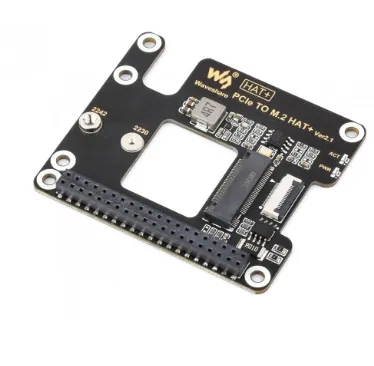
Features
- Designed exclusively for Raspberry Pi 5.
- Supports M-Key NVMe SSDs.
- Compatible with 2230 and 2242 M.2 SSD form factors.
- Supports PCIe Gen2 and PCIe Gen3 x1 operation.
- Supports Raspberry Pi OS booting from NVMe SSD.
- HAT+ compliant design with onboard EEPROM.
- Integrated INA219 voltage and current monitoring.
- Power and activity status LEDs.
- Reserved airflow opening for Raspberry Pi 5 cooling fan.
- Compact low-profile design.
- Ideal for high-speed storage and operating system installation.
Principle of Operation
The adapter connects directly to the Raspberry Pi 5 PCIe connector through the supplied flat-flex cable. It converts the Raspberry Pi's PCI Express Gen2/Gen3 x1 interface into a standard M.2 M-Key NVMe socket, allowing high-speed SSD communication using the NVMe protocol.
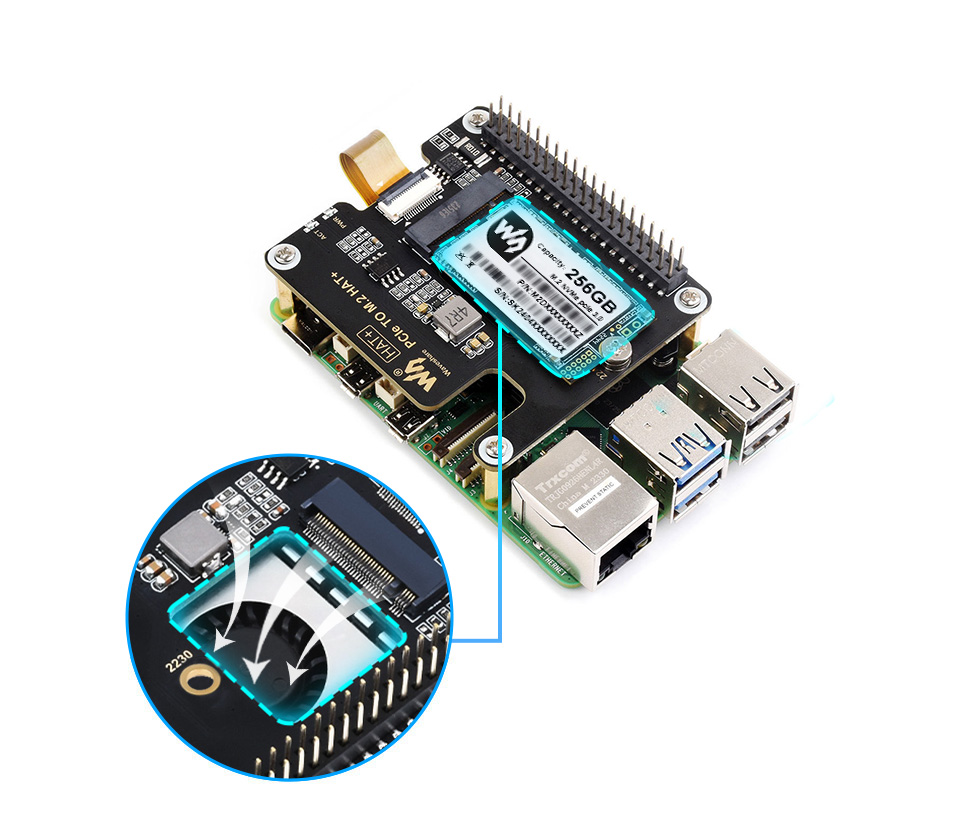
The onboard EEPROM enables automatic HAT+ identification by Raspberry Pi OS, while the INA219 power monitor continuously measures the SSD's input voltage and current over the I²C bus. Status LEDs indicate power and SSD activity, and the open-air PCB layout improves airflow to reduce SSD operating temperatures during continuous read/write operations.
Applications
- Booting Raspberry Pi OS from NVMe SSD
- Media servers
- NAS storage projects
- Database servers
- AI and machine learning projects
- Video recording systems
- Industrial data logging
- Home automation servers
- Edge computing
- High-speed file storage
Pinout on Board
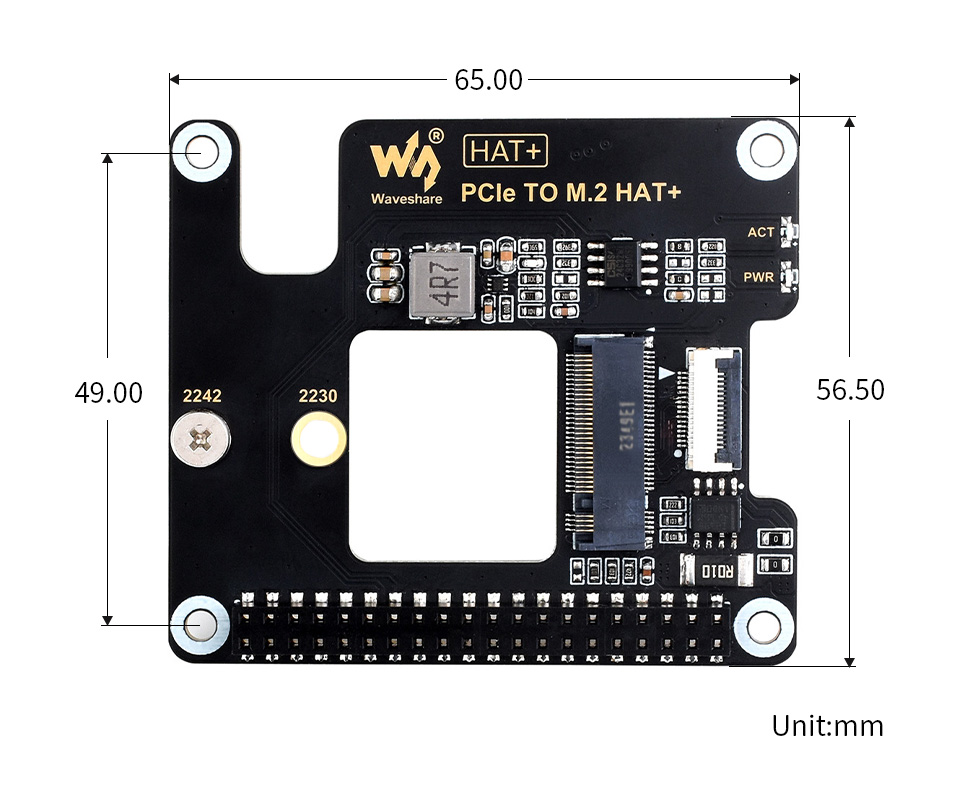
| Interface | Function |
|---|---|
| PCIe FFC Connector | Connects to Raspberry Pi 5 PCIe Interface |
| M.2 M-Key Socket | 2230 / 2242 NVMe SSD |
| EEPROM | HAT+ Auto Detection |
| INA219 | I²C Voltage & Current Monitoring |
| PWR LED | Power Indicator |
| ACT LED | SSD Read/Write Activity Indicator |
Wiring
The HAT connects directly to the Raspberry Pi 5 PCIe connector using the supplied flat-flex ribbon cable. Install the NVMe SSD into the M.2 socket, secure it using the mounting screw, then connect the ribbon cable while ensuring the correct orientation.
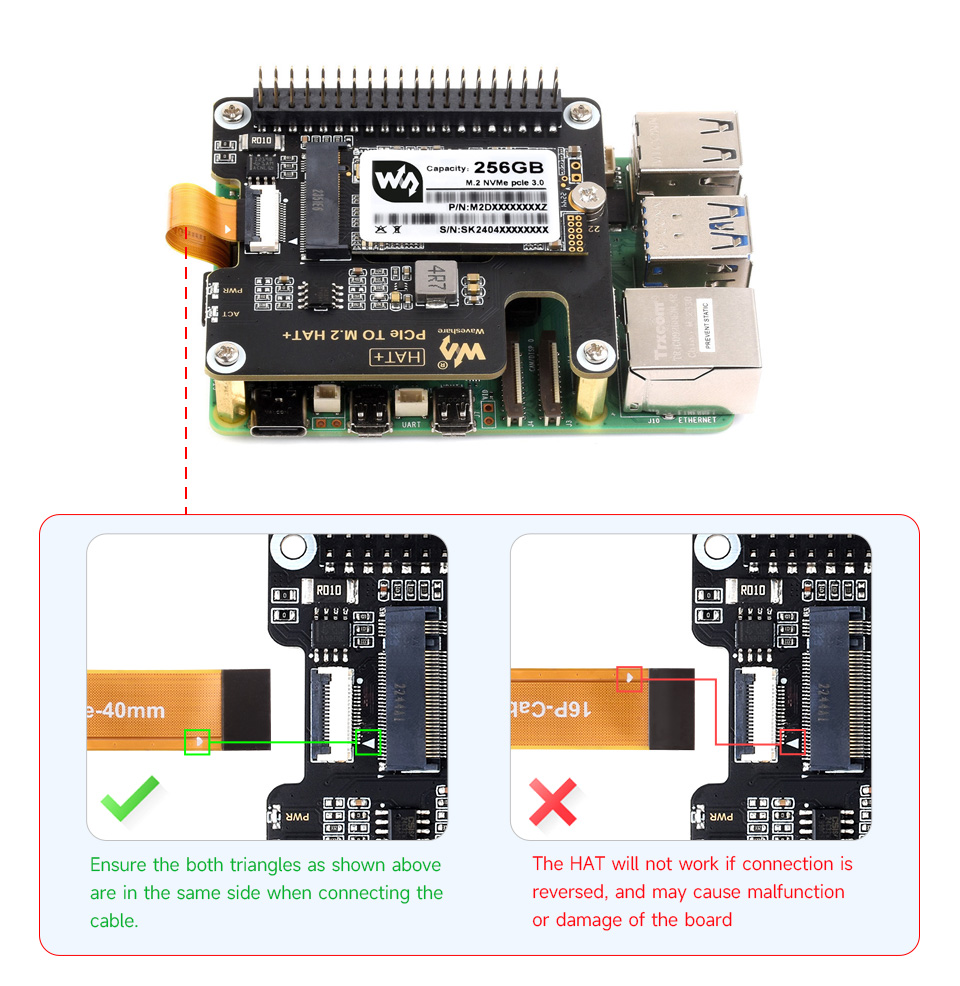
| Connection | Description |
|---|---|
| PCIe Ribbon Cable | Raspberry Pi 5 PCIe Connector ↔ HAT |
| M.2 Slot | Install 2230 or 2242 NVMe SSD |
| INA219 | Accessible through I²C (Default Address: 0x40) |
- Assembly and usage tutorial:
Software Configuration
To enable PCIe on Raspberry Pi 5, edit:
/boot/firmware/config.txt
Enable PCIe:
dtparam=pciex1
Enable PCIe Gen3 (Optional):
dtparam=pciex1_gen=3
Reboot the Raspberry Pi after saving the file.
Library Needed
- No library required for NVMe storage operation.
- Python INA219 Library (optional, for power monitoring).
Example Code
The onboard INA219 can be monitored using Python:
 wget https://files.waveshare.com/wiki/PCIe-TO-M.2-HAT+/PCIe_TO_M.2_HAT+.zip unzip
PCIe_TO_M.2_HAT+.zip
 cd PCIe_TO_M.2_HAT+
 sudo python3 INA219.py
Specifications
| Product Type | PCIe to M.2 NVMe HAT+ |
| Compatible Board | Raspberry Pi 5 |
| Storage Interface | M.2 M-Key NVMe |
| Supported SSD Sizes | 2230, 2242 |
| Supported Protocol | NVMe |
| PCIe Interface | PCIe Gen2 x1 / Gen3 x1 |
| Boot Support | Raspberry Pi 5 NVMe Boot |
| EEPROM | HAT+ Compliant |
| Power Monitoring | INA219 (I²C) |
| I²C Address | 0x40 (Default) |
| Status Indicators | PWR LED, ACT LED |
| Cooling Feature | Reserved Airflow Vent |
Resources
- Waveshare Product Wiki: https://www.waveshare.com/wiki/PCIe_TO_M.2_HAT%2B
- Assembly Guide: https://www.waveshare.com/wiki/PCIe_TO_M.2_HAT%2B#Hardware_Connection
- NVMe Boot Configuration: https://www.raspberrypi.com/documentation/computers/raspberry-pi.html#bootloader
- Raspberry Pi PCIe Documentation: https://www.raspberrypi.com/documentation/computers/raspberry-pi.html#pcie
- INA219 Datasheet: https://www.ti.com/lit/ds/symlink/ina219.pdf
- Raspberry Pi OS: https://www.raspberrypi.com/software/
Features
- Designed exclusively for Raspberry Pi 5.
- Supports M-Key NVMe SSDs.
- Compatible with 2230 and 2242 M.2 SSD form factors.
- Supports PCIe Gen2 and PCIe Gen3 x1 operation.
- Supports Raspberry Pi OS booting from NVMe SSD.
- HAT+ compliant design with onboard EEPROM.
- Integrated INA219 voltage and current monitoring.
- Power and activity status LEDs.
- Reserved airflow opening for Raspberry Pi 5 cooling fan.
- Compact low-profile design.
- Ideal for high-speed storage and operating system installation.
Principle of Operation
The adapter connects directly to the Raspberry Pi 5 PCIe connector through the supplied flat-flex cable. It converts the Raspberry Pi's PCI Express Gen2/Gen3 x1 interface into a standard M.2 M-Key NVMe socket, allowing high-speed SSD communication using the NVMe protocol.
The onboard EEPROM enables automatic HAT+ identification by Raspberry Pi OS, while the INA219 power monitor continuously measures the SSD's input voltage and current over the I²C bus. Status LEDs indicate power and SSD activity, and the open-air PCB layout improves airflow to reduce SSD operating temperatures during continuous read/write operations.
Applications
- Booting Raspberry Pi OS from NVMe SSD
- Media servers
- NAS storage projects
- Database servers
- AI and machine learning projects
- Video recording systems
- Industrial data logging
- Home automation servers
- Edge computing
- High-speed file storage
Pinout on Board
| Interface | Function |
|---|---|
| PCIe FFC Connector | Connects to Raspberry Pi 5 PCIe Interface |
| M.2 M-Key Socket | 2230 / 2242 NVMe SSD |
| EEPROM | HAT+ Auto Detection |
| INA219 | I²C Voltage & Current Monitoring |
| PWR LED | Power Indicator |
| ACT LED | SSD Read/Write Activity Indicator |
Wiring
The HAT connects directly to the Raspberry Pi 5 PCIe connector using the supplied flat-flex ribbon cable. Install the NVMe SSD into the M.2 socket, secure it using the mounting screw, then connect the ribbon cable while ensuring the correct orientation.
| Connection | Description |
|---|---|
| PCIe Ribbon Cable | Raspberry Pi 5 PCIe Connector ↔ HAT |
| M.2 Slot | Install 2230 or 2242 NVMe SSD |
| INA219 | Accessible through I²C (Default Address: 0x40) |
- Assembly and usage tutorial:
Software Configuration
To enable PCIe on Raspberry Pi 5, edit:
/boot/firmware/config.txt
Enable PCIe:
dtparam=pciex1
Enable PCIe Gen3 (Optional):
dtparam=pciex1_gen=3
Reboot the Raspberry Pi after saving the file.
Library Needed
- No library required for NVMe storage operation.
- Python INA219 Library (optional, for power monitoring).
Example Code
The onboard INA219 can be monitored using Python:
 wget https://files.waveshare.com/wiki/PCIe-TO-M.2-HAT+/PCIe_TO_M.2_HAT+.zip unzip
PCIe_TO_M.2_HAT+.zip
 cd PCIe_TO_M.2_HAT+
 sudo python3 INA219.py
Specifications
| Product Type | PCIe to M.2 NVMe HAT+ |
| Compatible Board | Raspberry Pi 5 |
| Storage Interface | M.2 M-Key NVMe |
| Supported SSD Sizes | 2230, 2242 |
| Supported Protocol | NVMe |
| PCIe Interface | PCIe Gen2 x1 / Gen3 x1 |
| Boot Support | Raspberry Pi 5 NVMe Boot |
| EEPROM | HAT+ Compliant |
| Power Monitoring | INA219 (I²C) |
| I²C Address | 0x40 (Default) |
| Status Indicators | PWR LED, ACT LED |
| Cooling Feature | Reserved Airflow Vent |
Resources
- Waveshare Product Wiki: https://www.waveshare.com/wiki/PCIe_TO_M.2_HAT%2B
- Assembly Guide: https://www.waveshare.com/wiki/PCIe_TO_M.2_HAT%2B#Hardware_Connection
- NVMe Boot Configuration: https://www.raspberrypi.com/documentation/computers/raspberry-pi.html#bootloader
- Raspberry Pi PCIe Documentation: https://www.raspberrypi.com/documentation/computers/raspberry-pi.html#pcie
- INA219 Datasheet: https://www.ti.com/lit/ds/symlink/ina219.pdf
- Raspberry Pi OS: https://www.raspberrypi.com/software/