Features:
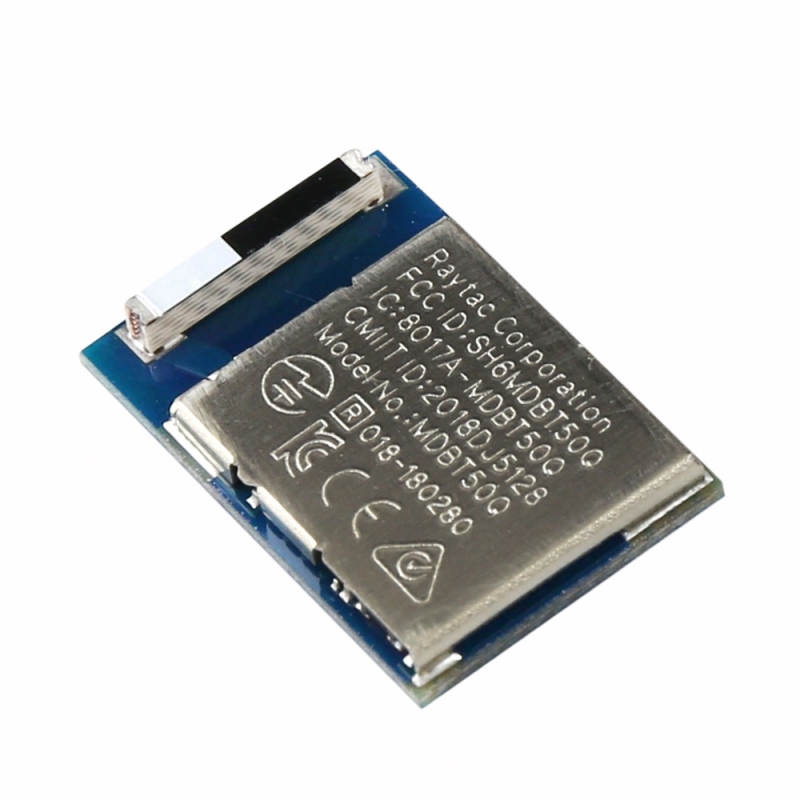
- Supports Bluetooth 5.0 and Bluetooth 4.2 Low Energy communication
- Based on Nordic nRF52840 multiprotocol SoC
- Integrated chip antenna for compact and simplified design
- Supports Bluetooth, IEEE 802.15.4, and proprietary 2.4 GHz protocols
- Pre-certified: FCC, IC, CE, TELEC, KC, SRRC, NCC
- Compact size suitable for space-constrained applications
- Up to 48 configurable GPIOs
- Low power consumption ideal for battery-powered devices
Specifications:
- SoC: Nordic nRF52840
- CPU: 32-bit ARM Cortex-M4F
- Operating Voltage: 1.7V – 5.5V
- Wireless: Bluetooth 5, IEEE 802.15.4, 2.4 GHz RF
- TX Power: +8 dBm to -20 dBm
- Sensitivity: -95 dBm (1 Mbps BLE), -103 dBm (125 kbps BLE)
- Data Rates: 2 Mbps, 1 Mbps, 500 kbps, 125 kbps (BLE)
- GPIO: Up to 48 pins
- ADC: 12-bit, 200 ksps, 8 channels
- Interfaces: USB 2.0, QSPI, SPI, I2C, UART, I2S, PDM
- PWM: 4 units with EasyDMA
- Timers: 5 × 32-bit timers, RTC support
- NFC: NFC-A tag support
- Operating Temperature: -40°C to +85°C
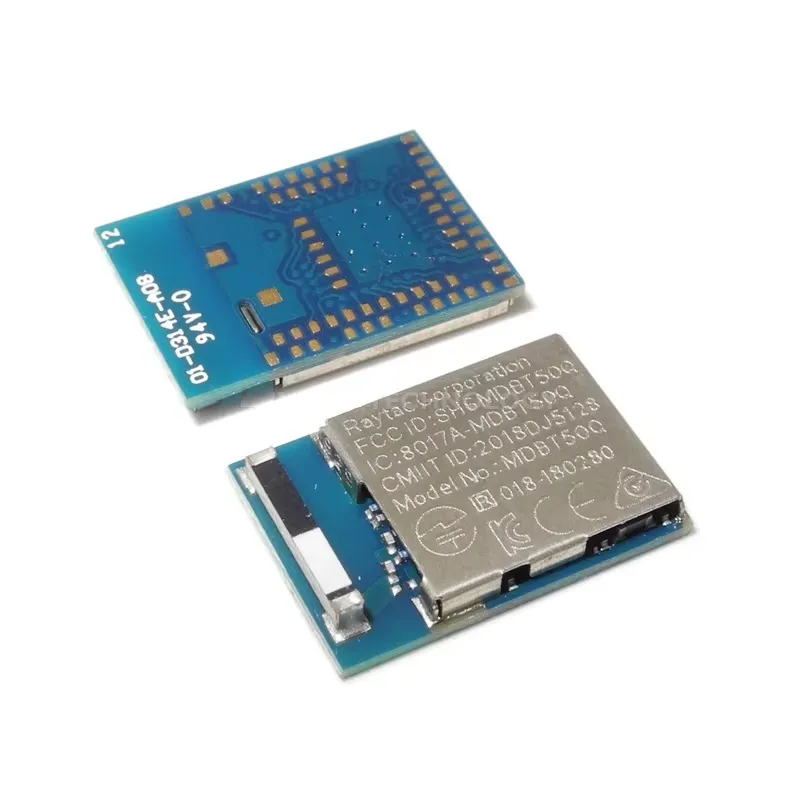
- Dimensions: 15.5 × 10.5 × 2.2 mm
Pinout of the Module:

- VCC: Power supply input (1.7V – 5.5V)
- GND: Ground
- GPIO Pins: Configurable digital I/O pins
- UART: Serial communication interface
- SPI: High-speed communication interface
- I2C: Two-wire communication interface
- USB: Full-speed USB interface
- NFC Pins: Near Field Communication interface
Applications:
- IoT (Internet of Things) devices
- Wearable electronics
- Wireless sensor networks
- Smart home and automation systems
- Industrial monitoring and control
- Bluetooth-enabled consumer products
Circuit:
The MDBT50Q-1 module can be directly integrated into your design by connecting power, ground, and required communication interfaces (UART, SPI, I2C). Ensure proper antenna clearance for optimal RF performance.
Connecting with MDBT50Q-1 for the First Time:
- Provide a stable power supply (1.7V–5.5V)
- Connect UART pins to a USB-to-TTL adapter for debugging
- Use compatible development tools such as nRF Connect or SDK
- Flash firmware using a programmer (SWD interface if available)
- Start testing BLE communication using example firmware
Code Example:
Example BLE initialization (simplified concept):
 // Pseudo-code for BLE initialization init_ble_stack(); set_device_name("MDBT50Q-1"); start_advertising();

while (1) {
process_ble_events();
}
Arduino IDE Support (nRF52 Core):
The MDBT50Q-1 module, based on the nRF52840 SoC, can be programmed using the Arduino IDE by installing nRF52 board support. This allows developers to quickly prototype using familiar Arduino libraries and functions.
Install Arduino IDE:
- Download and install Arduino IDE from the official website:
- https://www.arduino.cc/en/software
Install nRF52 Board Support:
- Open Arduino IDE
- Go to File → Preferences
- Add the following URL to "Additional Board Manager URLs":
https://adafruit.github.io/arduino-board-index/package_adafruit_index.json
- Go to Tools → Board → Boards Manager
- Search for Adafruit nRF52
- Click Install
Select Board & Port:
- Go to Tools → Board and select a compatible nRF52840 board (e.g., Feather nRF52840)
- Select the correct COM port under Tools → Port
Upload Code:
- Connect the module via a programmer (SWD or USB-enabled carrier board)
- Write or paste your Arduino code
- Click Upload to flash the firmware
Example Code (Blink LED):
 #define LED_PIN 13

void setup() {
pinMode(LED_PIN, OUTPUT);
}

void loop() {
digitalWrite(LED_PIN, HIGH);
delay(500);
digitalWrite(LED_PIN, LOW);
delay(500);
}
Notes:
- This module does not include a built-in USB interface, so programming typically requires an external programmer (e.g., SWD debugger or USB-to-Serial bootloader setup)
- Ensure correct pin mapping based on your hardware design
- Some features (like NFC or advanced BLE) may require Nordic SDK instead of Arduino
Resources:
- Nordic Semiconductor Official Website
- nRF52 SDK & Development Tools
- Bluetooth SIG Official Website
- MDBT50Q-1MV2 & MDBT50Q-P1MV2 Spec (Ver.G) (for Revision 2 IC)
- MDBT50Q & MDBT50Q-P & MDBT50Q-U Footprint_Design Guide (200103)
- 2020 RoHS & REACH Report for MDBT50Q & MDBT50Q-P & MDBT50Q-U
Features:
- Supports Bluetooth 5.0 and Bluetooth 4.2 Low Energy communication
- Based on Nordic nRF52840 multiprotocol SoC
- Integrated chip antenna for compact and simplified design
- Supports Bluetooth, IEEE 802.15.4, and proprietary 2.4 GHz protocols
- Pre-certified: FCC, IC, CE, TELEC, KC, SRRC, NCC
- Compact size suitable for space-constrained applications
- Up to 48 configurable GPIOs
- Low power consumption ideal for battery-powered devices
Specifications:
- SoC: Nordic nRF52840
- CPU: 32-bit ARM Cortex-M4F
- Operating Voltage: 1.7V – 5.5V
- Wireless: Bluetooth 5, IEEE 802.15.4, 2.4 GHz RF
- TX Power: +8 dBm to -20 dBm
- Sensitivity: -95 dBm (1 Mbps BLE), -103 dBm (125 kbps BLE)
- Data Rates: 2 Mbps, 1 Mbps, 500 kbps, 125 kbps (BLE)
- GPIO: Up to 48 pins
- ADC: 12-bit, 200 ksps, 8 channels
- Interfaces: USB 2.0, QSPI, SPI, I2C, UART, I2S, PDM
- PWM: 4 units with EasyDMA
- Timers: 5 × 32-bit timers, RTC support
- NFC: NFC-A tag support
- Operating Temperature: -40°C to +85°C
- Dimensions: 15.5 × 10.5 × 2.2 mm
Pinout of the Module:
- VCC: Power supply input (1.7V – 5.5V)
- GND: Ground
- GPIO Pins: Configurable digital I/O pins
- UART: Serial communication interface
- SPI: High-speed communication interface
- I2C: Two-wire communication interface
- USB: Full-speed USB interface
- NFC Pins: Near Field Communication interface
Applications:
- IoT (Internet of Things) devices
- Wearable electronics
- Wireless sensor networks
- Smart home and automation systems
- Industrial monitoring and control
- Bluetooth-enabled consumer products
Circuit:
The MDBT50Q-1 module can be directly integrated into your design by connecting power, ground, and required communication interfaces (UART, SPI, I2C). Ensure proper antenna clearance for optimal RF performance.
Connecting with MDBT50Q-1 for the First Time:
- Provide a stable power supply (1.7V–5.5V)
- Connect UART pins to a USB-to-TTL adapter for debugging
- Use compatible development tools such as nRF Connect or SDK
- Flash firmware using a programmer (SWD interface if available)
- Start testing BLE communication using example firmware
Code Example:
Example BLE initialization (simplified concept):
 // Pseudo-code for BLE initialization init_ble_stack(); set_device_name("MDBT50Q-1"); start_advertising();

while (1) {
process_ble_events();
}
Arduino IDE Support (nRF52 Core):
The MDBT50Q-1 module, based on the nRF52840 SoC, can be programmed using the Arduino IDE by installing nRF52 board support. This allows developers to quickly prototype using familiar Arduino libraries and functions.
Install Arduino IDE:
- Download and install Arduino IDE from the official website:
- https://www.arduino.cc/en/software
Install nRF52 Board Support:
- Open Arduino IDE
- Go to File → Preferences
- Add the following URL to "Additional Board Manager URLs":
https://adafruit.github.io/arduino-board-index/package_adafruit_index.json
- Go to Tools → Board → Boards Manager
- Search for Adafruit nRF52
- Click Install
Select Board & Port:
- Go to Tools → Board and select a compatible nRF52840 board (e.g., Feather nRF52840)
- Select the correct COM port under Tools → Port
Upload Code:
- Connect the module via a programmer (SWD or USB-enabled carrier board)
- Write or paste your Arduino code
- Click Upload to flash the firmware
Example Code (Blink LED):
 #define LED_PIN 13

void setup() {
pinMode(LED_PIN, OUTPUT);
}

void loop() {
digitalWrite(LED_PIN, HIGH);
delay(500);
digitalWrite(LED_PIN, LOW);
delay(500);
}
Notes:
- This module does not include a built-in USB interface, so programming typically requires an external programmer (e.g., SWD debugger or USB-to-Serial bootloader setup)
- Ensure correct pin mapping based on your hardware design
- Some features (like NFC or advanced BLE) may require Nordic SDK instead of Arduino
Resources:
- Nordic Semiconductor Official Website
- nRF52 SDK & Development Tools
- Bluetooth SIG Official Website
- MDBT50Q-1MV2 & MDBT50Q-P1MV2 Spec (Ver.G) (for Revision 2 IC)
- MDBT50Q & MDBT50Q-P & MDBT50Q-U Footprint_Design Guide (200103)
- 2020 RoHS & REACH Report for MDBT50Q & MDBT50Q-P & MDBT50Q-U