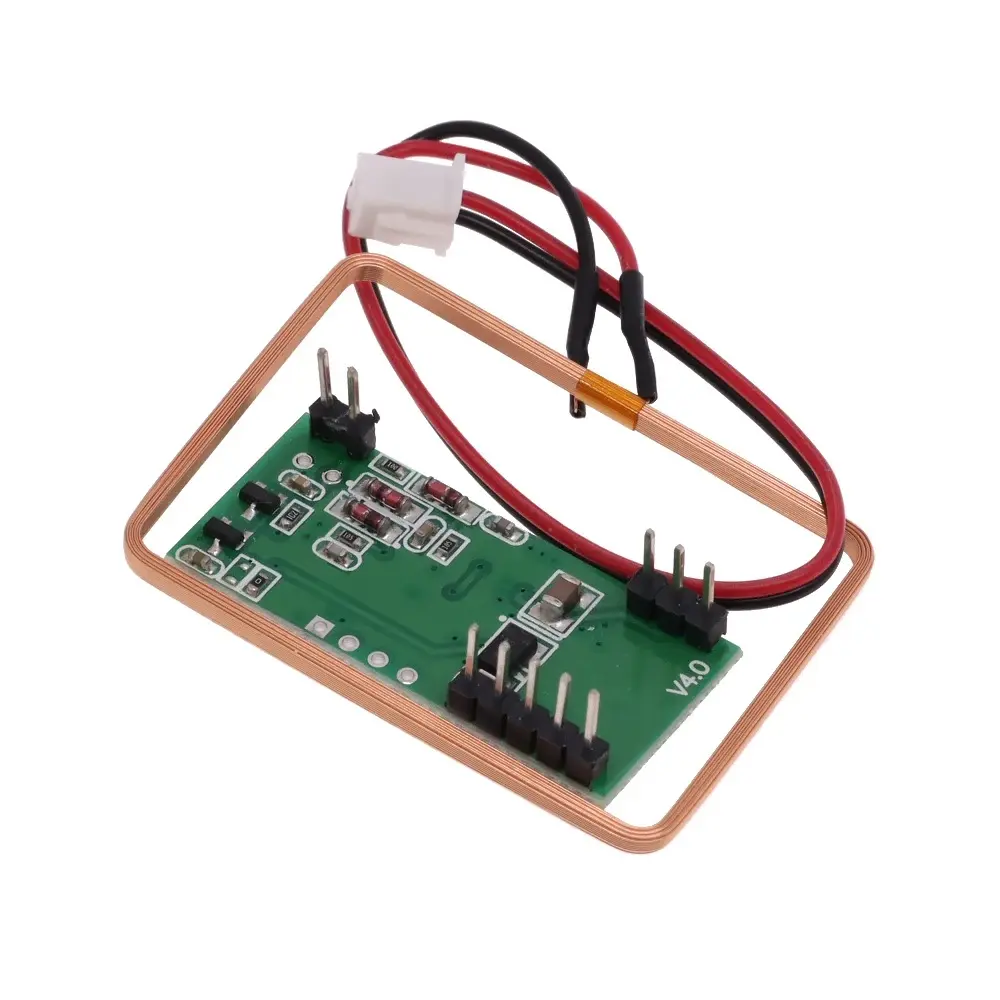
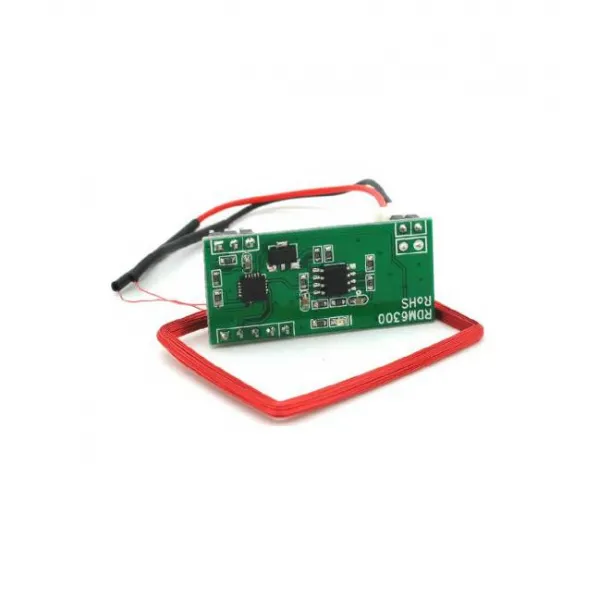
Features
- Operating frequency of 125kHz
- Designed for reading EM4100-compatible RFID cards and tags
- TTL-level UART serial communication
- 9600bps default communication speed
- External antenna support
- Automatic card ID reading
- Typical reading distance of up to approximately 5cm, depending on the antenna and RFID tag
- Fast RFID tag detection and decoding
- Low power consumption
- Compact module design
- Suitable for Arduino, microcontrollers, and embedded projects
Principle of Operation
The RDM630 operates using low-frequency RFID electromagnetic induction. The reader generates a 125kHz electromagnetic field through the connected external antenna. When a compatible passive RFID card or tag enters the reading area, the tag receives energy from the electromagnetic field and powers its internal chip.
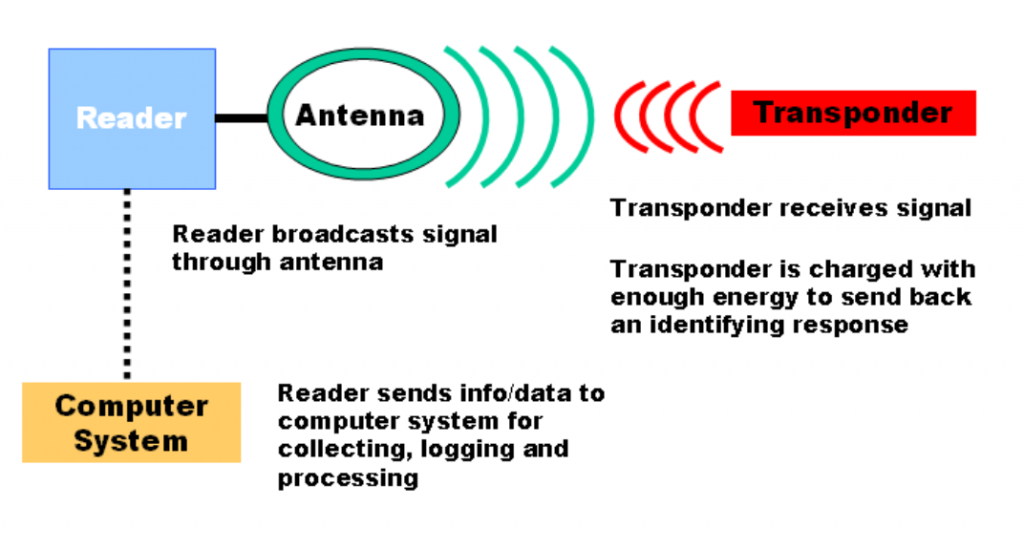
The RFID tag then transmits its unique identification information back to the reader using the same electromagnetic field. The RDM630 receives and decodes this information before sending the card data to a connected microcontroller through its UART serial output.
Applications
- Access control systems
- Electronic door locks
- Time and attendance systems
- Identification systems
- RFID-based automation projects
- Arduino and microcontroller projects
- Asset identification systems
- Educational RFID experiments
Pinout
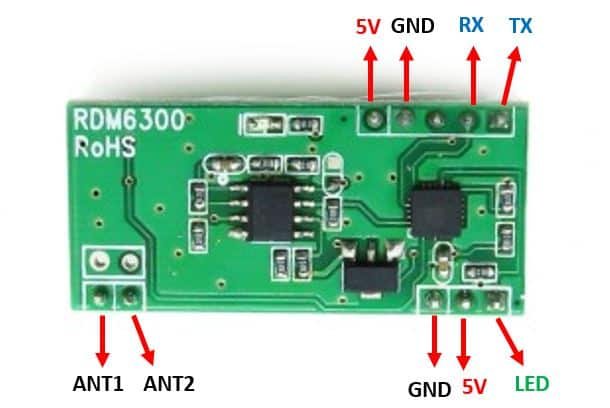
| Pin | Description |
|---|---|
| VCC | 5V power supply input |
| GND | Ground connection |
| TX | TTL UART serial data output from the RFID reader |
| RX | TTL UART serial data input for the RFID reader |
| ANT1 | External RFID antenna connection |
| ANT2 | External RFID antenna connection |
Note: ANT1 and ANT2 are connected to the external RFID antenna coil. Do not connect these pins directly to GND or the Arduino.
Wiring
The following wiring example connects the RDM630 RFID reader to an Arduino UNO using the built-in SoftwareSerial library.
| RDM630 Module | Arduino UNO |
|---|---|
| VCC | 5V |
| GND | GND |
| TX | D6 |
| RX | D8 |
| ANT1 / ANT2 | External RFID Antenna |
Library
No external library is required. The example code uses the built-in Arduino SoftwareSerial library.
Arduino Code
The following example reads the data frame transmitted by the RDM630 and extracts the RFID tag identification number.
#include <SoftwareSerial.h>

const byte RDM630_RX_PIN = 6;
const byte RDM630_TX_PIN = 8;

SoftwareSerial rfid(RDM630_RX_PIN, RDM630_TX_PIN);

const byte BUFFER_SIZE = 14;

byte buffer[BUFFER_SIZE];
byte bufferIndex = 0;

void setup() {
  Serial.begin(9600);
  rfid.begin(9600);

  Serial.println("RDM630 RFID Reader Ready");
}

void loop() {
  while (rfid.available()) {
    byte incomingByte = rfid.read();

    // Start of RFID data frame
    if (incomingByte == 0x02) {
      bufferIndex = 0;
    }

    // Store received data
    if (bufferIndex < BUFFER_SIZE) {
      buffer[bufferIndex++] = incomingByte;
    }

    // End of RFID data frame
    if (incomingByte == 0x03 && bufferIndex == BUFFER_SIZE) {
      printTag();
      bufferIndex = 0;
    }
  }
}

void printTag() {
  Serial.print("RFID Tag: ");

  // Display the 8-character RFID tag ID
  for (byte i = 3; i < 11; i++) {
    Serial.print((char)buffer[i]);
  }

  Serial.println();
}How the Code Works
The RDM630 communicates through a UART serial interface at 9600 baud. When a compatible RFID card or tag is detected, the module sends a serial data frame containing the card information.
The Arduino continuously monitors the serial data. When the start byte is detected, the program stores the received bytes until the complete RFID data frame is received. The program then extracts and displays the RFID tag ID in the Arduino Serial Monitor.
Specifications
| Operating Frequency | 125kHz |
|---|---|
| RFID Compatibility | EM4100 and compatible 125kHz passive RFID cards and tags |
| Communication Interface | TTL UART |
| Serial Baud Rate | 9600bps |
| Operating Voltage | 5V DC |
| Operating Current | Typically less than 50mA |
| Reading Distance | Typically up to approximately 5cm, depending on the antenna and RFID tag |
| Decoding Time | Typically less than 100ms |
| Operating Temperature | -10°C to +70°C |
| Storage Temperature | -20°C to +80°C |
| Relative Humidity | 5% to 95% RH, non-condensing |
Resources
Features
- Operating frequency of 125kHz
- Designed for reading EM4100-compatible RFID cards and tags
- TTL-level UART serial communication
- 9600bps default communication speed
- External antenna support
- Automatic card ID reading
- Typical reading distance of up to approximately 5cm, depending on the antenna and RFID tag
- Fast RFID tag detection and decoding
- Low power consumption
- Compact module design
- Suitable for Arduino, microcontrollers, and embedded projects
Principle of Operation
The RDM630 operates using low-frequency RFID electromagnetic induction. The reader generates a 125kHz electromagnetic field through the connected external antenna. When a compatible passive RFID card or tag enters the reading area, the tag receives energy from the electromagnetic field and powers its internal chip.
The RFID tag then transmits its unique identification information back to the reader using the same electromagnetic field. The RDM630 receives and decodes this information before sending the card data to a connected microcontroller through its UART serial output.
Applications
- Access control systems
- Electronic door locks
- Time and attendance systems
- Identification systems
- RFID-based automation projects
- Arduino and microcontroller projects
- Asset identification systems
- Educational RFID experiments
Pinout
| Pin | Description |
|---|---|
| VCC | 5V power supply input |
| GND | Ground connection |
| TX | TTL UART serial data output from the RFID reader |
| RX | TTL UART serial data input for the RFID reader |
| ANT1 | External RFID antenna connection |
| ANT2 | External RFID antenna connection |
Note: ANT1 and ANT2 are connected to the external RFID antenna coil. Do not connect these pins directly to GND or the Arduino.
Wiring
The following wiring example connects the RDM630 RFID reader to an Arduino UNO using the built-in SoftwareSerial library.
| RDM630 Module | Arduino UNO |
|---|---|
| VCC | 5V |
| GND | GND |
| TX | D6 |
| RX | D8 |
| ANT1 / ANT2 | External RFID Antenna |
Library
No external library is required. The example code uses the built-in Arduino SoftwareSerial library.
Arduino Code
The following example reads the data frame transmitted by the RDM630 and extracts the RFID tag identification number.
#include <SoftwareSerial.h>

const byte RDM630_RX_PIN = 6;
const byte RDM630_TX_PIN = 8;

SoftwareSerial rfid(RDM630_RX_PIN, RDM630_TX_PIN);

const byte BUFFER_SIZE = 14;

byte buffer[BUFFER_SIZE];
byte bufferIndex = 0;

void setup() {
  Serial.begin(9600);
  rfid.begin(9600);

  Serial.println("RDM630 RFID Reader Ready");
}

void loop() {
  while (rfid.available()) {
    byte incomingByte = rfid.read();

    // Start of RFID data frame
    if (incomingByte == 0x02) {
      bufferIndex = 0;
    }

    // Store received data
    if (bufferIndex < BUFFER_SIZE) {
      buffer[bufferIndex++] = incomingByte;
    }

    // End of RFID data frame
    if (incomingByte == 0x03 && bufferIndex == BUFFER_SIZE) {
      printTag();
      bufferIndex = 0;
    }
  }
}

void printTag() {
  Serial.print("RFID Tag: ");

  // Display the 8-character RFID tag ID
  for (byte i = 3; i < 11; i++) {
    Serial.print((char)buffer[i]);
  }

  Serial.println();
}
How the Code Works
The RDM630 communicates through a UART serial interface at 9600 baud. When a compatible RFID card or tag is detected, the module sends a serial data frame containing the card information.
The Arduino continuously monitors the serial data. When the start byte is detected, the program stores the received bytes until the complete RFID data frame is received. The program then extracts and displays the RFID tag ID in the Arduino Serial Monitor.
Specifications
| Operating Frequency | 125kHz |
|---|---|
| RFID Compatibility | EM4100 and compatible 125kHz passive RFID cards and tags |
| Communication Interface | TTL UART |
| Serial Baud Rate | 9600bps |
| Operating Voltage | 5V DC |
| Operating Current | Typically less than 50mA |
| Reading Distance | Typically up to approximately 5cm, depending on the antenna and RFID tag |
| Decoding Time | Typically less than 100ms |
| Operating Temperature | -10°C to +70°C |
| Storage Temperature | -20°C to +80°C |
| Relative Humidity | 5% to 95% RH, non-condensing |