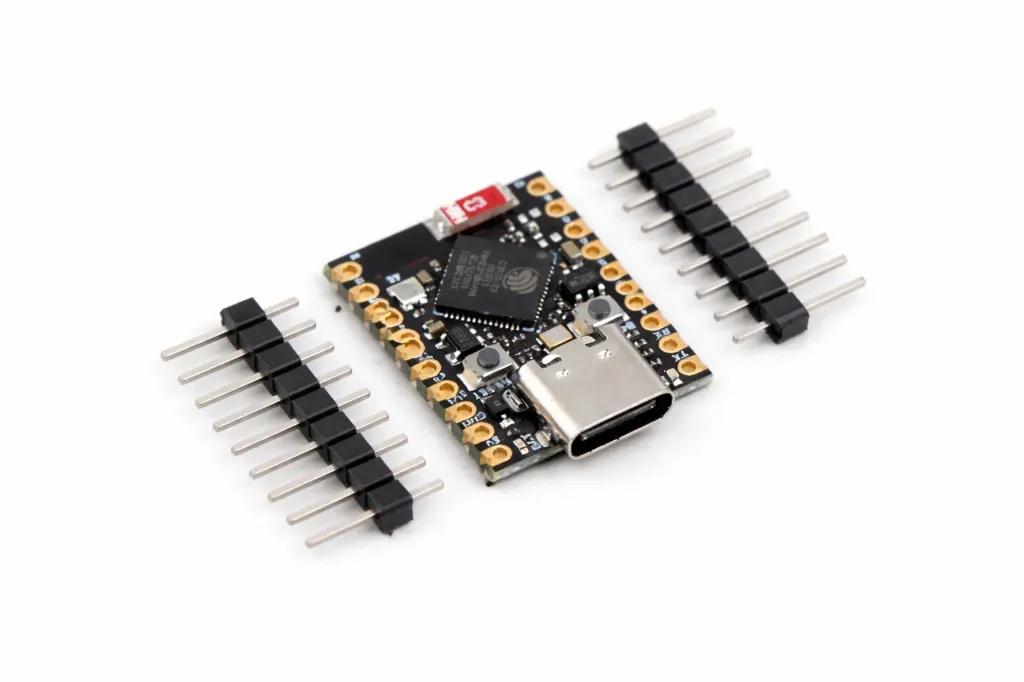
Features
- Powered by the Espressif ESP32-S3 dual-core Xtensa LX7 processor.
- Dual-core processor operating up to 240MHz.
- Built-in 2.4GHz Wi-Fi (802.11 b/g/n).
- Bluetooth 5 Low Energy (BLE) support.
- Native USB Type-C interface for programming and power.
- USB OTG support.
- Ultra-compact and lightweight design.
- Low-power operation with multiple sleep modes.
- Integrated PCB antenna.
- Supports AI acceleration and vector instructions.
- Compatible with Arduino IDE, ESP-IDF, and MicroPython.
- Multiple communication interfaces including GPIO, ADC, SPI, I²C, UART, and PWM.
Principle of Operation
The ESP32-S3 SuperMini operates as a programmable embedded controller capable of processing data, controlling external hardware, and communicating wirelessly. User applications are uploaded through the USB Type-C interface using supported development environments such as Arduino IDE or ESP-IDF.
The dual-core Xtensa LX7 processor executes application code while the integrated Wi-Fi and Bluetooth radios provide wireless networking and device communication. Multiple GPIO peripherals allow the board to interface with sensors, displays, motors, relays, and other electronic modules.
Low-power sleep modes significantly reduce current consumption, making the board suitable for battery-powered IoT devices that require long operating life.
Applications
- Internet of Things (IoT)
- Wireless sensor networks
- Home automation
- Robotics
- Wearable electronics
- Industrial monitoring
- Embedded AI applications
- Bluetooth devices
- Wi-Fi data loggers
- Portable embedded systems
Pinout

| Pin | Function |
|---|---|
| 3V3 | 3.3V Output |
| 5V | USB Power Input |
| GND | Ground |
| GPIO | Digital Input / Output |
| ADC | Analog Input Channels |
| PWM | Pulse Width Modulation Outputs |
| UART TX/RX | Serial Communication |
| SPI | High-Speed Peripheral Interface |
| I²C SDA / SCL | Two-Wire Communication Interface |
| USB Type-C | Programming and Power |
Wiring
The ESP32-S3 SuperMini is programmed through its USB Type-C connector. External sensors and modules can be connected directly to the GPIO pins using jumper wires.
| Peripheral | ESP32-S3 Connection |
|---|---|
| Computer | USB Type-C |
| I²C Sensors | SDA / SCL |
| SPI Devices | MOSI / MISO / SCK / CS |
| UART Modules | TX / RX |
| Servos / LEDs | PWM GPIO Pins |
| Analog Sensors | ADC Pins |
Library Required
Before programming the ESP32-S3 SuperMini using the Arduino IDE, install the ESP32 board package from Espressif Systems.
- Board Manager URL:
https://raw.githubusercontent.com/espressif/arduino-esp32/gh-pages/package_esp32_index.json - Board Package: ESP32 by Espressif Systems
- Built-in Libraries: WiFi, Bluetooth, SPI, Wire, Preferences
Arduino IDE Setup
Before programming the ESP32-S3 SuperMini using the Arduino IDE, you must install the official ESP32 board support package provided by Espressif Systems.
Step 1: Add ESP32 Board Manager URL
- Open Arduino IDE.
- Go to File → Preferences.
- In the Additional Boards Manager URLs field, add the following URL:
https://raw.githubusercontent.com/espressif/arduino-esp32/gh-pages/package_esp32_index.json
If you already have other Board Manager URLs, separate multiple URLs using a comma.
Step 2: Install ESP32 Board Package
- Go to Tools → Board → Boards Manager.
- Search for ESP32.
- Install: ESP32 by Espressif Systems
Step 3: Select ESP32-S3 SuperMini Board
- Connect the ESP32-S3 SuperMini board to your computer using a USB cable.
- Go to Tools → Board.
- Select the appropriate ESP32-S3 board option.
- Recommended selection: ESP32S3 Dev Module
Step 4: Recommended Board Settings
| Setting | Recommended Value |
|---|---|
| Board | ESP32S3 Dev Module |
| USB CDC On Boot | Enabled |
| Upload Mode | UART / USB-CDC |
| Flash Size | According to board specification |
| Partition Scheme | Default |
| PSRAM | Enabled (if supported) |
| Upload Speed | 460800 baud (or lower if upload fails) |
Built-in ESP32 Libraries
The ESP32 Arduino core includes several built-in libraries that can be used without additional installation:
| Library | Purpose |
|---|---|
| WiFi | Connect ESP32-S3 to Wi-Fi networks and create wireless applications |
| Bluetooth | Bluetooth Classic and BLE communication support |
| SPI | Communication with SPI-based devices such as displays, sensors, and memory modules |
| Wire | I2C communication with sensors and peripheral modules |
| Preferences | Non-volatile storage for saving configuration data in flash memory |
Example Library Include
#include <WiFi.h>
#include <BluetoothSerial.h>
#include <SPI.h>
#include <Wire.h>
#include <Preferences.h>
Notes
- Use a high-quality USB data cable. Some USB cables only provide power and cannot upload code.
- If the board is not detected, install the required USB driver depending on the ESP32-S3 USB interface.
- The ESP32-S3 supports native USB, Wi-Fi, Bluetooth LE, SPI, I2C, and multiple GPIO peripherals.
Example Code
// ESP32-S3 Blink Example

void setup() {
  pinMode(LED_BUILTIN, OUTPUT);
}

void loop() {
  digitalWrite(LED_BUILTIN, HIGH);
  delay(500);

  digitalWrite(LED_BUILTIN, LOW);
  delay(500);
}
Specifications
| Product Type | ESP32-S3 Development Board |
| Chip | ESP32-S3 |
| CPU | Dual-Core Xtensa LX7 |
| Clock Speed | Up to 240MHz |
| Flash Memory | 4MB (Typical) |
| SRAM | 512KB Internal |
| Operating Voltage | 3.3V |
| Input Voltage | 5V via USB Type-C |
| Wireless Connectivity | Wi-Fi 802.11 b/g/n + Bluetooth 5 BLE |
| USB Support | Native USB OTG |
| Communication Interfaces | GPIO, ADC, PWM, SPI, I²C, UART |
| Antenna | Onboard PCB Antenna |
| Dimensions | 23.2 × 18.2 mm |
| Weight | Approximately 2.7g |
Resources
- ESP32-S3 SuperMini Development Board Documentation:
https://www.espressif.com/en/products/socs/esp32-s3 - ESP32 Arduino Core:
https://github.com/espressif/arduino-esp32 - ESP32 Arduino Installation Guide:
https://docs.espressif.com/projects/arduino-esp32/en/latest/installing.html - ESP-IDF Documentation:
https://docs.espressif.com/projects/esp-idf/ - ESP32-S3 Technical Reference Manual:
https://www.espressif.com/sites/default/files/documentation/esp32-s3_technical_reference_manual_en.pdf - ESP32-S3 Datasheet:
https://www.espressif.com/sites/default/files/documentation/esp32-s3_datasheet_en.pdf - Arduino IDE Software:
https://www.arduino.cc/en/software
Features
- Powered by the Espressif ESP32-S3 dual-core Xtensa LX7 processor.
- Dual-core processor operating up to 240MHz.
- Built-in 2.4GHz Wi-Fi (802.11 b/g/n).
- Bluetooth 5 Low Energy (BLE) support.
- Native USB Type-C interface for programming and power.
- USB OTG support.
- Ultra-compact and lightweight design.
- Low-power operation with multiple sleep modes.
- Integrated PCB antenna.
- Supports AI acceleration and vector instructions.
- Compatible with Arduino IDE, ESP-IDF, and MicroPython.
- Multiple communication interfaces including GPIO, ADC, SPI, I²C, UART, and PWM.
Principle of Operation
The ESP32-S3 SuperMini operates as a programmable embedded controller capable of processing data, controlling external hardware, and communicating wirelessly. User applications are uploaded through the USB Type-C interface using supported development environments such as Arduino IDE or ESP-IDF.
The dual-core Xtensa LX7 processor executes application code while the integrated Wi-Fi and Bluetooth radios provide wireless networking and device communication. Multiple GPIO peripherals allow the board to interface with sensors, displays, motors, relays, and other electronic modules.
Low-power sleep modes significantly reduce current consumption, making the board suitable for battery-powered IoT devices that require long operating life.
Applications
- Internet of Things (IoT)
- Wireless sensor networks
- Home automation
- Robotics
- Wearable electronics
- Industrial monitoring
- Embedded AI applications
- Bluetooth devices
- Wi-Fi data loggers
- Portable embedded systems
Pinout
| Pin | Function |
|---|---|
| 3V3 | 3.3V Output |
| 5V | USB Power Input |
| GND | Ground |
| GPIO | Digital Input / Output |
| ADC | Analog Input Channels |
| PWM | Pulse Width Modulation Outputs |
| UART TX/RX | Serial Communication |
| SPI | High-Speed Peripheral Interface |
| I²C SDA / SCL | Two-Wire Communication Interface |
| USB Type-C | Programming and Power |
Wiring
The ESP32-S3 SuperMini is programmed through its USB Type-C connector. External sensors and modules can be connected directly to the GPIO pins using jumper wires.
| Peripheral | ESP32-S3 Connection |
|---|---|
| Computer | USB Type-C |
| I²C Sensors | SDA / SCL |
| SPI Devices | MOSI / MISO / SCK / CS |
| UART Modules | TX / RX |
| Servos / LEDs | PWM GPIO Pins |
| Analog Sensors | ADC Pins |
Library Required
Before programming the ESP32-S3 SuperMini using the Arduino IDE, install the ESP32 board package from Espressif Systems.
- Board Manager URL:
https://raw.githubusercontent.com/espressif/arduino-esp32/gh-pages/package_esp32_index.json - Board Package: ESP32 by Espressif Systems
- Built-in Libraries: WiFi, Bluetooth, SPI, Wire, Preferences
Arduino IDE Setup
Before programming the ESP32-S3 SuperMini using the Arduino IDE, you must install the official ESP32 board support package provided by Espressif Systems.
Step 1: Add ESP32 Board Manager URL
- Open Arduino IDE.
- Go to File → Preferences.
- In the Additional Boards Manager URLs field, add the following URL:
https://raw.githubusercontent.com/espressif/arduino-esp32/gh-pages/package_esp32_index.json
If you already have other Board Manager URLs, separate multiple URLs using a comma.
Step 2: Install ESP32 Board Package
- Go to Tools → Board → Boards Manager.
- Search for ESP32.
- Install: ESP32 by Espressif Systems
Step 3: Select ESP32-S3 SuperMini Board
- Connect the ESP32-S3 SuperMini board to your computer using a USB cable.
- Go to Tools → Board.
- Select the appropriate ESP32-S3 board option.
- Recommended selection: ESP32S3 Dev Module
Step 4: Recommended Board Settings
| Setting | Recommended Value |
|---|---|
| Board | ESP32S3 Dev Module |
| USB CDC On Boot | Enabled |
| Upload Mode | UART / USB-CDC |
| Flash Size | According to board specification |
| Partition Scheme | Default |
| PSRAM | Enabled (if supported) |
| Upload Speed | 460800 baud (or lower if upload fails) |
Built-in ESP32 Libraries
The ESP32 Arduino core includes several built-in libraries that can be used without additional installation:
| Library | Purpose |
|---|---|
| WiFi | Connect ESP32-S3 to Wi-Fi networks and create wireless applications |
| Bluetooth | Bluetooth Classic and BLE communication support |
| SPI | Communication with SPI-based devices such as displays, sensors, and memory modules |
| Wire | I2C communication with sensors and peripheral modules |
| Preferences | Non-volatile storage for saving configuration data in flash memory |
Example Library Include
#include <WiFi.h>
#include <BluetoothSerial.h>
#include <SPI.h>
#include <Wire.h>
#include <Preferences.h>
Notes
- Use a high-quality USB data cable. Some USB cables only provide power and cannot upload code.
- If the board is not detected, install the required USB driver depending on the ESP32-S3 USB interface.
- The ESP32-S3 supports native USB, Wi-Fi, Bluetooth LE, SPI, I2C, and multiple GPIO peripherals.
Example Code
// ESP32-S3 Blink Example

void setup() {
  pinMode(LED_BUILTIN, OUTPUT);
}

void loop() {
  digitalWrite(LED_BUILTIN, HIGH);
  delay(500);

  digitalWrite(LED_BUILTIN, LOW);
  delay(500);
}
Specifications
| Product Type | ESP32-S3 Development Board |
| Chip | ESP32-S3 |
| CPU | Dual-Core Xtensa LX7 |
| Clock Speed | Up to 240MHz |
| Flash Memory | 4MB (Typical) |
| SRAM | 512KB Internal |
| Operating Voltage | 3.3V |
| Input Voltage | 5V via USB Type-C |
| Wireless Connectivity | Wi-Fi 802.11 b/g/n + Bluetooth 5 BLE |
| USB Support | Native USB OTG |
| Communication Interfaces | GPIO, ADC, PWM, SPI, I²C, UART |
| Antenna | Onboard PCB Antenna |
| Dimensions | 23.2 × 18.2 mm |
| Weight | Approximately 2.7g |
Resources
- ESP32-S3 SuperMini Development Board Documentation:
https://www.espressif.com/en/products/socs/esp32-s3 - ESP32 Arduino Core:
https://github.com/espressif/arduino-esp32 - ESP32 Arduino Installation Guide:
https://docs.espressif.com/projects/arduino-esp32/en/latest/installing.html - ESP-IDF Documentation:
https://docs.espressif.com/projects/esp-idf/ - ESP32-S3 Technical Reference Manual:
https://www.espressif.com/sites/default/files/documentation/esp32-s3_technical_reference_manual_en.pdf - ESP32-S3 Datasheet:
https://www.espressif.com/sites/default/files/documentation/esp32-s3_datasheet_en.pdf - Arduino IDE Software:
https://www.arduino.cc/en/software