Features
- Nordic nRF52840 ARM Cortex-M4 processor with FPU
- 64 MHz operating frequency
- Bluetooth Low Energy wireless connectivity
- Onboard 6-axis LSM6DS3TR-C IMU
- Onboard PDM digital microphone
- 256 KB RAM and 1 MB internal Flash
- 2 MB onboard QSPI Flash
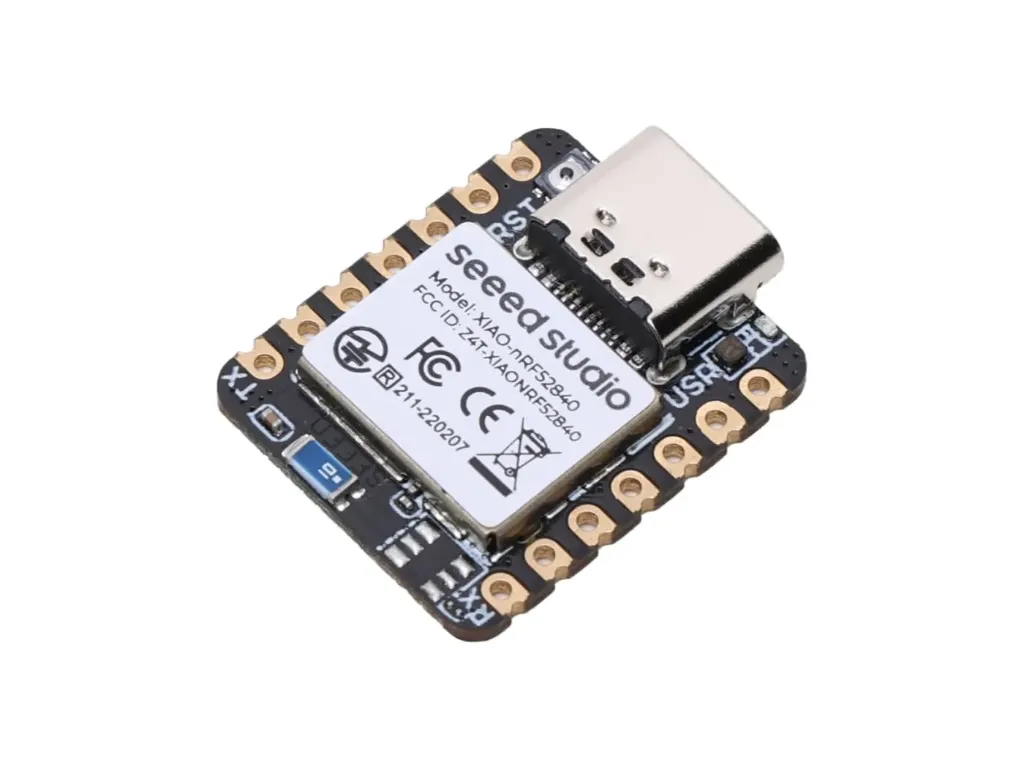
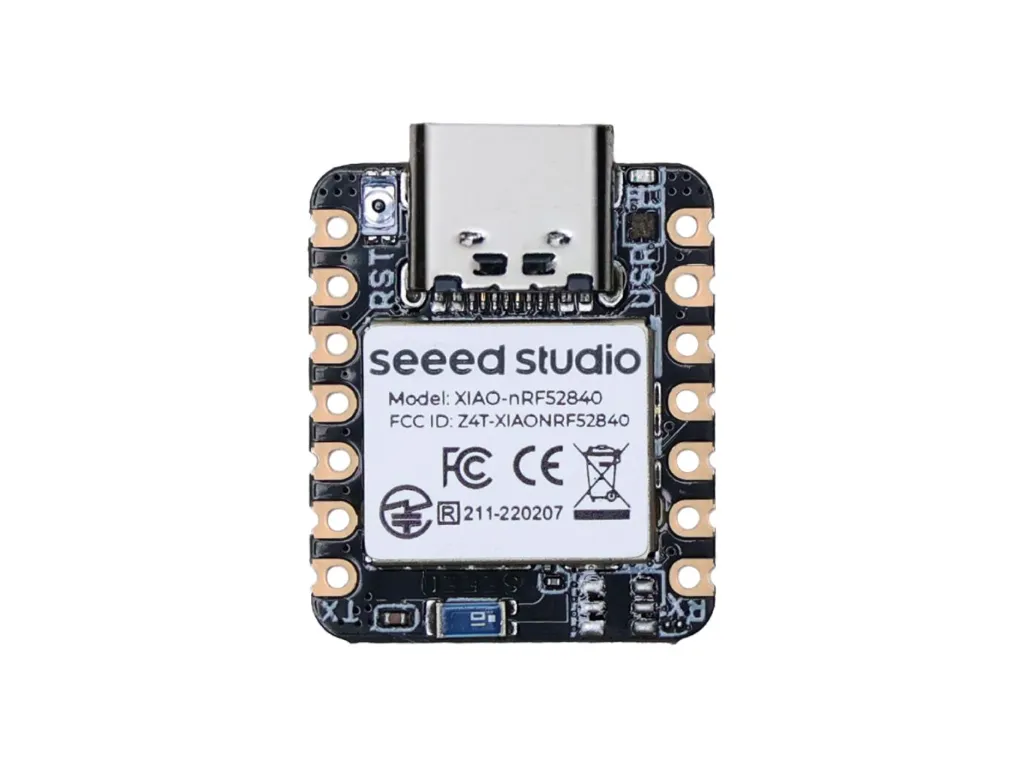
- Ultra-compact 21 x 17.8 mm form factor
- 11 GPIO pins with PWM support and 6 ADC pins
- UART, I2C, SPI, NFC, and SWD interfaces
- Built-in battery charging and power management
- Supports Arduino, MicroPython, and CircuitPython
- Suitable for TinyML and embedded machine learning projects
Principle of Operation
The XIAO nRF52840 Sense uses the Nordic nRF52840 microcontroller to run embedded applications and communicate with external devices. Its integrated Bluetooth Low Energy capability provides wireless communication, while the onboard IMU can detect motion and orientation and the PDM microphone can capture audio data for processing. The board can be programmed through supported development environments such as Arduino, MicroPython, and CircuitPython.
Applications
- Bluetooth Low Energy devices
- IoT and wireless sensor nodes
- Wearable electronics
- Motion and gesture detection
- Voice and audio recognition
- TinyML and machine learning projects
- Smart home devices
- Low-power embedded systems
- Portable and battery-powered projects
Pinout
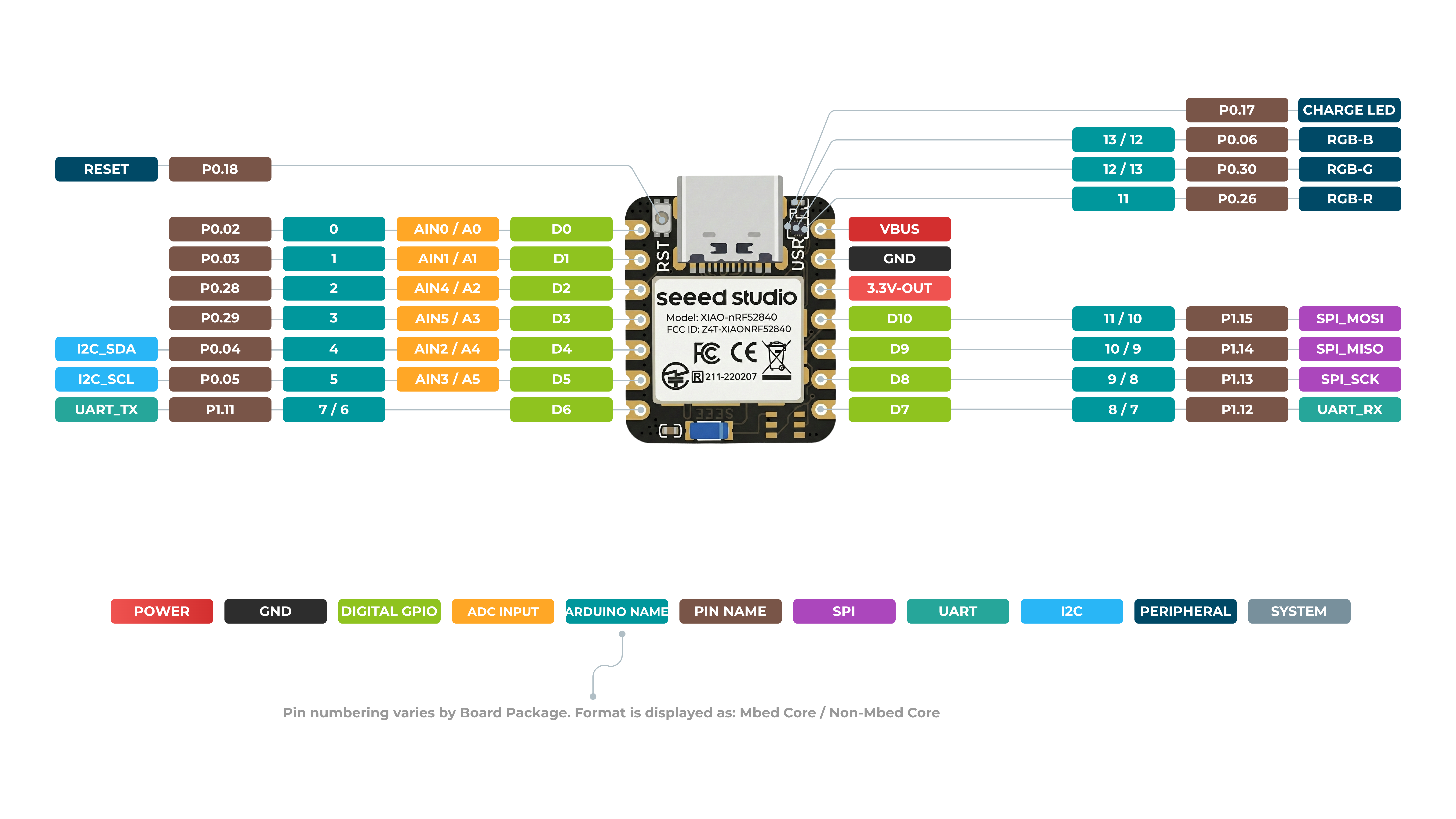
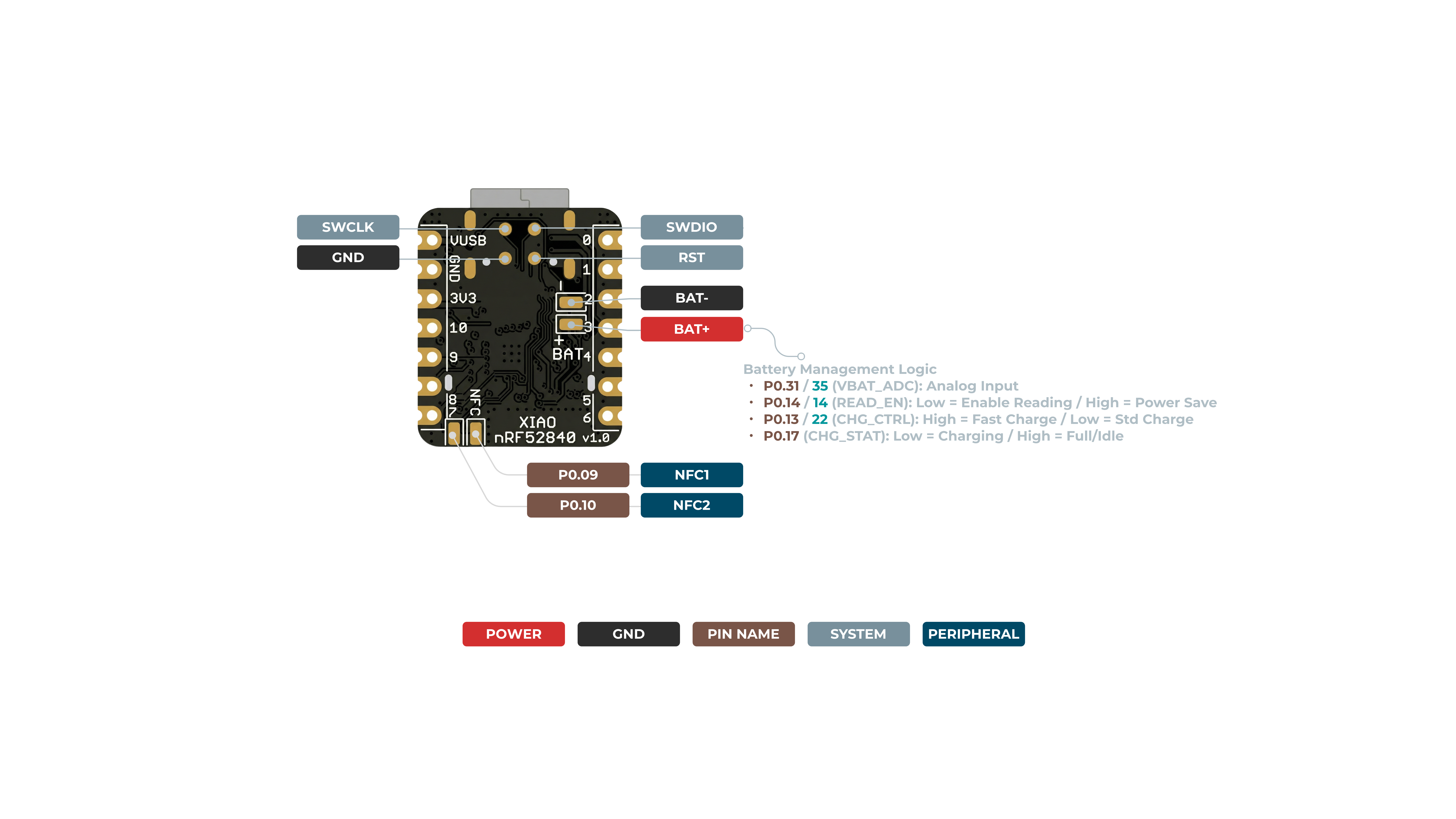
- GPIO: 11 digital GPIO pins with PWM support
- ADC: 6 analog input pins
- UART: Serial communication interface
- I2C: I2C communication interface
- SPI: SPI communication interface
- NFC: NFC interface
- SWD: Serial Wire Debug interface
Software setup
- Step 1. Download and Install the latest version of Arduino IDE according to your operating system

-
Step 2. Launch the Arduino application
-
Step 3. Add Seeed Studio XIAO nRF52840 (Sense) board package to your Arduino IDE
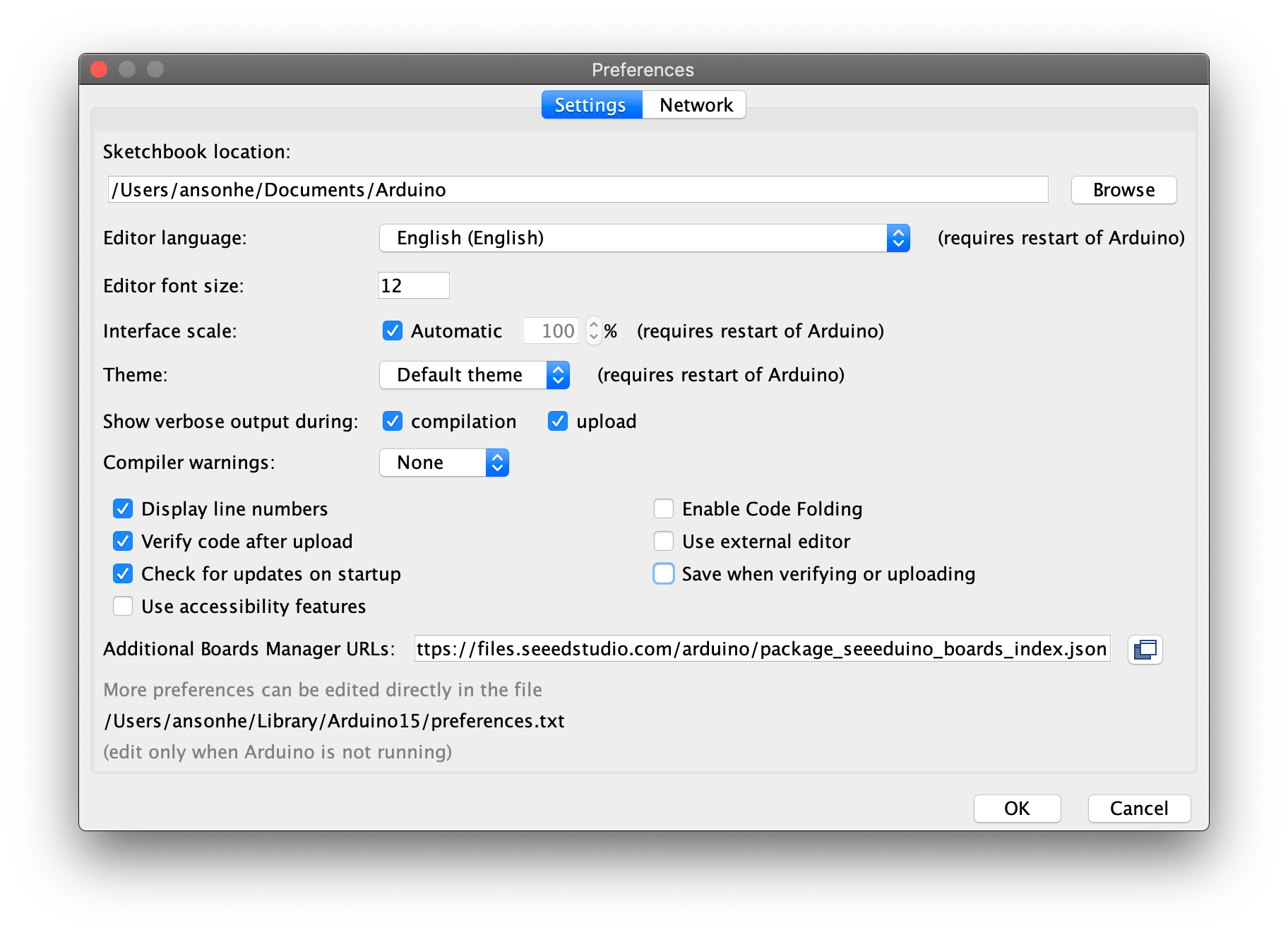
Navigate to File > Preferences, and fill "Additional Boards Manager URLs" with the url below: https://files.seeedstudio.com/arduino/package_seeeduino_boards_index.json
Navigate to Tools > Board > Boards Manager..., type the keyword "seeed nrf52" in the search box, select the latest version of the board you want, and install it. You can install both.

- Step 4. Select your board and port
Board
After installing the board package, navigate to Tools > Board and choose the board you want, continue to select "Seeed XIAO nRF52840 Sense". Now we have finished setting up the Seeed Studio XIAO nRF52840 (Sense) for Arduino IDE.

Port
Navigate to Tools > Port and select the serial port name of the connected Seeed Studio XIAO nRF52840 (Sense). This is likely to be COM3 or higher (COM1 and COM2 are usually reserved for hardware serial ports). The serial port of the connected Seeed Studio XIAO nRF52840 (Sense) usually contains parentheses that are written Seeed Studio XIAO nRF52840 for Seeed Studio XIAO nRF52840 or Seeed Studio XIAO nRF52840 Sense for Seeed Studio XIAO nRF52840 Sense.

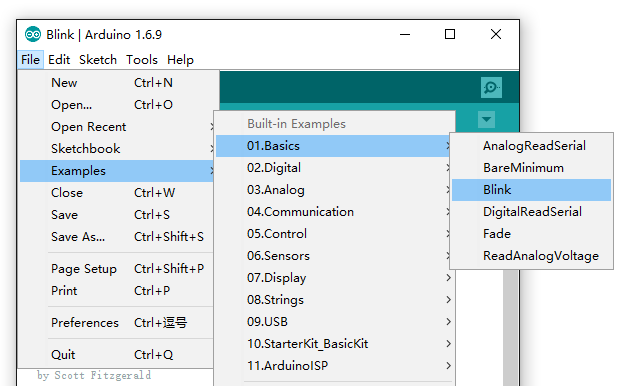
- Step 5. Navigate to File > Examples > 01.Basics > Blink to open Blink example
- Step 6. Click the Upload button to upload the Blink example code to the board
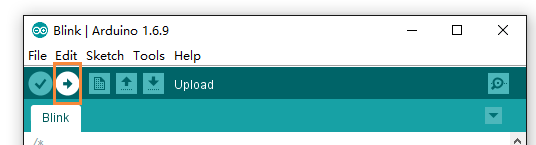
Once uploaded, you will see the built-in red LED blinking with a 1-second delay between each blink. This means the connection is successful and now you can explore more projects with the Seeed Studio XIAO nRF52840 (Sense)!
Wiring
External sensors and modules can be connected to the XIAO nRF52840 Sense through its GPIO, ADC, UART, I2C, or SPI interfaces. The board operates at 3.3V logic. For battery-powered applications, a suitable 3.7V lithium battery can be connected to the battery input, with the onboard charging circuit providing battery charge management.
Simple Code
#include <ArduinoBLE.h>

void setup() {
Serial.begin(115200);

if (!BLE.begin()) {
Serial.println("Starting Bluetooth failed!");
while (1);
}

Serial.println("XIAO nRF52840 Sense BLE Ready");
}

void loop() {
delay(1000);
}Specifications
- Microcontroller: Nordic nRF52840
- Processor: ARM Cortex-M4 with FPU
- CPU Frequency: Up to 64 MHz
- RAM: 256 KB
- Internal Flash: 1 MB
- Onboard Flash: 2 MB QSPI Flash
- Wireless: Bluetooth Low Energy
- IMU: 6-axis LSM6DS3TR-C
- Microphone: PDM digital microphone
- GPIO: 11 GPIO with PWM support
- ADC: 6 channels
- Interfaces: UART, I2C, SPI, NFC, SWD
- Operating Voltage: 3.3V
- VIN: 5V
- Battery Input: 3.7V
- Standby Power Consumption: Less than 5 μA
- Board Dimensions: 21 x 17.8 mm
- Programming: Arduino, MicroPython, CircuitPython
Resources:
- [Datasheet] Nordic nRF52840 Datasheet
- [Datasheet] Flash-P25Q16H-UXH-IR Datasheet
- [Schematic] XIAO nRF52840 (Sense) Plus Schematic
- [PCB Design Files]
- [PCB Design Libraries]
Features
- Nordic nRF52840 ARM Cortex-M4 processor with FPU
- 64 MHz operating frequency
- Bluetooth Low Energy wireless connectivity
- Onboard 6-axis LSM6DS3TR-C IMU
- Onboard PDM digital microphone
- 256 KB RAM and 1 MB internal Flash
- 2 MB onboard QSPI Flash
- Ultra-compact 21 x 17.8 mm form factor
- 11 GPIO pins with PWM support and 6 ADC pins
- UART, I2C, SPI, NFC, and SWD interfaces
- Built-in battery charging and power management
- Supports Arduino, MicroPython, and CircuitPython
- Suitable for TinyML and embedded machine learning projects
Principle of Operation
The XIAO nRF52840 Sense uses the Nordic nRF52840 microcontroller to run embedded applications and communicate with external devices. Its integrated Bluetooth Low Energy capability provides wireless communication, while the onboard IMU can detect motion and orientation and the PDM microphone can capture audio data for processing. The board can be programmed through supported development environments such as Arduino, MicroPython, and CircuitPython.
Applications
- Bluetooth Low Energy devices
- IoT and wireless sensor nodes
- Wearable electronics
- Motion and gesture detection
- Voice and audio recognition
- TinyML and machine learning projects
- Smart home devices
- Low-power embedded systems
- Portable and battery-powered projects
Pinout
- GPIO: 11 digital GPIO pins with PWM support
- ADC: 6 analog input pins
- UART: Serial communication interface
- I2C: I2C communication interface
- SPI: SPI communication interface
- NFC: NFC interface
- SWD: Serial Wire Debug interface
Software setup
- Step 1. Download and Install the latest version of Arduino IDE according to your operating system
-
Step 2. Launch the Arduino application
-
Step 3. Add Seeed Studio XIAO nRF52840 (Sense) board package to your Arduino IDE
Navigate to File > Preferences, and fill "Additional Boards Manager URLs" with the url below: https://files.seeedstudio.com/arduino/package_seeeduino_boards_index.json
Navigate to Tools > Board > Boards Manager..., type the keyword "seeed nrf52" in the search box, select the latest version of the board you want, and install it. You can install both.
- Step 4. Select your board and port
Board
After installing the board package, navigate to Tools > Board and choose the board you want, continue to select "Seeed XIAO nRF52840 Sense". Now we have finished setting up the Seeed Studio XIAO nRF52840 (Sense) for Arduino IDE.
Port
Navigate to Tools > Port and select the serial port name of the connected Seeed Studio XIAO nRF52840 (Sense). This is likely to be COM3 or higher (COM1 and COM2 are usually reserved for hardware serial ports). The serial port of the connected Seeed Studio XIAO nRF52840 (Sense) usually contains parentheses that are written Seeed Studio XIAO nRF52840 for Seeed Studio XIAO nRF52840 or Seeed Studio XIAO nRF52840 Sense for Seeed Studio XIAO nRF52840 Sense.
- Step 5. Navigate to File > Examples > 01.Basics > Blink to open Blink example
- Step 6. Click the Upload button to upload the Blink example code to the board
Once uploaded, you will see the built-in red LED blinking with a 1-second delay between each blink. This means the connection is successful and now you can explore more projects with the Seeed Studio XIAO nRF52840 (Sense)!
Wiring
External sensors and modules can be connected to the XIAO nRF52840 Sense through its GPIO, ADC, UART, I2C, or SPI interfaces. The board operates at 3.3V logic. For battery-powered applications, a suitable 3.7V lithium battery can be connected to the battery input, with the onboard charging circuit providing battery charge management.
Simple Code
#include <ArduinoBLE.h>

void setup() {
Serial.begin(115200);

if (!BLE.begin()) {
Serial.println("Starting Bluetooth failed!");
while (1);
}

Serial.println("XIAO nRF52840 Sense BLE Ready");
}

void loop() {
delay(1000);
}
Specifications
- Microcontroller: Nordic nRF52840
- Processor: ARM Cortex-M4 with FPU
- CPU Frequency: Up to 64 MHz
- RAM: 256 KB
- Internal Flash: 1 MB
- Onboard Flash: 2 MB QSPI Flash
- Wireless: Bluetooth Low Energy
- IMU: 6-axis LSM6DS3TR-C
- Microphone: PDM digital microphone
- GPIO: 11 GPIO with PWM support
- ADC: 6 channels
- Interfaces: UART, I2C, SPI, NFC, SWD
- Operating Voltage: 3.3V
- VIN: 5V
- Battery Input: 3.7V
- Standby Power Consumption: Less than 5 μA
- Board Dimensions: 21 x 17.8 mm
- Programming: Arduino, MicroPython, CircuitPython
Resources:
- [Datasheet] Nordic nRF52840 Datasheet
- [Datasheet] Flash-P25Q16H-UXH-IR Datasheet
- [Schematic] XIAO nRF52840 (Sense) Plus Schematic
- [PCB Design Files]
- [PCB Design Libraries]