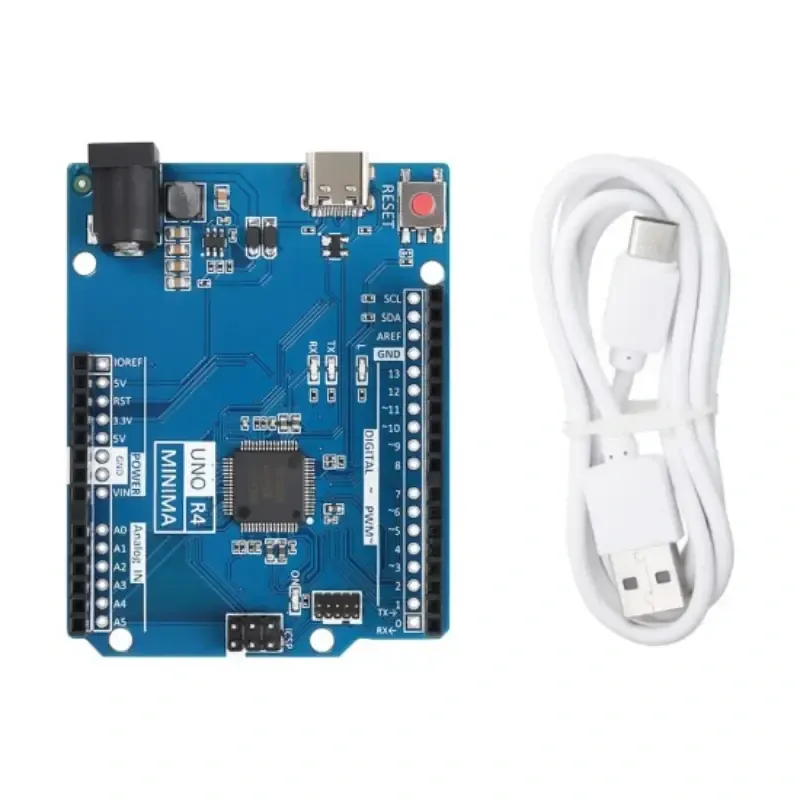
Features
- Fully compatible with the official Arduino UNO R4 Minima.
- Maintains the same pin layout and functionality.
- Compatible with the Arduino IDE and UNO ecosystem libraries.
- Additional GPIO header row for easier wiring and expansion.
- USB Type-C interface for programming and power.
- Dial switch for convenient hardware mode selection.
- No soldering required for switching operating modes.
- Cost-optimized hardware design while maintaining stable performance.
- Suitable for rapid prototyping and educational projects.
- Breadboard and shield compatible using the standard UNO layout.
Principle of Operation
The UNO R4 Minima Compatible Board operates as a standard Arduino-compatible microcontroller development platform. Programs are uploaded from the Arduino IDE through the USB Type-C interface, where they are stored in the onboard microcontroller and executed independently.
The onboard GPIO pins allow the microcontroller to interface with sensors, displays, communication modules, motors, relays, and other electronic peripherals. Digital, analog, PWM, and serial communication peripherals enable the board to perform monitoring, control, automation, and data acquisition tasks.
The integrated dial switch simplifies hardware configuration by allowing operating modes to be selected without modifying solder jumpers, making development faster and more convenient.
Applications
- Arduino development projects
- Embedded systems
- Internet of Things (IoT)
- Robotics
- Industrial automation
- Sensor interfacing
- Motor control
- Data acquisition systems
- Educational STEM projects
- Rapid prototyping
Pinout
The board follows the standard Arduino UNO R4 Minima pin layout, ensuring compatibility with existing shields and accessories.

| Pin Group | Function |
|---|---|
| D0 – D13 | Digital Input / Output Pins |
| D3, D5, D6, D9, D10, D11 | PWM Outputs |
| A0 – A5 | Analog Inputs |
| UART | Serial Communication |
| SPI | High-Speed Peripheral Communication |
| I²C | Two-Wire Communication Interface |
| 5V | Power Output |
| 3.3V | Power Output |
| VIN | External Power Input |
| GND | Ground |
| USB Type-C | Programming and Power |
Wiring
The board connects directly to a computer using the included USB Type-C cable for programming and power. External modules connect to the standard Arduino GPIO headers using jumper wires.

| Peripheral | Connection |
|---|---|
| Computer | USB Type-C |
| Digital Sensors | D0–D13 |
| Analog Sensors | A0–A5 |
| I²C Modules | SDA / SCL |
| SPI Devices | MOSI / MISO / SCK / SS |
| Servo Motors | PWM Pins |
Library Required
No special libraries are required for basic operation. The board is fully compatible with the Arduino IDE and standard Arduino libraries.
Commonly used libraries include:
- Wire (I²C Communication)
- SPI
- EEPROM
- Servo
- SoftwareSerial (if required)
Example Code
// Blink Example

void setup() {
  pinMode(LED_BUILTIN, OUTPUT);
}

void loop() {
  digitalWrite(LED_BUILTIN, HIGH);
  delay(500);

  digitalWrite(LED_BUILTIN, LOW);
  delay(500);
}
Specifications
| Product Type | UNO R4 Minima Compatible Development Board |
| Compatibility | Arduino UNO R4 Minima |
| Operating Voltage | 5V |
| Recommended Input Voltage | 6V – 24V DC |
| Digital I/O Pins | 14 |
| Analog Inputs | 6 |
| PWM Channels | 6 |
| USB Interface | USB Type-C |
| Mode Selection | Dial Switch |
| GPIO Expansion | Additional Header Row |
| Software Support | Arduino IDE |
Resources
- Arduino IDE:
https://www.arduino.cc/en/software - Arduino UNO R4 Documentation:
https://docs.arduino.cc/hardware/uno-r4-minima/ - Arduino Reference:
https://docs.arduino.cc/ - Arduino Libraries:
https://docs.arduino.cc/libraries/
Features
- Fully compatible with the official Arduino UNO R4 Minima.
- Maintains the same pin layout and functionality.
- Compatible with the Arduino IDE and UNO ecosystem libraries.
- Additional GPIO header row for easier wiring and expansion.
- USB Type-C interface for programming and power.
- Dial switch for convenient hardware mode selection.
- No soldering required for switching operating modes.
- Cost-optimized hardware design while maintaining stable performance.
- Suitable for rapid prototyping and educational projects.
- Breadboard and shield compatible using the standard UNO layout.
Principle of Operation
The UNO R4 Minima Compatible Board operates as a standard Arduino-compatible microcontroller development platform. Programs are uploaded from the Arduino IDE through the USB Type-C interface, where they are stored in the onboard microcontroller and executed independently.
The onboard GPIO pins allow the microcontroller to interface with sensors, displays, communication modules, motors, relays, and other electronic peripherals. Digital, analog, PWM, and serial communication peripherals enable the board to perform monitoring, control, automation, and data acquisition tasks.
The integrated dial switch simplifies hardware configuration by allowing operating modes to be selected without modifying solder jumpers, making development faster and more convenient.
Applications
- Arduino development projects
- Embedded systems
- Internet of Things (IoT)
- Robotics
- Industrial automation
- Sensor interfacing
- Motor control
- Data acquisition systems
- Educational STEM projects
- Rapid prototyping
Pinout
The board follows the standard Arduino UNO R4 Minima pin layout, ensuring compatibility with existing shields and accessories.
| Pin Group | Function |
|---|---|
| D0 – D13 | Digital Input / Output Pins |
| D3, D5, D6, D9, D10, D11 | PWM Outputs |
| A0 – A5 | Analog Inputs |
| UART | Serial Communication |
| SPI | High-Speed Peripheral Communication |
| I²C | Two-Wire Communication Interface |
| 5V | Power Output |
| 3.3V | Power Output |
| VIN | External Power Input |
| GND | Ground |
| USB Type-C | Programming and Power |
Wiring
The board connects directly to a computer using the included USB Type-C cable for programming and power. External modules connect to the standard Arduino GPIO headers using jumper wires.
| Peripheral | Connection |
|---|---|
| Computer | USB Type-C |
| Digital Sensors | D0–D13 |
| Analog Sensors | A0–A5 |
| I²C Modules | SDA / SCL |
| SPI Devices | MOSI / MISO / SCK / SS |
| Servo Motors | PWM Pins |
Library Required
No special libraries are required for basic operation. The board is fully compatible with the Arduino IDE and standard Arduino libraries.
Commonly used libraries include:
- Wire (I²C Communication)
- SPI
- EEPROM
- Servo
- SoftwareSerial (if required)
Example Code
// Blink Example

void setup() {
  pinMode(LED_BUILTIN, OUTPUT);
}

void loop() {
  digitalWrite(LED_BUILTIN, HIGH);
  delay(500);

  digitalWrite(LED_BUILTIN, LOW);
  delay(500);
}
Specifications
| Product Type | UNO R4 Minima Compatible Development Board |
| Compatibility | Arduino UNO R4 Minima |
| Operating Voltage | 5V |
| Recommended Input Voltage | 6V – 24V DC |
| Digital I/O Pins | 14 |
| Analog Inputs | 6 |
| PWM Channels | 6 |
| USB Interface | USB Type-C |
| Mode Selection | Dial Switch |
| GPIO Expansion | Additional Header Row |
| Software Support | Arduino IDE |
Resources
- Arduino IDE:
https://www.arduino.cc/en/software - Arduino UNO R4 Documentation:
https://docs.arduino.cc/hardware/uno-r4-minima/ - Arduino Reference:
https://docs.arduino.cc/ - Arduino Libraries:
https://docs.arduino.cc/libraries/